1. Introduction
Thank you for purchasing the PRUNUS J-288 Portable Radio. This device combines a powerful FM/AM(MW) radio with a versatile Bluetooth speaker, MP3 player, and AUX input, offering a comprehensive audio experience. Please read this manual carefully to ensure proper use and optimal performance of your new device.
2. Product Overview
2.1 Package Contents
- 1 x PRUNUS J-288 Portable Radio
- 1 x Rechargeable Lithium Battery
- 1 x USB Charging Cable
- User Manuals (This document serves as your primary guide)
2.2 Device Layout and Controls
Familiarize yourself with the main components and controls of your PRUNUS J-288 radio.

Figure 2.2.1: Front view of the PRUNUS J-288 Portable Radio, showing the LED display, dual speakers, numeric keypad, and function buttons (Power, Play/Pause, Next/Previous, Mode, Scan, Lock, Sleep Timer).
- LED Display: Shows frequency, mode, and other information.
- Power Button (⏻): Press and hold to turn on/off.
- Play/Pause Button (⏸): Play or pause audio playback.
- Previous/Next Buttons (⏪ / ⏩): Navigate tracks or radio stations.
- Mode Button: Switch between FM, AM, Bluetooth, USB, TF, and AUX modes.
- SCAN Button: Automatically scan and save radio stations.
- LOCK Button: Lock/unlock the keypad to prevent accidental presses.
- Sleep Timer Button (⏰): Set a timer for the radio to automatically turn off.
- Numeric Keypad (0-9): Directly input frequencies or saved station numbers.
- Telescopic Antenna: Extend for improved radio reception.
- USB Port: For USB flash drives.
- TF Card Slot: For TF/Micro SD cards.
- AUX Input: 3.5mm jack for external audio devices.
- Headphone Jack: 3.5mm jack for private listening.
- Charging Port: Micro USB port for charging.
- Charge Indicator Light: Red when charging, green when fully charged.
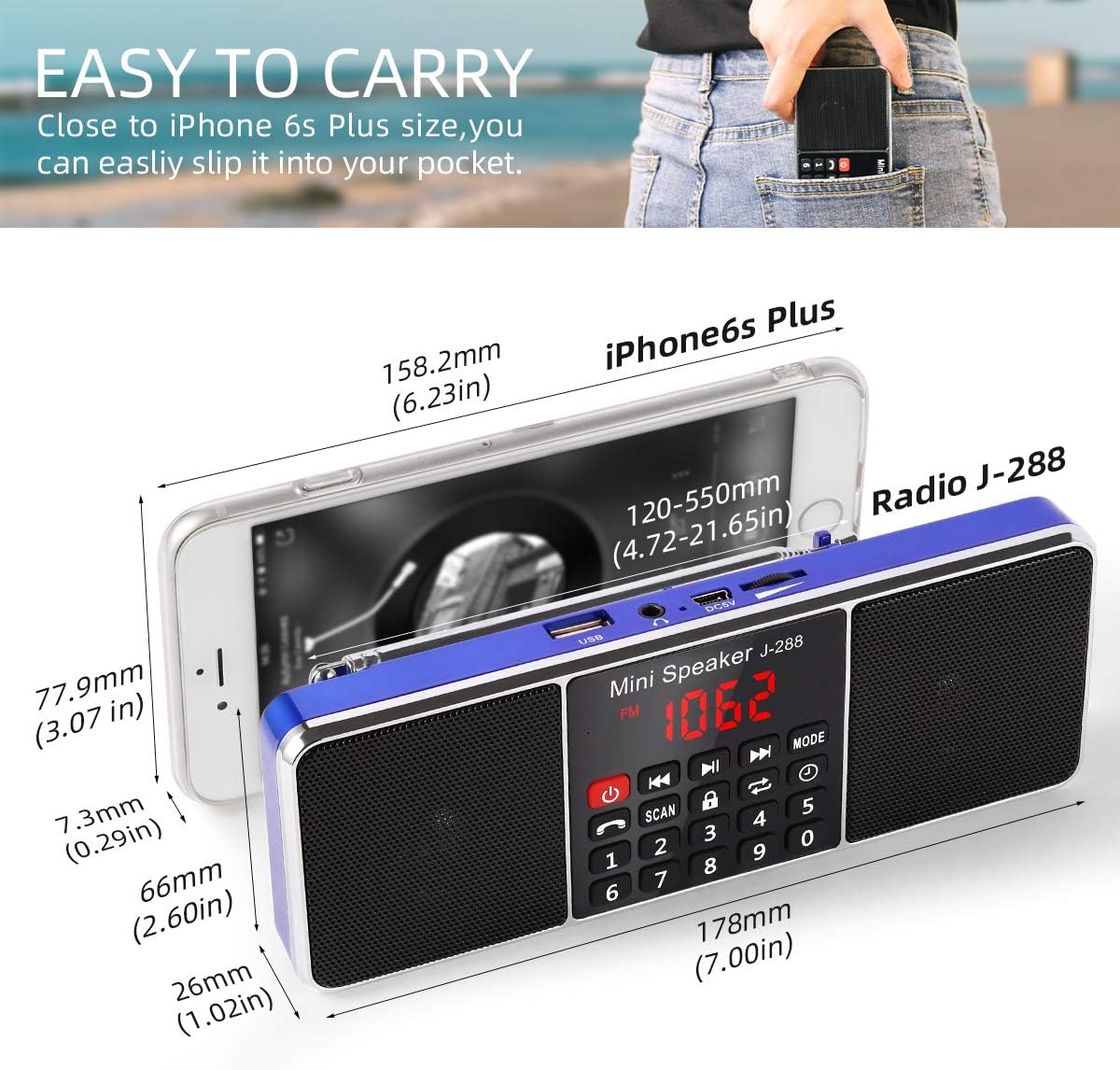
Figure 2.2.2: The compact size of the PRUNUS J-288 radio, illustrating its portability and ease of carrying, similar in size to a large smartphone.
3. Setup
3.1 Battery Installation
- Locate the battery compartment on the back of the radio.
- Open the compartment cover.
- Insert the provided rechargeable Lithium battery, ensuring correct polarity.
- Close the battery compartment cover securely.
3.2 Initial Charging
Before first use, fully charge the radio.
- Connect the small end of the USB charging cable to the charging port on the radio.
- Connect the large end of the USB cable to a 5V/500-1000MA USB power adapter (not included) or a computer USB port.
- The charge indicator light will turn red, indicating charging is in progress.
- Charging typically takes about 2 hours. The light will turn green when fully charged.
Note: Avoid completely discharging the battery to prolong its lifespan.
4. Operating Instructions
4.1 Power On/Off
- Press and hold the Power button (⏻) for a few seconds to turn the radio on or off.
4.2 Mode Selection
- Press the MODE button repeatedly to cycle through available modes: FM Radio, AM(MW) Radio, Bluetooth, USB, TF Card, and AUX.
4.3 Radio Operation (FM/AM)

Figure 4.3.1: The PRUNUS J-288 radio with its long telescopic antenna extended, highlighting its capability for clear and stereo sound reception from favorite stations.
- Select Radio Mode: Press the MODE button until "FM" or "AM" appears on the display.
- Extend Antenna: Fully extend the telescopic antenna for optimal reception.
- Automatic Scan: Press and hold the SCAN button for about 3 seconds. The radio will automatically scan for available stations and save them.
- Manual Tuning:
- Use the Previous (⏪) and Next (⏩) buttons to fine-tune the frequency or jump between saved stations.
- Alternatively, use the numeric keypad to directly enter a frequency (e.g., for 97.3 MHz, enter "973").
- Access Saved Stations: After scanning, you can directly input the saved station number using the numeric keypad (e.g., "1" for the first saved station).

Figure 4.3.2: This image illustrates the user-friendly numeric keypad of the PRUNUS J-288, allowing for quick and direct input of radio frequencies or selection of saved stations, contrasting with less intuitive tuning methods found on other devices.
4.4 Bluetooth Operation
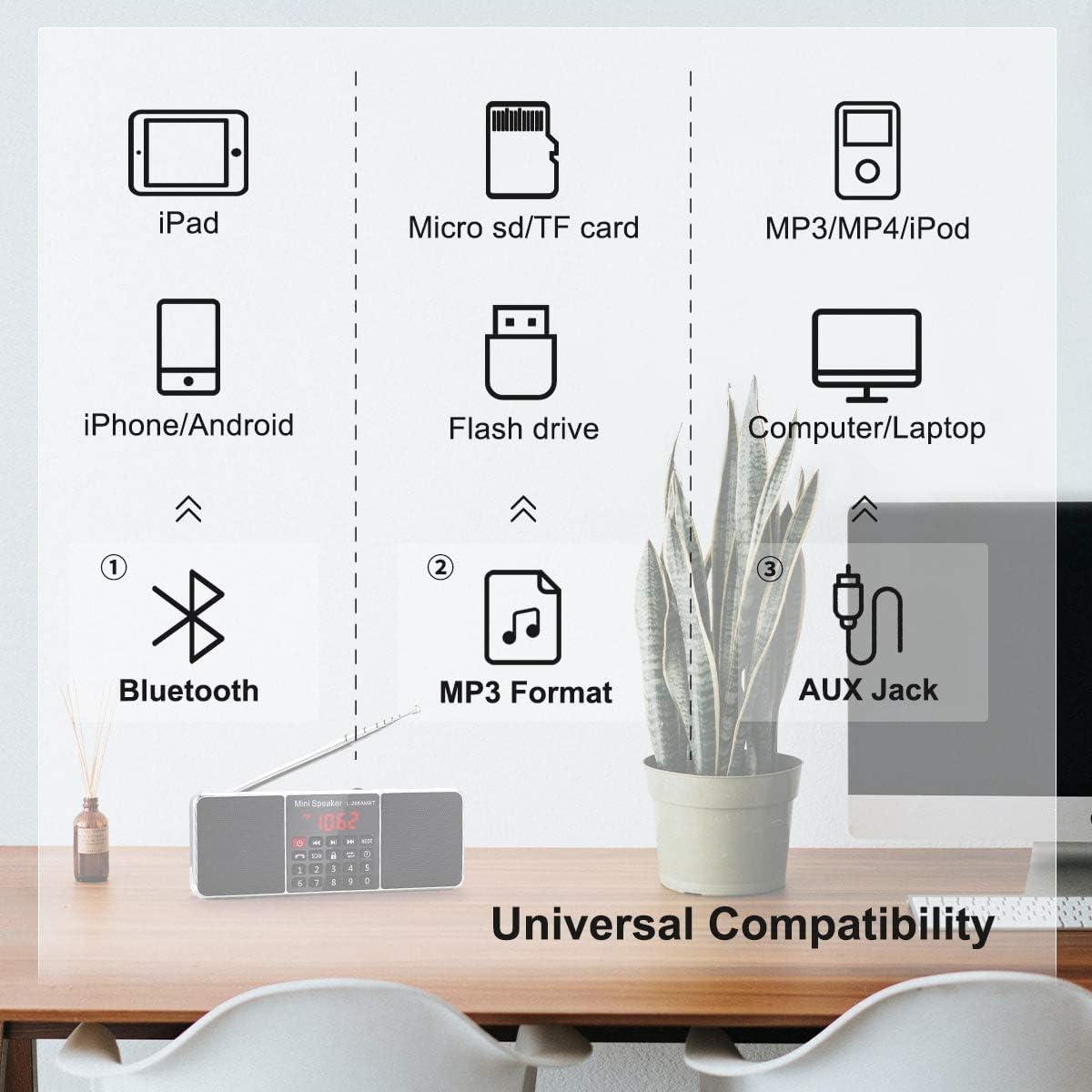
Figure 4.4.1: This diagram highlights the universal compatibility of the PRUNUS J-288, showing its ability to connect via Bluetooth to smartphones and tablets, play MP3 files from USB drives and TF cards, and connect to various audio sources via AUX jack.
- Select Bluetooth Mode: Press the MODE button until "BLUE" or "BT" appears on the display. The radio will enter pairing mode.
- Pairing: On your mobile device (smartphone, tablet, etc.), enable Bluetooth and search for "PRUNUS J-288" (or similar). Select it to pair.
- Playback: Once paired, you can play audio from your device through the radio. Use the Play/Pause (⏸), Previous (⏪), and Next (⏩) buttons to control playback.
- Hands-Free Calling: The radio features a built-in microphone. When a call comes in during Bluetooth mode, you can answer it through the radio.
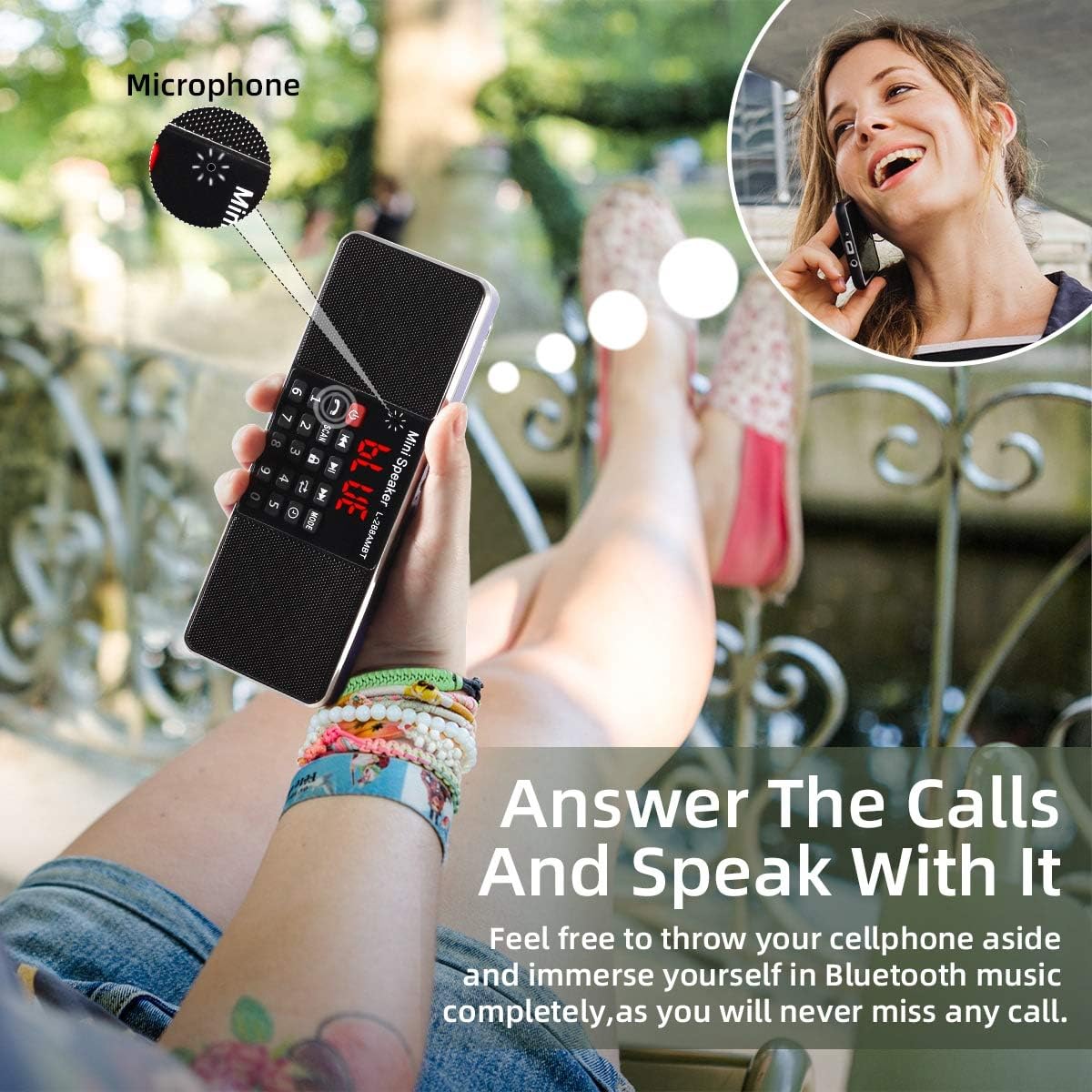
Figure 4.4.2: This image demonstrates the hands-free calling capability of the PRUNUS J-288, allowing users to answer calls and speak directly through the radio's built-in microphone while connected via Bluetooth.
4.5 MP3 Playback (USB/TF Card)
- Insert a USB flash drive into the USB port or a TF (Micro SD) card into the TF card slot. Ensure the audio files are in MP3 format.
- The radio will automatically switch to USB or TF card mode and begin playback. If not, press the MODE button to select the correct source.
- Use the Play/Pause (⏸), Previous (⏪), and Next (⏩) buttons to control playback.
- The radio supports breakpoint memory, meaning it will resume playback from where it left off when turned on again.
4.6 AUX Input
- Connect an external audio device (e.g., smartphone, MP3 player) to the radio's 3.5mm AUX input jack using a 3.5mm audio cable (not included).
- Press the MODE button until "AUX" appears on the display.
- Control playback from your external audio device.
4.7 Sleep Timer Function

Figure 4.7.1: The PRUNUS J-288 features a convenient sleep timer function, allowing users to set a specific duration after which the radio will automatically power off, ideal for bedtime listening.
- Press the Sleep Timer button (⏰) repeatedly to cycle through preset sleep times (e.g., 15min, 30min, 60min, 90min, 120min, 240min). The radio will automatically turn off after the selected time.
4.8 Keypad Lock Function
- Press the LOCK button to lock the keypad, preventing accidental button presses. Press it again to unlock.
5. Charging the Battery
When the battery is low, the radio may indicate this on the display or through reduced performance. Recharge the battery as follows:
- Connect the USB charging cable to the radio's charging port and to a 5V USB power source.
- The charge indicator light will illuminate red.
- Once fully charged (approximately 2 hours), the indicator light will turn green.
- Disconnect the charging cable.
6. Maintenance
- Keep the device dry. Avoid exposure to water or high humidity.
- Clean the radio with a soft, dry cloth. Do not use abrasive cleaners or solvents.
- Do not disassemble the device. Repairs should only be performed by qualified personnel.
- Store the radio in a cool, dry place when not in use for extended periods.
7. Troubleshooting
| Problem | Possible Cause | Solution |
|---|---|---|
| Radio does not turn on. | Battery is low or depleted. | Charge the battery fully. |
| Poor radio reception. | Antenna not extended or weak signal area. | Fully extend the telescopic antenna. Try moving the radio to a different location. |
| Bluetooth not connecting. | Radio not in Bluetooth mode or device not discoverable. | Ensure radio is in Bluetooth mode. Make sure your device's Bluetooth is on and searching. Try restarting both devices. |
| No sound from USB/TF card. | Incorrect mode, unsupported file format, or corrupted media. | Ensure radio is in USB/TF mode. Verify files are in MP3 format. Try a different USB drive/TF card. |
| Buttons are unresponsive. | Keypad lock is activated. | Press the LOCK button to unlock the keypad. |
8. Specifications
| Feature | Detail |
|---|---|
| Model | J-288 (RADIO288CB) |
| Brand | PRUNUS |
| Power Output | 3W x 2 (max) |
| FM Frequency Range | 87.5 - 108 MHz |
| AM(MW) Radio | Supported (Specific frequency range not provided) |
| Bandwidth | 150Hz - 20KHz |
| Signal-to-Noise Ratio | > 80 dB |
| Speaker Type | 16 cores of 40MM internal magnetic |
| Charging Voltage | DC 5V / 500-1000MA |
| Media Support | TF Card / USB Flash Drive (MP3 format) |
| Battery Type | Rechargeable Lithium |
| Charging Time | Approx. 2 hours |
| Music Playback Time | Approx. 3-4 hours |
| Dimensions (L x W x H) | 20L x 10W x 3.5H cm |
| Connectivity | Bluetooth, Auxiliary, USB |
9. Warranty and Support
PRUNUS offers a 12-month quality guarantee for this product. For any questions, issues, or support needs, please contact PRUNUS customer service. They are reachable by email 24 hours a day on working days.
Please refer to your purchase documentation or the PRUNUS official website for the most up-to-date contact information.


