
1. Product Overview
The Blackview BV5500 Plus is a rugged smartphone designed for durability and performance in challenging environments. It features an IP68 waterproof rating, drop-proof construction, and is powered by Android 10. This manual provides essential information for setting up, operating, and maintaining your device.

Image 1.1: Package contents of the Blackview BV5500 Plus, including the smartphone, adapter, USB cable, card needle, earphone, and manual.
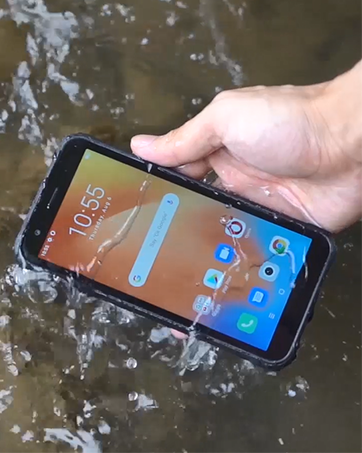
Image 1.2: Front view of the Blackview BV5500 Plus smartphone, showcasing its display.

Image 1.3: Rear view of the Blackview BV5500 Plus smartphone, highlighting its rugged design and camera module.
Key Features:
- 5.5-inch IPS Display: Clear and vibrant visuals.
- Android 10: Latest operating system for smooth performance.
- 3GB RAM + 32GB ROM: Ample memory and storage for apps and media.
- 4400mAh Battery: Long-lasting power for extended use.
- IP68 Waterproof & Drop Proof: Built to withstand harsh conditions.
- Dual SIM Support: Flexibility for multiple networks.
- Multifunctional NFC: Convenient for payments and data transfer.
2. Setup
2.1 Inserting SIM and SD Cards
To begin using your Blackview BV5500 Plus, you will need to insert your SIM card(s) and optionally an SD card for expanded storage. The device supports either two Nano-SIM cards or one Nano-SIM card and one microSD card.
- Locate the SIM tray on the side of your phone.
- Insert the provided SIM ejector tool into the small hole on the SIM tray. Push gently until the tray pops out.
- Carefully pull out the SIM tray.
- Place your Nano-SIM card(s) and/or microSD card into the designated slots on the tray. Ensure the gold contacts are facing upwards and the cards are correctly oriented according to the tray's diagram.
- Gently push the tray back into the phone until it is flush with the device's side.
2.2 Initial Power-On and Configuration
After inserting your cards, press and hold the Power button on the side of the phone until the Blackview logo appears. Follow the on-screen prompts to complete the initial setup, including selecting your language, connecting to Wi-Fi, and setting up your Google account.
3. Operating Instructions
3.1 Basic Navigation
- Touchscreen Gestures: Swipe, tap, pinch-to-zoom to navigate the interface.
- Home Screen: Access your apps, widgets, and notifications.
- Navigation Bar: Use the Back, Home, and Recent Apps buttons at the bottom of the screen.
3.2 Calls and Messaging
To make a call, open the Phone app and dial the number or select a contact. To send a message, open the Messages app and compose your text.
3.3 Camera Usage
Open the Camera app to capture photos and videos. Tap the shutter button to take a picture or the record button to start/stop video recording. The phone features a Sony 8MP Dual Camera for enhanced photography.
3.4 Face ID Unlock
For quick and secure access, you can set up Face ID. Navigate to Settings > Security & location > Face Unlock and follow the instructions to register your face. This allows for speedy facial unlocking.
Video 3.1: This video provides an overview of the Blackview BV5500 Plus, highlighting its rugged features, camera, battery, and other functionalities.
3.5 Multifunctional NFC
The Blackview BV5500 Plus supports NFC (Near Field Communication) for various functions, including contactless payments, quick data transfer with other NFC-enabled devices, and reading NFC tags. To use NFC, ensure it is enabled in Settings > Connected devices > NFC.
4. Maintenance
4.1 Cleaning Your Device
Due to its rugged design and IP68 rating, the BV5500 Plus can be cleaned with water. Use a soft, damp cloth to wipe down the device. For stubborn dirt, a mild soap solution can be used, followed by rinsing with clean water. Ensure all ports are securely closed before cleaning.
4.2 Battery Care
To maximize the lifespan of your 4400mAh battery:
- Avoid extreme temperatures.
- Use the original charger and cable provided.
- Avoid completely draining the battery frequently.
4.3 Software Updates
Regularly check for software updates to ensure your device has the latest features, security patches, and performance improvements. Go to Settings > System > Advanced > System update to check for and install updates.
4.4 Ruggedness Features
The Blackview BV5500 Plus is built to withstand:
- Water Immersion (IP68): Up to 1.5 meters for 60 minutes.
- Drops: From heights up to 1.5 meters (MIL-STD-810G compliant).
- Dust: Fully protected against dust ingress.
- Temperature Extremes: Operates in temperatures from -30°C to 50°C.
Video 4.1: This video demonstrates the drop and waterproof capabilities of the Blackview BV5500 Pro, showcasing its resilience in various challenging conditions.
5. Troubleshooting
If you encounter issues with your device, refer to the following common solutions:
- Device Not Turning On: Ensure the battery is charged. Connect the charger and wait a few minutes before attempting to power on again.
- No Network Signal: Check if your SIM card is correctly inserted. Verify that mobile data is enabled in settings. Contact your carrier to confirm service status.
- SD Card Not Recognized: Reinsert the SD card. Check if the card is damaged or try it in another device. Format the SD card (this will erase all data) if necessary via Settings > Storage.
- Apps Crashing/Freezing: Clear the cache of the problematic app (Settings > Apps & notifications > App info > [App Name] > Storage & cache > Clear cache). If the issue persists, uninstall and reinstall the app.
- Slow Performance: Close unnecessary background apps. Clear cached data. Consider performing a factory reset (Settings > System > Advanced > Reset options > Erase all data (factory reset) - Note: This will erase all data on your phone. Back up important data first.).
6. Specifications
| Feature | Specification |
|---|---|
| Model | Blackview BV5500 Plus |
| Operating System | Android 10.0 |
| Display | 5.5-inch IPS, 720 x 1440 Resolution |
| RAM | 3 GB |
| Internal Storage | 32 GB |
| Battery Capacity | 4400 mAh |
| Rear Camera | Sony 8MP Dual Camera |
| Front Camera | Yes |
| SIM Card Slots | Dual SIM (Nano-SIM) |
| Connectivity | 4G LTE, GSM, Wi-Fi, Bluetooth, NFC |
| Rugged Features | IP68 Waterproof, Drop Proof (MIL-STD-810G), Dustproof |
| Dimensions | 5.98 x 2.95 x 0.55 inches |
| Weight | 7.9 ounces (225 grams) |
7. Warranty and Support
Your Blackview BV5500 Plus smartphone comes with a standard manufacturer's warranty. For detailed information regarding warranty terms, conditions, and duration, please refer to the warranty card included in your product packaging or visit the official Blackview website. For technical support, troubleshooting assistance, or service inquiries, please contact Blackview customer service through their official channels.


