Introduction
Thank you for choosing the SCS Sentinel Remote Controlled Power Strip. This device is designed to provide convenient control over your electronic appliances, helping you save energy by easily switching off devices from standby mode. This manual provides essential information for the safe and efficient use of your power strip.
Safety Instructions
Please read these safety instructions carefully before using the product. Failure to follow these instructions may result in electric shock, fire, or serious injury.
- Do not exceed the maximum load capacity of 2300W or 10A.
- This product is designed for indoor use only. Do not expose to moisture, rain, or extreme temperatures.
- Do not disassemble or modify the power strip or remote control. Refer all servicing to qualified personnel.
- Ensure the power strip is fully inserted into a wall outlet.
- Keep out of reach of children.
- Do not connect multiple power strips together.
- Unplug the power strip from the wall outlet before cleaning or when not in use for extended periods.
Package Contents
Verify that all items are present in the package:
- 1 x SCS Sentinel Remote Controlled Power Strip (5 outlets, 3m cable)
- 1 x Remote Control
- 1 x A23-12V Battery (pre-installed in remote control)
- 1 x User Manual (this document)
Product Overview
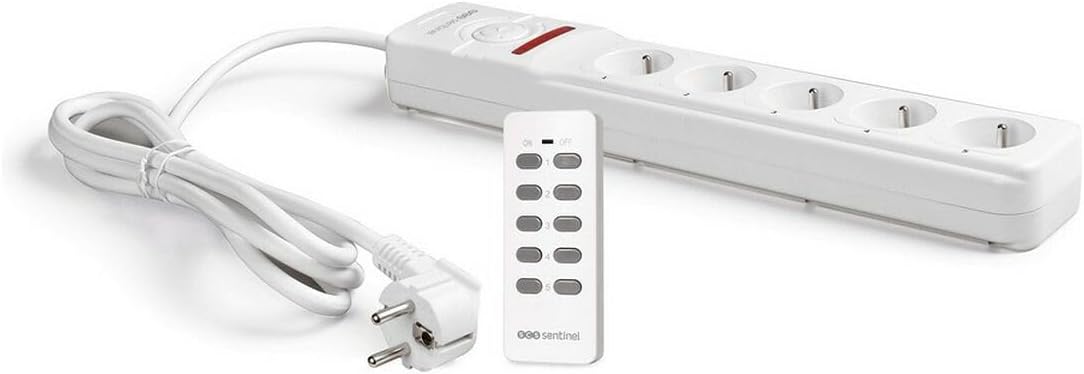
Figure 1: The SCS Sentinel Remote Controlled Power Strip with its accompanying remote control. The power strip features five outlets and a main power button, while the remote control has individual buttons for each outlet and a master ON/OFF button.
The SCS Sentinel Remote Controlled Power Strip consists of two main components:
- Power Strip: Features five Type E outlets, a 3-meter power cable, and a manual reset button. Each outlet can be controlled independently.
- Remote Control: Allows wireless control of the power strip outlets. It has individual ON/OFF buttons for each of the five outlets (numbered 1-5) and a master ON/OFF button to control all connected devices simultaneously. The remote operates on an A23-12V battery.
Setup
- Battery Installation (Remote Control):
The A23-12V battery is typically pre-installed. If not, open the battery compartment on the back of the remote control and insert the A23-12V battery, ensuring correct polarity (+/-). Close the compartment securely.
- Connecting Appliances:
Plug your desired electrical appliances into the five outlets on the power strip. Ensure that the total power consumption of all connected devices does not exceed 2300W (10A).

Figure 2: Example setup showing different types of appliances (TV, lamp, computer, Christmas tree lights, speakers) connected to the power strip's individual outlets.
- Powering the Power Strip:
Plug the power strip's main cable into a standard 230V, 50Hz wall outlet. The power strip is now ready for operation.
Operating Instructions
- Individual Outlet Control:
On the remote control, press the numbered button (1-5) corresponding to the outlet you wish to control. Pressing the button once will toggle the power for that specific outlet (ON/OFF).
- Master Control:
Use the master ON/OFF button on the remote control to switch all five outlets on or off simultaneously.
- Range:
The remote control operates effectively up to a distance of 30 meters in an open field. Obstacles such as walls or furniture may reduce the effective range.
- Manual Reset:
In case of an overload, the power strip may trip. Press the manual reset button on the power strip to restore power. Before resetting, unplug some devices to reduce the load.
Maintenance
- Cleaning:
Always unplug the power strip from the wall outlet before cleaning. Use a soft, dry cloth to wipe the surface. Do not use liquid cleaners or abrasive materials.
- Battery Replacement (Remote Control):
If the remote control's range decreases or it stops responding, the battery may need replacement. Open the battery compartment and replace the A23-12V battery with a new one, observing polarity. Dispose of old batteries responsibly.
Troubleshooting
| Problem | Possible Cause | Solution |
|---|---|---|
| Power strip not turning on. | Not plugged in; Wall outlet no power; Overload tripped. | Ensure power strip is fully plugged in. Test wall outlet with another device. Press the manual reset button on the power strip. Reduce connected load if overload occurred. |
| Remote control not working. | Battery low or dead; Incorrect battery polarity; Out of range; Obstruction. | Replace the A23-12V battery. Check battery polarity. Move closer to the power strip. Remove any large obstructions between remote and power strip. |
| Individual outlets not responding. | Remote control issue; Appliance issue. | Try the master ON/OFF button. Ensure the appliance is correctly plugged into the outlet. Test the appliance in a different working outlet. |
Specifications
| Model Number | HCN0063 |
| Brand | SCS Sentinel |
| Number of Outlets | 5 |
| Cable Length | 3 Meters |
| Voltage | 230 Volts |
| Maximum Load | 2300W / 10A |
| Remote Control Battery | A23-12V Alkaline |
| Remote Control Range | Up to 30 meters (open field) |
| Dimensions (L x W) | 38.1 cm x 6.9 cm |
| Weight | 1 Kilogram |
| Recommended Use | Indoor |
Warranty and Support
This SCS Sentinel product benefits from a 2-year warranty against any manufacturing defects or material flaws, effective from the date of delivery or product availability. The warranty is applicable only upon presentation of proof of purchase.
The effect of this warranty is strictly limited to the replacement of parts exhibiting a clearly established manufacturing defect.
For technical assistance or support, please contact SCS Sentinel customer service. Our technical support team, based in France, is available to assist you with product installation and provide personalized advice.
For more information, you may visit the official SCS Sentinel store on Amazon: SCS Sentinel Store


