
eufy Security T8200
eufy Security Wi-Fi Doorbell Camera (2K Wired) User Manual
Brand: eufy Security | Model: T8200
1. Introduction and Overview
The eufy Security Wi-Fi Doorbell Camera provides advanced home security with 2K resolution video, local storage, and intelligent human detection. Designed for wired installations, it integrates with existing doorbell wiring and offers real-time communication with visitors. This manual provides essential information for setup, operation, and maintenance of your eufy Security Video Doorbell.
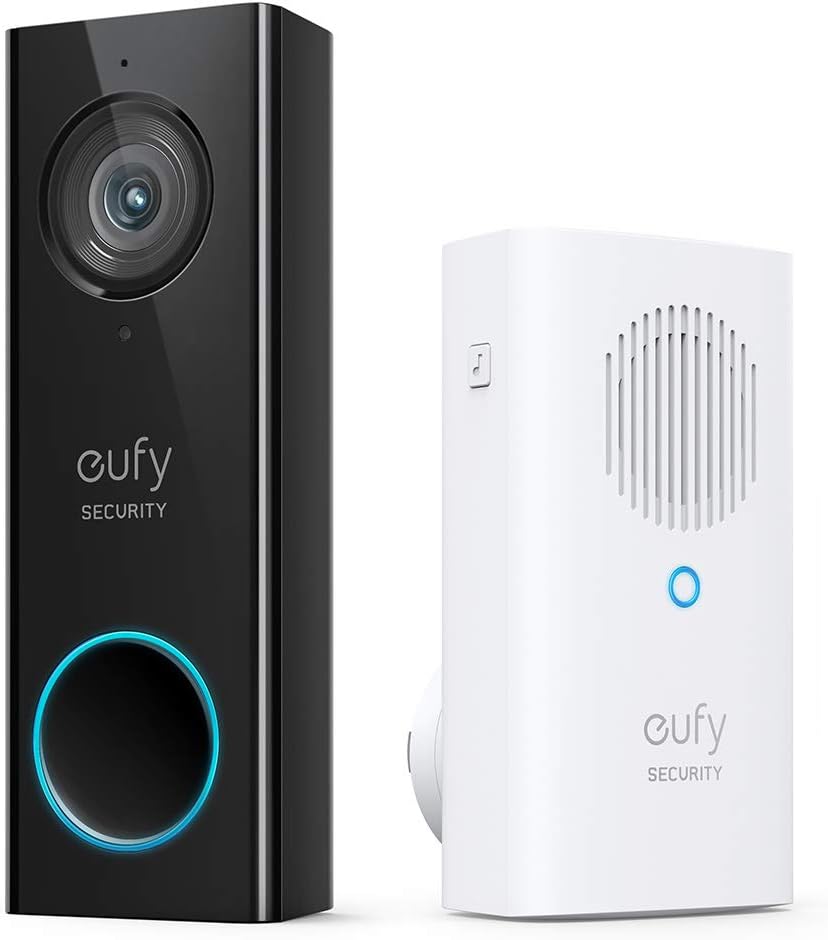
Figure 1.1: eufy Security Wi-Fi Doorbell Camera and Wireless Chime.
2. What's in the Box
Verify that all components are present before beginning installation:
- 1x Video Doorbell 2K (Wired)
- 1x Screw Hole Positioning-Card
- 1x Mounting Bracket
- 1x 15° Wedge
- 1x Jumper for Existing Chime
- 2x Extension Wires
- 1x Screw Packs
- 1x Doorbell Detaching Pin
- 1x Electronic Doorbell Chime
- 1x Doorbell Power Pin
- 1x Quick Start Guide
3. Key Features
- 2K High Definition Resolution: Captures clear and detailed video footage with advanced HDR for optimal viewing.
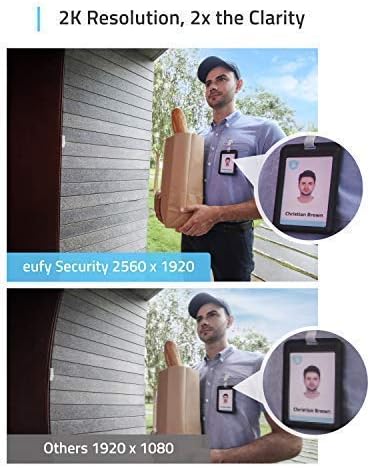
Figure 3.1: Visual comparison demonstrating 2K resolution clarity.
- Intelligent Human Recognition: AI-powered detection accurately identifies human figures, reducing false alerts from pets or inanimate objects.

Figure 3.2: Human detection capability, minimizing false alerts.
- Local Storage: All recorded footage is stored locally, eliminating the need for monthly subscription fees.

Figure 3.3: Local storage feature, highlighting no monthly fees.
- Instant Dialogue: Two-way audio allows for real-time conversations with visitors.
- Personalized Alerts: The electronic chime offers 8 ringtones, holiday themes, and adjustable volume.
- Weatherproof Design: Durable construction for outdoor use.
4. Setup and Installation
The eufy Security Wi-Fi Doorbell Camera requires existing doorbell wires for power. Professional installation experience is recommended due to electrical wiring requirements.
- Power Requirements: The doorbell requires a transformer providing 16-24 VAC, 30 VA. Ensure your existing doorbell system meets these specifications. Modification of your original chime or an upgrade to the doorbell transformer may be necessary.
- Wi-Fi Connection: The doorbell connects exclusively to 2.4GHz Wi-Fi networks. Ensure your network is compatible.
- App Installation: Download the eufy Security app from your mobile device's app store. Follow the in-app instructions for device pairing and initial setup.

Figure 4.1: Installation process, emphasizing wired connection and transformer requirements.
5. Operating Instructions
- Live View: Access a live feed of your doorstep through the eufy Security app at any time.
- Motion Detection Alerts: Receive instant notifications on your smartphone when motion is detected. Customize detection zones and sensitivity within the app to minimize unwanted alerts.
- Two-Way Audio: Speak directly with visitors via the app.
- Pre-set Responses: Utilize pre-recorded messages for quick interactions when you are unable to speak live.
- Chime Operation: The included electronic chime will sound when the doorbell button is pressed. Adjust volume and select ringtones via the app.
- Smart Home Integration: Connect your eufy Doorbell to Google Assistant or Amazon Alexa for voice control and integration with other smart home devices.
6. Maintenance
Regular maintenance ensures optimal performance and longevity of your eufy Security Doorbell Camera:
- Cleaning: Periodically wipe the camera lens and doorbell surface with a soft, damp cloth to remove dust and smudges. Avoid abrasive cleaners.
- Firmware Updates: Keep the doorbell's firmware updated through the eufy Security app. Updates often include performance improvements and security enhancements.
- Network Stability: Ensure your Wi-Fi network remains stable and strong for consistent connectivity and video streaming.
7. Troubleshooting
If you encounter issues with your eufy Security Doorbell Camera, try the following steps:
- No Power/Offline:
- Verify the doorbell wiring connections are secure.
- Check your doorbell transformer to ensure it meets the 16-24 VAC, 30 VA requirements.
- Confirm your Wi-Fi network is active and the doorbell is within range.
- Restart the doorbell by temporarily disconnecting and reconnecting power if accessible.
- Poor Video Quality:
- Clean the camera lens.
- Ensure adequate lighting in the viewing area.
- Check your Wi-Fi signal strength in the app; a weak signal can affect video quality.
- False Motion Alerts:
- Adjust motion detection sensitivity settings in the eufy Security app.
- Configure activity zones to focus on specific areas and exclude high-traffic zones.
- Chime Not Ringing:
- Ensure the electronic chime is properly plugged in and paired with the doorbell.
- Check the jumper wire connection on your existing chime (if applicable).
For further assistance, refer to the eufy Security app's help section or contact customer support.
8. Specifications
| Product Dimensions | 4.8 x 1.69 x 0.94 inches |
| Item Weight | 3.2 ounces |
| Item Model Number | T8200 |
| ASIN | B07R3WY95C |
| Manufacturer | Eufy |
| Power Requirements | 16-24 VAC, 30 VA (Requires existing doorbell wires) |
| Wi-Fi Connectivity | 2.4GHz networks only |
| Video Resolution | 2K High Definition |
| Storage | Local Storage (No monthly fees) |

Figure 8.1: Feature comparison across different eufy doorbell models.
9. Warranty and Support
For warranty information, product registration, or technical support, please visit the official eufy Security website or contact their customer service. You can also find additional resources and FAQs within the eufy Security app.
Visit the eufy Security Store for more products and information.
Related documentsT8200


Ask a question about this manual
Ask about setup, troubleshooting, compatibility, parts, safety, or missing instructions. Manuals+ will review the question and use this page’s manual context to help answer it.