
Introduction
These instructions provide detailed guidance for the safe and effective use of your AfterShokz Titanium Open Ear Wireless Bone Conduction Headphones, model AS600CR. This manual covers setup, operation, maintenance, and troubleshooting to ensure optimal performance and longevity of your device.
Product Overview
Key Features
- Open-Ear Design: Patented bone conduction technology delivers audio through the cheekbone, keeping you connected and aware of your surroundings.
- Secure & Comfortable Fit: An open-ear design enables bud-free listening and a partial titanium frame keeps the headphones in place through any activity.
- Multifunction Button: Easy controls to play, pause, skip, activate voice assistant, and answer calls.
- Sweatproof: IP55 certified to repel sweat, dust, and moisture. Ideal for various activities, including rainy runs.
- 6-Hour Battery Life: Provides up to 6 hours of continuous music and calls on a single charge.
Package Contents
Your AfterShokz Titanium headphones package typically includes:
- AfterShokz Titanium Headphones (AS600CR)
- Micro-USB Charging Cable
- Storage Pouch
- Earplugs (for optional use)
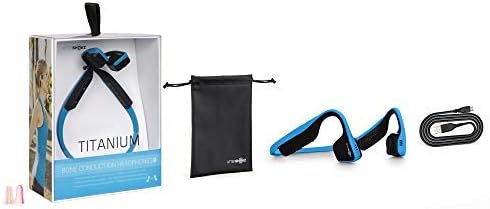
Image: Contents of the AfterShokz Titanium package, including the headphones, charging cable, storage pouch, and earplugs.
Setup
Charging the Headphones
- Locate the Micro-USB charging port on your headphones.
- Connect the Micro-USB charging cable to the headphones and the other end to a USB power adapter or computer USB port.
- The LED indicator will show a solid red light during charging.
- Once fully charged, the LED indicator will turn blue. A full charge takes approximately 1.5 hours.
Pairing with a Bluetooth Device
- Ensure the headphones are turned off.
- Press and hold the power button (usually the volume+ button) for 5-7 seconds until the LED indicator flashes red and blue alternately. This indicates pairing mode.
- On your device (smartphone, tablet, computer), enable Bluetooth and search for available devices.
- Select "AfterShokz Titanium" from the list of found devices.
- Once successfully paired, the LED indicator will flash blue once, and a voice prompt will confirm "Connected."
Operating Instructions
Wearing the Headphones
Place the headphones with the transducers resting on your cheekbones, just in front of your ears. The band should rest comfortably behind your head.

Image: A person wearing AfterShokz Titanium headphones, demonstrating the open-ear design and comfortable fit during physical activity.
Button Functions
| Button | Action | Function |
|---|---|---|
| Multifunction Button (Large button on left transducer) | Single Press | Play/Pause music, Answer call |
| Double Press | Skip to next track | |
| Press and Hold (2 seconds) | Activate voice assistant, Reject call | |
| Volume + / Power Button | Single Press | Increase volume |
| Press and Hold (2 seconds) | Power On/Off | |
| Volume - Button | Single Press | Decrease volume |
Maintenance
Cleaning
- Wipe the headphones with a soft, damp cloth.
- Avoid using harsh chemicals or abrasive materials.
- Ensure the charging port is dry before charging.
Storage
- Store the headphones in the provided pouch when not in use to protect them from dust and damage.
- Avoid storing in extreme temperatures.
Troubleshooting
No Power
- Ensure the headphones are fully charged. Connect to a power source and check the LED indicator.
- Try a different charging cable or USB port.
Cannot Pair
- Ensure the headphones are in pairing mode (LED flashing red and blue).
- Turn off and on your device's Bluetooth.
- Move the headphones closer to your device.
- Clear previous Bluetooth connections on your device if you have too many.
Low Volume or Poor Sound Quality
- Adjust the volume on both the headphones and your connected device.
- Ensure the transducers are positioned correctly on your cheekbones.
- If using earplugs, ensure they are inserted correctly.
- Check for interference from other wireless devices.
Specifications
| Feature | Detail |
|---|---|
| Model | AS600 |
| Connectivity | Bluetooth |
| Battery Life | Up to 6 hours |
| Water Resistance | IP55 (Sweat and water-resistant) |
| Weight | 40 grams |
| Material | Titanium |
| Frequency Range | 20 Hz - 20,000 Hz |
| Microphone | Built-in |
Warranty and Support
For warranty information and customer support, please refer to the official AfterShokz (now Shokz) website or contact their customer service directly. Keep your proof of purchase for warranty claims.
Note: AfterShokz has been rebranded to Shokz. Product support and warranty services are now provided under the Shokz brand.


