
Introduction
This manual provides comprehensive instructions for the assembly, operation, and maintenance of your Tribesigns 63-inch Computer Desk. Please read all instructions carefully before assembly and use to ensure proper function and longevity of the product.
Safety Information
For your safety and to prevent damage to the product, please observe the following:
- Do not exceed the maximum weight recommendation of 900 lbs (approximately 408 kg).
- Properly assemble the desk according to the instructions to ensure stability.
- Keep small parts away from children during assembly to avoid choking hazards.
Parts List
Before beginning assembly, please verify that all components are present and undamaged. If any parts are missing or damaged, contact customer service immediately.
- Desktop (0.59" thick laminated MDF)
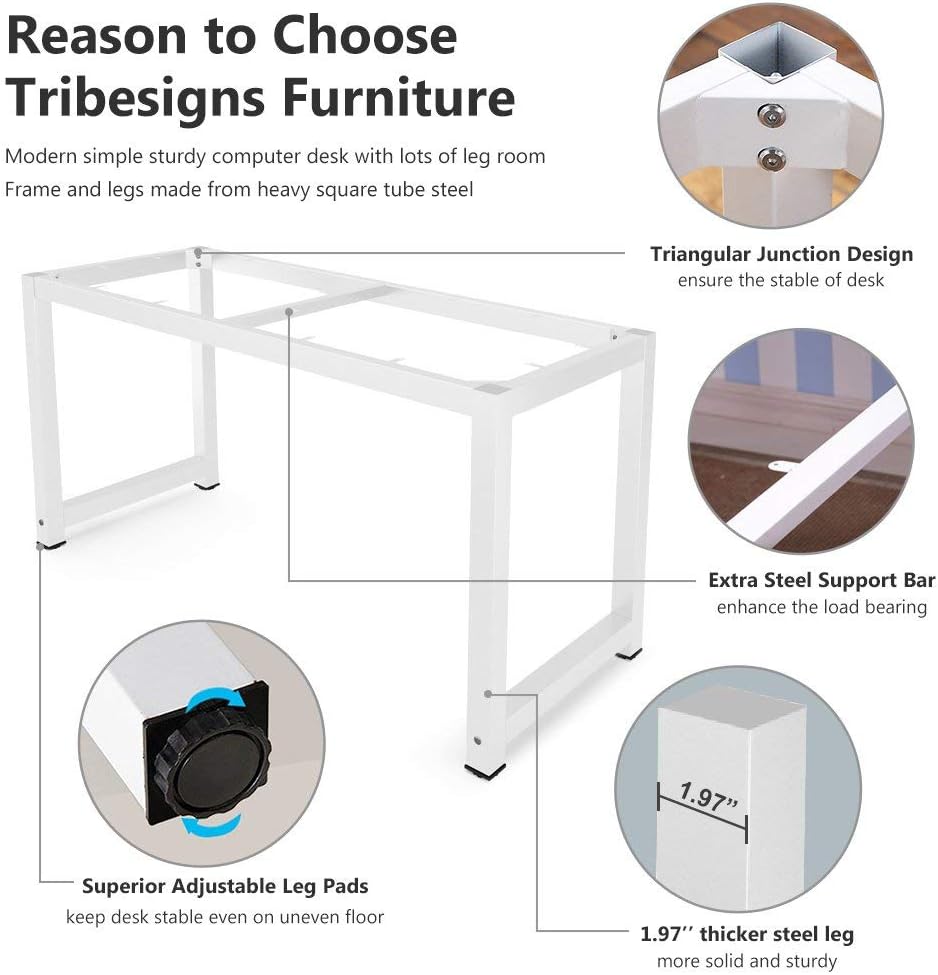
- Metal Legs (Powder coated steel, 1.57" x 1.57" width) - 4 pieces
- Leg Bars - 2 pieces
- Adjustable Leg Pads - 4 pieces
- Assembly Hardware (bolts, hex key) - 1 set
Setup and Assembly
Assembly is designed to be straightforward and typically takes less than 15 minutes with the included tools.
- Unpack all components from the box and lay them out on a soft, clean surface (e.g., a blanket or carpet) to prevent scratches.
- Attach the four metal legs to the underside of the desktop using the provided bolts and hex key. Ensure the legs are correctly oriented with the pre-drilled holes.
- Secure the two leg bars between the metal legs. These bars provide additional structural support and stability.
- Install the adjustable leg pads at the bottom of each leg. These pads can be rotated to make minor height adjustments, ensuring the desk is level and stable on uneven floors.
- Carefully turn the assembled desk upright.

Operating Instructions
The Tribesigns computer desk is designed for versatile use, providing a spacious and sturdy surface for various activities.
- Spacious Workspace: The 63" (L) x 23.6" (W) desktop offers ample space for computers, multiple monitors, printers, and other work or study materials.
- Sturdy Construction: The robust metal frame and thick laminated MDF desktop ensure stability and can support heavy loads, up to 900 lbs.
- Adjustable Stability: The adjustable leg pads allow for minor height adjustments to ensure a level and stable work surface on various floor types, preventing wobbling.


Maintenance
To maintain the appearance, durability, and longevity of your Tribesigns computer desk, follow these simple maintenance guidelines:
- Cleaning: Wipe the desktop and metal frame with a damp cloth. For tougher stains, a mild soap solution can be used, followed by wiping with a clean, dry cloth.
- Avoid Harsh Chemicals: Do not use abrasive cleaners, strong chemical solvents, or harsh scrubbing pads, as these may damage the laminated finish and powder coating.
- Regular Checks: Periodically check all bolts and connections to ensure they remain tight. Re-tighten if necessary to maintain optimal stability and prevent wobbling.
- Protect Surface: Use coasters for drinks and placemats for hot items to prevent water rings or heat damage to the desktop surface.
Troubleshooting
If you encounter any issues with your desk, refer to the following common troubleshooting tips:
Desk Wobbles
If the desk feels unstable or wobbles:
- Ensure all assembly bolts are securely tightened.
- Adjust the leg pads at the bottom of each leg. Rotate them clockwise or counter-clockwise until the desk is level and stable on the floor.
Loose Connections
If any parts feel loose over time:
- Re-tighten all bolts using the provided hex key. Do not overtighten, as this can strip the threads or damage the material.
Product Specifications
| Feature | Detail |
|---|---|
| Brand | Tribesigns |
| Model Number | HOGA-1005-1 |
| Product Dimensions | 23.6"D x 63"W x 28.7"H |
| Color | Walnut+white |
| Style | Modern |
| Base Material | Manufactured Wood, Steel |
| Top Material Type | Engineered Wood |
| Finish Type | Powder Coated |
| Special Feature | Scratch Resistant |
| Item Weight | 48.4 Pounds |
| Maximum Weight Recommendation | 900 Pounds |
| Required Assembly | Yes |
| Recommended Number of People for Assembly | 1 |
| Includes All Assembly Tools | Yes |
| Product Care Instructions | Wipe with Damp Cloth |
Warranty and Support
This Tribesigns product comes with an 18-month warranty from the date of purchase, covering manufacturing defects.
For customer service inquiries, technical support, or to report missing/damaged parts, please refer to the contact information provided by your retailer or on the official Tribesigns website. Please have your model number (HOGA-1005-1) and proof of purchase ready when contacting support.


