
Introduction
The Apple 61W USB-C Power Adapter is designed to provide fast and efficient charging for your USB-C enabled devices, whether at home, in the office, or while traveling. This adapter is optimized for use with specific MacBook Pro and MacBook Air models, but is compatible with any USB-C device requiring up to 61 watts of power. A USB-C charge cable is required and sold separately.
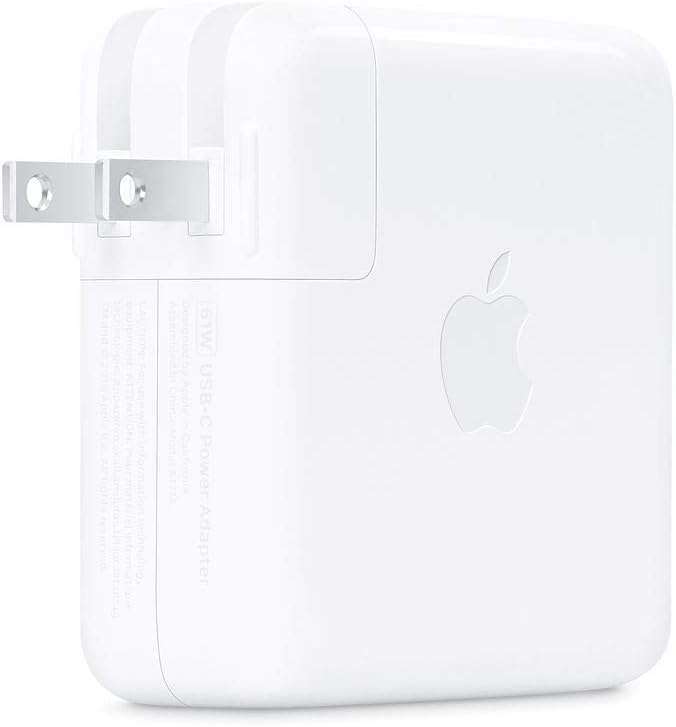
Image 1: Front view of the Apple 61W USB-C Power Adapter with its foldable prongs extended. The Apple logo is visible on the side.
Safety Information
- Read all instructions: Before using the power adapter, read all safety information and operating instructions.
- Indoor use only: This adapter is designed for indoor use in dry locations. Do not expose to water or excessive moisture.
- Proper ventilation: Ensure adequate ventilation around the adapter. Do not cover the adapter or place it in an enclosed space during use.
- Avoid damage: Do not use the adapter if it has been damaged, dropped, or exposed to liquid.
- Unplug when not in use: Disconnect the power adapter from the electrical outlet when not in use for extended periods.
- Children: Keep out of reach of children.
Setup
- Unpack: Carefully remove the 61W USB-C Power Adapter from its packaging.
- Extend Prongs: Fold out the electrical prongs from the adapter body.
- Connect USB-C Cable: Plug one end of your USB-C charge cable (sold separately) into the USB-C port on the power adapter.
- Connect to Device: Plug the other end of the USB-C charge cable into the USB-C charging port on your compatible device.
- Plug into Power Outlet: Insert the power adapter's prongs into a standard electrical wall outlet.
The adapter is now ready to charge your device.

Image 2: Side view of the Apple 61W USB-C Power Adapter, showing the smooth white casing and the USB-C port.
Operating Instructions
Once connected as described in the Setup section, the Apple 61W USB-C Power Adapter will automatically begin charging your device. The charging indicator on your device (if available) will show its charging status.
- Fast Charging: This adapter supports fast charging for compatible devices.
- Optimal Performance: For optimal charging performance with a 13-inch MacBook Pro, pair it with this 61W USB-C Power Adapter.
- Temperature: The adapter may become warm during normal operation. This is expected. If it becomes excessively hot, disconnect it from the power outlet and your device.
Compatibility
The 61W USB-C Power Adapter is compatible with any USB-C enabled device. Apple specifically recommends pairing it with the following models for optimal charging performance:
- MacBook Air (M1, 2020)
- MacBook Air (Retina, 13-inch, 2020)
- MacBook Air (Retina, 13-inch, 2018 - 2019)
- MacBook Pro (13-inch, M1, 2020)
- MacBook Pro (13-inch, 2020)
- MacBook Pro (13-inch, 2016 - 2019)
- MacBook (Retina, 12-inch, Early 2015 – 2017)
Also compatible with various USB-C enabled phones, tablets, and computers.
Maintenance and Care
- Cleaning: Disconnect the adapter from the power outlet and your device before cleaning. Use a soft, dry, lint-free cloth to wipe the exterior. Do not use liquid cleaners or aerosols.
- Storage: Store the adapter in a cool, dry place when not in use. The prongs can be folded back into the adapter body for compact storage and travel.
- Handling: Avoid dropping the adapter or subjecting it to strong impacts. Do not attempt to disassemble or repair the adapter yourself.
- Cable Care: Ensure your USB-C charge cable is not bent sharply or subjected to excessive strain, as this can damage the cable and affect charging performance.
Troubleshooting
- Device not charging:
- Ensure the power adapter is securely plugged into a working electrical outlet.
- Verify that the USB-C charge cable is firmly connected to both the adapter and your device.
- Try a different electrical outlet.
- Inspect the USB-C cable for any visible damage. If damaged, replace it with a new, compatible cable.
- Test the adapter with a different compatible device, if available, to isolate the issue.
- Slow charging:
- Ensure your device is fully compatible with 61W charging. Some devices may draw less power.
- Close unnecessary applications on your device that might be consuming significant power.
- Ensure you are using an official Apple or certified USB-C charge cable.
- Adapter feels hot:
- It is normal for the adapter to become warm during use.
- If it becomes excessively hot, disconnect it immediately and allow it to cool down. Ensure it is in a well-ventilated area and not covered.
- If the issue persists, discontinue use and contact Apple Support.
Specifications
| Model Number | MRW22LL/A |
| Wattage | 61 watts |
| Input Voltage | 20 Volts |
| Connector Type | USB Type C |
| Total USB Ports | 1 |
| Product Dimensions | 4.17 x 4.17 x 1.19 inches |
| Item Weight | 9.1 ounces |
| Manufacturer | Apple |
Warranty and Support
For information regarding the warranty of your Apple 61W USB-C Power Adapter, please refer to the official Apple warranty documentation included with your purchase or visit the official Apple Support website. Apple's standard limited warranty applies to hardware products.
For technical support, service, or to purchase replacement parts, please visit support.apple.com or contact Apple customer service directly.


