
Shark NV352
Shark Navigator Lift-Away HEPA Canister Vacuum Cleaner NV352 User Manual
Model: NV352 | Brand: Shark
1. Overview
The Shark Navigator Lift-Away HEPA Canister Vacuum Cleaner NV352 is designed for versatile and powerful cleaning. This lightweight vacuum, offering the convenience of a detachable canister for easy above-floor cleaning, weighs approximately 14 lbs in Lift-Away mode. Its advanced cyclonic technology maintains strong suction, preventing dirt from clogging filters. Equipped with Anti-Allergen Complete Seal Technology and a HEPA filter, it captures and retains over 99.9% of dust and allergens within the vacuum, ensuring cleaner air.
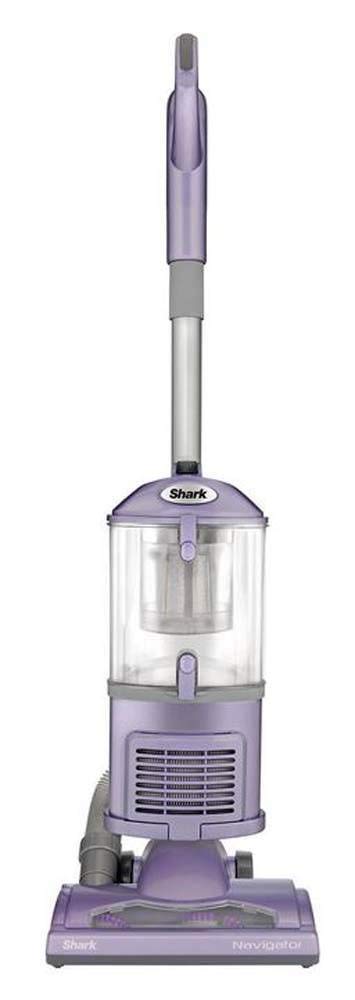
Figure 1: Shark Navigator Lift-Away HEPA Canister Vacuum Cleaner NV352.
2. Key Features
- Lift-Away Technology: Detachable pod for portable cleaning of stairs, upholstery, and hard-to-reach areas.
- Anti-Allergen Complete Seal Technology + HEPA Filter: Captures and holds over 99.9% of dust and allergens inside the vacuum.
- Lightweight Design: Weighs approximately 14 lbs (canister only), making it easy to maneuver.
- Brushroll Shutoff: Allows seamless transition from deep carpet cleaning to gentle bare floor cleaning.
- Swivel Steering: Provides excellent control for navigating around furniture and obstacles.
- Versatile Attachments: Includes Upholstery Tool and two lengths of Crevice Tool for comprehensive cleaning.
3. Setup
The Shark Navigator NV352 is designed for quick and easy assembly. Follow these steps to set up your vacuum:
- Unpack all components from the box.
- Insert the wand into the nozzle until it clicks securely.
- Attach the hose to the back of the vacuum pod. Ensure it clicks into place.
- Secure the accessory holder to the wand.
- Store the included attachments (Crevice Tool, Upholstery Tool) on the accessory holder.
Ensure all connections are firm before operating the vacuum.
4. Operating Instructions
4.1 Upright Mode
For general floor cleaning, use the vacuum in its upright configuration.
- Plug the power cord into an electrical outlet. The cord length is 25 feet.
- Place your foot on the floor nozzle and tilt the handle back to recline the vacuum.
- Select the desired cleaning mode using the power switch located on the vacuum pod:
- "I" (Bare Floor): For bare floors and delicate area rugs. The brushroll will not spin.
- "II" (Brushroll On): For carpeted surfaces. The brushroll will spin to agitate carpet fibers for deeper cleaning.
- Begin vacuuming. The swivel steering allows for easy maneuverability around furniture.
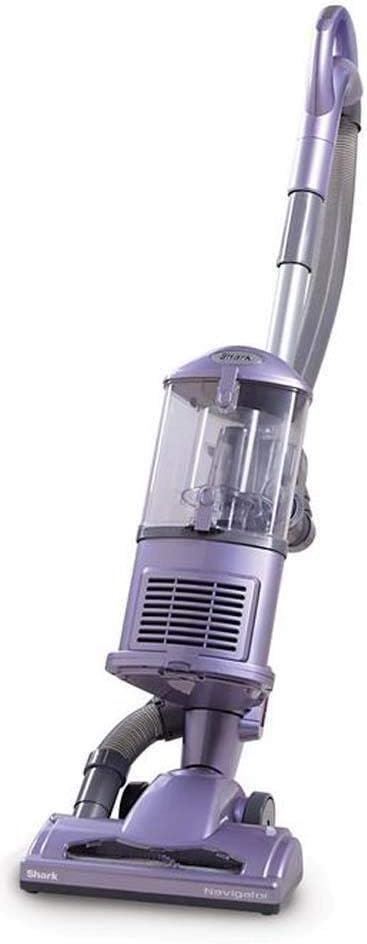
Figure 2: Using the Shark Navigator NV352 in upright mode for carpet cleaning.
4.2 Lift-Away Mode
The Lift-Away feature allows you to detach the canister from the floor nozzle for portable cleaning.
- Press the "Lift-Away" button on the side of the vacuum pod to detach it from the floor nozzle.
- You can now carry the lightweight canister by its handle.
- To use with attachments:
- Detach the hose from the wand by pressing the release button.
- Attach the desired cleaning tool (e.g., Crevice Tool, Upholstery Tool) directly to the end of the hose or to the extension wand for extended reach.
- Adjust suction for high-pile carpets and area rugs by sliding the "Suction Release" collar on the handle.
- After cleaning, reattach the hose to the wand and the canister to the floor nozzle until they click into place.

Figure 3: Cleaning stairs using the Lift-Away mode.

Figure 4: Utilizing the extension wand for elevated cleaning.

Figure 5: Cleaning upholstery with the specialized tool in Lift-Away mode.
5. Maintenance
Regular maintenance ensures optimal performance of your Shark Navigator NV352.
5.1 Emptying the Dust Cup
- Ensure the vacuum is unplugged.
- Press the dust cup release latches and lift the dust cup off the vacuum pod.
- Hold the dust cup over a trash bin and press the bottom release latch to open the bottom flap. Empty contents.
- Close the bottom flap securely until it clicks.
- Reattach the dust cup to the vacuum pod.
5.2 Cleaning Filters
The NV352 uses foam and felt filters, along with a post-motor HEPA filter. Refer to the full manual for detailed cleaning instructions and frequency.
- Pre-Motor Filters (Foam & Felt): Rinse with water and air dry completely (24 hours) before reinstalling.
- Post-Motor HEPA Filter: Tap clean or rinse with water and air dry completely (24 hours) before reinstalling. Do not use detergent.
6. Troubleshooting
If your Shark Navigator NV352 encounters issues, try these common troubleshooting steps:
- No Power: Ensure the power cord is securely plugged into a working outlet. Check the circuit breaker.
- Loss of Suction:
- Empty the dust cup if it is full.
- Check all hose connections for secure fit.
- Inspect the hose, nozzle, and attachments for blockages.
- Clean the pre-motor and post-motor filters as per maintenance instructions.
- Brushroll Not Spinning:
- Ensure the power switch is set to "II" (Brushroll On).
- Check the brushroll area for any obstructions (e.g., hair, debris) and remove them.
- Ensure the vacuum is reclined for the brushroll to engage.
For further assistance, refer to the complete troubleshooting guide in the full product manual or contact Shark customer support.
7. Specifications
| Feature | Detail |
|---|---|
| Brand | Shark |
| Model Name/Number | NV352 |
| Special Features | HEPA, Lightweight |
| Filter Type | Foam, HEPA |
| Surface Recommendation | Carpet |
| Power Source | Corded Electric |
| Capacity | 1.1 Quarts |
| Color | Purple |
| Noise Level | 70 Decibels |
| Motor Horsepower | 1.608 horsepower |
| Style Name | Lift-Away |
| Portable | Yes |
| Number of Power Levels | 3 |
| Indoor Outdoor Usage | Indoor |
| Item Weight | 19.9 Pounds |
| Item Dimensions (L x W x H) | 12.9"L x 14.5"W x 26.8"H |
| Form Factor | Upright |
| Included Components | Canister, Crevice Tool, HEPA Filter |
| Voltage | 120 Volts |
| Wattage | 1200 watts |
| Control Method | Touch, Push Button |
8. Warranty and Support
This Shark Navigator Lift-Away HEPA Canister Vacuum Cleaner NV352 comes with a 90-day limited warranty from the manufacturer. For warranty claims, product support, or to purchase replacement parts, please contact SharkNinja customer service directly. Keep your purchase receipt as proof of purchase for warranty purposes.
For the most up-to-date support information, visit the official SharkNinja website or refer to the contact details provided with your product packaging.