
1. Introduction
Thank you for choosing the MEIKEE 30W Motion Sensor Floodlight. This manual provides essential information for the safe and efficient operation of your new floodlight. Please read these instructions carefully before installation and use, and retain them for future reference.
2. Product Features
- Remote Control Operation: Easily adjust settings from a distance.
- Constant Lighting Function: Option for 1H, 2H, or 3H continuous illumination.
- PIR Motion Detection: Detects movement to automatically turn the light on/off.
- Adjustable Detection Distance: Customize the sensor's range up to 12 meters.
- Daylight White (6500K): Provides bright, clear illumination.
- High Brightness: 3000 Lumens for effective lighting.
- IP66 Waterproof Rating: The light body is IP66 waterproof, and the sensor is IP65 rated, making it resistant to rain, snow, and fog.
- Durable Construction: Features high-quality protective glass and corrosion-resistant aluminum.
- Adjustable Sensor Head: 360° horizontal and 180° vertical adjustment for optimal coverage.
- Energy Efficient: High-efficiency LED beads save over 85% energy.
- Improved Foldable 3-Prong Plug: For convenient and secure connection.

Figure 1: Product durability demonstration. The floodlight features high-quality protective glass and corrosion-resistant aluminum for enhanced durability.

Figure 2: Overview of key features, including remote control, constant lighting, PIR sensor, IP66 waterproof rating, and adjustable stand.
3. Specifications
| Parameter | Value |
|---|---|
| Brand | MEIKEE |
| Model | 30W |
| Input Voltage | AC 90~120V |
| Power Consumption | 30W |
| Lumen Output | 3000LM |
| Color Temperature | 6500K (Daylight White) |
| LED Lifespan | > 50,000 hours |
| LED Light Source | SMD |
| CRI | > 75 |
| Beam Angle | 120° |
| PIR Detection Range | 180° |
| Max Detection Distance | 12 meters |
| Cable Length | 1.5m |
| Waterproof Rating | IP66 (Light Body), IP65 (Sensor) |
| Dimensions | 18.5 x 17 x 6.4 cm |
| Weight | 670 g |

Figure 3: Product dimensions and heat dissipation design. The floodlight features an efficient heat sink for extended lifespan.
4. Safety Information
- Ensure the power is OFF before installation or maintenance.
- Installation should be performed by a qualified electrician if you are unsure.
- Do not install the light in areas with frequent human or vehicle traffic if using motion sensor mode, as this can lead to excessive on/off cycles and reduce product lifespan.
- The product is IP66 waterproof, but it should not be submerged in water.
- Keep the product away from flammable materials.
5. Installation
The MEIKEE 30W Motion Sensor Floodlight offers flexible installation options:
- Wall Mount: Securely attach the bracket to a vertical surface.
- Base Mount: Install on a horizontal surface or ground.
- Ceiling Mount: Attach to an overhead surface for downward illumination.
The sensor head can be adjusted 360° horizontally and 180° vertically to optimize detection area.
Installation Steps:
- Mark the desired drilling points on the installation surface using the bracket as a template.
- Drill holes at the marked positions.
- Insert wall plugs (if necessary) and secure the bracket with screws.
- Attach the floodlight to the secured bracket.
- Connect the power cable to a suitable AC 90~120V power source. Ensure proper grounding.
- Adjust the light body and sensor head to the desired angle.

Figure 4: Adjustable bracket and various installation methods (wall, base, ceiling).
Video 1: Demonstration of sensor head adjustment and installation process. This video illustrates how to adjust the sensor's angle and the steps for mounting the floodlight.
6. Operation Modes
The MEIKEE 30W Motion Sensor Floodlight features two primary operation modes, controllable via the included remote:
6.1. 24H Sensor Mode
In this mode, the light will activate upon detecting motion at any time of day or night. The illumination duration can be set to 45 seconds, 90 seconds, 120 seconds, 5 minutes, or 10 minutes.
6.2. Night Sensor Mode
This mode allows the light to activate only when motion is detected during nighttime or in dark conditions. The illumination duration can be set to 45 seconds, 90 seconds, 120 seconds, 5 minutes, or 10 minutes.
6.3. Constant Lighting Function
The remote control also allows for constant lighting for 1 hour, 2 hours, or 3 hours. After the set duration, the light will automatically revert to the 45-second night sensor mode.
6.4. Brightness Adjustment
You can increase or decrease the brightness of the light using the remote control.
6.5. Detection Distance Adjustment
The remote control allows you to adjust the motion sensor's detection distance, from a shorter range (e.g., 6 meters) to a longer range (e.g., 12 meters).
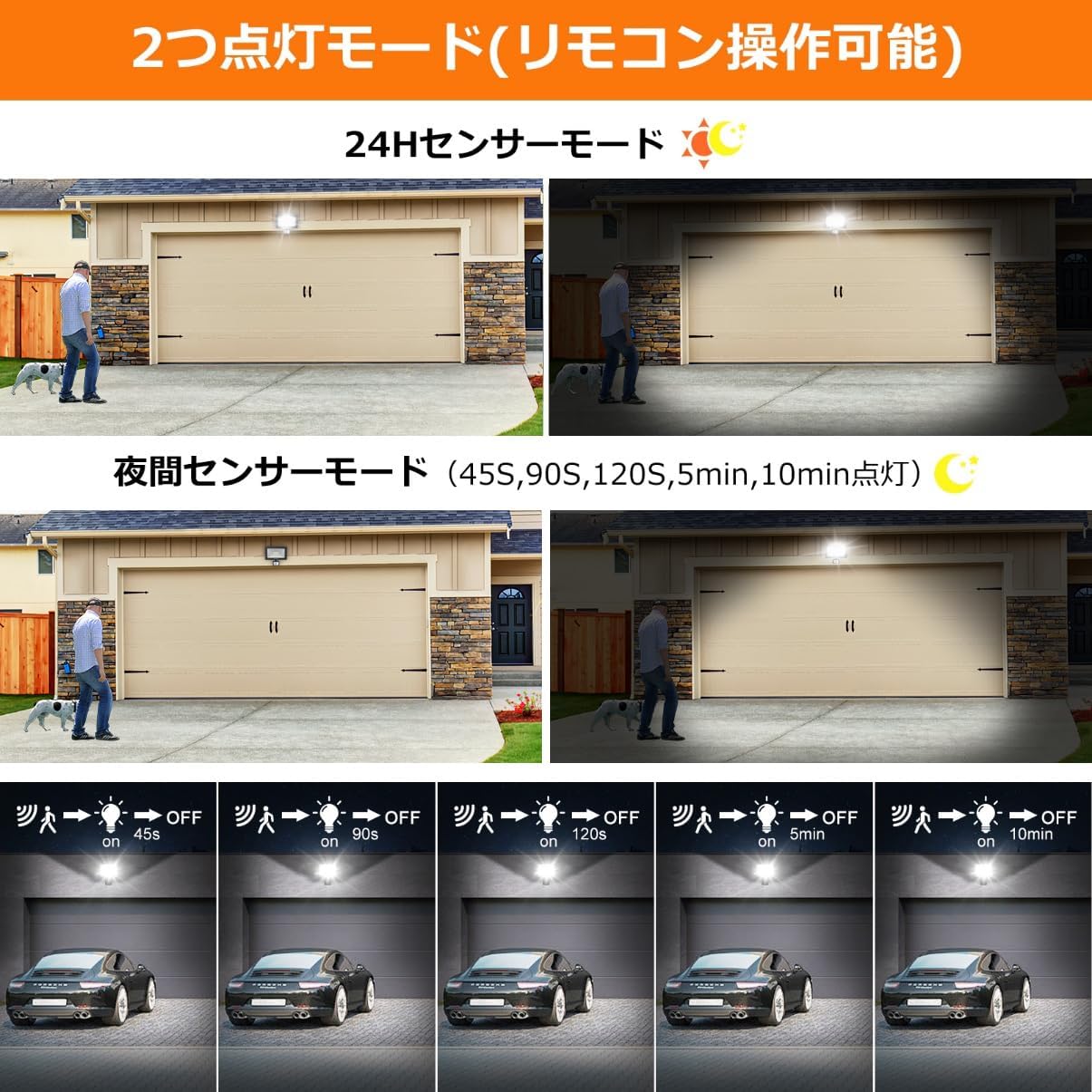
Figure 5: Illustration of 24H and Night sensor modes with adjustable lighting durations.

Figure 6: Remote control functions for mode selection, timing, brightness, and detection distance.
Video 2: Demonstration of the motion sensor light's operation modes and remote control features. This video shows how the light responds to motion and how to use the remote for various settings.
Video 3: Demonstration of remote control functions, including constant lighting and timer settings. This video illustrates how to utilize the remote for advanced light control.
7. Maintenance
- Cleaning: Regularly wipe the light's surface and sensor lens with a soft, damp cloth to remove dust and debris. Do not use abrasive cleaners.
- Inspection: Periodically check the power cable and connections for any signs of damage. Ensure the mounting is secure.
- Sensor Performance: Ensure the sensor is not obstructed by plants, furniture, or other objects that could interfere with motion detection.
8. Troubleshooting
| Problem | Possible Cause | Solution |
|---|---|---|
| Light does not turn on. | No power; sensor not detecting motion; light sensor detects too much ambient light. | Check power connection; ensure motion is within detection range; adjust light sensor sensitivity or switch to 24H mode. |
| Light stays on constantly. | Constant lighting mode activated; continuous motion detected; sensor malfunction. | Deactivate constant lighting mode via remote; ensure no continuous motion in detection area; contact support if issue persists. |
| Light flashes or cycles on/off rapidly. | Frequent motion detection in a high-traffic area; unstable power supply. | Relocate the light to a less busy area or adjust detection range; check power source stability. |
| Remote control not working. | Battery depleted; remote out of range; obstruction between remote and light. | Replace remote battery; ensure remote is within effective range and has a clear line of sight to the light. |
9. Application Scenarios
The MEIKEE 30W Motion Sensor Floodlight is suitable for a variety of indoor and outdoor applications, including:
- Parking Lots
- Building Entrances
- Warehouses
- Garages
- Gardens and Yards
- Corridors and Pathways
- Anti-theft Lighting

Figure 7: Examples of the floodlight's use in different environments, such as garages, entrances, and warehouses.

Figure 8: Additional application examples showcasing the floodlight's versatility in various settings.

Figure 9: The floodlight's wide beam angle and optimal illumination range, suitable for various outdoor areas.

Figure 10: The floodlight's robust design ensures reliable operation in diverse weather conditions, including rain, snow, and extreme temperatures.
10. Warranty and Support
The MEIKEE 30W Motion Sensor Floodlight comes with a 2-year warranty from the date of purchase.
If you encounter any issues or have questions regarding your product, please contact our customer support. When contacting support, please provide your order number and a detailed description of the issue.
You can typically find support contact information through your purchase platform (e.g., Amazon account service > Order history > Seller: MEIKEE-JP > Ask a question).


