
Primo hTRIO
Primo hTRIO Water Cooler Dispenser + Single Serve Coffee Brewer User Manual
Model: hTRIO
Introduction
This manual provides essential information for the safe and efficient operation, maintenance, and troubleshooting of your Primo hTRIO Water Cooler Dispenser and Single Serve Coffee Brewer. Please read this manual thoroughly before initial use and retain it for future reference.
The Primo hTRIO combines a water dispenser with a single-serve coffee brewer, offering both hot and cold water on demand, along with the convenience of brewing K-cup compatible beverages. Its bottom-loading design simplifies water bottle replacement, and it includes a child safety feature for hot water dispensing.
Important Safety Information
Always follow basic safety precautions when using electrical appliances to reduce the risk of fire, electric shock, and personal injury.
- Do not operate any appliance with a damaged cord or plug, or after the appliance malfunctions or has been damaged in any manner.
- Ensure the dispenser is placed on a level, stable surface.
- Keep the dispenser away from direct sunlight and heat sources.
- Do not immerse the cord, plug, or dispenser in water or other liquids.
- Unplug the dispenser before cleaning or performing any maintenance.
- The hot water feature includes a child safety lock. Always engage this lock when not actively dispensing hot water.
- Use only 5-gallon water bottles with this dispenser.
Product Components
Familiarize yourself with the main parts of your Primo hTRIO dispenser.
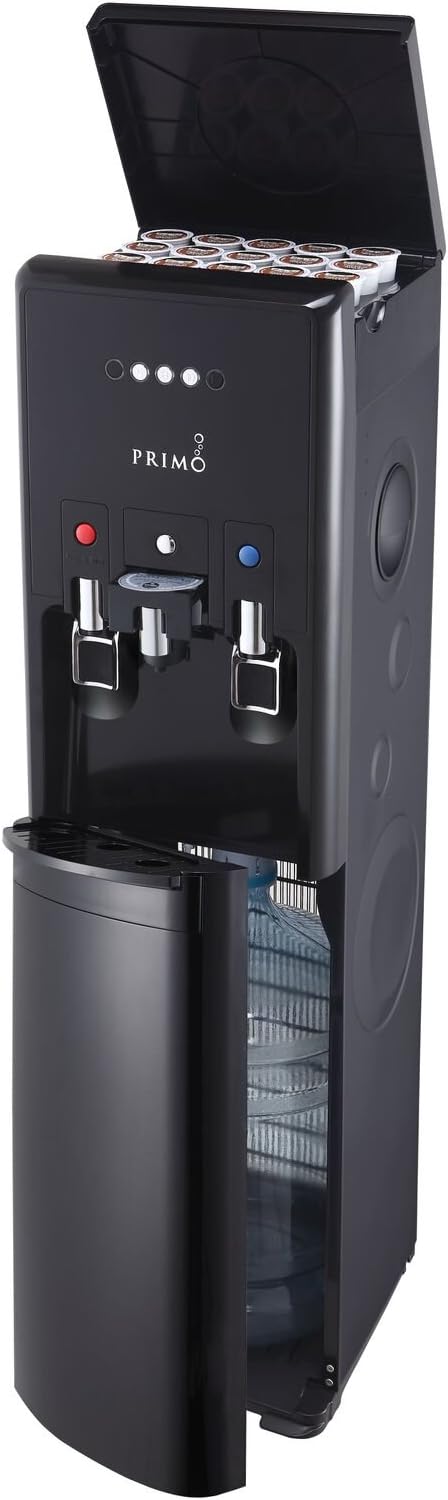
Image: Front view of the Primo hTRIO dispenser. The top lid is open, showing K-cup storage slots. The bottom cabinet door is also open, revealing a 5-gallon water bottle inside. This image highlights the integrated design for both water dispensing and coffee brewing.
- K-Cup Brewing System: Integrated brewer for single-serve coffee pods.
- Hot Water Dispense Lever: Dispenses hot water, equipped with a child safety feature.
- Cold Water Dispense Lever: Dispenses cold water.
- Bottom-Loading Water Cabinet: Houses the 5-gallon water bottle, accessible via a front door.
- K-Cup Storage: Built-in storage for up to 20 K-cup pods.
- LED Indicator Lights: Indicate power, heating, cooling, and empty bottle status.
- Removable Drip Tray: Collects spills and is easy to clean.
- Reusable Coffee Filter: Allows use of personal coffee grounds.
Setup and Installation
- Unpacking: Carefully remove the dispenser from its packaging. Inspect for any damage.
- Placement: Place the dispenser on a flat, level surface in a cool, dry location, away from direct sunlight and heat sources. Ensure there is at least 4 inches of clearance from the wall for proper ventilation.
- Initial Cleaning: Before first use, clean the drip tray and wipe down the exterior with a damp cloth.
- Water Bottle Installation:
- Open the bottom cabinet door.
- Remove the cap from a new 5-gallon Primo water bottle.
- Slide the water bottle into the cabinet, ensuring the probe enters the bottle opening.
- Close the cabinet door.
- Power Connection: Plug the dispenser into a grounded 120V AC outlet. The indicator lights will illuminate.
- Priming the System: Before dispensing, allow the unit to sit for at least 15 minutes to allow water to fill the internal reservoirs. Dispense a few cups of both hot and cold water to ensure proper flow and remove any air from the lines. Discard this initial water.

Image: The Primo hTRIO dispenser positioned in a home environment, demonstrating typical placement. It is shown standing upright, blending into the kitchen decor.
Operating Instructions
Dispensing Cold Water

Image: A hand pressing the blue lever on the Primo hTRIO dispenser to dispense cold water into a clear glass. This illustrates the simple one-handed operation for cold water.
To dispense cold water, place your cup or container under the cold water spigot. Press the blue cold water dispense lever. Release the lever to stop the flow.
Dispensing Hot Water

Image: A hand pressing the red lever on the Primo hTRIO dispenser to dispense hot water into a white mug. This shows the process for obtaining hot water, which requires engaging the child safety feature.
The hot water feature includes a child safety lock. To dispense hot water, first slide the red child safety lock button to the side, then press the red hot water dispense lever. Release both to stop the flow. Exercise caution as the water is very hot (up to 198°F).
Brewing Coffee (K-Cup Compatible)

Image: A person's hands placing a K-cup coffee pod into the designated brewing slot on the Primo hTRIO dispenser. This demonstrates the ease of loading single-serve coffee pods.
- Lift the top lid of the dispenser to access the K-cup brewing chamber.
- Insert a K-cup pod into the brewing chamber. Alternatively, use the included reusable coffee filter with your own coffee grounds.
- Close the top lid securely.
- Place your mug on the drip tray.
- Select your desired brew size (6, 8, or 10 oz.) by pressing the corresponding button on the control panel.
- The dispenser will begin brewing. Once complete, remove your mug.
- Carefully remove and discard the used K-cup pod or clean the reusable filter.
Maintenance and Cleaning
Regular cleaning ensures optimal performance and hygiene of your dispenser.
- Exterior Cleaning: Wipe the exterior surfaces with a soft, damp cloth. Do not use abrasive cleaners or solvents.
- Drip Tray Cleaning: The drip tray should be emptied and cleaned regularly. Slide it out, empty any collected water, wash with mild soap and water, rinse thoroughly, and replace.
- Brewing System Cleaning:
- Periodically run a few cycles of plain water through the brewing system without a K-cup or coffee grounds to flush out any residue.
- If using the reusable filter, clean it thoroughly after each use.
- If the coffee pod feature becomes clogged, a straightened paper clip can be used to gently clear the coffee grounds from the eye/needle. Push the back part of the eye down slightly and insert the paper clip into the hole.
- Descaling (Recommended Annually): Over time, mineral deposits can build up.
- Unplug the dispenser and drain all water from the hot and cold reservoirs (refer to the full manual for drain plug locations).
- Prepare a descaling solution (e.g., a mixture of white vinegar and water, or a commercial descaling agent).
- Pour the solution into the water bottle compartment and allow it to be drawn into the system.
- Let it sit for 30 minutes, then dispense the entire solution through both hot and cold spigots.
- Rinse thoroughly by running several full bottles of clean water through the system.
Troubleshooting
| Problem | Possible Cause | Solution |
|---|---|---|
| No water dispensing. | Water bottle empty or not properly installed. Air lock in system. | Replace water bottle. Ensure bottle is fully seated. Allow unit to sit for 15 minutes after bottle change, then dispense water to clear air. |
| Water not hot/cold enough. | Unit not plugged in or power switch off. Insufficient time for heating/cooling. | Ensure unit is plugged in and power is on. Allow 15-30 minutes for water to reach optimal temperature after initial setup or bottle change. |
| Coffee brewer not working or clogged. | K-cup not properly inserted. Coffee grounds clogging needle. | Ensure K-cup is seated correctly. Clean the brewing needle/eye with a straightened paper clip as described in Maintenance. |
| Water leaking from dispenser. | Water bottle cracked or improperly seated. Drip tray overflowing. | Check water bottle for cracks and ensure it is properly installed. Empty and clean the drip tray. If leaking persists, unplug and contact customer support. |
| Loud noise during operation. | Compressor cycling (normal). Air in water lines. | Some noise is normal. If excessive, ensure unit is level. Dispense water to clear air. If noise is persistent and unusual, contact customer support. |
Specifications
| Feature | Detail |
|---|---|
| Model | hTRIO |
| Brand | Primo |
| Color | Black |
| Capacity | 5 gallons (water bottle) |
| Material | Stainless Steel (internal components) |
| Special Features | Removable Tank, K-Cup Compatibility, Child Safety Lock (Hot Water), Bottom-Loading Design |
| Access Location | Bottom |
| UPC | 817206012290 |
| Manufacturer | Primo Water Corporation |
Customer Support
For further assistance, technical support, or inquiries regarding your Primo hTRIO dispenser, please contact Primo Water Corporation directly. Refer to the product packaging or the official Primo Water website for the most current contact information.
Note: Warranty terms may vary based on retailer and region. Please retain your proof of purchase for any warranty claims.
Related documentshTRIO


Ask a question about this manual
Ask about setup, troubleshooting, compatibility, parts, safety, or missing instructions. Manuals+ will review the question and use this page’s manual context to help answer it.