
Plantronics 209061-63
Plantronics BackBeat FIT 300 Sweatproof Sport Earbuds User Manual
Model: 209061-63
Brand: Plantronics
Product Overview
The Plantronics BackBeat FIT 300 are sweatproof sport earbuds designed for active lifestyles. They offer wireless connectivity via Bluetooth, providing freedom of movement during exercise and daily activities. These earbuds feature a secure and comfortable in-ear fit, along with media controls for easy management of audio and calls.
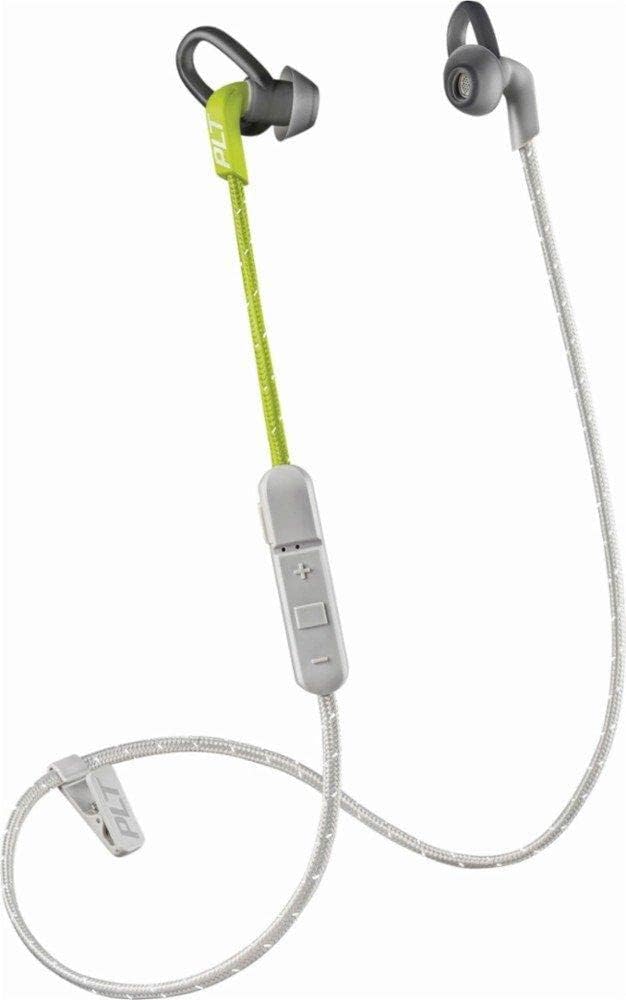
Image: Plantronics BackBeat FIT 300 earbuds in Grey/Lime color, showing the full product with the inline remote and cable.
What's in the Box
- Plantronics BackBeat FIT 300 Earbuds
- Ear Cushions (various sizes)
- USB Charging Cable (Micro USB)
- Carrying Case (Nylon)

Image: Retail packaging for the Plantronics BackBeat FIT 300, highlighting key features and contents.
Setup
Charging the Earbuds
Before first use, fully charge your BackBeat FIT 300 earbuds. Connect the micro USB charging cable to the charging port on the inline remote control and the other end to a USB power source. A full charge takes approximately 15 minutes and provides up to 6 hours of listening time.
Pairing with a Device
- Ensure the earbuds are turned off.
- Press and hold the power button on the inline remote until the LED indicator flashes red and blue, indicating pairing mode.
- On your device (cellphone, tablet, laptop, smart speaker), enable Bluetooth and search for new devices.
- Select "Plantronics BackBeat FIT 300" from the list of available devices.
- Once paired, the LED indicator will stop flashing and remain solid blue. The earbuds are now ready for use.
The earbuds use Bluetooth version 4.0 and have a wireless range of up to 10 meters (33 feet).
Operating Instructions
Wearing the Earbuds
The BackBeat FIT 300 earbuds are designed for a secure in-ear fit, ideal for sports and exercise. Choose the ear cushions that provide the best seal and comfort for your ears. The rounded tip earpiece shape helps ensure a stable fit.

Image: Close-up view of a single Plantronics BackBeat FIT 300 earbud, highlighting its design and ear tip.

Image: A person performing push-ups with a kettlebell, wearing the Plantronics BackBeat FIT 300 earbuds, demonstrating their use during exercise.
Controls
The inline remote provides convenient control over your audio and calls. It features media control buttons and acts as the headphone controller.
- Power On/Off: Press and hold the power button.
- Play/Pause: Press the center button.
- Next Track: Double-press the center button.
- Previous Track: Triple-press the center button.
- Volume Up/Down: Press the '+' or '-' buttons.
- Answer/End Call: Press the center button during a call.
- Reject Call: Press and hold the center button during an incoming call.
Audio Features
The earbuds provide sound isolation to help reduce ambient noise, allowing for a more immersive listening experience. They feature a dynamic audio driver type and a frequency range of 20 Hz - 20,000 Hz.
Water Resistance
The BackBeat FIT 300 earbuds are water resistant, making them suitable for workouts and activities where you might encounter sweat or light moisture.

Image: Close-up of a Plantronics BackBeat FIT 300 earbud with water droplets, illustrating its sweatproof and water-resistant design.
Maintenance
Cleaning
To maintain optimal performance and hygiene, regularly clean your earbuds. Wipe the earbuds and ear tips with a soft, damp cloth. Ensure they are completely dry before storing or charging. Do not use abrasive cleaners or submerge the earbuds in water.
Storage
When not in use, store your BackBeat FIT 300 earbuds in the provided nylon carrying case to protect them from dust, dirt, and damage. Store in a cool, dry place away from extreme temperatures.
Troubleshooting
Earbuds Not Turning On or Charging
- Ensure the charging cable is securely connected to both the earbuds and the power source.
- Try a different USB port or power adapter.
- Allow the earbuds to charge for at least 15 minutes.
- Verify the charging indicator light is active.
Cannot Pair with Device
- Make sure Bluetooth is enabled on your device.
- Ensure the earbuds are in pairing mode (LED flashing red and blue).
- Move the earbuds closer to your device (within 10 meters).
- Forget or remove the earbuds from your device's Bluetooth list and try pairing again.
- Restart both your device and the earbuds.
Poor Audio Quality or Disconnections
- Ensure the earbuds are within the 10-meter Bluetooth range of your device.
- Minimize obstacles between the earbuds and your device.
- Check for interference from other wireless devices.
- Ensure the earbuds are adequately charged.
- Clean the ear tips and ensure a proper seal in your ear.
Specifications
| Feature | Detail |
|---|---|
| Model Name | Plantronics BackBeat FIT 300 Sweatproof Sport Earbuds, Wireless Headphones, Grey/Lime |
| Item Model Number | 209061-63 |
| Brand | Plantronics |
| Connectivity Technology | Wireless (Bluetooth) |
| Bluetooth Version | 4.0 |
| Bluetooth Range | 10 Meters |
| Battery Life | 6 Hours |
| Charging Time | 15 minutes |
| Water Resistance Level | Water Resistant |
| Noise Control | Sound Isolation |
| Frequency Range | 20 Hz - 20,000 Hz |
| Control Type | Media Control, Remote |
| Ear Placement | In Ear |
| Material | Thermoplastic Elastomer (TPE) Silicone (earbuds), Nylon (carrying case) |
| Item Weight | 3.2 ounces |
| Product Dimensions | 8 x 6 x 4 inches |
| UPC | 017229160583 |
Warranty and Support
Information regarding product warranty and specific support contacts is not available in the provided data. For detailed warranty terms, technical support, or service inquiries, please refer to the official Plantronics (now Poly) website or contact their customer service directly. Keep your proof of purchase for warranty claims.
Important Safety Information
- Do not expose earbuds to extreme temperatures or humidity.
- Avoid dropping or subjecting the earbuds to strong impacts.
- Do not disassemble or attempt to repair the earbuds yourself. This may void the warranty and cause damage.
- Use only the provided or recommended charging cables and accessories.
- Listen at moderate volume levels to prevent hearing damage.
- Be aware of your surroundings when using earbuds, especially in traffic or hazardous environments.
Video Resources
No official product videos from the seller were found in the provided data. Please check the manufacturer's official website or authorized channels for any available video tutorials or demonstrations.
Ask a question about this manual
Ask about setup, troubleshooting, compatibility, parts, safety, or missing instructions. Manuals+ will review the question and use this page’s manual context to help answer it.