Product Overview
The APEXEL Phone Photography Kit is a comprehensive 4-in-1 lens set designed to enhance your smartphone photography. It includes an 18X telephoto lens, a 198-degree fisheye lens, a 0.63X wide-angle lens, and a 15X macro lens. Additionally, the kit provides essential accessories such as a flexible tripod, phone holder, lens clips, a rubber eyecup, and a cleaning cloth.

Figure 1: Complete APEXEL Phone Photography Kit
What's in the Box
- 1 x 18X Telephoto Lens
- 1 x 198° Fisheye Lens
- 1 x 0.63X Wide Angle Lens & 15x Macro Lens (Note: Wide Angle and Macro Lenses are screwed together upon arrival)
- 1 x Phone Holder
- 1 x Flexible Tripod
- 1 x Remote Shutter with instructions
- 3 x Lens Cover
- 2 x Lens Clip
- 1 x Rubber Eyecup
- 1 x Cleaning Cloth
Setup and Installation
General Preparation
Before attaching any lens, ensure your smartphone's camera lens is clean using the provided cleaning cloth. If your phone has multiple cameras, identify the main camera lens as this is where the clip-on lens should be aligned.
1. Attaching the 18X Telephoto Lens
- Step 1: Remove your smartphone case for optimal fit. Adjust the clip's slide plate to align the lens screw ring with your phone's main camera (standard camera).
- Step 2: Securely tighten the fixed screw on the clip.
- Step 3: Attach the telephoto lens to the clip. Then, rotate the focus ring on the lens to adjust the focus.
- Step 4: Attach the phone holder to the flexible tripod. The tripod can be used to stabilize your phone and lens setup.
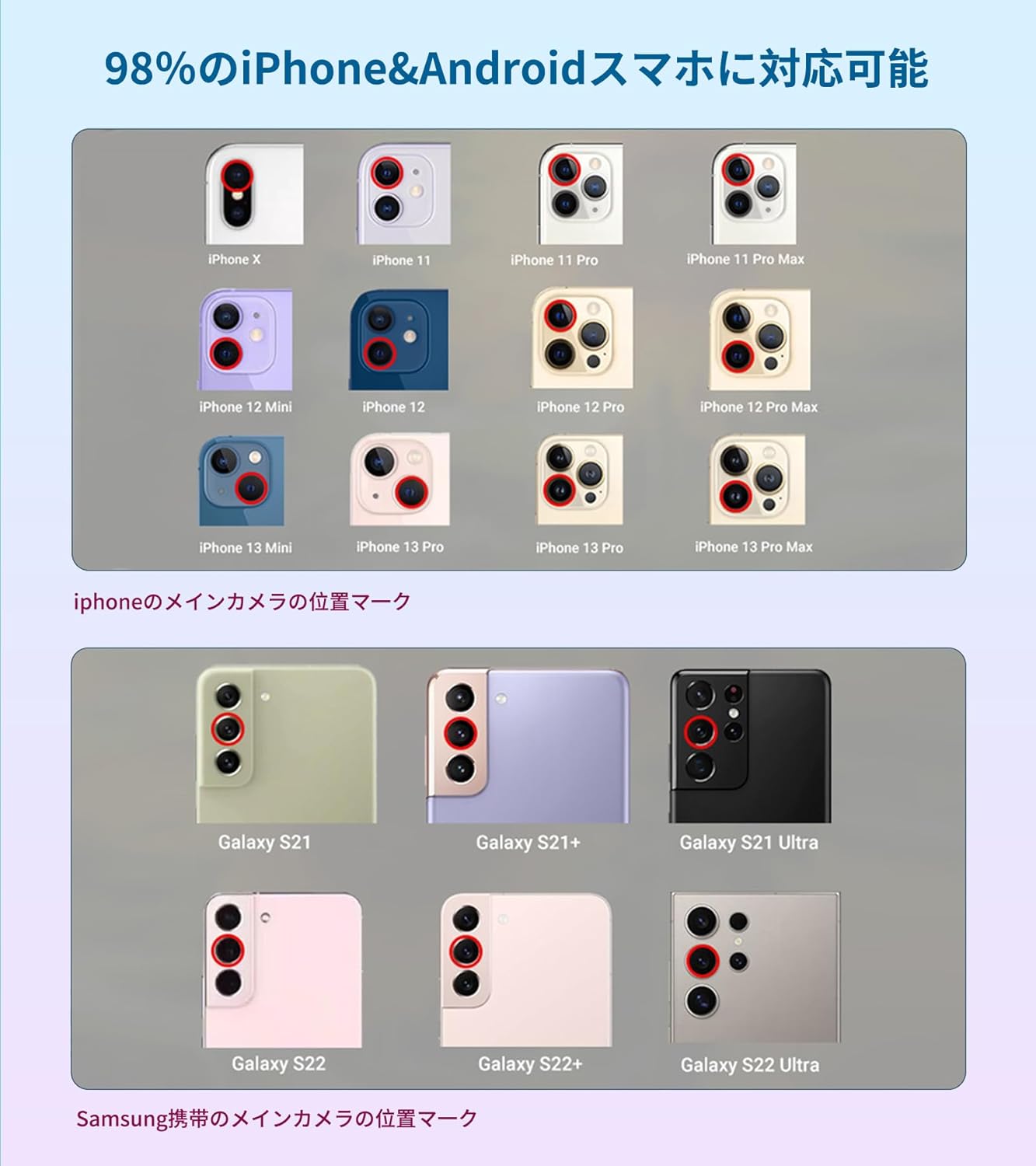
Figure 2: Telephoto Lens Setup Steps
2. Attaching the Fisheye, Macro, and Wide Angle Lenses
- Step 1: Remove your smartphone case.
- Step 2: Adjust the clip's slide plate to align the clip for the mini lenses with your phone's main camera.
- Step 3: Attach the desired lens (Fisheye, Macro, or Wide Angle) to the clip.
- Step 4: If images appear blurry, use your smartphone's digital focus feature to adjust.

Figure 3: Mini Lens Setup Steps
Using the Wide Angle and Macro Lenses
- The 0.63X Wide Angle Lens and 15X Macro Lens arrive screwed together.
- To use the Wide Angle Lens, simply attach both lenses (screwed together) to the clip.
- To use the Macro Lens, unscrew the wide-angle lens from the macro lens. The macro lens can then be used independently.
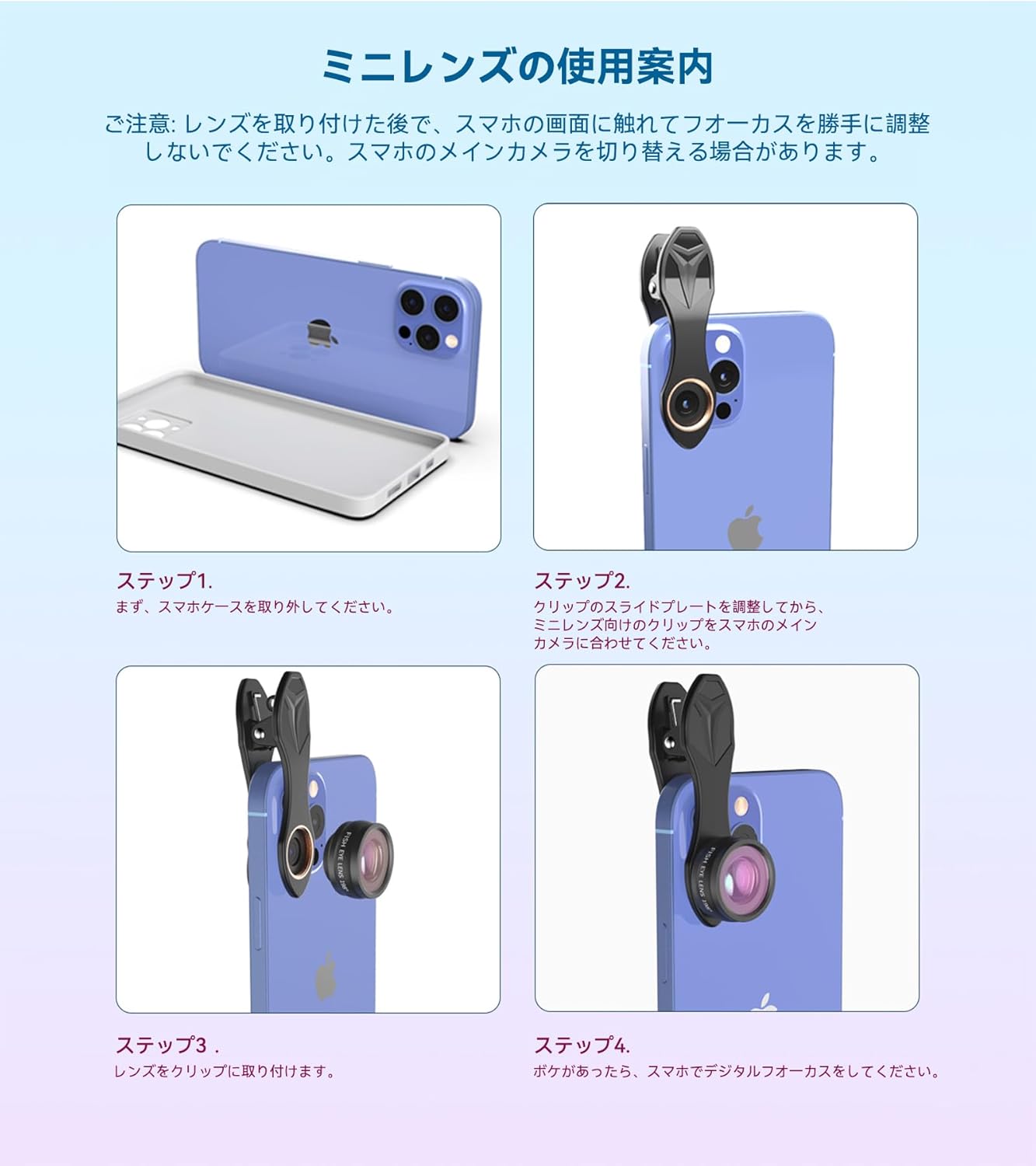
Figure 4: Wide Angle Lens Usage
For optimal results with the Macro Lens, place the transparent cap on the surface of the object you wish to photograph, ensuring it does not block your light source. Maintain a distance of 2-3 cm (0.79-1.18 inches) from the shooting object.

Figure 5: Macro Lens Optimal Distance
Operating the Lenses
18X Telephoto Lens
This lens magnifies distant subjects, overcoming the limitations of smartphone zoom. It can also be used as a standalone monocular by attaching the included rubber eyecup.

Figure 6: Telephoto Lens in Use
Fisheye Lens
The 198-degree fisheye lens creates a unique, circular, fish-bowl effect, capturing a large scene and offering a distinct artistic perspective.
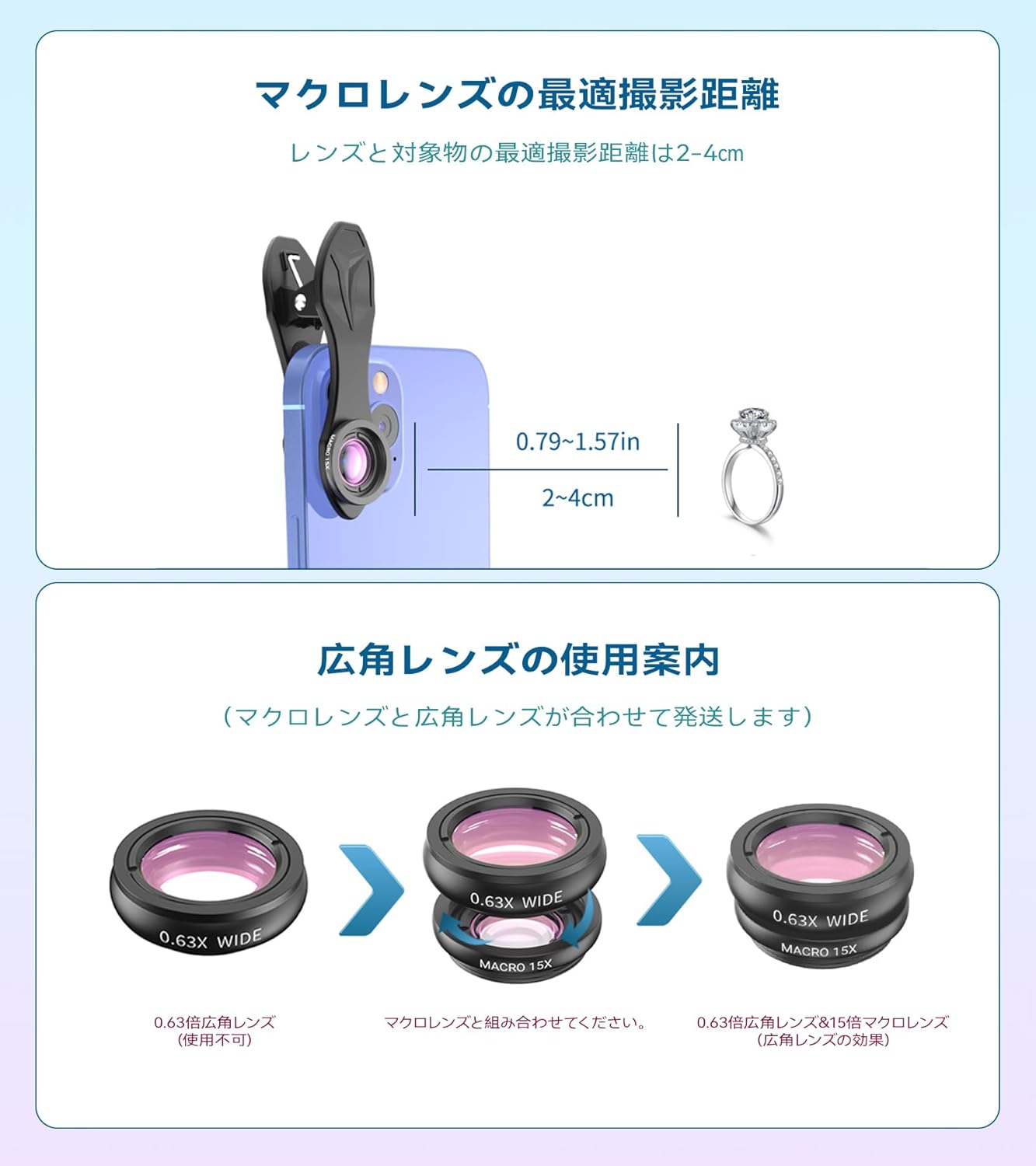
Figure 7: Fisheye Lens Example (bottom row)
Remote Shutter
The included remote shutter connects via Bluetooth to your smartphone, allowing you to take photos or start/stop video recording remotely. This helps to avoid camera shake and is ideal for selfies or group shots.
Specifications
| Product Dimensions | 7.8 x 1.6 x 3.9 inches |
| Item Weight | 9.6 ounces |
| Item Model Number | T18XBZJ5 |
| Focal Length Description | 100 millimeters |
| Lens Type | Fisheye, Macro, Telephoto |
| Compatible Mountings | ALL iPhone models, Samsung Galaxy and Note, Google Pixel, Huawei and more |
Maintenance
To ensure the longevity and optimal performance of your APEXEL lenses, always use the provided cleaning cloth to gently wipe the lens surfaces. Avoid using abrasive materials or harsh chemicals that could damage the coatings.
Troubleshooting
- Blurry Images: Ensure the lens is perfectly aligned with your smartphone's main camera. Remove any phone cases that might obstruct the lens. For the telephoto lens, adjust the focus ring until the image is clear. For macro and wide-angle lenses, use your phone's digital focus if needed.
- Lens Not Fitting Securely: Verify that your phone case is removed. The clip's screw should be tightened just enough to hold the lens firmly without over-tightening, as it is made of plastic.
- Remote Shutter Not Connecting: Ensure Bluetooth is enabled on your smartphone and the remote shutter is powered on and in pairing mode. Refer to the remote shutter's specific instructions for pairing.
Warranty and Support
APEXEL offers a 2-year replacement warranty for this product. For further assistance or warranty claims, please refer to the official user manual (PDF) available at https://manuals.plus/m/69a0233cfba5f07be506299f2d2b4c5260ce91e26a7e693ff1c5cd95b21f0763 or visit the APEXEL Store on Amazon.


