
Introduction
This manual provides instructions for the safe and proper installation, operation, and maintenance of your NorStone Skye F2355-GC Wall Mount TV Support. This universal wall mount is designed for flat and curved screens, offering a discreet and robust solution for mounting your television in a living room or bedroom. It is compatible with televisions from 23 to 55 inches (58 to 140 cm diagonal) and supports a maximum weight of 40 kg (88 lbs).
Safety Information
Read all instructions carefully before installation to prevent injury or damage.
- Ensure the wall structure can support the combined weight of the mount and the television.
- Do not exceed the maximum weight capacity of 40 kg (88 lbs).
- Use appropriate tools and follow all safety precautions during installation.
- Keep children and pets away from the installation area.
- If unsure about any part of the installation, consult a qualified professional.
Package Contents
Verify that all components are present before beginning installation. The product is delivered disassembled and includes all necessary screws, plans, and basic tools for assembly.
- NorStone Skye F2355-GC Wall Mount Assembly
- Mounting Hardware (screws, anchors, washers)
- Installation Plan/Diagram
- Basic Tools (e.g., small wrench, Allen key)
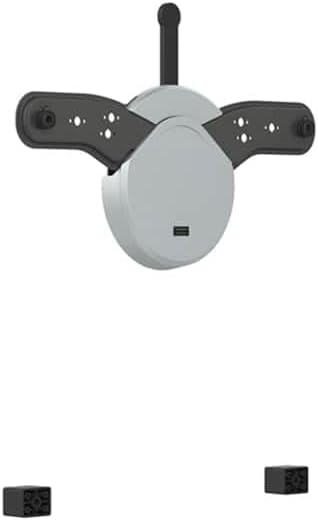
Image: The NorStone Skye F2355-GC wall mount showing its main circular body, two extending arms for TV attachment, and two small black blocks which are likely spacers or additional mounting hardware.
Setup and Installation
This section guides you through the process of mounting your TV support.
Tools Required (Not Included)
- Drill
- Phillips Head Screwdriver
- Pencil
- Measuring Tape
- Stud Finder (recommended)
Step-by-Step Installation
Step 1: Locate Mounting Position
Determine the desired height and position for your TV. Use a stud finder to locate wall studs for secure mounting. Mark the drilling points on the wall using a pencil.
Step 2: Drill Pilot Holes
Drill pilot holes at the marked positions. Ensure the drill bit size matches the recommended size for your wall anchors (if applicable) or screws.
Step 3: Attach Wall Plate
Secure the wall plate of the NorStone Skye F2355-GC mount to the wall using the provided screws and anchors. Ensure it is level using the integrated spirit level.
Step 4: Attach TV Brackets
Attach the TV mounting brackets to the back of your television. Ensure they are securely fastened to the VESA mounting holes on your TV. The mount is compatible with TVs from 23 to 55 inches.
Step 5: Mount TV to Wall Plate
Carefully lift the television with the attached brackets and hook it onto the wall plate. Ensure the TV is securely seated on the mount. Engage any safety locking mechanisms.
Step 6: Adjust Tilt (Optional)
The mount allows for an upward tilt of +3°. Adjust the tilt to your preferred viewing angle by loosening the tilt mechanism, setting the angle, and re-tightening.
Operating Instructions
Once installed, the NorStone Skye F2355-GC offers simple operation.
Adjusting Tilt
The mount features a fixed upward tilt of +3 degrees for optimal viewing comfort. No further adjustment is typically needed beyond the initial setup.
Integrated Spirit Level
The integrated spirit level assists in ensuring a perfectly horizontal installation of the wall plate. Verify the bubble is centered during Step 3 of installation.
Maintenance
To ensure the longevity and proper function of your NorStone Skye F2355-GC wall mount, follow these simple maintenance guidelines:
- Cleaning: Wipe the mount with a soft, dry cloth. Do not use abrasive cleaners or solvents, as they may damage the finish.
- Periodic Check: Periodically check all screws and bolts to ensure they remain tight. Over time, vibrations or movement may cause them to loosen.
- Weight Limit: Never exceed the maximum weight capacity of 40 kg (88 lbs).
Troubleshooting
If you encounter issues with your NorStone Skye F2355-GC wall mount, refer to the following common problems and solutions:
| Problem | Possible Cause | Solution |
|---|---|---|
| TV is not level | Wall plate not installed level | Re-check the wall plate with the integrated spirit level and adjust if necessary. |
| Mount feels unstable | Screws are loose or improper wall anchors used | Tighten all mounting screws. Ensure appropriate anchors were used for your wall type (e.g., concrete, drywall with studs). |
| TV does not fit | TV size or VESA pattern incompatible | Verify your TV's size is between 23 and 55 inches and its VESA mounting pattern is compatible with the mount. |
Specifications
- Brand: NorStone
- Model: Skye F2355-GC (NORSSKYEF2355GC)
- Compatible TV Sizes: 23 to 55 inches (58 to 140 cm diagonal)
- Maximum Weight Capacity: 40 kg (88 lbs)
- Tilt Angle: +3° (upward)
- Mount Type: Wall Mount
- Movement Type: Tilting
- Special Features: Integrated Spirit Level
- Material: Steel structure
Warranty and Support
For warranty information or technical support regarding your NorStone Skye F2355-GC Wall Mount TV Support, please contact NorStone customer service. Refer to the product packaging or the official NorStone website for contact details.
Note: Availability of spare parts is not guaranteed. Software updates are not applicable to this product.


