1. Introduction
This manual provides instructions for the VIZIO XRS321-C Sound Bar Remote Control. This remote is designed as a direct replacement for compatible VIZIO sound bar audio systems, specifically models that originally used the XRS321 remote. It operates using infrared (IR) technology and typically requires no programming or pairing for immediate use with your VIZIO sound bar.
2. Package Contents
- VIZIO XRS321-C Sound Bar Remote Control (batteries not included)
3. Features
- Direct Replacement: Functions immediately with compatible VIZIO sound bars without programming.
- Infrared (IR) Technology: Standard remote control communication method.
- Ergonomic Design: Comfortable to hold and use.
- Dedicated Sound Bar Functions: Includes controls for power, input, Bluetooth, volume, mute, play/pause, skip, treble, and bass.
4. Setup: Battery Installation
The VIZIO XRS321-C remote control requires two (2) AAA batteries (not included) for operation. Follow these steps to install the batteries:
- Locate the battery compartment on the back of the remote control.
- Press down on the latch and slide the battery cover downwards to open it.
- Insert two new AAA batteries, ensuring the positive (+) and negative (-) terminals align correctly with the markings inside the compartment.
- Slide the battery cover back into place until it clicks securely.

Figure 1: Back view of the VIZIO XRS321-C remote control, illustrating the location of the battery compartment. The cover slides off to reveal the battery slots.
Important: Always use fresh batteries. Do not mix old and new batteries, or different types of batteries. Remove batteries if the remote will not be used for an extended period.
5. Operating Instructions
Once batteries are installed, the remote is ready for use. Point the remote control directly at your VIZIO sound bar and press the desired button. Ensure there are no obstructions between the remote and the sound bar's IR receiver.
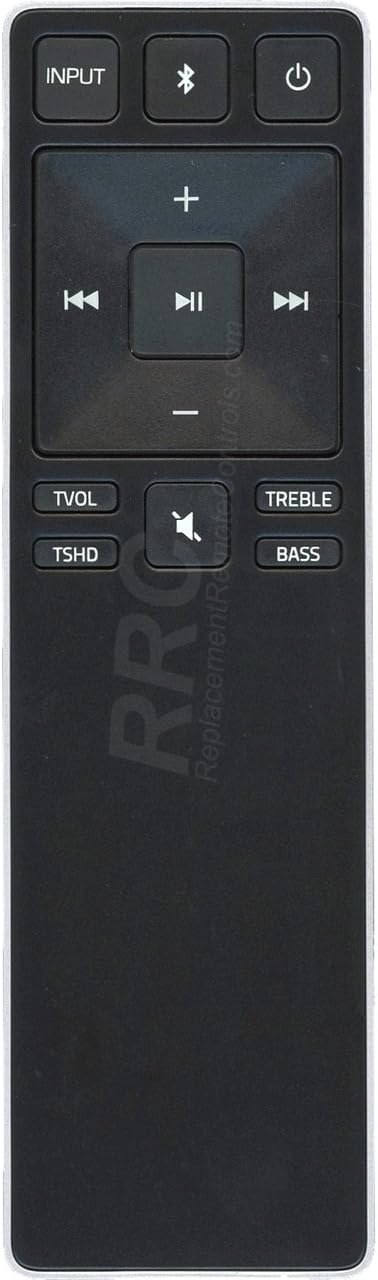
Figure 2: Front view of the VIZIO XRS321-C remote control, displaying all functional buttons for sound bar operation.
Button Functions:
- INPUT: Cycles through available audio input sources (e.g., Optical, Coaxial, RCA, USB).
- Bluetooth (&%23x27;%3B): Activates Bluetooth pairing mode or switches to the Bluetooth input.
- Power (&%23x2303;): Turns the sound bar On or Off.
- Volume Up (+): Increases the sound bar's volume.
- Volume Down (-): Decreases the sound bar's volume.
- Mute (&%23x1F507;): Mutes or unmutes the sound bar's audio output.
- Play/Pause (&%23x23F8;): Controls playback for connected devices (e.g., Bluetooth audio).
- Previous Track (&%23x23EE;): Skips to the previous track for connected devices.
- Next Track (&%23x23ED;): Skips to the next track for connected devices.
- TREBLE: Adjusts the treble level of the sound bar.
- BASS: Adjusts the bass level of the sound bar.
6. Troubleshooting
- Remote not responding:
- Ensure fresh AAA batteries are correctly installed.
- Check for any obstructions between the remote and the sound bar's IR receiver.
- Verify that the remote is pointed directly at the sound bar.
- Limited range:
- Replace batteries with new ones.
- Ensure no strong light sources (like direct sunlight or bright fluorescent lights) are interfering with the IR signal.
- Remote works intermittently:
- Check battery contacts for corrosion and clean if necessary.
- Replace batteries.
7. Maintenance
- Cleaning: Use a soft, dry cloth to clean the remote control. Do not use liquid cleaners or abrasive materials.
- Battery Replacement: Replace batteries promptly when the remote's performance degrades. Always dispose of used batteries according to local regulations.
- Storage: Store the remote in a cool, dry place away from direct sunlight and extreme temperatures. If storing for an extended period, remove the batteries to prevent leakage.
8. Specifications
| Model Name | XRS321-C |
| Brand | VIZIO |
| Connectivity Technology | Infrared (IR) |
| Power Source | 2 x AAA Batteries (not included) |
| Maximum Range | Approximately 10 Meters (33 feet) |
| Number of Buttons | 10 |
| Compatible Devices | VIZIO Sound Bar Audio Systems (models compatible with XRS321) |
| Special Feature | Ergonomic Design, No Programming Required |
| Item Weight | 27.22 g |
9. Warranty and Support
For information regarding warranty coverage and technical support for your VIZIO product, please refer to the documentation that came with your VIZIO sound bar or visit the official VIZIO support website. This replacement remote control typically carries a limited warranty from the seller. Please retain your purchase receipt for warranty claims.
For further assistance, you may contact VIZIO customer support directly through their official channels.


