
Intellitronix DP1010R
Intellitronix DP1010R LED Gauge Instruction Manual
Model: DP1010R
Introduction
This manual provides detailed instructions for the installation, operation, and maintenance of your Intellitronix DP1010R LED Gauge. Please read this manual thoroughly before installation and operation to ensure proper function and longevity of the product. This gauge is designed for 1973-1979 Ford Trucks.
Setup and Installation
Proper installation is crucial for the accurate performance of your LED gauge. If you are unfamiliar with automotive electrical systems, it is recommended to seek professional assistance.
Tools Required:
- Wire strippers/crimpers
- Screwdriver set
- Multimeter
- Drill (if new mounting holes are required)
- Electrical tape or heat shrink tubing
Wiring Instructions:
- Disconnect Battery: Before beginning any electrical work, disconnect the negative terminal of your vehicle's battery to prevent electrical shorts and damage.
- Power Connection: Connect the red wire from the gauge to a switched 12V ignition source. This source should only be active when the ignition is on.
- Ground Connection: Connect the black wire from the gauge to a reliable chassis ground point. Ensure the connection is clean and secure.
- Sensor Input: Connect the signal wire from your vehicle's oil pressure sender unit to the designated input wire on the gauge. Refer to your vehicle's service manual for the correct sender wire.
- Illumination (Optional): If your gauge has an illumination wire (e.g., white or orange), connect it to your vehicle's headlight switch or dimmer circuit for adjustable backlighting.
- Verify Connections: Double-check all wiring connections for proper polarity and secure fitment.
Mounting:
The Intellitronix DP1010R LED Gauge is designed to fit standard gauge openings. Carefully insert the gauge into the dashboard opening. Secure it using the provided mounting bracket and hardware. Ensure the gauge is firmly seated and does not obstruct other dashboard components.
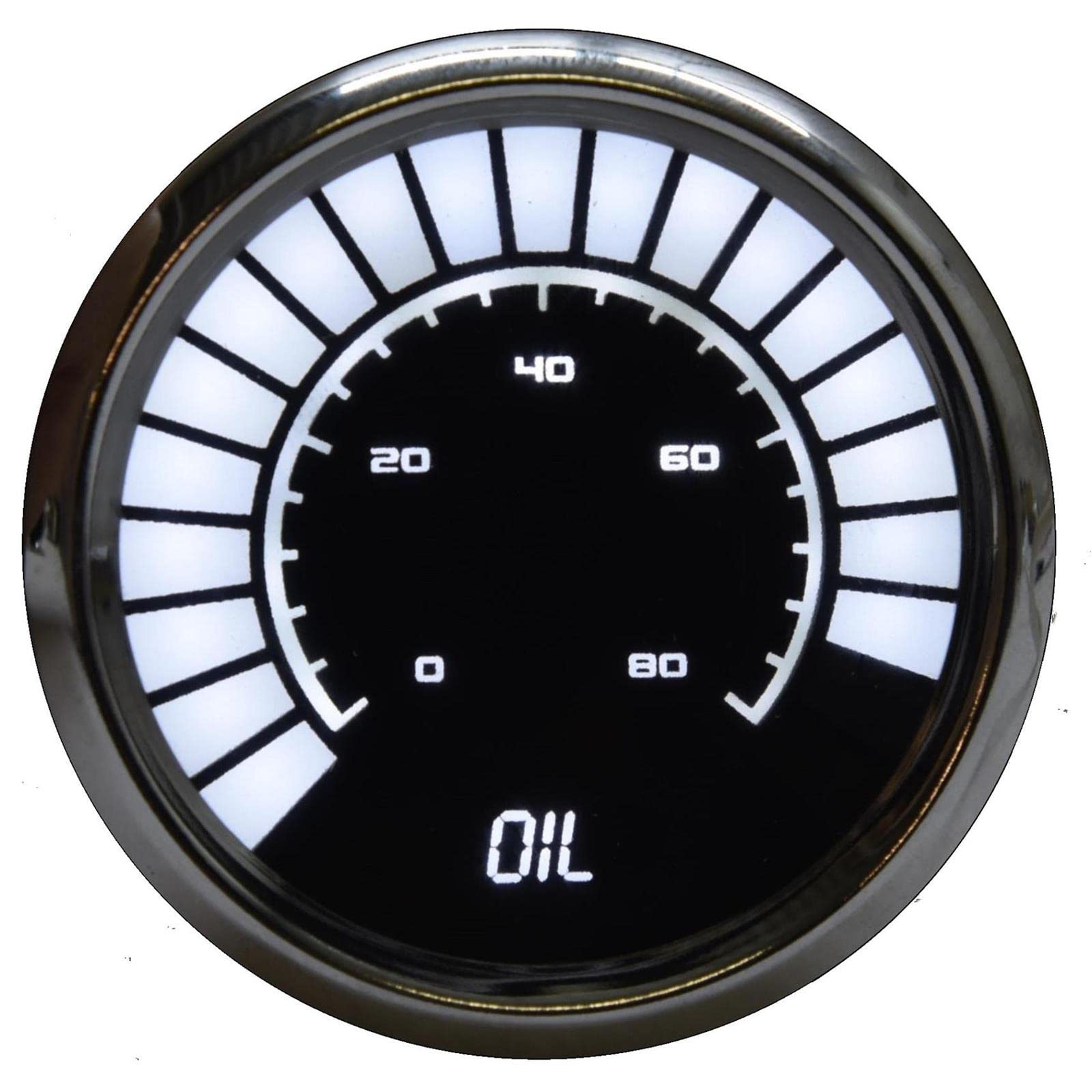
Figure 1: Front view of the Intellitronix DP1010R LED Oil Pressure Gauge. This image shows the gauge face with white LED segments indicating values from 0 to 80, and the word "OIL" displayed at the bottom, all within a chrome bezel.
Operating Instructions
Once properly installed and wired, the Intellitronix DP1010R LED Gauge will activate when the vehicle's ignition is turned on.
- Power On: Turn the vehicle's ignition to the "ON" position. The gauge will perform a self-test, and the LED segments will illuminate.
- Reading the Gauge: The illuminated LED segments indicate the current oil pressure. The numerical markings (0, 20, 40, 60, 80) correspond to pressure readings.
- Normal Operation: During normal engine operation, the oil pressure should fall within the manufacturer's recommended range for your vehicle. Consult your vehicle's service manual for specific pressure values.
- Warning: A sudden drop or consistently low oil pressure reading indicates a potential engine problem. Stop the vehicle safely and investigate immediately.
Maintenance
The Intellitronix DP1010R LED Gauge requires minimal maintenance to ensure long-term performance.
- Cleaning: To clean the gauge face, use a soft, damp cloth. Avoid abrasive cleaners or solvents, as these can damage the display or bezel finish.
- Connections: Periodically check all electrical connections to ensure they remain secure and free from corrosion.
- Sensor: Ensure the oil pressure sender unit is functioning correctly and free from leaks or damage.
Troubleshooting
If you encounter issues with your Intellitronix DP1010R LED Gauge, refer to the following troubleshooting guide:
| Problem | Possible Cause | Solution |
|---|---|---|
| Gauge does not illuminate | No power, poor ground, blown fuse | Check 12V power connection, verify ground, inspect vehicle's fuse box. |
| Inaccurate readings | Faulty sender, incorrect wiring, poor connection | Test sender unit, re-check signal wire connection, ensure proper gauge calibration (if applicable, though not specified for this model). |
| Gauge flickers or is intermittent | Loose wiring, poor ground, electrical interference | Secure all connections, improve ground point, check for sources of electrical noise. |
Specifications
Key specifications for the Intellitronix DP1010R LED Gauge:
- Model: DP1010R
- Brand: Intellitronix
- Application: 1973-1979 Ford Trucks
- Light Source Type: LED
- Item Weight: 2 pounds
- Product Dimensions: 6 x 6 x 6 inches
- UPC: 818731013769
Warranty Information
Intellitronix products are manufactured to high standards. This product is covered by a limited warranty against defects in materials and workmanship. For specific warranty terms and conditions, please refer to the official Intellitronix website or contact customer support. Keep your proof of purchase for warranty claims.
Customer Support
If you require further assistance or have questions not covered in this manual, please contact Intellitronix customer support. Visit the official Intellitronix website for contact details, FAQs, and additional resources.