
1. Introduction
Thank you for choosing the IRIS USA WOOZOO Desk Fan Model PCF-M15U. This instruction manual provides essential information for the safe and efficient operation, maintenance, and troubleshooting of your new fan. Please read this manual thoroughly before use and retain it for future reference.
2. Safety Instructions
- Electrical Safety: Ensure the power supply voltage matches the fan's requirements. Do not operate the fan with a damaged cord or plug. Avoid placing the fan in wet or damp areas.
- Placement: Place the fan on a stable, flat surface to prevent tipping. Keep the fan away from curtains, loose clothing, or other objects that could be drawn into the fan blades.
- Usage: Do not insert fingers or any objects into the fan grille while it is operating. Unplug the fan from the power outlet before cleaning or when not in use.
- Children and Pets: Keep the fan out of reach of children and pets. This appliance is not intended for use by persons with reduced physical, sensory, or mental capabilities unless supervised.
3. Package Contents
Verify that all items are present in the package:
- IRIS USA WOOZOO Desk Fan Model PCF-M15U
- Instruction Manual
- Remote Control (Note: Remote control availability may vary by model variant.)
4. Product Overview
The IRIS USA WOOZOO Desk Fan is designed to provide efficient air circulation with multiple features for enhanced comfort.
Key Features:
- 3 Speed Settings: Easily adjust airflow intensity from low to high.
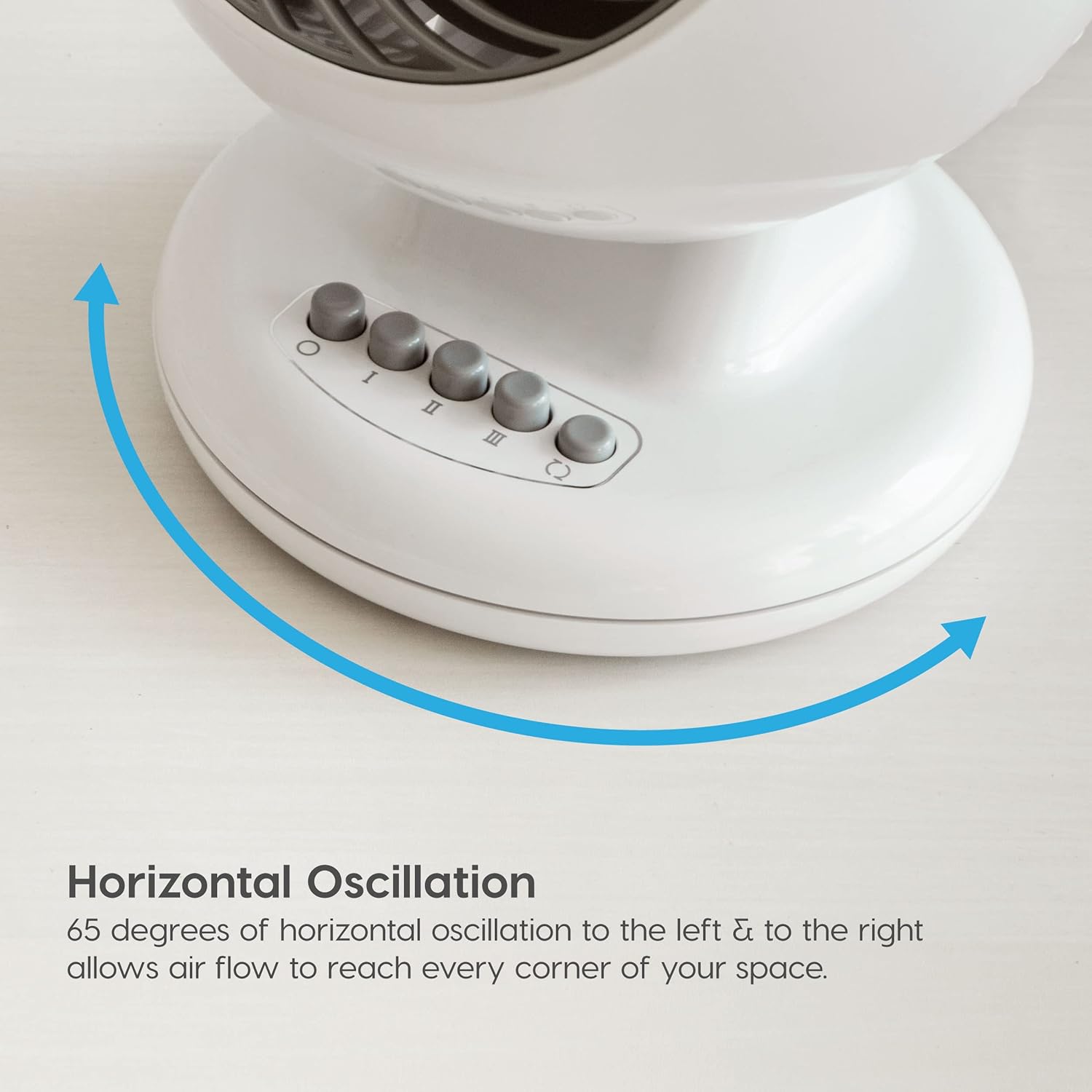
- Horizontal Oscillation: The fan oscillates 65 degrees horizontally to distribute air across a wider area.
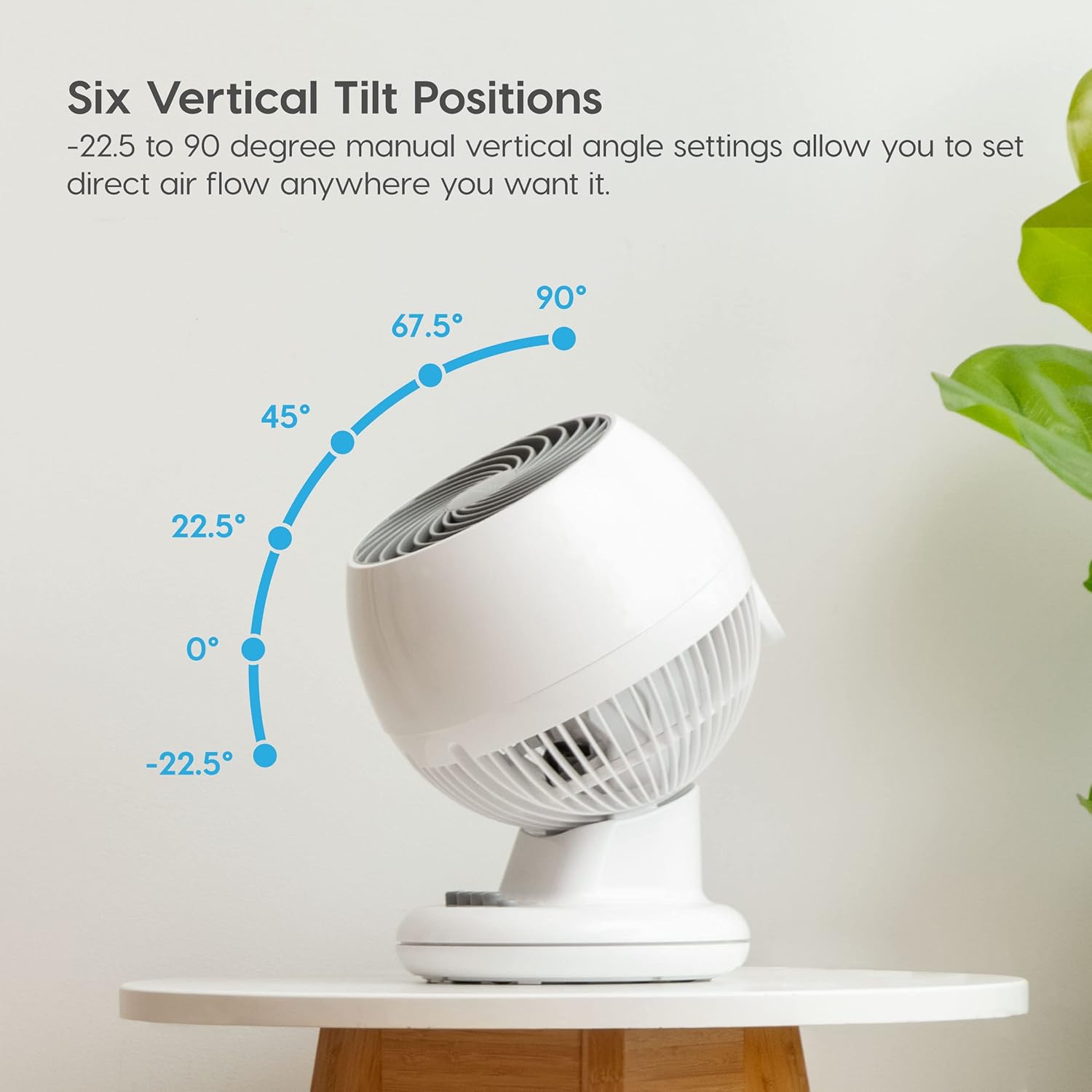
- Vertical Tilt: Manual vertical angle adjustment from -22.5 to 90 degrees allows precise airflow direction.
- Quiet Operation: Operates at a low noise level of 35 dB, suitable for bedrooms and offices.
- Powerful Airflow: Designed to circulate air up to 46 feet.
- Compact Design: Ideal for placement on desks, tables, or nightstands.


5. Setup
- Unpacking: Carefully remove the fan and all packaging materials from the box. Inspect the fan for any signs of damage.
- Placement: Place the fan on a firm, level surface in the desired location. Ensure there is adequate space around the fan for optimal air intake and output.
- Power Connection: Plug the power cord into a standard 120V AC electrical outlet.
6. Operating Instructions
Control Panel:
- Power On/Off: Press the Power button (O) on the control panel or remote control to turn the fan on or off.
- Adjusting Fan Speed: Press the Speed buttons (I, II, III) on the control panel or the corresponding speed buttons on the remote to cycle through the 3 available speed settings (Low, Medium, High).

Figure 5: Illustration of the three distinct speed settings available on the fan, allowing users to choose their preferred airflow intensity. - Horizontal Oscillation: Press the Oscillation button (circular arrow) on the control panel or remote to activate or deactivate the 65-degree horizontal oscillation feature.
- Vertical Tilt Adjustment: Manually adjust the fan head to one of the six vertical tilt positions (-22.5°, 0°, 22.5°, 45°, 67.5°, 90°) to direct airflow as needed.
- Timer Function (if applicable): If your model includes a timer, use the Timer button on the remote control to set the fan to automatically turn off after a specified duration.
Using the Remote Control:
If your fan model includes a remote control, ensure the battery is correctly installed. The remote allows you to conveniently control all fan functions from a distance.
7. Maintenance
Regular cleaning will help maintain your fan's performance and extend its lifespan.
- Cleaning the Exterior: Wipe the exterior surfaces with a soft, damp cloth. Do not use abrasive cleaners or solvents.
- Cleaning the Grille and Blades: Periodically, the front grille can be removed for cleaning the fan blades. Refer to the diagram below for guidance. Use a soft brush or vacuum cleaner to remove dust from the blades and grilles. Ensure the fan is unplugged before attempting to clean.

8. Troubleshooting
If you encounter issues with your fan, refer to the following common problems and solutions:
- Fan Does Not Turn On:
- Check if the power cord is securely plugged into a working outlet.
- Ensure the power button is pressed.
- Weak Airflow:
- Increase the fan speed setting.
- Clean any dust or debris from the fan grille and blades.
- Unusual Noise:
- Ensure the fan is placed on a stable, flat surface.
- Check for any obstructions around or within the fan grille.
9. Specifications
| Feature | Detail |
|---|---|
| Brand | IRIS USA |
| Model Name | PCF-M15U |
| Product Dimensions (D x W x H) | 7.99"D x 8.66"W x 11.93"H |
| Item Weight | 4.4 Pounds |
| Color | White |
| Material | Plastic |
| Number of Speeds | 3 |
| Noise Level | 35 Decibels |
| Max Air Distance | 46 feet |
| Oscillation | 65° Horizontal |
| Vertical Tilt | 112° (6 positions from -22.5° to 90°) |
| Power Source | AC (120 Volts, 72 Watts) |

10. Warranty and Support
The IRIS USA WOOZOO Desk Fan Model PCF-M15U comes with a 5-year warranty, covering defects in materials and workmanship under normal use. For warranty claims, technical support, or any product-related inquiries, please contact IRIS USA customer service.
For further assistance, please visit the official IRIS USA website or refer to the contact information provided on your product packaging.


