
1. Introduction
The Duronic DMUSB5X1 is a desk-mounted monitor arm designed to optimize your workspace. It features a gas spring mechanism for smooth, effortless adjustments, allowing you to position your monitor for optimal viewing comfort. This model also integrates a USB hub and audio ports for convenient connectivity directly at your desk.
This manual provides detailed instructions for the safe and efficient installation, operation, and maintenance of your Duronic DMUSB5X1 monitor arm.
2. Safety Instructions
- Read all instructions carefully before assembly and use.
- Ensure your desk surface is strong enough to support the monitor arm and attached monitor(s).
- Do not exceed the maximum weight capacity of 8 kg (17.6 lbs) per arm.
- Ensure all screws and connections are securely tightened before use. Periodically check for tightness.
- Keep children and pets away from the assembly area.
- Use only the provided hardware. If any parts are missing or damaged, contact Duronic customer support.
- Adjust the gas spring tension carefully to match your monitor's weight. Improper tension can cause the monitor to drop or spring up unexpectedly.
3. Package Contents
Please verify that all components are present before beginning assembly:
- Monitor Arm Assembly (Gas Spring Arm, Pole)
- Desk Clamp Base
- VESA Mounting Plate
- USB and Audio Extension Cables
- Mounting Hardware (various screws, washers, spacers)
- Allen Keys for assembly and adjustment
4. Setup and Installation
Follow these steps to install your Duronic DMUSB5X1 monitor arm:
- Attach Desk Clamp: Position the desk clamp base on your desk edge. Ensure the desk clamp is securely fastened to a stable surface. The clamp can accommodate desk thicknesses up to 68mm. Tighten the clamp screw firmly.

Figure 4.1: Desk clamp installation.
- Assemble Arm to Pole: Insert the monitor arm onto the pole of the desk clamp. Secure it with the provided screws and Allen key.
- Attach VESA Plate to Monitor: Carefully place your monitor face down on a soft, clean surface. Attach the VESA mounting plate to the back of your monitor using the appropriate screws and spacers (if needed). The arm supports VESA 75x75mm and 100x100mm patterns.
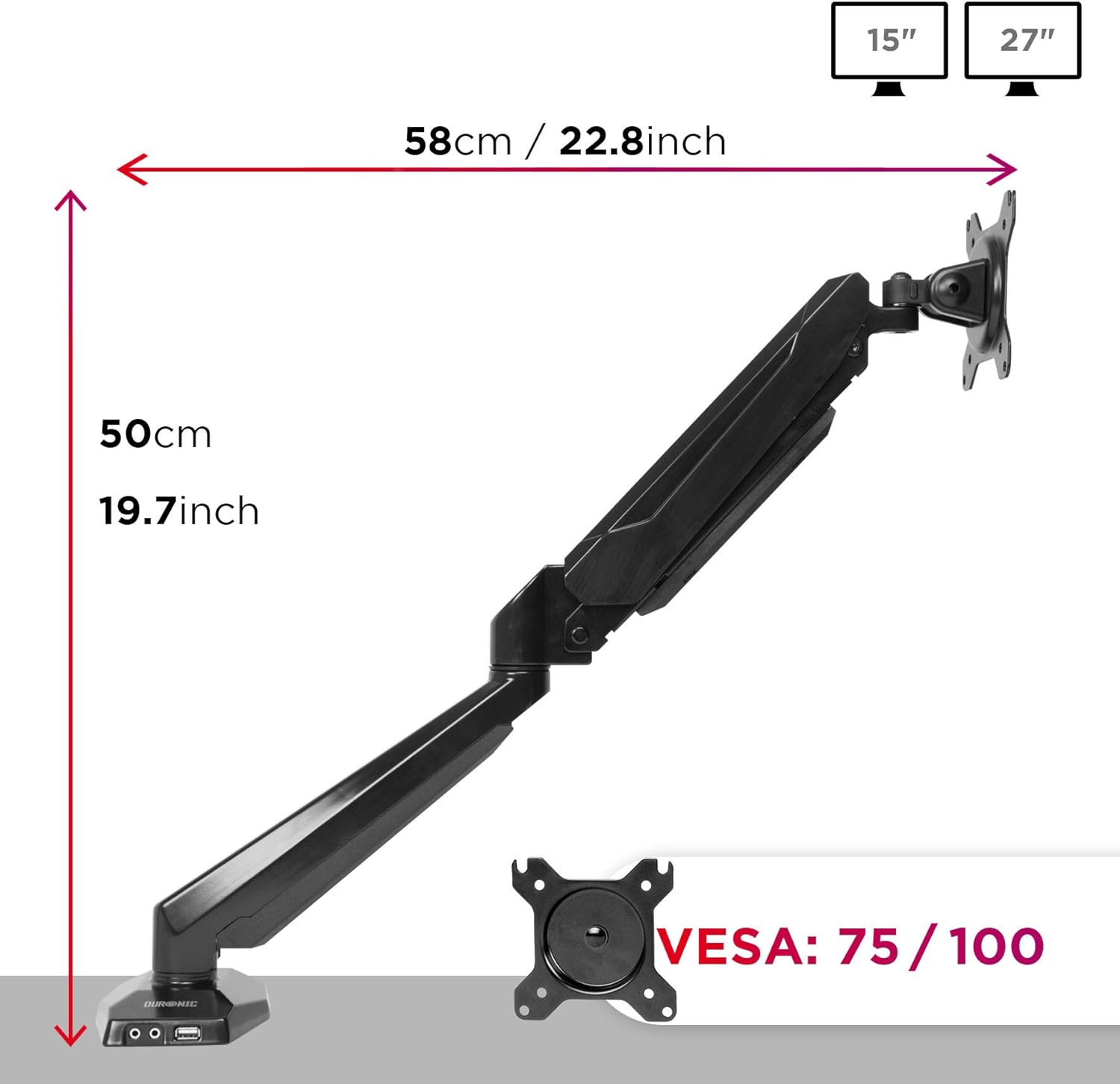
Figure 4.2: VESA plate and arm dimensions.
- Mount Monitor to Arm: Slide the monitor (with VESA plate attached) onto the arm's VESA head. Secure it with the locking mechanism or screws as per the specific design.
- Connect USB and Audio Cables: Connect the integrated USB and audio extension cables from the monitor arm base to the corresponding ports on your computer. This enables the convenient USB and audio ports on the arm's base.

Figure 4.3: Integrated USB and audio ports.
- Adjust Gas Spring Tension: The gas spring comes pre-tensioned. You may need to adjust it to match your monitor's weight. Use the provided Allen key to turn the adjustment screw on the arm. Turn clockwise to increase tension for heavier monitors, and counter-clockwise to decrease tension for lighter monitors. Adjust until the monitor stays in position when moved.
5. Operating and Adjustments
The Duronic DMUSB5X1 offers a wide range of adjustments for optimal viewing:
- Height Adjustment: The gas spring arm allows for smooth vertical movement. Gently push or pull the monitor to the desired height.
- Tilt: The VESA head allows tilting the monitor -90° (downwards) to +85° (upwards) to reduce glare and improve viewing angles.
- Swivel: The arm can swivel 180° left or right at the pole and at the arm joints, allowing you to share your screen or adjust its position.
- Rotation: The VESA plate allows for 360° rotation, enabling you to switch between landscape and portrait orientations.
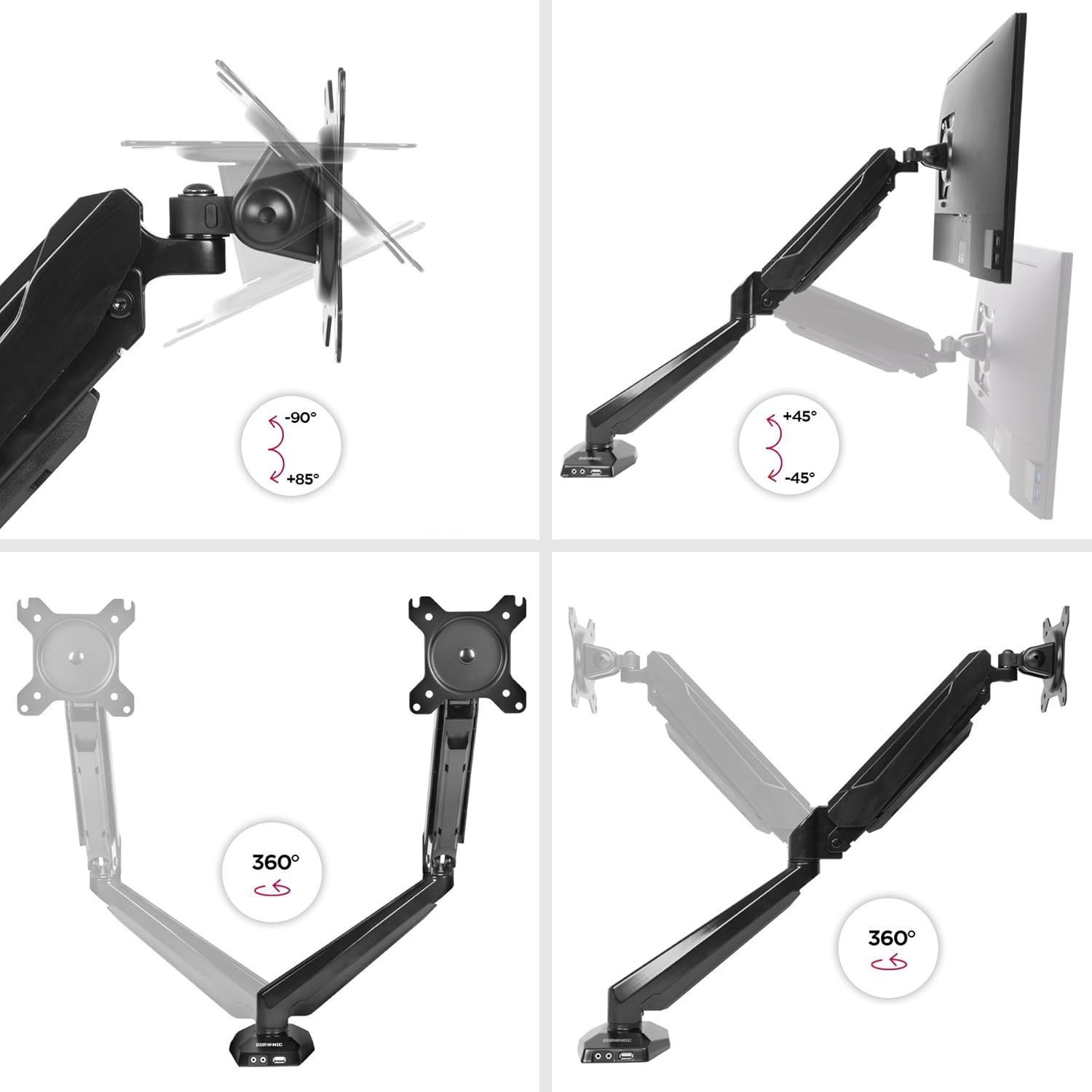
Figure 5.1: Monitor arm adjustment ranges.
- Integrated USB and Audio Ports: Use the two USB 2.0 ports for connecting peripherals like keyboards, mice, or USB drives. The headphone and microphone jacks provide convenient access for audio devices.
6. Maintenance
- Cleaning: Wipe the monitor arm with a soft, damp cloth. Avoid abrasive cleaners or solvents that could damage the finish.
- Periodic Checks: Regularly check all screws and connections to ensure they remain tight and secure. Re-tighten if necessary.
- Gas Spring Adjustment: If your monitor's weight changes, or if the arm no longer holds its position correctly, re-adjust the gas spring tension as described in the setup section.
7. Troubleshooting
| Problem | Possible Cause | Solution |
|---|---|---|
| Monitor does not stay in desired position (sags or springs up). | Incorrect gas spring tension. | Adjust the gas spring tension using the provided Allen key. Turn clockwise for heavier monitors, counter-clockwise for lighter monitors. |
| Monitor cannot be attached to the VESA plate. | Monitor VESA pattern is not compatible (not 75x75mm or 100x100mm). | Verify your monitor's VESA compatibility. An adapter may be required for non-standard patterns. |
| USB or audio ports on the arm base are not working. | Extension cables are not properly connected to the computer. | Ensure the USB and audio extension cables from the monitor arm base are securely plugged into the corresponding ports on your computer. |
| Arm feels loose or unstable. | Desk clamp is not tightened sufficiently or desk surface is unstable. | Re-tighten the desk clamp. Ensure the desk surface is stable and within the recommended thickness. |
8. Specifications
- Model: DMUSB5X1
- Brand: Duronic
- Material: Aluminum
- Monitor Size Compatibility: 15-27 inches (38-68 cm)
- Weight Capacity: Up to 8 kg (17.6 lbs) per arm
- VESA Compatibility: 75x75mm, 100x100mm
- Adjustments:
- Tilt: -90° to +85°
- Swivel: 180°
- Rotation: 360°
- Desk Clamp Thickness: Up to 68mm
- Integrated Ports: 2 x USB 2.0, 1 x Headphone Jack, 1 x Microphone Jack
9. Warranty and Support
Warranty Information: For detailed warranty terms and conditions, please refer to the manufacturer's official website or the warranty card included with your product packaging.
Customer Support: If you encounter any issues or have questions regarding your Duronic DMUSB5X1 monitor arm, please visit the official Duronic website for support resources, FAQs, and contact information for their customer service team.


