
Introduction
Welcome to your new WOOZOO Desk Fan. This manual provides important information regarding the safe operation, maintenance, and troubleshooting of your fan. Please read it thoroughly before use.
This powerful yet compact unit is designed for optimal air circulation in various settings, including offices, homes, and dorms. It features an adjustable fan head, multiple speed settings, and quiet operation.
Important Safety Instructions
To reduce the risk of fire, electric shock, or injury, please observe the following:
- Read all instructions before using this fan.
- This appliance has a polarized plug (one blade is wider than the other). To reduce the risk of electric shock, this plug is intended to fit into a polarized outlet only one way. If the plug does not fit fully into the outlet, reverse the plug. If it still does not fit, contact a qualified electrician. Do not attempt to defeat this safety feature.
- Do not operate any fan with a damaged cord or plug. Discard fan or return to an authorized service facility for examination and/or repair.
- Do not run cord under carpeting. Do not cover cord with throw rugs, runners, or similar coverings. Do not route cord under furniture or appliances. Arrange cord away from traffic area and where it will not be tripped over.
- Always unplug the fan before moving, cleaning, or when not in use.
- Do not immerse the fan in water or other liquids.
- Do not allow foreign objects to enter any ventilation or exhaust opening as this may cause an electric shock or fire, or damage the fan.
- Do not block air openings or operate near curtains or other materials that may block airflow.
- This fan is intended for indoor use only.
Product Components
- WOOZOO Oscillating Circulator Fan (Main Unit)
- Power Cord (attached)

Image: The WOOZOO Desk Fan in black, showcasing its compact design and control knob.
Setup Guide
- Unpack the fan carefully from its packaging.
- Place the fan on a stable, flat surface. Ensure there is adequate space around the fan for proper air circulation.
- Plug the power cord into a standard 120V AC electrical outlet.
Operating Your WOOZOO Desk Fan
Power and Speed Control
The fan features a rotary control knob located on the base.
- Turn the knob clockwise to select desired speed:
- Setting I: Low Power
- Setting II: Medium Power
- Setting III: High Power
- Turn the knob counter-clockwise to the "O" position to turn the fan off.
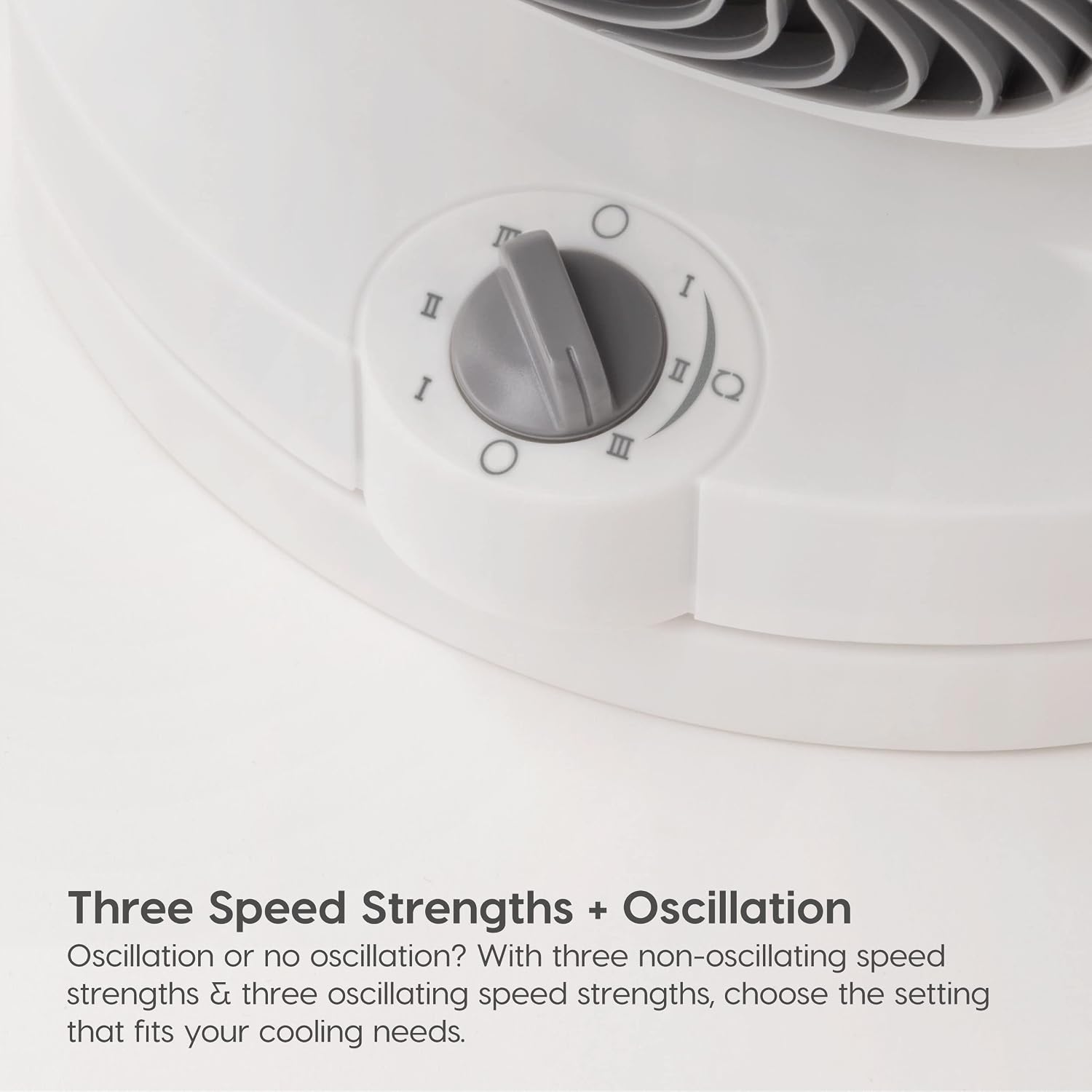
Image: Close-up view of the control knob on the fan's base, indicating speed settings I, II, III, and off (O).
Oscillation Function
The WOOZOO fan offers 120° of horizontal oscillation to distribute air across a wider area.
- To activate oscillation, turn the control knob to any of the oscillating speed settings (indicated by a small circle next to the Roman numeral).
- To stop oscillation, turn the knob to a non-oscillating speed setting or turn the fan off.

Image: Diagram illustrating the 65 degrees of horizontal oscillation to the left and right, ensuring wide air distribution.
Adjustable Tilt Settings
The fan head can be manually adjusted to 6 different vertical tilt positions, allowing you to direct airflow precisely where needed.
- Gently tilt the fan head up or down to your desired angle. The fan supports angles from -22.5° to 90°.

Image: Diagram showing the six vertical tilt positions of the fan head, ranging from -22.5 to 90 degrees.
Air Circulation Performance
The deep pitch fan blades and unique design funnel and push air out, allowing you to feel the breeze from up to 74 feet away. The fan provides up to 275 sq ft area coverage.

Image: Illustration demonstrating the fan's ability to project air up to 52 feet, highlighting its powerful airflow.
Care and Maintenance
Regular cleaning will help maintain your fan's performance.
- Always unplug the fan before cleaning.
- To clean the exterior, wipe with a soft, damp cloth. Do not use abrasive cleaners or solvents.
- The front grill can be removed for cleaning the fan blades. Refer to the instructions in the product manual for detailed steps on grill removal and reattachment.
- Ensure all parts are completely dry before plugging the fan back in.

Image: Exploded view of the fan showing the deep pitch fan blade, wind vein funnel, and motorized base, illustrating components for cleaning.
Troubleshooting Guide
| Problem | Possible Cause | Solution |
|---|---|---|
| Fan does not turn on. | Not plugged in; Power outlet not working; Fan damaged. | Ensure plug is securely in outlet; Check circuit breaker or try another outlet; Do not attempt to repair, contact customer support. |
| Weak airflow. | Fan speed too low; Air intake/output blocked; Dirty fan blades. | Increase speed setting; Ensure fan is not obstructed; Clean fan blades and grill as per maintenance instructions. |
| Fan is noisy. | Fan not on a stable surface; Internal component issue. | Place fan on a flat, stable surface; If noise persists, contact customer support. |
| Oscillation not working. | Incorrect speed setting selected. | Ensure an oscillating speed setting (e.g., I with circle) is selected. |
Product Specifications
- Brand: IRIS USA
- Model Name: PCF-HD18U
- Color: Black
- Product Dimensions: 7.48"D x 11.42"W x 12.2"H
- Item Weight: 4.4 Pounds
- Power Source: AC
- Voltage: 120 Volts
- Wattage: 72 watts
- Noise Level: 35 dB
- Number of Speeds: 3
- Oscillation: 120° Horizontal
- Tilt Settings: 6 adjustable vertical angles (-22.5° to 90°)
- Max Air Distance: 74ft
- Area Coverage: Up to 275 ft²
- Control Method: Rotary Knob

Image: Diagram illustrating the dimensions of the WOOZOO Desk Fan: 7.48 inches deep, 11.42 inches wide, and 12.2 inches high.
Warranty and Customer Support
For warranty information and customer support, please refer to the documentation included with your product packaging or visit the official IRIS USA website.
You can also visit the IRIS USA Store on Amazon for more product information and support resources.


