
Introduction
The Anderic RR3UNV is a versatile 3-device universal remote control designed to simplify the management of your entertainment systems. This remote can control up to three different devices, including TVs, DVD players, VCRs, cable boxes, satellite receivers, and audio systems. It features a learning function for expanded compatibility and glow-in-the-dark buttons for ease of use in low-light conditions. This manual provides detailed instructions for setup, operation, and maintenance of your RR3UNV remote control.
Setup
1. Battery Installation
The Anderic RR3UNV remote requires two (2) AA batteries for operation. Ensure correct polarity when inserting the batteries.
- Open the battery compartment cover located on the back of the remote control.
- Insert two new AA batteries, matching the (+) and (-) terminals as indicated inside the compartment.
- Close the battery compartment cover securely.

Image: Rear view of the Anderic RR3UNV remote control, showing the battery compartment cover at the bottom. The back is black with a textured grip area.
2. Programming the Remote
The RR3UNV can be programmed using direct code entry or the learning function. Refer to the included code booklet for a list of compatible device codes.
2.1. Direct Code Entry
- Turn on the device you wish to program (e.g., TV, DVD player).
- Press and hold the desired device button (TV, DVD, or AUDIO) for approximately 5 seconds until the device button lights up and stays lit.
- Enter the 3-digit code for your device brand from the code booklet.
- If the code is valid, the device button light will blink twice and then turn off.
- Test the remote by pressing the POWER button. If the device turns off, the programming was successful. If not, repeat the process with the next code listed for your brand.
2.2. Learning Function
The learning function allows the RR3UNV to learn commands directly from your original remote control.
- Place the RR3UNV and your original remote control head-to-head on a flat surface, approximately 1-2 inches apart.
- Press and hold the desired device button (TV, DVD, or AUDIO) on the RR3UNV for approximately 5 seconds until the device button lights up and stays lit.
- Press and release the button on the RR3UNV that you want to program (e.g., POWER). The device button light will start blinking slowly.
- Press and hold the corresponding button on your original remote control (e.g., POWER).
- The device button light on the RR3UNV will blink rapidly three times and then stay lit, indicating successful learning.
- Repeat steps 3-5 for all other buttons you wish to program.
- To exit learning mode, press the device button again. The light will turn off.
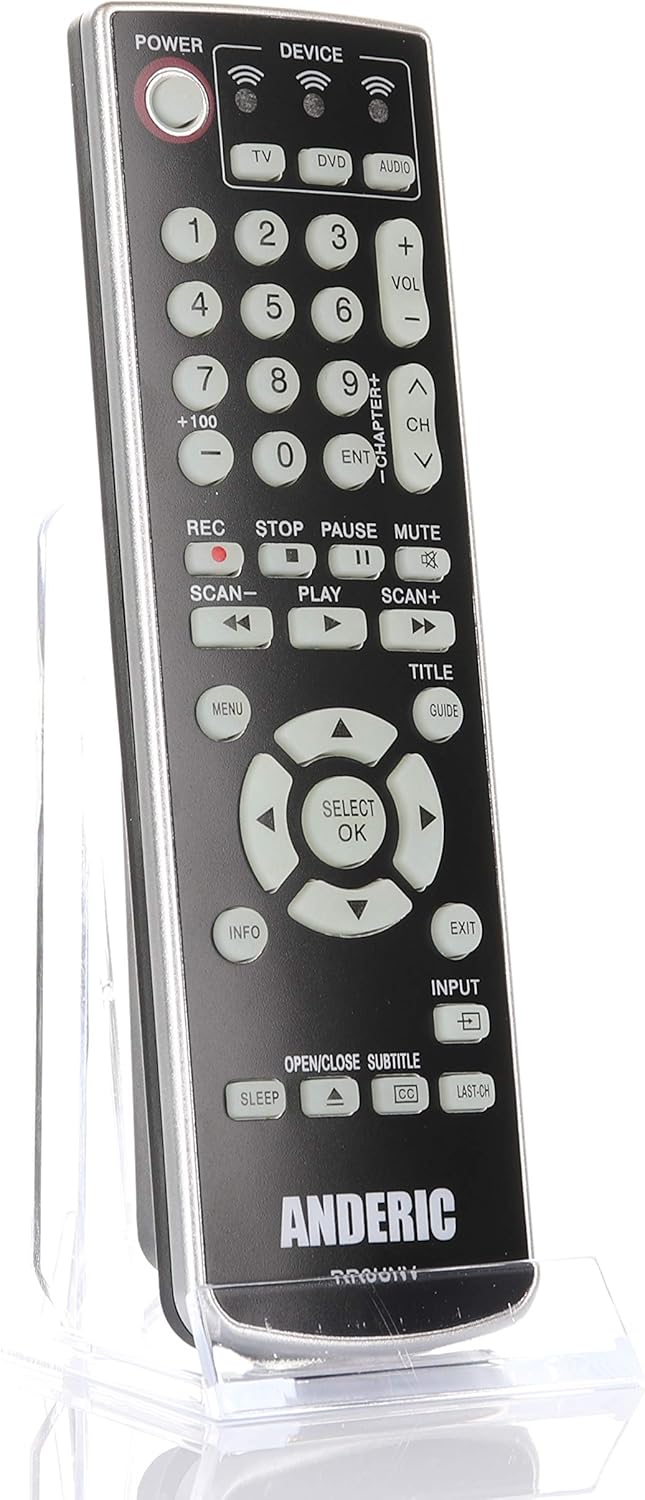
Image: Front view of the Anderic RR3UNV remote control. It is black with silver trim, featuring glow-in-the-dark buttons for power, device selection, number pad, volume, channel, playback, menu, and navigation controls.
Operating the Remote
Once programmed, the Anderic RR3UNV remote functions like your original remote. Select the desired device mode before sending commands.
- Device Selection: Press the TV, DVD, or AUDIO button to select the device you want to control. The selected device button will light up briefly.
- Power: Press the POWER button to turn the selected device on or off.
- Volume Control: Use the VOL+ and VOL- buttons to adjust the volume.
- Channel Control: Use the CH+ and CH- buttons to change channels.
- Mute: Press the MUTE button to silence the audio.
- Number Pad: Use the number buttons (0-9) to directly enter channel numbers or other numerical inputs.
- Playback Controls: Buttons like PLAY, PAUSE, STOP, REC, SCAN-, and SCAN+ control media playback functions.
- Navigation: The directional arrow buttons and SELECT/OK button are used for menu navigation.
- Menu/Guide/Info/Exit: These buttons provide access to device-specific menus, program guides, information displays, and exit functions.
- Input: The INPUT button cycles through available input sources on your TV.
- Sleep: The SLEEP button may activate a sleep timer function on compatible devices.
- CC/Subtitles: The CC/SUBTITLE button toggles closed captions or subtitles.
Maintenance
- Battery Replacement: Replace batteries when the remote's performance degrades or if the device indicator light does not illuminate. Always replace both AA batteries at the same time with new ones.
- Cleaning: Clean the remote control with a soft, dry cloth. Do not use liquid cleaners or abrasive materials, as they may damage the remote's surface or internal components.
- Storage: Store the remote in a dry place away from direct sunlight and extreme temperatures. If storing for an extended period, remove the batteries to prevent leakage.
Troubleshooting
| Problem | Possible Cause | Solution |
|---|---|---|
| Remote does not work at all. | Dead or incorrectly inserted batteries. | Replace batteries with new AA batteries, ensuring correct polarity. |
| Remote controls some functions but not others. | Incorrect device code or incomplete learning. | Try a different code for your device brand or re-program specific buttons using the learning function. |
| Device does not respond to remote commands. | Remote not aimed correctly; obstruction; device not selected. | Ensure the remote is aimed directly at the device's IR sensor. Remove any obstructions. Press the correct device button (TV, DVD, AUDIO) before sending commands. |
| Learning function fails. | Original remote batteries low; remotes too far apart; ambient light interference. | Ensure original remote has fresh batteries. Place remotes 1-2 inches apart. Try learning in a dimly lit room. |
Specifications
- Brand: Anderic
- Model Name: RR3UNV
- Model Number: RR3UNV
- Max Number of Supported Devices: 3
- Connectivity Technology: Infrared (IR)
- Battery Type: 2 x AA batteries (not included)
- Maximum Range: Approximately 25 feet (7.6 meters)
- Button Quantity: 41
- Special Features: Universal compatibility, Learning function, Glow-in-the-dark buttons
- Compatible Devices: TV, DVD, VCR, Cable, Satellite, Audio, DVD/VCR Combos, TV/DVD/VCR Combos
Warranty Information
Anderic products typically come with a limited warranty covering manufacturing defects. For specific warranty details, including duration and terms, please refer to the documentation included with your purchase or visit the official Anderic website. Keep your proof of purchase for warranty claims.
Customer Support
For technical assistance, programming help, or general inquiries regarding your Anderic RR3UNV remote control, please contact Anderic customer support:
- Website: www.anderic.com
- Phone: 1-855-573-6683
Please have your model number (RR3UNV) and a description of your issue ready when contacting support.


