
Ozobot Bit Coding Robot
Ozobot Bit Coding Robot User Manual
Introduction to Ozobot Bit
The Ozobot Bit is a compact, programmable robot designed to introduce users to the fundamentals of coding and robotics. It offers two primary methods of interaction: drawing lines and Color Codes for screen-free programming, and using the OzoBlockly visual editor for more advanced programming.
Key features of the Ozobot Bit include:
- Optical Sensors: Allows the robot to detect lines and colors on surfaces.
- LED Light: Provides visual feedback during operation.
- Durable Polycarbonate Shell: Ensures longevity and protection.
- Two Coding Methods: Supports both physical Color Codes and digital OzoBlockly programming.
What's in the Box
The Ozobot Bit Starter Kit typically includes the following components:
- Ozobot Bit Robot
- Charging Cable
- Set of Ozobot Markers
- Activity Pack with Color Code stickers and instructions

Image: Ozobot Bit Starter Kit contents including the robot, markers, charging cable, and activity sheets.
Setup
Charging the Ozobot Bit
Before first use, fully charge your Ozobot Bit. The robot contains a Lithium Polymer battery. Connect the provided charging cable to the Ozobot Bit and a USB power source. The LED light on the robot will indicate its charging status.
Initial Calibration
For optimal performance, calibrate your Ozobot Bit on a white surface before each use or if it exhibits unusual behavior. To calibrate, turn on the Ozobot Bit and place it on a white surface. The robot will flash its LED light, indicating it is calibrating. Once the light stops flashing and turns solid, calibration is complete.

Image: Close-up view of the Ozobot Bit robot, showing its clear dome and internal components.
Operating the Ozobot Bit
Using Color Codes (Screen-Free Coding)
Ozobot Bit responds to specific sequences of colors, known as Color Codes, drawn on paper. Use the provided Ozobot markers or other broad-tip markers to draw lines and Color Codes. Ensure lines are thick enough for the robot's sensors to detect (approximately 1/4 inch or 6mm).
- Draw a black line for the Ozobot Bit to follow.
- Insert Color Codes (e.g., red-green-blue) into the line to command the robot to perform actions like speed changes, turns, or special moves.
- Refer to the included Activity Pack for a guide to various Color Codes and activities.

Image: A child observing an Ozobot Bit robot as it follows a drawn line on paper.

Image: Two children drawing color codes on paper for their Ozobot Bit robots.

Image: A hand applying a color code sticker onto a drawn line for an Ozobot Bit robot.
Using OzoBlockly (Online Programming)
For more advanced programming, Ozobot Bit can be programmed using OzoBlockly, a visual block-based editor accessible via a web browser on a computer or tablet. This platform allows users to drag and drop code blocks to create complex programs.
- Access OzoBlockly through the official Ozobot website.
- Create programs by arranging code blocks for movement, light effects, and more.
- Load your created program onto the Ozobot Bit by holding the robot up to the screen when prompted by the OzoBlockly interface.

Image: A hand interacting with an Ozobot Bit robot on a tablet displaying the OzoBlockly coding interface.
Maintenance
To ensure the longevity and proper functioning of your Ozobot Bit, follow these maintenance guidelines:
- Cleaning: Gently wipe the robot's optical sensors on the bottom with a soft, dry cloth to remove dust or debris. Avoid using liquids or abrasive materials.
- Storage: Store the Ozobot Bit in a cool, dry place away from direct sunlight and extreme temperatures.
- Battery Care: Do not attempt to replace the internal battery. If the robot will not be used for an extended period, charge it periodically to maintain battery health.
Troubleshooting
| Issue | Possible Cause | Solution |
|---|---|---|
| Ozobot Bit is not following lines or Color Codes correctly. |
|
|
| Ozobot Bit is not turning on or responding. |
|
|
| OzoBlockly program is not loading onto the robot. |
|
|
Specifications
- Model Number: OZ-BIT-S-WHITE
- Product Dimensions: 24.5 x 15.5 x 6.5 inches (packaging)
- Item Weight: 0.64 ounces
- Battery: 1 Lithium Polymer battery (included)
- Recommended Age: 3 years and up
- Release Date: November 21, 2017
- Manufacturer: Ozobot

Image: An exploded diagram of the Ozobot Bit, highlighting its optical sensors, LED light, and polycarbonate shell.
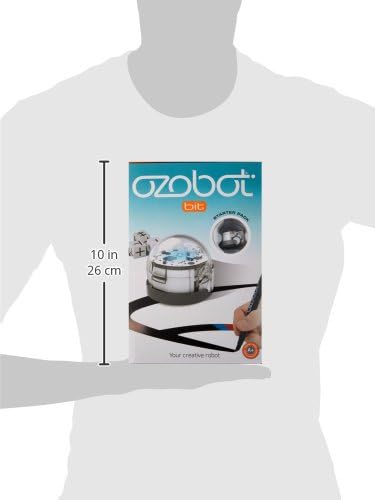
Image: Image showing the dimensions of the Ozobot Bit Starter Kit packaging.
Safety Information
Choking Hazard: This toy contains small parts and may include a small ball. Not suitable for children under 3 years of age due to potential choking hazards.
Support and Warranty
For detailed warranty information, technical support, or additional resources, please visit the official Ozobot website or contact their customer service. Specific warranty terms may vary by region and purchase location.
You can find more information and resources at the Ozobot Store.
Related documentsBit Coding Robot


Ask a question about this manual
Ask about setup, troubleshooting, compatibility, parts, safety, or missing instructions. Manuals+ will review the question and use this page’s manual context to help answer it.