
Whirlpool Magicook 20BC
Whirlpool Magicook 20BC 20 L Convection Microwave Oven
User Manual
1. Introduction
Thank you for choosing the Whirlpool Magicook 20BC 20 L Convection Microwave Oven. This manual provides essential information for the safe and efficient operation, maintenance, and troubleshooting of your new appliance. Please read it thoroughly before using the oven and keep it for future reference.
2. Important Safety Instructions
When using electrical appliances, basic safety precautions should be followed, including the following:
- Read all instructions before using the appliance.
- Do not operate the oven if the cord or plug is damaged, if it is not working properly, or if it has been damaged or dropped.
- Do not heat liquids or other foods in sealed containers as they are liable to explode.
- Only use utensils that are suitable for use in microwave ovens.
- Do not use corrosive chemicals or vapors in this appliance.
- Close supervision is necessary when the appliance is used by or near children.
- Do not use this appliance for commercial purposes. It is intended for household use only.
- Ensure proper ventilation around the oven.
- Always ensure the turntable is correctly positioned before operation.
3. Product Overview
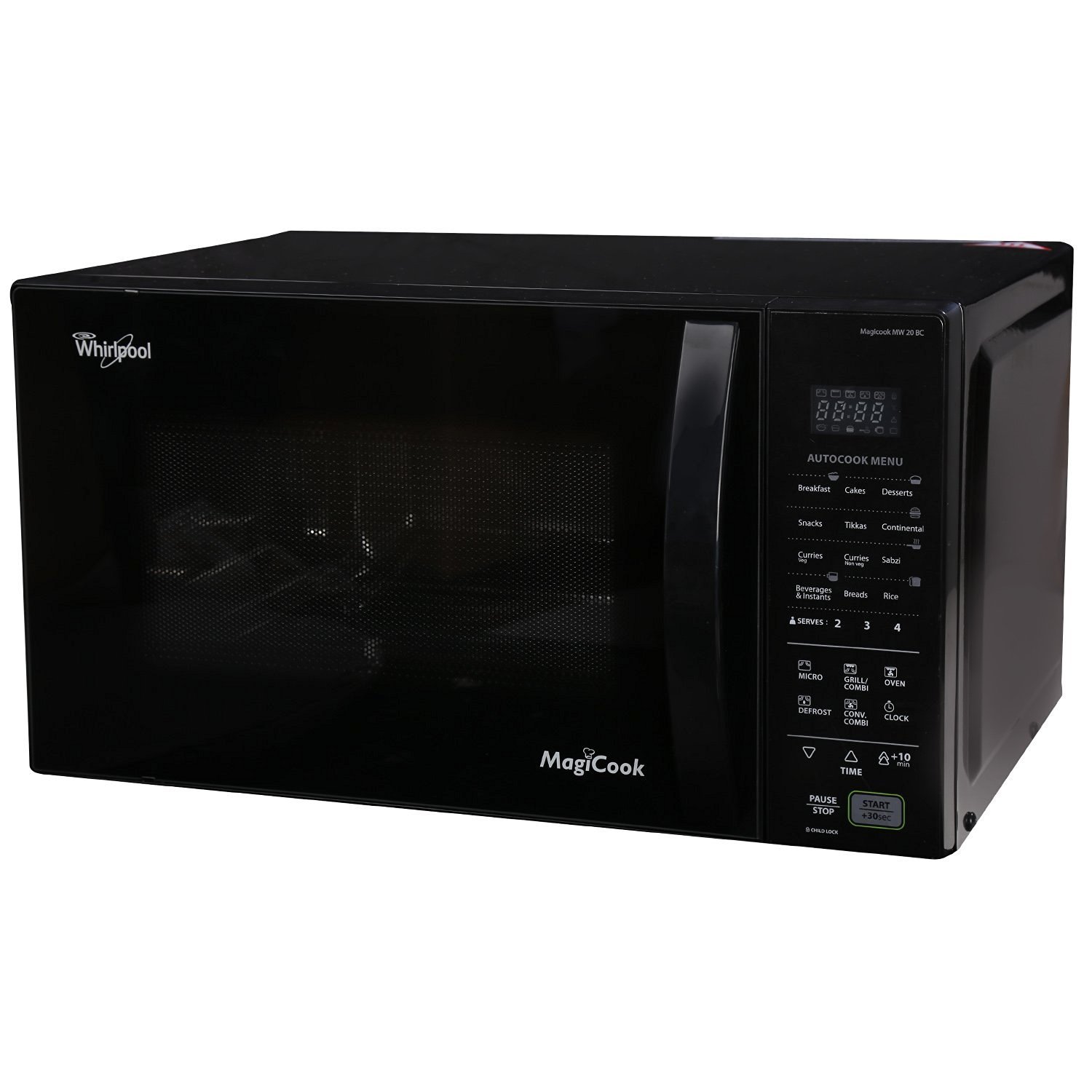
The Whirlpool Magicook 20BC is a versatile 20-liter convection microwave oven designed for a family of 3-4 people. It features a feather touch control panel for easy operation and a 24.5 cm recessed turntable.
Key Features:
- 20 Litre Capacity: Ideal for small to medium-sized families.
- 118 Auto Cook Menus: A wide variety of pre-programmed settings for different dishes.
- 10 Power Levels: Offers precise control over cooking intensity.
- Combi Mode: Combines microwave, grill, and convection for efficient cooking.
- Convection Mode: Allows for baking and roasting.
- Grill Mode: For browning and crisping food.
- Defrost Function: Manually defrosts food by weight.
- Feather Touch Panel: Easy-to-use and clean control interface.
- Auto Start: Simplifies cooking by setting mode and time.
Components:



Included Components (Starter Kit):
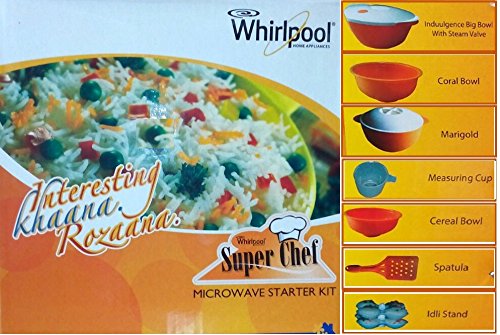
Your microwave oven comes with a starter kit to enhance your cooking experience. The kit typically includes:
- 1 Cooking Bowl
- 1 Coral Bowl
- 1 Marigold Bowl
- 1 Measuring Cup
- 1 Cereal Bowl
- 1 Spatula
- 1 Idli Stand
4. Setup and Installation
Proper installation is crucial for the safe and efficient operation of your microwave oven.
Unpacking:
- Remove all packaging materials from inside and outside the oven.
- Check the oven for any damage, such as dents or a misaligned door. Do not operate if damaged.
- Ensure all accessories, including the turntable and roller ring, are present.
Placement:
- Place the oven on a flat, stable surface strong enough to hold its weight.
- Ensure adequate ventilation: leave at least 10 cm of space at the back, 20 cm at the sides, and 30 cm above the oven.
- Keep the oven away from heat sources and strong magnetic fields.
- Do not block air vents.
Electrical Connection:
- Plug the oven into a properly grounded electrical outlet.
- Do not use extension cords or adapters.
- Ensure the voltage matches the rating label on the oven.
5. Operating Instructions
This section details how to use the various functions of your Whirlpool Magicook 20BC microwave oven.
Control Panel Overview:
The feather touch control panel allows for easy selection of cooking modes, time, and power levels. Refer to Figure 4 for a visual guide to the control panel buttons.
Basic Microwave Cooking:
- Place food in a microwave-safe container on the turntable.
- Close the oven door securely.
- Press the MICRO button.
- Use the TIME buttons (+ or -) to set the desired cooking time.
- Press START/+30sec to begin cooking.
- To adjust power levels, press the POWER LEVEL button (if available, or cycle through MICRO presses) and then use the TIME buttons to select from 10 power levels.
Convection Cooking:
Use this mode for baking and roasting, similar to a conventional oven.
- Place food on the appropriate rack (if provided) in the oven.
- Press the CONV/COMBI button until CONV mode is selected.
- Set the desired temperature using the TIME buttons.
- Set the cooking time using the TIME buttons.
- Press START/+30sec to begin.
Grill Cooking:
Ideal for browning and crisping food.
- Place food on the grill rack.
- Press the GRILL/COMBI button until GRILL mode is selected.
- Set the desired cooking time using the TIME buttons.
- Press START/+30sec to begin.
Combi Mode (Convection Combi, Grill Combi):
This mode combines different heating methods for faster and more even cooking.
- Place food in the oven.
- Press the CONV/COMBI or GRILL/COMBI button to select the desired combi mode (e.g., C-1, C-2).
- Set the cooking time using the TIME buttons.
- Press START/+30sec to begin.
Auto Cook Menu:
The oven features 118 pre-programmed auto cook menus for various dishes.
- Refer to the auto cook menu chart (usually inside the oven door or in a separate guide) to find the appropriate menu number for your food.
- Press the AUTO COOK MENU button (or corresponding food category button).
- Use the TIME buttons to select the menu number and/or food weight/servings.
- Press START/+30sec to begin cooking.
Defrost Function:
This function allows you to defrost frozen food based on its weight.
- Place the frozen food in a microwave-safe container.
- Press the DEFROST button.
- Use the TIME buttons to input the weight of the food.
- Press START/+30sec to begin defrosting.
Timer Function:
The timer can be used independently or during cooking.
- To set the clock, press the CLOCK button and use the TIME buttons to set the current time. Press CLOCK again to confirm.
- To use as a kitchen timer, press the TIMER button (if separate) or set time without selecting a cooking mode, then press START/+30sec.
6. Maintenance and Cleaning
Regular cleaning and maintenance will ensure the longevity and optimal performance of your microwave oven.
General Cleaning:
- Always unplug the oven before cleaning.
- Clean the interior and exterior surfaces with a damp cloth and mild detergent. Avoid abrasive cleaners.
- For stubborn food splatters, place a bowl of water with lemon slices inside and microwave for a few minutes to loosen residue, then wipe clean.
- Wash the turntable and roller ring in warm, soapy water. They are usually dishwasher safe.
- Clean the door seals and surrounding areas to ensure a proper seal.
Care for the Starter Kit:
- The bowls and other accessories in the starter kit are typically microwave-safe and can be washed with regular dish soap.
- Always check for specific care instructions provided with the kit.
7. Troubleshooting
If you encounter issues with your microwave oven, refer to the following common problems and solutions before contacting service.
| Problem | Possible Cause | Solution |
|---|---|---|
| Oven does not start | Power cord not plugged in; Door not closed properly; Fuse blown or circuit breaker tripped. | Ensure plug is firmly in outlet; Close door securely; Check household fuse/circuit breaker. |
| Food not heating | Incorrect cooking time/power level; Door not closed properly; Utensil not microwave-safe. | Adjust time/power; Close door firmly; Use microwave-safe cookware. |
| Sparking inside oven | Metal or foil in oven; Food splatters/grease buildup. | Remove all metal objects; Clean oven interior thoroughly. |
| Turntable not rotating | Turntable not properly seated; Obstruction under turntable. | Re-seat turntable and roller ring; Remove any obstructions. |
If the problem persists after trying these solutions, please contact Whirlpool customer service.
8. Specifications
| Feature | Detail |
|---|---|
| Brand | Whirlpool |
| Model Name | MAGicook 20BC |
| Capacity | 20 Litres |
| Colour | Black |
| Special Feature | Touch Panel |
| Installation Type | Countertop |
| Wattage | 800 Watts |
| Number of Power Levels | 10 |
| Timer Function | Available |
| Heating Method | Convection |
| Defrost System Type | Defrost |
| Number of Programs | 118 (Auto Cook Menus) |
| Item Weight | 14400 Grams |
| Material Type | Stainless Steel (Cavity) |
| Included Components | Microwave oven and Starter kit |
9. Warranty and Support
Warranty Information:
Your Whirlpool Magicook 20BC Convection Microwave Oven comes with a 2-year warranty on the magnetron from the date of purchase. Please retain your purchase receipt as proof of warranty.
The warranty covers manufacturing defects in the magnetron. It does not cover damage caused by misuse, accident, unauthorized repair, or normal wear and tear.
Customer Support:
For any service requests, technical assistance, or warranty claims, please contact Whirlpool customer service. You can find contact details on the official Whirlpool website or your product registration card.
When contacting support, please have your model number (Magicook 20BC) and purchase details ready.
Related documentsMagicook 20BC


Ask a question about this manual
Ask about setup, troubleshooting, compatibility, parts, safety, or missing instructions. Manuals+ will review the question and use this page’s manual context to help answer it.