
Product Overview
The GARRISON 8,000 BTU Through-The-Wall Air Conditioner is designed to provide efficient cooling for rooms up to 350 square feet. This unit features electronic controls with an easy-to-read LED display and includes a remote control for convenient operation. It is Energy Star rated, ensuring energy efficiency.
Key Features:
- Cools rooms measuring 300 to 350 sq. ft. using R-410A refrigerant.
- Includes a remote control for convenient cooling adjustments.
- Electronic control panel with digital display.
- Energy Star rated with a 10.6 Energy Efficiency Ratio (EER).
- Auto-restart function: automatically resumes operation with previous settings after a power loss.
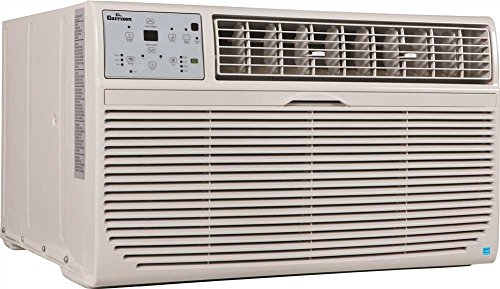
Image: Front view of the Garrison 8,000 BTU Through-The-Wall Air Conditioner. The unit is light-colored with a control panel on the top left and air vents on the top right and across the lower front.
Safety Information
Please read all instructions carefully before installing and operating your air conditioner. Keep this manual for future reference. Failure to follow these instructions could result in property damage, personal injury, or death.
General Safety Precautions:
- Always plug the unit into a grounded 3-prong outlet. Do not remove the grounding prong.
- Do not use an adapter or extension cord.
- Do not operate the air conditioner if the power cord or plug is damaged.
- Ensure the unit is installed securely according to installation instructions to prevent falling.
- Do not block air inlets or outlets.
- Unplug the unit before cleaning or performing any maintenance.
- Keep children and pets away from the unit during operation.
- Do not attempt to repair or modify the unit yourself. Refer all servicing to qualified personnel.
Setup and Installation
This GARRISON air conditioner is designed for through-the-wall installation. While the unit is lightweight and assembly is not required, proper installation is crucial for optimal performance and safety.
Pre-Installation Checklist:
- Verify the wall opening dimensions. The unit dimensions are approximately 20.38 x 24.25 x 14.5 inches (Width x Depth x Height).
- Ensure the wall structure can support the unit's weight of 64.9 pounds.
- Confirm a dedicated 115 Volt, grounded electrical outlet is available near the installation site.
- Unpack the unit carefully and inspect for any shipping damage.
For detailed installation instructions, please refer to the separate installation guide provided with your unit. Proper sealing and insulation around the unit are essential to prevent air leaks and maximize efficiency.
Operating Instructions
Your GARRISON air conditioner features an intuitive electronic control panel and a convenient remote control for easy operation.
Control Panel and Display:
The digital display on the unit shows the current temperature setting or operating mode. Buttons on the control panel allow you to power on/off, adjust temperature, select fan speed, and choose operating modes (Cool, Fan, Dry, Auto).
Using the Remote Control:
The included remote control provides full functionality from a distance. Point the remote directly at the unit's receiver. Ensure there are no obstructions between the remote and the unit. While the remote offers convenience, some users have noted a slight delay in response or discrepancies in temperature display between the remote and the unit. This is generally normal operation.
Operating Modes:
- Cool Mode: For maximum cooling. Adjust temperature using the up/down arrows.
- Fan Mode: Circulates air without cooling. Select desired fan speed (Low, Medium, High).
- Dry Mode (Dehumidify): Reduces humidity in the room.
- Auto Mode: The unit automatically selects the appropriate mode (Cool or Fan) and fan speed based on the room temperature and your set temperature.
Auto-Restart Function:
In the event of a power outage, the unit will automatically resume operation with its last settings once power is restored. This feature ensures continuous comfort without manual intervention.
Maintenance
Regular maintenance ensures optimal performance and extends the lifespan of your GARRISON air conditioner. Always unplug the unit before performing any maintenance.
Air Filter Cleaning:
The air filter should be cleaned every two weeks or more frequently depending on usage and air quality. A dirty filter can reduce cooling efficiency and airflow.
- Locate the air filter, typically behind the front grille.
- Gently slide out the filter.
- Wash the filter with warm, soapy water. Rinse thoroughly.
- Allow the filter to air dry completely before reinserting it. Do not use hot water or harsh detergents.
Unit Exterior Cleaning:
Wipe the exterior of the unit with a soft, damp cloth. Do not use abrasive cleaners, waxes, or polishes. Ensure no water enters the electrical components.
Seasonal Storage:
If storing the unit for an extended period, clean the filter and exterior. Cover the unit to protect it from dust and store it in a dry, safe place.
Troubleshooting
Before contacting customer support, please refer to the following common issues and their solutions.
| Problem | Possible Cause | Solution |
|---|---|---|
| Unit does not turn on. | No power, tripped circuit breaker, loose plug. | Check power cord connection. Reset circuit breaker. Ensure outlet is functional. |
| Insufficient cooling. | Dirty air filter, blocked air vents, room too large, doors/windows open. | Clean air filter. Clear obstructions from vents. Close doors/windows. Ensure unit capacity matches room size. |
| Remote control not working. | Dead batteries, obstruction, remote not pointed correctly. | Replace batteries. Remove obstructions. Point remote directly at the unit. |
| Unit is noisy. | Loose parts, unit not level, fan hitting something. | Ensure unit is level and securely installed. Check for loose components. |
| Water dripping inside. | Unit not level, drain pan full/blocked. | Ensure unit is slightly tilted outwards for proper drainage. Check and clear drain pan/hose. |
Specifications
| Feature | Detail |
|---|---|
| Brand | GARRISON |
| Model Number | 2498540 |
| Cooling Power | 8,000 BTU |
| Coverage Area | Up to 350 sq. ft. |
| Voltage | 115 Volts |
| Energy Efficiency Ratio (EER) | 10.6 (Energy Star Rated) |
| Refrigerant Type | R-410A |
| Product Dimensions (W x D x H) | 20.38 x 24.25 x 14.5 inches |
| Item Weight | 64.9 pounds |
| Included Components | Air Conditioner, Remote Control |
| Assembly Required | No |
Warranty and Support
Your GARRISON 8,000 BTU Through-The-Wall Air Conditioner comes with the following warranty:
- 1-year limited warranty on the entire unit.
- 5-year limited warranty on the sealed system.
For warranty claims or technical support, please contact GARRISON customer service. Keep your purchase receipt and the product's serial number (found on the unit's label) readily available.
Please note that protection plans are also available for extended coverage, such as the 3-Year Protection Plan or 4-Year Protection Plan, which can be purchased separately.
Official Product Videos
No official product videos from the seller are available for this model at this time.


