
1. Introduction
This manual provides detailed instructions for the installation, operation, and maintenance of your TP-Link Kasa Smart Wi-Fi LED Light Bulb, model LB130. This smart bulb offers multicolor, dimmable lighting and connects directly to your home Wi-Fi network without requiring a separate hub. It is compatible with voice assistants such as Amazon Alexa and Google Assistant.

Image 1.1: Kasa Smart Wi-Fi LED Light Bulb (LB130) packaging and the bulb itself.
2. Safety Information
Please read and follow all safety instructions before using the product. Failure to do so may result in fire, electric shock, injury, or damage to the product.
- Do not use with standard dimmers. This bulb is dimmable only via the Kasa app or compatible voice assistants.
- Suitable for damp locations.
- Not for use in totally enclosed luminaires.
- Risk of electric shock. Do not open.
- Ensure power is off before installation or removal.
- Operating temperature: -20°C to 40°C (-4°F to 104°F).
3. Package Contents
The package should contain the following items:
- Kasa Smart Wi-Fi LED Light Bulb (LB130)
- Quick Installation Guide
4. Setup
4.1 Physical Installation
- Turn off the power to the light fixture at the switch before replacing the bulb.
- Carefully screw the Kasa Smart Wi-Fi LED Light Bulb (LB130) into a standard E26 light socket.
- Turn on the power to the light fixture. The bulb will flash three times, indicating it is ready for setup.

Image 4.1: Close-up of the Kasa Smart Wi-Fi LED Light Bulb (LB130) showing its design and base.
4.2 Kasa App Setup
The Kasa Smart Wi-Fi LED Light Bulb requires the Kasa Smart app for initial configuration and control. Ensure your smartphone or tablet is connected to a 2.4 GHz Wi-Fi network.
- Download the Kasa Smart app from the App Store (iOS) or Google Play Store (Android).
- Open the Kasa Smart app and create a TP-Link ID or log in if you already have one.
- Tap the '+' icon in the top right corner of the app and select 'Device' > 'Smart Lights' > 'Smart Bulb'.
- Follow the on-screen instructions to connect the bulb to your home Wi-Fi network. This typically involves connecting your phone to the bulb's temporary Wi-Fi network, then selecting your home Wi-Fi network and entering its password.
- Once connected, you can name your bulb and assign it to a room.
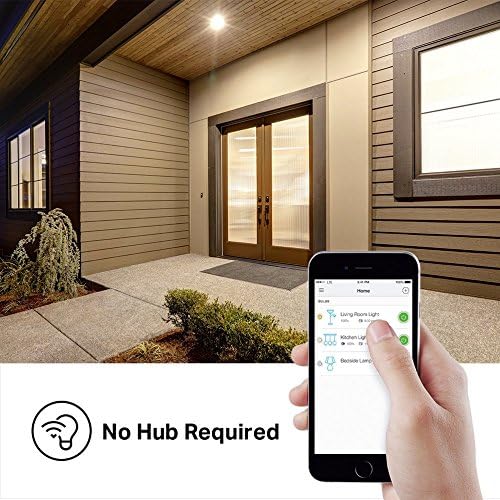
Image 4.2: The Kasa app interface showing control over multiple smart bulbs.
4.3 Voice Assistant Integration
The LB130 bulb works with Amazon Alexa and Google Assistant for hands-free control.
- For Amazon Alexa: Open the Alexa app, go to 'Skills & Games', search for 'Kasa', enable the skill, and link your Kasa account. Then, discover devices.
- For Google Assistant: Open the Google Home app, tap 'Add' > 'Set up device' > 'Works with Google', search for 'Kasa', and link your Kasa account.

Image 4.3: The Kasa Smart Wi-Fi LED Light Bulb supports voice control via Amazon Alexa and Google Assistant.
5. Operating the Smart Bulb
Once set up, you can control your LB130 bulb using the Kasa app or voice commands.
5.1 Basic On/Off and Brightness Control
- In the Kasa app, tap on the bulb's name to access its controls. You can toggle it on/off and adjust brightness using a slider.
- Voice commands: "Alexa, turn on [Bulb Name]", "Hey Google, dim [Bulb Name] to 50%."
5.2 Color Changing
The LB130 offers a wide range of colors to suit any mood or occasion.
- In the Kasa app, navigate to the color selection interface. You can choose from a color wheel or preset colors.
- Voice commands: "Alexa, change [Bulb Name] to blue", "Hey Google, set [Bulb Name] to warm white."

Image 5.1: Kasa app interface for selecting colors for the smart bulb.
5.3 Schedules and Scenes
Automate your lighting with schedules and scenes for convenience and energy saving.
- Schedules: In the Kasa app, you can set specific times for the bulb to turn on/off, change color, or adjust brightness.
- Scenes: Create custom lighting presets (e.g., "Movie Night" with dim, warm light) and activate them with a single tap or voice command.
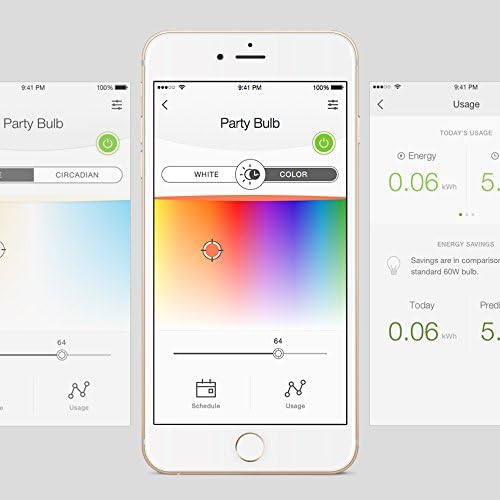
Image 5.2: Kasa app interface showing options for scheduling and tracking energy usage.
Video 5.3: Official TP-Link video demonstrating the color changing capabilities of the Smart Wi-Fi LED Bulb.
6. Maintenance
To ensure optimal performance and longevity of your Kasa Smart Wi-Fi LED Light Bulb, follow these maintenance guidelines:
- Cleaning: Ensure the bulb is off and cool before cleaning. Wipe with a soft, dry cloth. Do not use liquid or abrasive cleaners.
- Storage: If storing the bulb for an extended period, keep it in a cool, dry place away from direct sunlight.
- Firmware Updates: Regularly check the Kasa app for firmware updates to ensure your bulb has the latest features and security enhancements.
7. Troubleshooting
If you encounter issues with your Kasa Smart Wi-Fi LED Light Bulb, refer to the following common solutions:
7.1 Bulb Not Connecting to Wi-Fi
- Ensure your Wi-Fi network is 2.4 GHz. The LB130 does not support 5 GHz networks.
- Check your Wi-Fi signal strength. The bulb should be within range of your router.
- Restart the bulb by turning the light switch off and on.
- Restart your Wi-Fi router.
- Perform a factory reset on the bulb (turn the light switch off and on five times, waiting 1 second between each flip, until the bulb flashes).
7.2 Voice Control Not Working
- Verify that your Kasa account is correctly linked to your Alexa or Google Assistant app.
- Ensure the bulb is online and responsive in the Kasa app.
- Try re-discovering devices in your Alexa or Google Home app.
- Use the exact name you assigned to the bulb in the Kasa app when giving voice commands.
7.3 Bulb Flickers or Changes Color Unexpectedly
- Ensure the bulb is not connected to a traditional dimmer switch. Smart bulbs require a constant power supply.
- Check for Wi-Fi interference. Move the bulb or router if possible.
- Update the bulb's firmware via the Kasa app.
8. Specifications
Detailed technical specifications for the Kasa Smart Wi-Fi LED Light Bulb LB130:
| Feature | Specification |
|---|---|
| Model Number | LB130 |
| Light Type | LED |
| Bulb Shape Size | A19 |
| Bulb Base | E26 |
| Wattage | 11 Watts (60W Incandescent Equivalent) |
| Brightness | 800 Lumens |
| Light Color | Multicolor (Dynamic - Multiple Color Options) |
| Color Temperature | 2500K - 9000K (Tunable White) |
| Voltage | 100-120 Volts, 60 Hertz |
| Connectivity | Wi-Fi (2.4 GHz only) |
| Control Method | App, Voice (Alexa, Google Assistant) |
| Average Life | 25,000 Hours |
| Product Dimensions | 3.11"W x 6.73"H |
| Item Weight | 7 Ounces |
| Indoor/Outdoor Usage | Indoor |

Image 8.1: Dimensions of the Kasa Smart Wi-Fi LED Light Bulb (LB130).
9. Warranty
This product is covered by a 2-year warranty from the date of purchase. For warranty claims or further details, please refer to the official TP-Link website or contact customer support.
10. Support
For technical support, troubleshooting guides, FAQs, and other resources, please visit the official TP-Link support website:


