
Introduction
This manual provides detailed instructions for the installation, operation, and maintenance of your TECKNET Wireless Doorbell (Model HDB01806). Please read this manual thoroughly before using the product to ensure proper function and longevity. This doorbell system offers a convenient and reliable solution for your home or office.
Product Overview
The TECKNET Wireless Doorbell is a battery-free, waterproof doorbell system designed for ease of use and reliability. It features a plug-in receiver with an integrated EU socket, a self-powered transmitter, multiple ringtones, and adjustable volume levels. The system is engineered to provide a stable wireless connection over a significant range.

Image: The TECKNET Wireless Doorbell system, showing the plug-in receiver with an integrated socket and the sleek, white transmitter unit.
What's Included
Upon opening the package, please verify that all the following components are present:
- 1 x TECKNET Wireless Doorbell Receiver (Plug-in unit)
- 1 x TECKNET Wireless Doorbell Transmitter (Push button unit)
- Mounting Accessories (Screws, anchors, double-sided adhesive tape)
- 1 x User Manual
Key Features
- Plug-in Receiver with Integrated Socket: The receiver plugs directly into a standard EU wall socket and includes a pass-through socket, ensuring no power outlet is lost.
- Battery-Free Transmitter (Self-Powered): The transmitter generates its own power when pressed, eliminating the need for batteries and reducing environmental impact.
- Digital Code System: Utilizes a digital code system to prevent interference from other wireless devices, ensuring reliable operation.
- Extended Wireless Range: Offers a wireless range of up to 400 meters (1300 feet) in open areas, suitable for large homes or properties.
- 32 Selectable Ringtones: Choose from a variety of 32 melodies to personalize your doorbell sound.
- 5 Adjustable Volume Levels: Adjust the volume from 25 dB to 90 dB to suit your preference and environment.
- Visual LED Signal: A blue LED light flashes on the receiver when the doorbell is pressed, providing a visual alert, especially useful in noisy environments or for individuals with hearing impairments.
- IP65 Waterproof Transmitter: The transmitter is rated IP65 waterproof, making it suitable for outdoor installation and resistant to dust and water splashes.

Image: The receiver unit plugged into a wall socket, demonstrating the integrated pass-through socket for continued use of the power outlet.
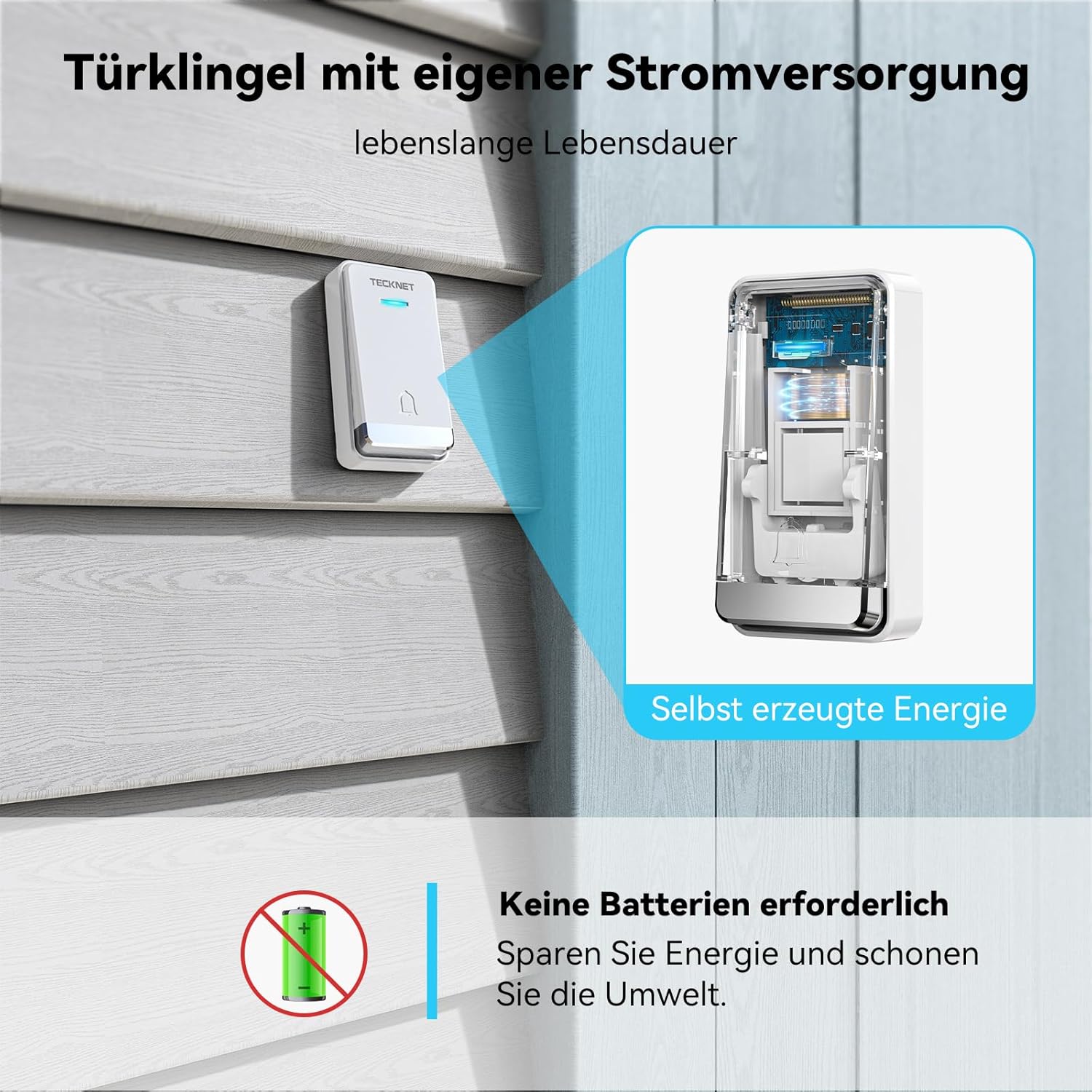
Image: A cutaway view of the transmitter, illustrating the internal self-powering mechanism that eliminates the need for batteries.

Image: An illustration showing the doorbell's effective range through various common building materials like wooden doors, brick walls, and concrete, extending up to 400 meters.

Image: A visual representation of the doorbell's 0-110 dB volume levels and 60 ringtones (note: product description states 32 ringtones, 5 volume levels, using product description for accuracy).
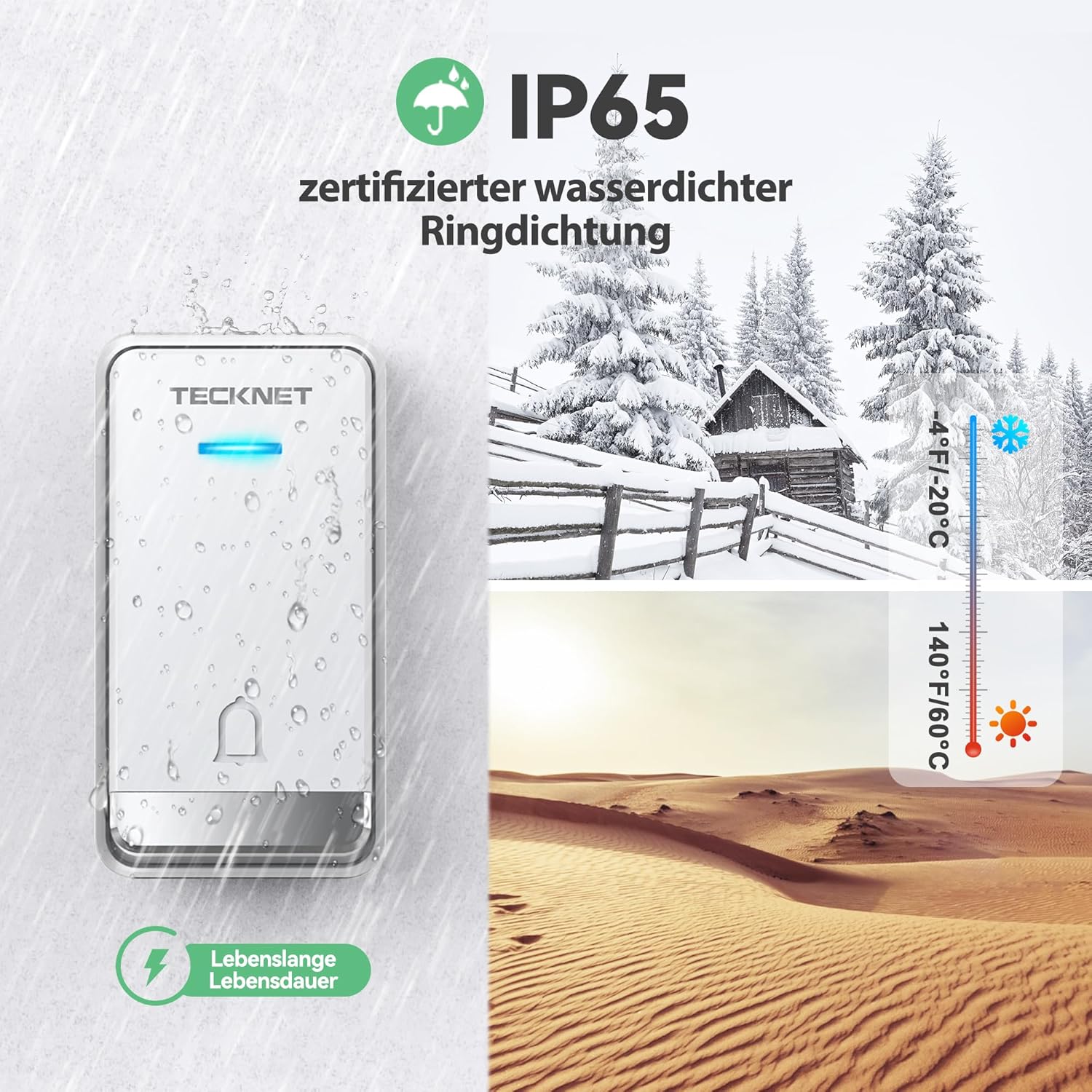
Image: The transmitter unit shown with water droplets, illustrating its IP65 waterproof rating and suitability for various weather conditions, from cold to hot climates.
Setup Instructions
1. Receiver Installation
- Select a suitable indoor EU wall socket for the receiver. Ensure it is within the desired range of the transmitter.
- Plug the receiver directly into the chosen wall socket. The integrated socket on the receiver allows you to continue using the power outlet for other devices.
2. Transmitter Installation
Choose a location for the transmitter (push button unit) outside your door. Consider factors like direct sunlight, rain exposure, and ease of access for visitors. The transmitter is IP65 waterproof, but placing it under a small overhang can offer additional protection.

Image: An illustration detailing two methods for installing the transmitter: using double-sided adhesive tape for a quick setup, or using screws and anchors for a more permanent fixture.
There are two primary methods for mounting the transmitter:
- Using Double-Sided Adhesive Tape:
- Clean the mounting surface thoroughly to ensure it is dry and free of dust or grease.
- Peel off one side of the protective film from the double-sided adhesive tape and attach it to the back of the transmitter.
- Peel off the other side of the protective film and firmly press the transmitter onto the desired surface for at least 30 seconds.
- Using Screws and Anchors:
- Mark the desired drilling points on the wall using the transmitter as a template.
- Drill two holes at the marked positions.
- Insert the plastic anchors into the drilled holes.
- Align the transmitter with the holes and secure it with the provided screws.
The transmitter and receiver are pre-paired at the factory. If re-pairing is ever needed, refer to the troubleshooting section.
Operating Instructions
1. Changing Ringtones
To change the ringtone, locate the 'Music Selection' button on the side of the receiver. Press this button repeatedly to cycle through the 32 available melodies. The receiver will play each melody as you press the button. Once you hear your preferred melody, stop pressing the button, and it will be set.
2. Adjusting Volume
To adjust the volume, locate the 'Volume Control' button on the side of the receiver. Press this button to cycle through the 5 available volume levels (ranging from 25 dB to 90 dB). Select the volume level that best suits your needs.
3. LED Indicator
When the transmitter button is pressed, the receiver's blue LED light will flash simultaneously with the chosen ringtone. This visual indicator is helpful in loud environments or for individuals who may not hear the chime.

Image: The receiver unit plugged into a wall, with a visual representation of its memory function, indicating that selected ringtones and volume levels are retained even after power loss.
The doorbell system features a memory function, retaining your selected ringtone and volume level even after a power outage or if the receiver is unplugged.
Maintenance
To ensure the optimal performance and longevity of your TECKNET Wireless Doorbell, follow these simple maintenance guidelines:
- Cleaning: Wipe both the transmitter and receiver with a soft, dry cloth. Avoid using abrasive cleaners, solvents, or harsh chemicals, as these can damage the surfaces.
- Transmitter Placement: Periodically check the transmitter's mounting to ensure it remains securely attached to the surface. If using adhesive tape, ensure the surface is still clean and dry.
- No Battery Replacement: The transmitter is self-powered, so no battery replacement is ever required.
- Environmental Conditions: While the transmitter is waterproof (IP65), extreme temperatures or prolonged exposure to direct harsh weather conditions (e.g., blizzards, intense heat waves) should be minimized if possible to extend its lifespan.
Troubleshooting
If you encounter any issues with your TECKNET Wireless Doorbell, please refer to the following common problems and solutions:
| Problem | Possible Cause | Solution |
|---|---|---|
| Doorbell does not ring. | Receiver unplugged or no power. Transmitter too far from receiver. Obstructions between units. Units are not paired. | Ensure receiver is securely plugged into a working power outlet. Move receiver closer to transmitter. Reduce obstructions (e.g., thick walls, metal objects). Re-pair the units (see below). |
| Short wireless range. | Thick walls or metal structures. Interference from other devices. Receiver placed too low. | Relocate receiver or transmitter to minimize obstructions. Move doorbell away from other wireless devices (e.g., Wi-Fi routers, microwaves). Place receiver higher on a wall. |
| False ringing. | Interference from other wireless devices. | The digital code system minimizes this, but if it occurs, try re-pairing the units to reset the code. |
| How to re-pair the units. | Units lost pairing due to power surge or reset. | 1. Plug in the receiver. 2. Press and hold the 'Volume Control' button on the receiver for approximately 5-7 seconds until you hear a 'ding' sound and the LED flashes rapidly. 3. Within 10 seconds, quickly press the transmitter button. The receiver should chime with the selected melody, indicating successful pairing. |
Technical Specifications
| Feature | Specification |
|---|---|
| Model Number | HDB01806 |
| Receiver Voltage | AC 100-220V, 50HZ/60HZ |
| Receiver Power Consumption | 0.5 W |
| Volume Levels | 5 levels (25 dB to 90 dB) |
| Ringtones | 32 melodies |
| Operating Frequency | 433.92 + 2 MHz |
| Wireless Range | Up to 400 meters (open area) |
| Transmitter Waterproof Rating | IP65 |
| Receiver Dimensions (L x W x H) | 8.51 x 5.99 x 7.49 cm |
| Transmitter Dimensions (L x W x H) | 8.5 x 6 x 7.5 cm |
| Weight | 190 g (total package) |
Warranty and Support
TECKNET products are designed and manufactured to the highest quality standards. This product is covered by a manufacturer's warranty. For specific warranty terms and conditions, please refer to the warranty card included in your product packaging or visit the official TECKNET website.
If you require technical assistance or have any questions regarding your TECKNET Wireless Doorbell, please contact TECKNET customer support through their official website or the contact information provided in your product documentation. Please have your model number (HDB01806) and purchase details ready when contacting support.


