
Shure P3TRA215CL-G20
Shure PSM300 P3TRA215CL Pro Wireless in-Ear Personal Monitoring System
User Manual
Introduction
The Shure PSM300 Professional Stereo Personal Monitor System delivers detailed 24-bit digital audio and reliable wireless freedom. This system is designed to provide clear, low-noise audio with no artifacts, ensuring optimal performance on stage. It offers dependable wireless coverage up to 300 ft. (90 m) and is easy to set up and operate with one-touch frequency scan and sync. The P3TRA215CL system includes the P3RA bodypack receiver and SE215-CL Sound Isolating Earphones.
System Components
The PSM300 P3TRA215CL system includes the following main components:
- P3RA Bodypack Receiver: Durable aluminum construction with advanced audio controls.
- P3T Wireless Transmitter: Rack-mountable unit for sending audio signals.
- SE215-CL Sound Isolating Earphones: Designed for detailed sound, enhanced bass, and up to 37 dB of isolation.
- Accessories: Rack mount and hardware kits, 1/4 wave antenna, BNC bulkhead adapter, BNC cable, power supply, battery adapter kit, 2 AA batteries, and a zipper bag.

Figure 1: Overview of the Shure PSM300 P3TRA215CL system, showing the P3T transmitter, P3RA bodypack receiver, and SE215-CL earphones.
Setup Guide
1. Transmitter Setup (P3T)
- Placement: Position the P3T transmitter in a rack or on a stable surface near your audio mixer.
- Power Connection: Connect the provided power supply to the transmitter's power input and plug it into an AC outlet.
- Antenna Connection: Attach the 1/4 wave antenna to the ANTENNA port on the rear of the transmitter.
- Audio Input: Connect your audio source (e.g., mixer outputs) to the LEFT/CH.1 IN and RIGHT/CH.2 IN inputs on the rear panel using 1/4-inch TRS cables.
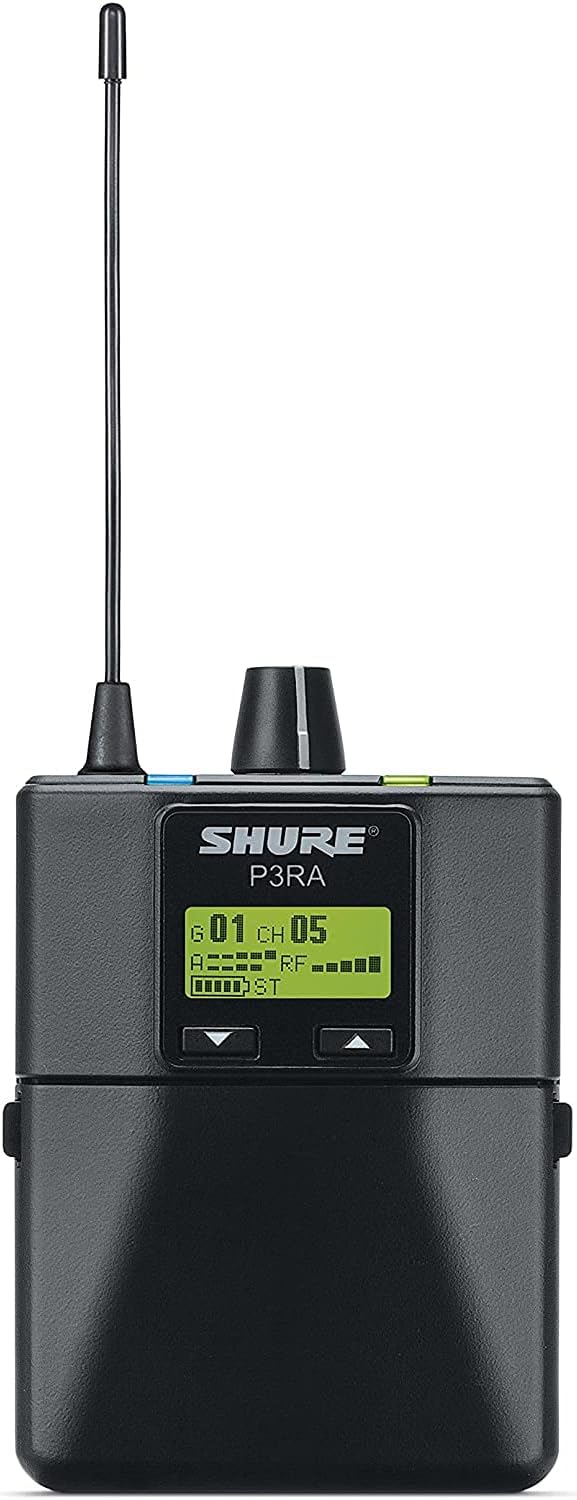
Figure 2: Front panel of the Shure PSM300 P3T Transmitter, showing input knob, sync button, stereo/mix switch, group/channel buttons, and power button.

Figure 3: Rear panel of the Shure PSM300 P3T Transmitter, illustrating power input, audio inputs (L/R), loop outputs, and antenna port.
2. Receiver Setup (P3RA)
- Battery Installation: Open the battery compartment on the P3RA bodypack receiver and insert two AA batteries. The system supports both standard AA batteries and optional Shure SB900 lithium-ion rechargeable batteries.
- Earphone Connection: Plug the SE215-CL Sound Isolating Earphones into the 3.5mm headphone jack on the top of the P3RA receiver.
- Power On: Rotate the volume knob on the top of the receiver clockwise to power it on.

Figure 4: Shure P3RA Bodypack Receiver with the battery compartment open, illustrating the correct insertion of AA batteries.

Figure 5: Shure P3RA Bodypack Receiver with SE215-CL earphones plugged into the top jack.
3. Frequency Scan and Sync
- Scan for Clean Channel: On the P3RA receiver, press the 'scan' button to automatically find an available, clear frequency.
- Sync Transmitter and Receiver: Align the infrared (IR) windows on the P3T transmitter and P3RA receiver. Press the 'sync' button on the transmitter. The receiver will automatically sync to the selected frequency.

Figure 6: The display of the Shure P3RA Bodypack Receiver, indicating the selected group and channel, along with RF signal strength and battery life.
Operating Instructions
Mix Mode Technology
The PSM300 system offers flexible monitoring modes:
- Stereo Mode: Provides a stereo mix from the two input channels. Ideal for a full, immersive sound experience.
- Mono Mode: Combines both input channels into a single mono signal, heard equally in both earphones. Useful for basic monitoring.
- MixMode: Allows the performer to create a personal mix by adjusting the balance between two distinct audio channels (e.g., vocals and instruments) directly from the bodypack receiver. This is achieved using the balance control on the P3RA receiver.
Video 1: Shure PSM In-Ear Monitoring Basics. This video provides an overview of the PSM300 system's operational modes, including Stereo, Mono, and MixMode, demonstrating how to create a personalized audio mix.
Video 2: Shure PSM300 Product Overview. This video highlights the key features and benefits of the Shure PSM300 system, including its robust design and ease of use for personal monitoring.
Optimizing Performance
- Line of Sight: Maintain a direct line of sight between the transmitter antenna and the bodypack receiver for optimal signal reception and to minimize dropouts.
- Frequency Coordination: When using multiple wireless systems (e.g., microphones and in-ear monitors), ensure all devices operate on compatible frequencies to avoid interference.
- Bodypack Placement: If wearing both a wireless microphone transmitter and an in-ear monitor receiver, place them on opposite sides of your body to reduce potential interference.
Maintenance
- Cleaning: Use a soft, dry cloth to clean the exterior of the transmitter and receiver. Avoid using harsh chemicals or abrasive materials.
- Earphone Care: Regularly clean the SE215-CL earphones according to Shure's guidelines to maintain sound quality and hygiene. Replace ear tips as needed.
- Battery Management: For optimal battery life, use high-quality AA batteries or the recommended Shure SB900 lithium-ion rechargeable battery. Remove batteries if the system will not be used for an extended period.
Troubleshooting
| Problem | Possible Cause | Solution |
|---|---|---|
| No Audio / Dropouts | Interference, out of range, low battery, incorrect frequency. | Perform frequency scan and sync. Ensure clear line of sight. Check battery level. |
| Poor Sound Quality | Interference, earphone fit, input level issues. | Rescan for a clear frequency. Adjust earphone tips for a secure fit. Check input levels on transmitter and mixer. |
| Receiver Not Powering On | Dead batteries, incorrect battery insertion. | Replace batteries or recharge. Ensure batteries are inserted with correct polarity. |
Specifications
- Model: P3TRA215CL-G20
- Frequency Band: G20 (488-512 MHz)
- Audio Frequency Response: 38 Hz–15 kHz
- Wireless Range: Up to 300 ft. (90 m)
- Earphones: SE215-CL Sound Isolating Earphones (up to 37 dB isolation)
- Receiver Power: 2 AA batteries (included)
- Transmitter Dimensions: 18.5 x 14.6 x 4.5 inches
- Transmitter Weight: 3.59 pounds
- Material: Aluminum (receiver bodypack)
Warranty Information
This product is covered by a limited warranty. For detailed warranty terms and conditions, please refer to the official Warranty (PDF) document available on the product's Amazon page or Shure's official website. Keep your proof of purchase for warranty claims.
2-Year Protection Plan: Available for purchase at $103.99.
3-Year Protection Plan: Available for purchase at $129.99.
Support and Contact
For further assistance, technical support, or product inquiries, please visit the official Shure website or refer to the comprehensive User Manual (PDF) provided with your product.
Related documentsP3TRA215CL-G20


Ask a question about this manual
Ask about setup, troubleshooting, compatibility, parts, safety, or missing instructions. Manuals+ will review the question and use this page’s manual context to help answer it.