
1. Overview
The Timex Men's Ironman Classic 30 38mm Watch is a durable and functional digital timepiece designed for active individuals. It features a 100-hour chronograph, 30-lap memory, 24-hour countdown timer, multiple alarms, dual time zones, and the INDIGLO backlight for clear visibility in low light conditions. This manual will guide you through its various functions and maintenance.

Figure 1: Front view of the Timex Ironman Classic 30 38mm Watch.
2. Setup
2.1 Initial Time and Date Setting
- Press the MODE button repeatedly until the time setting screen appears.
- Use the SET/RECALL button to select the digit you wish to adjust (hours, minutes, seconds, month, day, year).
- Use the START/SPLIT button to increase the selected value.
- Press MODE to confirm and exit the setting mode.
2.2 Button Functions
- MODE: Cycles through watch functions (Time, Chronograph, Timer, Alarm).
- SET/RECALL: Used to set values in setting modes and recall lap times.
- INDIGLO: Activates the backlight for the display.
- STOP/RESET: Stops the chronograph/timer and resets values.
- START/SPLIT: Starts the chronograph/timer and records split/lap times.

Figure 2: Angled front view of the watch, highlighting the function buttons.
3. Operating Instructions
3.1 Chronograph Function
The 100-hour chronograph measures elapsed time with lap or split timing. It includes a 30-lap memory recall and a 99-lap counter.
- Press MODE until "CHRONO" appears on the display.
- Press START/SPLIT to begin timing.
- Press START/SPLIT again to record a lap or split time. The display will show the lap time while the chronograph continues to run in the background.
- Press STOP/RESET to pause the chronograph. Press again to resume.
- To reset, press and hold STOP/RESET.
3.2 Countdown Timer
The 24-hour countdown timer features countdown/stop and countdown/repeat options.
- Press MODE until "TIMER" appears.
- Use SET/RECALL and START/SPLIT to set the desired countdown duration.
- Press START/SPLIT to begin the countdown.
- To pause, press STOP/RESET. Press again to resume.
- To reset, press and hold STOP/RESET.
3.3 Alarms
The watch includes three customizable alarms (daily, weekday, or weekend).
- Press MODE until "ALARM" appears.
- Use SET/RECALL to select an alarm (ALA 1, ALA 2, ALA 3).
- Use SET/RECALL and START/SPLIT to set the alarm time and frequency (daily, weekday, weekend).
- Press MODE to activate the alarm. An alarm icon will appear on the display.
3.4 INDIGLO Backlight
Press the INDIGLO button (top right) to illuminate the watch display for enhanced visibility in low-light conditions.
Video 1: A brief overview of the Timex Men's T5K822 Ironman Classic 30 Black Resin Strap Watch, demonstrating its features and design.
4. Maintenance
4.1 Water Resistance
The watch is water-resistant up to 100 meters (330 feet). This makes it suitable for showering, swimming, and snorkeling. However, it is not recommended for scuba diving. Do not press any buttons while the watch is submerged to prevent water ingress.
4.2 Cleaning
Clean the watch with a soft, damp cloth. Avoid using harsh chemicals or abrasive materials that could damage the case or strap.
4.3 Battery Replacement
The watch uses 1 Lithium Metal battery (included). Battery replacement should ideally be performed by a qualified watch technician to ensure water resistance is maintained. If attempting self-replacement, note that some models may feature specialized screws (e.g., triangle head screws) requiring specific tools.
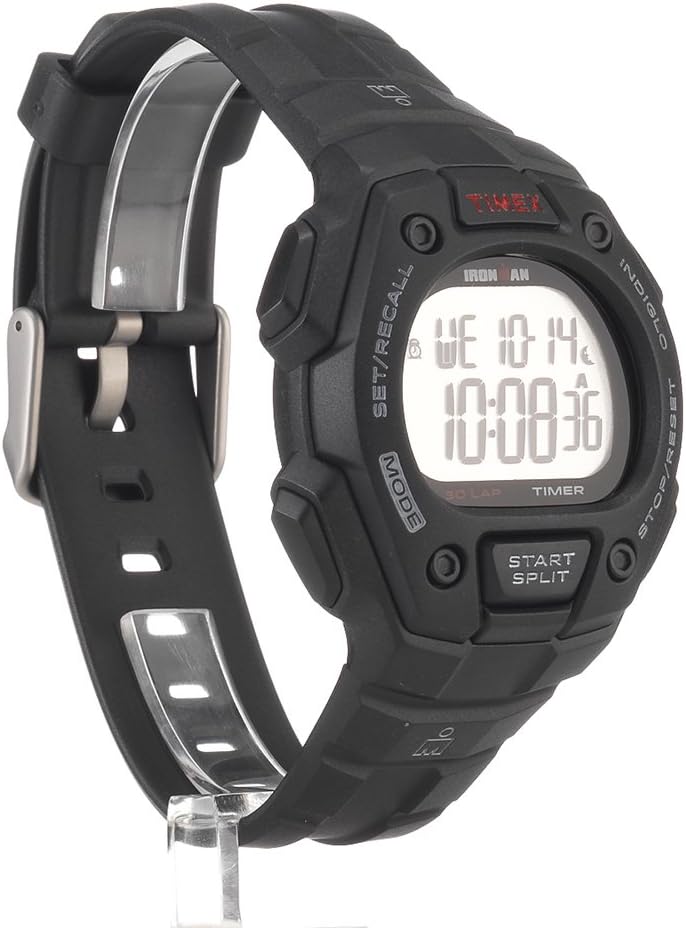
Figure 3: Back view of the watch, showing the case back.
5. Troubleshooting
- Display is blank or dim: The battery may be low or depleted. Replace the battery.
- Buttons are unresponsive: Ensure the watch is not in a locked mode (if applicable, refer to specific model instructions for lock features). If the issue persists, a reset may be required (consult the full manual or contact support).
- Incorrect time/date: Re-enter the time and date settings as described in Section 2.1.
- Water inside the watch: Immediately take the watch to a qualified service center. Do not attempt to open it yourself, as this may void the warranty and cause further damage.
6. Specifications
| Model Number | T5K822 |
| Case Diameter | 38mm |
| Case Material | Resin |
| Strap Material | Resin |
| Water Resistance | 100 meters (330 feet) |
| Battery Type | Lithium Metal (included) |
| Chronograph | 100-hour with lap/split, 30-lap memory, 99-lap counter |
| Timer | 24-hour countdown with stop/repeat |
| Alarms | 3 daily, weekday, or weekend alarms |
| Backlight | INDIGLO |
Video 2: A short promotional video from Timex Corporation showcasing the Ironman Classic series.
7. Warranty and Support
Your Timex watch is covered by a manufacturer's warranty against defects in materials and workmanship. For specific warranty details, including duration and coverage, please refer to the warranty card included with your purchase or visit the official Timex website. For technical support, service, or inquiries, please contact Timex customer service directly.
Timex Official Website: www.timex.com


