
Kwikset 99130-003
Kwikset SmartCode 913 Electronic Keypad Deadbolt User Manual
Model: 99130-003
1. Introduction
Product Overview
The Kwikset SmartCode 913 is a non-connected electronic keypad deadbolt designed for convenient keyless entry. It features a motorized deadbolt for one-touch locking and unlocking, and a backlit keypad for enhanced visibility in low light conditions. This deadbolt offers personalized code access and includes SmartKey Security as a backup keyway.
Key Features
- Keyless entry with a 10-digit backlit audible keypad.
- Motorized deadbolt for one-touch locking.
- Supports up to 16 customizable user codes plus a master code for added security.
- 30-second auto-lock option for enhanced security.
- Includes traditional key functionality for manual override.
- Features SmartKey re-key technology with bump guard protection.
- BHMA Grade 2 certified and UL certified with a 20-minute fire rating.
- Operates on 4 AA batteries (not included).
2. Setup and Installation
Before You Begin
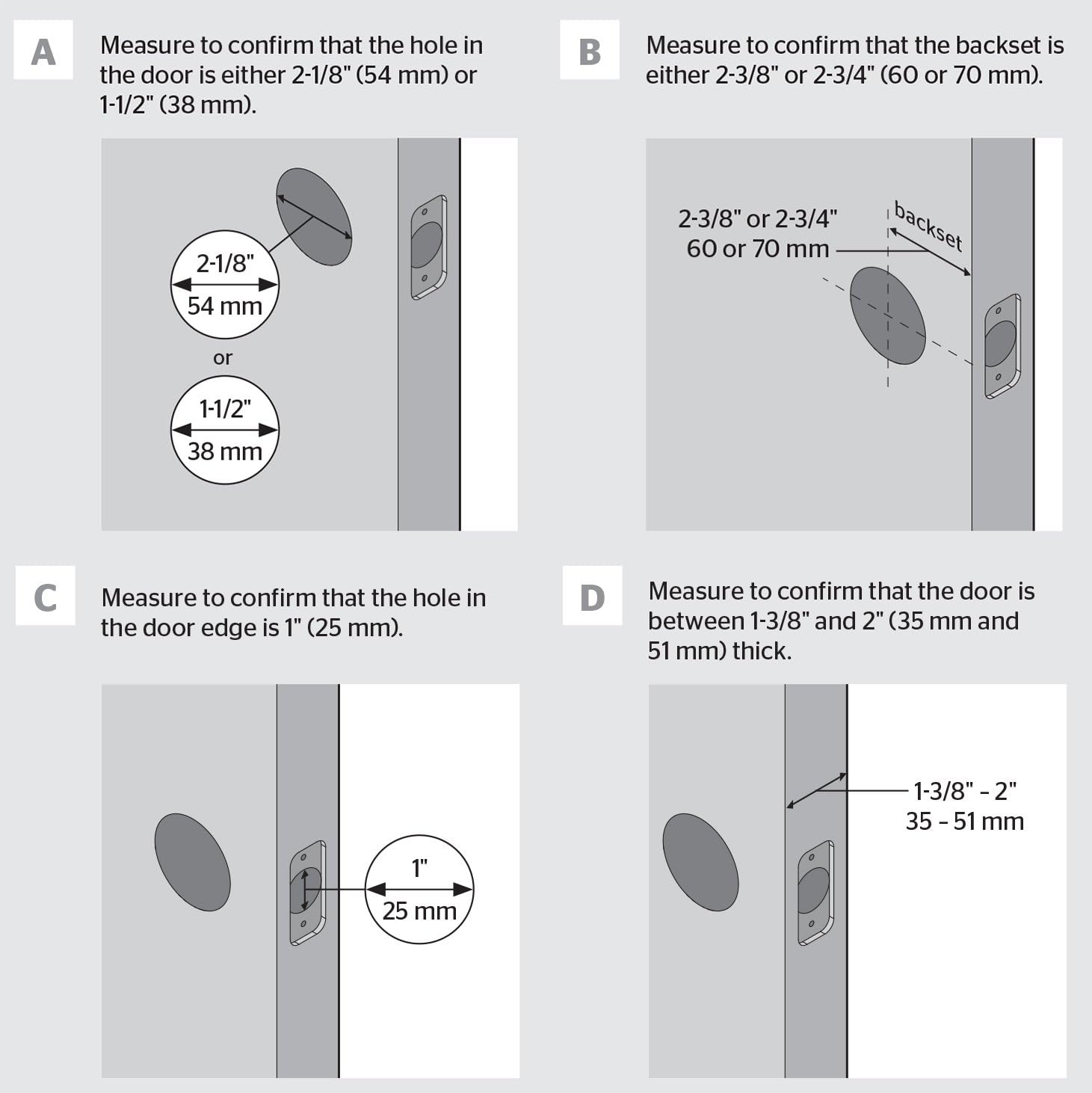
Before installing your SmartCode 913 deadbolt, ensure your door meets the following specifications:
- Door thickness: 1-3/8 inches to 2 inches (35 mm to 51 mm).
- Cross bore hole diameter: 2-1/8 inches (54 mm) or 1-1/2 inches (38 mm).
- Backset: 2-3/8 inches or 2-3/4 inches (60 mm or 70 mm).
- Edge bore hole diameter: 1 inch (25 mm).
You will need a Phillips head screwdriver for installation. No new screw holes or hardwiring are typically required.
Door Measurement Diagram
This diagram illustrates the critical measurements for your door to ensure proper fit and function of the SmartCode 913 deadbolt, including cross bore, backset, edge bore, and door thickness.
Installation Steps
For detailed, step-by-step installation instructions, please refer to the official Installation Manual (PDF) provided by Kwikset. This manual contains comprehensive diagrams and instructions to guide you through the process.
A digital copy of the installation guide can often be found on the product's support page or included with your purchase.
3. Operating Instructions
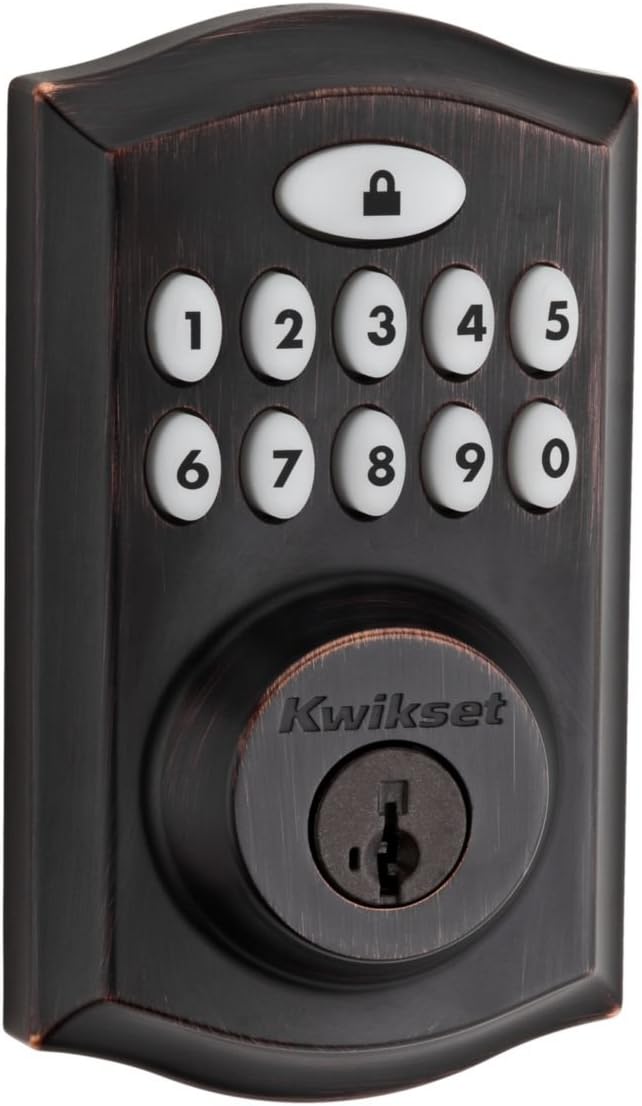
Product Appearance

The image above shows the exterior keypad and the interior unit of the Kwikset SmartCode 913 deadbolt, highlighting its design and components.

This image demonstrates the SmartCode 913 deadbolt installed on a door, paired with a traditional door knob, showcasing its integrated appearance.

Here, the SmartCode 913 deadbolt is shown installed on a door, complemented by a lever-style handle, illustrating its versatility with different door hardware.
This visual guide highlights the compatibility of the SmartCode 913 deadbolt with a range of Kwikset door hardware, including various styles of handlesets, levers, and knobs, allowing for a cohesive look.
Unlocking the Door
- Using a User Code: Enter your 4-8 digit user code on the keypad. The deadbolt will retract automatically.
- Using the Key: Insert the physical key into the cylinder and turn it to unlock the deadbolt.
Locking the Door
- One-Touch Locking: Press the "Lock" button on the keypad. The deadbolt will extend automatically.
- Auto-Lock Feature: If enabled, the deadbolt will automatically lock 30 seconds after being unlocked.
- Using the Key: Insert the physical key into the cylinder and turn it to lock the deadbolt.
Programming User Codes
The SmartCode 913 allows you to program up to 16 unique user codes. Refer to the User Guide (PDF) for detailed instructions on adding, deleting, and managing user codes, including the master code functionality.
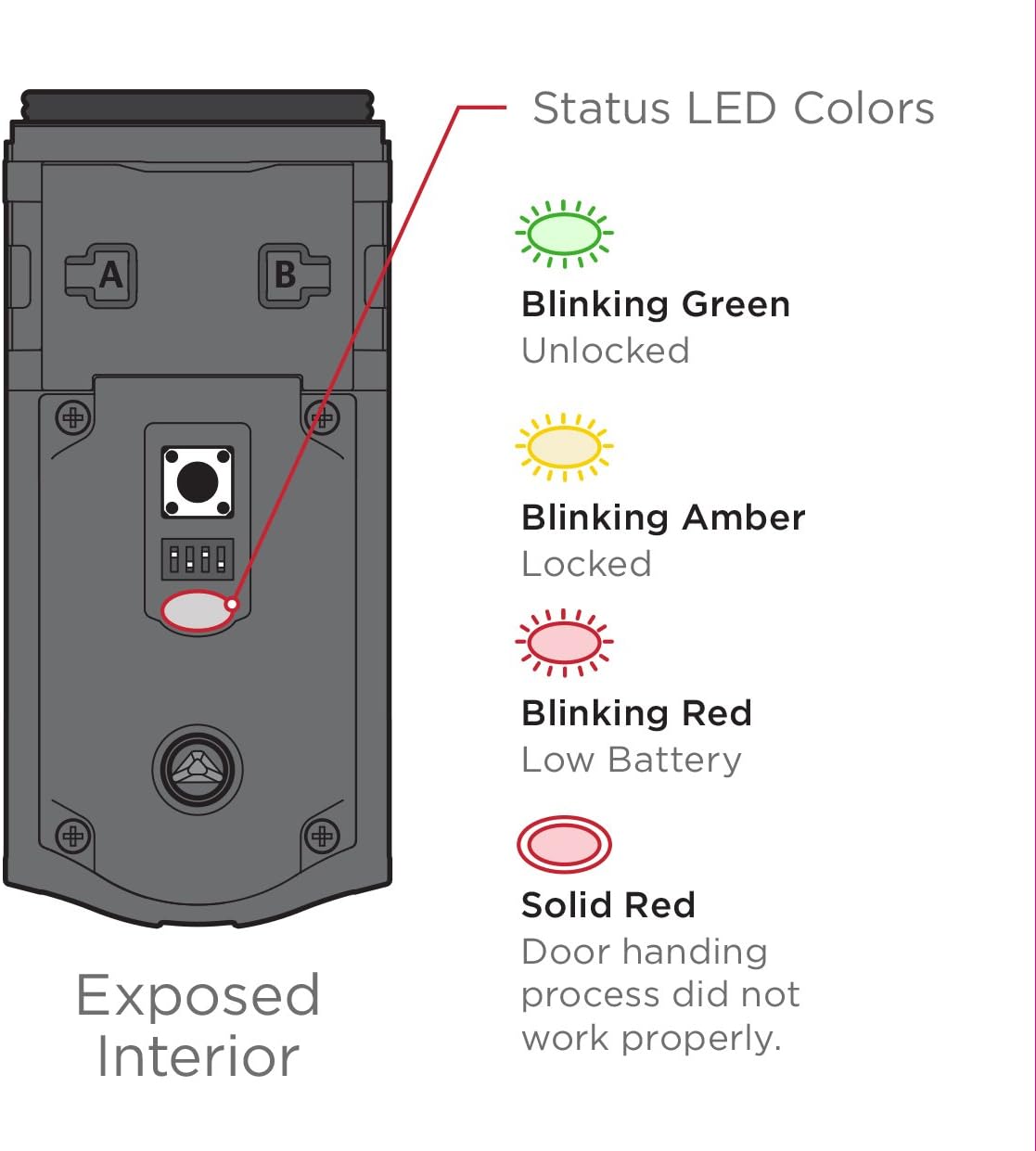
Status Indicators

This diagram explains the different colors of the Status LED on the interior unit of the SmartCode 913 deadbolt: Blinking Green (Unlocked), Blinking Amber (Locked), Blinking Red (Low Battery), and Solid Red (Door handing process did not work properly).
- Blinking Green: Indicates the deadbolt is unlocked.
- Blinking Amber: Indicates the deadbolt is locked.
- Blinking Red: Indicates low battery. Replace batteries promptly.
- Solid Red: Indicates an issue with the door handing process. Refer to troubleshooting.
4. SmartKey Security
The Kwikset SmartCode 913 features SmartKey Security, allowing you to re-key your lock yourself in seconds. This is particularly useful if you've recently moved, lost a key, or wish to use a single key for multiple Kwikset locks.
This diagram illustrates the SmartKey Security feature, showing where the re-keying tool is inserted and highlighting the benefits of having one key for all your locks, such as convenience after moving or in case of lost keys.
To re-key your lock, you will need the SmartKey re-key tool (included with your lock) and the new key you wish to use. Follow the specific re-keying instructions provided in your product's User Manual.
5. Maintenance
Battery Replacement
The SmartCode 913 deadbolt requires 4 AA alkaline batteries for operation. When the batteries are low, the Status LED will blink red. To replace the batteries:
- Remove the interior cover of the deadbolt.
- Carefully remove the old batteries from the battery pack.
- Insert four new AA alkaline batteries, ensuring correct polarity (+/-).
- Replace the interior cover.
It is recommended to use high-quality alkaline batteries for optimal performance and longevity.
Care and Cleaning
To maintain the finish and functionality of your Kwikset SmartCode 913 deadbolt:
- Clean with a soft, damp cloth.
- Do not use abrasive cleaners, solvents, or harsh chemicals, as these can damage the finish and electronic components.
- Avoid exposing the lock to excessive moisture.
6. Troubleshooting
If you encounter issues with your Kwikset SmartCode 913 deadbolt, consider the following common solutions:
- Lock not responding: Check battery levels. If the Status LED is blinking red, replace the batteries.
- Keypad not lighting up: Ensure batteries are correctly installed and have sufficient charge.
- Deadbolt not extending/retracting fully: Verify that the door handing process was completed correctly during installation. A solid red Status LED indicates a handing issue. Re-perform the door handing procedure as per the installation guide.
- User code not working: Ensure the correct code is being entered. Try reprogramming the user code. Verify that the master code is correctly set.
- Lock is noisy: Some noise during operation is normal for motorized deadbolts. If the noise is excessive or unusual, ensure all components are properly aligned and secured.
For more detailed troubleshooting steps or persistent issues, please consult the comprehensive User Manual (PDF) or contact Kwikset customer support.
7. Product Specifications
| Specification | Detail |
|---|---|
| Brand | Kwikset |
| Model Name | SmartCode 913 Non-Connected |
| Model Number | 99130-003 |
| Lock Type | Electronic Lock, Key Lock |
| Special Feature | Key Unlock |
| Material | Bronze |
| Style | Traditional |
| Color | Traditional Venetian Bronze |
| Item Dimensions (L x W x H) | 3.5 x 5.38 x 9.88 inches |
| Item Weight | 1.5 Pounds |
| Power Source | 4 AA batteries (not included) |
| Battery Cell Type | Alkaline |
| Control Method | Touch |
| Certifications | BHMA Grade 2, UL Certified (20-minute fire rating) |
8. Warranty and Support
Kwikset stands behind the quality of its products. For information regarding your product's warranty, please refer to the warranty documentation included with your purchase or visit the official Kwikset website.
For additional support, frequently asked questions, or to purchase accessories, please visit the Kwikset Store on Amazon or their official customer support channels.
Related documents99130-003


Ask a question about this manual
Ask about setup, troubleshooting, compatibility, parts, safety, or missing instructions. Manuals+ will review the question and use this page’s manual context to help answer it.