
Introduction
This manual provides instructions for the proper use and maintenance of the Icom HM-158LA Compact Speaker Microphone. This accessory is designed to enhance the audio quality and operational flexibility of compatible Icom two-way radios, allowing for communication without needing to remove the radio from its carry case.
Product Overview
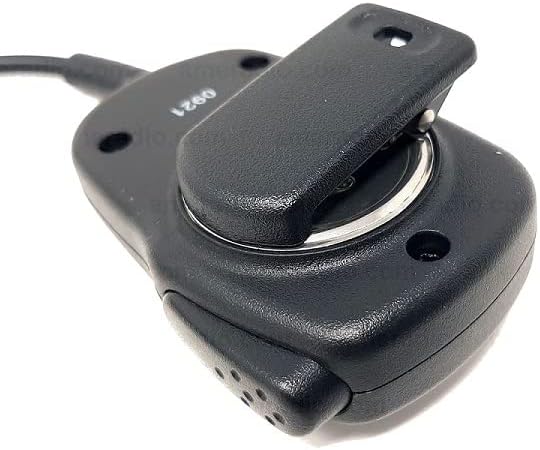
The Icom HM-158LA is a compact speaker microphone featuring a 2-pin screw-down connector, a revolving alligator clip, and a stereo microphone with a mono speaker. It is engineered for clear audio transmission and reception.
Key Features:
- Compact design for portability and ease of use.
- Stereo microphone for clear voice capture.
- Mono speaker for audible reception.
- Revolving alligator clip for secure and flexible attachment to clothing or gear.
- Durable 2-pin screw-down connector for reliable connection to compatible radios.

Package Contents
The Icom HM-158LA package includes the following item:
- Icom HM-158LA Compact Speaker Microphone
Setup and Installation
- Connecting to the Radio: Locate the 2-pin accessory jack on your compatible Icom two-way radio. Align the 2-pin connector of the HM-158LA with the radio's jack and gently push it in. Secure the connection by screwing down the connector's retaining screw until it is finger-tight. Do not overtighten.
- Attaching the Microphone: Use the revolving alligator clip located on the back of the speaker microphone to attach it securely to your clothing, such as a collar, lapel, or pocket. The clip's revolving feature allows for optimal positioning.

Operation
- Receiving Audio: Once connected, audio from the radio will be routed through the HM-158LA's mono speaker. Adjust the radio's volume control to a comfortable listening level.
- Transmitting Audio: To transmit, press and hold the Push-To-Talk (PTT) button located on the side of the speaker microphone. Speak clearly into the microphone, keeping it approximately 2 to 6 inches (5 to 15 cm) from your mouth for optimal clarity. Release the PTT button to return to receive mode.
- Microphone Gain: Depending on your radio model and environment, you may need to adjust the microphone gain setting on your radio for best performance. Refer to your radio's user manual for instructions on adjusting microphone gain.
Maintenance
- Cleaning: Wipe the exterior of the speaker microphone with a soft, damp cloth. Do not use harsh chemicals or abrasive cleaners.
- Storage: Store the HM-158LA in a dry environment, away from extreme temperatures and direct sunlight, when not in use.
- Cable Care: Avoid sharp bends or excessive pulling on the coiled cable to prevent internal wire damage.
Troubleshooting
- No Audio from Speaker:
- Ensure the 2-pin connector is fully inserted and the retaining screw is tightened.
- Check the radio's volume level.
- Verify the radio is powered on and functioning correctly.
- Poor Transmit Audio Quality:
- Ensure the microphone is positioned correctly (2-6 inches from mouth).
- Adjust the microphone gain setting on your radio.
- Check for any obstructions to the microphone port.
- Intermittent Connection:
- Re-seat the 2-pin connector and ensure the screw is tight.
- Inspect the cable for visible damage.
Specifications
| Feature | Detail |
|---|---|
| Model Name | HM-158LA |
| Brand | ICOM |
| Connector Type | 2-pin screw-down |
| Microphone Form Factor | Mini |
| Polar Pattern | Unidirectional |
| Impedance | 600 Ohm |
| Frequency Response | 20 KHz |
| Signal-to-Noise Ratio | 75 dB |
| Material | Plastic |
| Color | Black |
| Item Weight | 4.8 ounces (136 grams) |
| Product Dimensions (L x W x H) | 6 x 3 x 2 inches (15.24 x 7.62 x 5.08 cm) |
| Power Source | Corded Electric (powered by radio) |
| Special Features | Revolving Alligator Clip |
| Included Components | Microphone |
Compatible Icom Radios
The Icom HM-158LA Compact Speaker Microphone is compatible with a wide range of Icom two-way radios. A partial list of compatible models includes:
- F10, F11, F14, F14S, F15, F20, F21, F21S, F21BR, F21GM, F24, F24S, F25
- F33GS, F33GT, F34GS, F34GT, F33TR, F43GS, F43GT, F44GS, F44GT, F43TR
- F1000S, F1000T, F1000D, F1100D, F2000S, F2000T, F2000D, F2100D
- F3001, F3002, F3003, F3011, F3021, F3022, F3023, F3031
- F3101D, F3102D, F3210D, F3230DS
- F4001, F4002, F4003, F4011, F4021, F4022, F4023, F4031
- F4101D, F4102D, F4210D, F4230DS
- IC-V8, IC-V80, V86
For a complete list of compatible models, please consult your radio's documentation or the official Icom website.
Warranty and Support
Specific warranty information for the Icom HM-158LA is not provided in this document. For warranty details, technical support, or service inquiries, please refer to the documentation included with your purchase or visit the official Icom website. You can find more information about Icom products and support at the ICOM Store.


