
1. Introduction
The Chamberlain MYQ-G0201 MyQ-Garage is a smart device designed to provide remote control and monitoring of your garage door opener using your smartphone. This system connects to your home's Wi-Fi network, allowing you to open, close, and check the status of your garage door from virtually anywhere. It also provides alerts and notifications for enhanced security and convenience.
2. Safety Information
Always prioritize safety when operating your garage door. Ensure no obstructions are in the path of the garage door before activating it remotely. The MyQ-Garage system includes audible and visual warnings (beeping and flashing lights) when the garage door is about to close via the app, providing a safety measure for anyone in the vicinity. Keep children and pets away from the garage door area during operation. This device is intended for use with garage door openers manufactured after 1993 that utilize standard safety sensors.
3. Package Contents
Verify that all the following components are included in your package:
- Wi-Fi Hub
- Power Cord
- Mounting Bracket
- Door Sensor
- Instructions for MyQ App download
4. Setup and Installation
Follow these steps to install your Chamberlain MyQ-Garage system:
4.1. Overview of Installation
This video provides a general overview of the Chamberlain MyQ-Garage system and its installation process, demonstrating how the device connects to your garage door opener and smartphone for remote control.
4.2. Mount the Wi-Fi Hub
Position the Wi-Fi Hub on the ceiling near your garage door opener. Ensure it is within reach of a power outlet and has a clear line of sight to your garage door opener for optimal signal transmission. Use the provided mounting bracket to secure the hub.

Image: A man installing the Chamberlain MyQ-Garage Wi-Fi Hub on the garage ceiling, positioning it close to the existing garage door opener unit.
4.3. Mount the Door Sensor
Attach the door sensor to the top panel of your garage door. Ensure the sensor is mounted securely and oriented correctly (usually with an arrow pointing upwards). This sensor communicates the open/closed status of your garage door to the Wi-Fi Hub.
4.4. Connect to Wi-Fi and App Setup
Download the Chamberlain MyQ app from your smartphone's app store (available for Apple and Android devices). Follow the in-app instructions to connect the Wi-Fi Hub to your home's wireless network. This typically involves connecting your phone to the hub's temporary Wi-Fi network, then configuring it to join your home network. The hub will display a blinking blue light when ready for setup and a solid green light once successfully connected to your home Wi-Fi.

Image: A hand pointing at the installed MyQ-Garage Wi-Fi Hub on the ceiling, which is connected to power and ready for operation.
4.5. Link Door Sensor and Garage Door Opener
Within the MyQ app, follow the prompts to link the door sensor and your existing garage door opener to the Wi-Fi Hub. This process often involves pressing a 'learn' button on your garage door opener and then a corresponding button on the MyQ-Garage hub. The app will guide you through this synchronization.
5. Operating Instructions
Once installed and configured, you can operate your garage door using the MyQ app:
- Open/Close: Tap the garage door icon in the app to open or close your garage door. The hub will emit an audible beep and flash its lights for several seconds before the door moves, providing a safety warning.
- Status Monitoring: The app displays the current status of your garage door (open or closed) based on the door sensor.
- Alerts and Notifications: Configure the app to receive alerts when your garage door opens, closes, or remains open for a specified duration.
- Scheduling: Set up schedules for your garage door to automatically close at specific times, such as every morning.
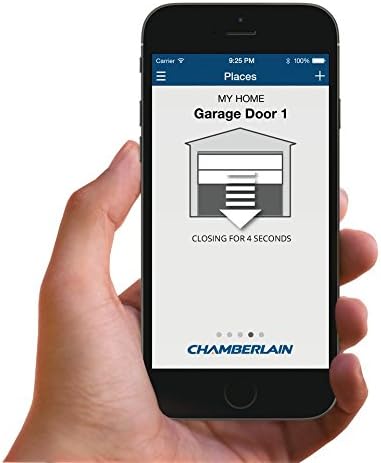
Image: A smartphone displaying the MyQ app, indicating the garage door is in the process of closing with a countdown.

Image: A smartphone displaying the MyQ app, showing the status of the garage door as 'CLOSING GARAGE DOOR'.
6. Maintenance
The primary maintenance for your MyQ-Garage system involves replacing the battery in the door sensor when needed. The door sensor uses one CR2450 Lithium coin cell battery. The MyQ app may notify you when the sensor battery is low.
7. Troubleshooting
If you encounter issues with your MyQ-Garage system, consider the following:
- Connectivity Issues: If the Wi-Fi Hub loses connection, check your home Wi-Fi network. You may need to re-pair the hub with your router or relocate it to improve signal strength. Ensure the hub's light is solid green, indicating a stable connection.
- Door Sensor Errors: If the app reports a sensor error or incorrect door status, verify that the door sensor is securely mounted and its battery is not depleted. Replace the CR2450 battery if necessary.
- Garage Door Opener Not Responding: Ensure the MyQ-Garage hub is properly linked to your garage door opener. You may need to repeat the linking process (pressing the 'learn' button on your opener and the corresponding button on the hub).
- App Functionality: Ensure your MyQ app is updated to the latest version. If issues persist, try restarting the app or your smartphone.
8. Specifications
| Brand | CHAMBERLAIN |
| Model Name | MYQ-G0201 |
| Connectivity Technology | Wi-Fi |
| Compatible Devices | Smartphone (Apple, Android) |
| Maximum Number of Supported Devices | 1 (garage door opener) |
| Item Weight | 15.2 ounces |
| Item Dimensions (L x W x H) | 4.4"L x 4.4"W x 1.28"H |
| Battery Type (Door Sensor) | 1 Lithium Metal CR2450 (included) |
9. Warranty
The Chamberlain MYQ-G0201 MyQ-Garage comes with a One Year Parts warranty. Please retain your proof of purchase for warranty claims.
10. Support
For further assistance, technical support, or to view additional resources, please visit the official Chamberlain website or contact their customer service department. Refer to the documentation included with your product for specific contact details.


