
1. Introduction
Thank you for purchasing the ATOLL IN50SE Integrated Amplifier. This manual provides essential information for the safe and efficient operation of your new audio component. Please read these instructions thoroughly before connecting or operating the unit and retain them for future reference.
2. Safety Instructions
- Power Supply: Connect the unit only to an AC power outlet of the voltage specified on the rear panel.
- Ventilation: Ensure adequate ventilation. Do not block ventilation openings. Avoid placing the unit on carpets or in enclosed spaces that restrict airflow.
- Water and Moisture: To reduce the risk of fire or electric shock, do not expose this appliance to rain or moisture. Do not place objects filled with liquids, such as vases, on the apparatus.
- Heat: Do not place the unit near heat sources such as radiators, heat registers, stoves, or other apparatus (including amplifiers) that produce heat.
- Cleaning: Unplug the unit from the wall outlet before cleaning. Use a soft, dry cloth only. Do not use liquid cleaners or aerosol cleaners.
- Servicing: Do not attempt to service this product yourself. Refer all servicing to qualified service personnel.
3. Package Contents
Please check that your package contains the following items:
- ATOLL IN50SE Integrated Amplifier Unit
- Power Cord
- Remote Control (if included with your specific model)
- User Manual (this document)
4. Product Overview
4.1 Front Panel
The front panel provides access to essential controls and indicators for daily operation.
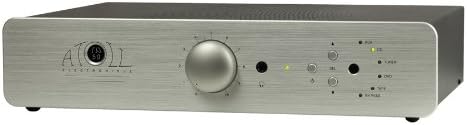
Front view of the ATOLL IN50SE integrated amplifier, showing the central volume knob, input selection buttons, and power indicator.
- Power Button: Turns the amplifier on or off.
- Volume Knob: Adjusts the overall output volume.
- Input Selectors: Buttons or knob to choose between different audio sources (e.g., CD, Tuner, AUX).
- Indicator Lights: Display the currently selected input and power status.
4.2 Rear Panel
The rear panel houses all the necessary connections for your audio system.

Rear view of the ATOLL IN50SE integrated amplifier, displaying various RCA input jacks, speaker binding posts, and the AC power inlet.
- Analog Inputs (RCA): Connect your audio sources such as CD players, tuners, or other line-level devices.
- Speaker Terminals: Connect your loudspeakers. Ensure correct polarity (+ to + and - to -).
- Power Inlet: Connect the supplied power cord to this port.
- Pre-Out/Main-In (if available): Allows for connection to an external power amplifier or use of the IN50SE as a preamplifier.
5. Setup
5.1 Placement
Place the amplifier on a stable, level surface away from direct sunlight, heat sources, and excessive moisture. Ensure there is sufficient space around the unit for proper ventilation.
5.2 Connecting Audio Sources
- Using high-quality RCA cables, connect the output of your audio source (e.g., CD player, streamer) to one of the available analog inputs on the rear panel of the IN50SE (e.g., 'CD', 'AUX').
- Note which input you used for each source for easy selection later.
5.3 Connecting Speakers
- Ensure the amplifier is turned off and unplugged from the power outlet.
- Connect your loudspeakers to the speaker terminals on the rear panel. Match the positive (+) terminal of the amplifier to the positive (+) terminal of the speaker, and the negative (-) terminal of the amplifier to the negative (-) terminal of the speaker.
- Use appropriate gauge speaker wire for optimal performance.
5.4 Power Connection
Once all audio and speaker connections are made, connect the supplied power cord to the power inlet on the rear panel of the IN50SE, and then plug the other end into a suitable AC wall outlet.
6. Operating Instructions
- Power On: Press the power button on the front panel. The power indicator light will illuminate.
- Select Input: Use the input selector buttons/knob on the front panel to choose the audio source you wish to listen to. The corresponding indicator light will show the active input.
- Adjust Volume: Slowly turn the volume knob clockwise to increase the volume. Turn counter-clockwise to decrease. Start at a low volume level to avoid sudden loud sounds.
- Power Off: Press the power button again to turn off the amplifier.
7. Maintenance
- Cleaning: Regularly wipe the unit with a soft, dry, lint-free cloth to remove dust. Do not use abrasive cleaners or solvents.
- Ventilation: Ensure that the ventilation openings are kept clear of dust and debris.
- Connections: Periodically check all cable connections to ensure they are secure.
8. Troubleshooting
| Problem | Possible Cause | Solution |
|---|---|---|
| No power | Power cord not connected; Wall outlet not active | Check power cord connection; Test wall outlet with another device |
| No sound | Incorrect input selected; Speaker cables loose; Source device not playing | Select correct input; Check speaker connections; Ensure source device is playing and its volume is up |
| Distorted sound | Volume too high; Damaged cables; Speaker impedance mismatch | Reduce volume; Check/replace cables; Consult speaker specifications for compatibility |
9. Specifications
- Model: IN50SE
- Dimensions (W x D x H): Approximately 30 x 20 x 10 cm (11.8 x 7.9 x 3.9 inches)
- Weight: Approximately 7 kg (15.4 lbs)
- Power Requirements: AC 100-240V, 50/60Hz (Specific voltage may vary by region)
- Batteries: Not required for main unit operation.
- ASIN: B00DISB5B4
- First Available: June 21, 2013
Note: Specifications are subject to change without notice for product improvement.
10. Warranty and Support
ATOLL products are designed for reliability and performance. This product is covered by a limited warranty against defects in materials and workmanship. The specific terms and duration of the warranty may vary by region and retailer. Please retain your proof of purchase for warranty claims.
For technical support, service, or warranty inquiries, please contact your authorized ATOLL dealer or distributor. Do not attempt to repair the unit yourself, as this may void your warranty.
For more information, please visit the official ATOLL website or consult your local dealer.


