
DAEWOO DWD-M1244
Daewoo DWD-M1244 Washing Machine User Manual
Model: DWD-M1244
1. Introduction
This manual provides essential information for the safe and efficient operation, installation, and maintenance of your Daewoo DWD-M1244 washing machine. Please read this manual thoroughly before using the appliance and retain it for future reference.
2. Safety Information
Always follow basic safety precautions when using electrical appliances to reduce the risk of fire, electric shock, and injury to persons.
- Ensure the washing machine is properly grounded.
- Do not allow children to play on or in the appliance.
- Unplug the appliance before cleaning or performing any maintenance.
- Do not wash items that are soiled with flammable substances.
- Keep the area around the washing machine clear of obstructions.
3. Setup and Installation
3.1 Unpacking
Carefully remove all packaging materials. Inspect the machine for any damage during transit. Keep packaging materials out of reach of children.
3.2 Location
Place the washing machine on a firm, level floor. Avoid direct sunlight or extreme temperatures. Ensure adequate ventilation around the appliance.
3.3 Leveling the Machine
Adjust the leveling feet to ensure the machine is stable and does not wobble. An unlevel machine can cause excessive vibration and noise during operation.
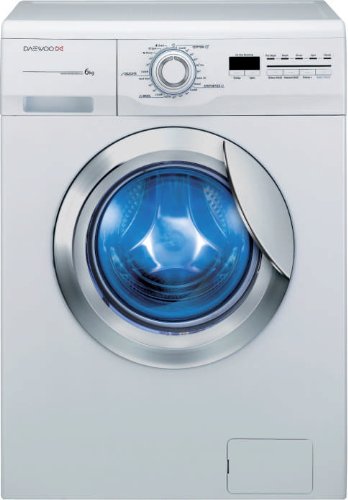
Image: Front view of the Daewoo DWD-M1244 washing machine, showing the control panel and front-loading door. This image illustrates the general appearance of the appliance during setup.
3.4 Water Connection
Connect the water inlet hoses to the hot and cold water taps. Ensure connections are tight to prevent leaks. Connect the drain hose to a suitable drain pipe.
3.5 Electrical Connection
Plug the power cord into a grounded electrical outlet. Do not use extension cords or adapters. Ensure the voltage matches the specifications of the appliance.
4. Operating Instructions
4.1 Control Panel Overview
The control panel features a program selector dial, function buttons, and a display screen. Refer to the specific markings on your machine for detailed functions.
4.2 Loading Laundry
Open the door and load laundry into the drum. Do not overload the machine. Close the door firmly.
4.3 Adding Detergent and Softener
Pull out the detergent dispenser drawer. Add appropriate amounts of detergent to the main wash compartment and fabric softener to its designated compartment. Close the drawer.
4.4 Selecting a Wash Program
Turn the program selector dial to choose the desired wash program (e.g., Cotton, Synthetics, Delicates). The display will show the default settings for the selected program.
4.5 Adjusting Options
Use the function buttons to adjust temperature, spin speed, or add extra rinses if desired.
4.6 Starting the Wash Cycle
Press the Start/Pause button to begin the wash cycle. The door will lock, and the machine will start filling with water.
4.7 End of Cycle
Once the cycle is complete, the machine will signal, and the door will unlock. Remove laundry promptly to prevent wrinkles.
5. Maintenance and Cleaning
Regular maintenance ensures optimal performance and extends the life of your washing machine.
5.1 Cleaning the Detergent Dispenser
Periodically remove and clean the detergent dispenser drawer under running water to prevent residue buildup.
5.2 Cleaning the Drum
Run a maintenance wash cycle (e.g., a hot wash with no laundry and a descaling agent) monthly to clean the drum and remove odors.
5.3 Cleaning the Drain Filter
Locate the drain filter (usually at the bottom front of the machine). Open the cover, drain any residual water, and clean the filter of lint and debris. Perform this every few months or if drainage issues occur.
5.4 Cleaning the Exterior
Wipe the exterior surfaces with a soft, damp cloth. Do not use abrasive cleaners or solvents.
6. Troubleshooting
Before contacting service, refer to the following common issues and solutions:
| Problem | Possible Cause | Solution |
|---|---|---|
| Machine does not start | Power cord unplugged, door not closed, program not selected. | Check power connection, ensure door is latched, select a program and press Start. |
| No water filling | Water taps closed, inlet hoses kinked, water pressure low. | Open water taps, straighten hoses, check household water supply. |
| Excessive vibration/noise | Machine not level, transport bolts not removed, overloaded drum. | Adjust leveling feet, ensure transport bolts are removed (during installation), reduce laundry load. |
| Water not draining | Drain hose kinked, drain filter clogged. | Straighten drain hose, clean the drain filter. |
7. Specifications
Key technical details for the Daewoo DWD-M1244 washing machine:
- Model Name: DWD-M1244
- Brand: Daewoo
- Loading Type: Front Load
- Capacity: 6 kg
- Maximum Spin Speed: 1200 RPM
- Noise Level (Wash): 59 Decibels
- Installation Type: Freestanding
- Product Weight: 54 kg
- ASIN: B009X6OP5I
8. Warranty and Support
For warranty information and customer support, please refer to the warranty card included with your purchase or visit the official Daewoo website. Keep your proof of purchase for warranty claims.
Official Daewoo Website: www.daewoo.com
For service inquiries, please contact your local authorized service center.
Related documentsDWD-M1244


Ask a question about this manual
Ask about setup, troubleshooting, compatibility, parts, safety, or missing instructions. Manuals+ will review the question and use this page’s manual context to help answer it.