1. Introduction
Thank you for purchasing the Amewi 22100 Mini Truggy Running Dog remote control car. This manual provides essential information for the safe and proper operation, maintenance, and troubleshooting of your new RC vehicle. Please read this manual thoroughly before using the product to ensure optimal performance and longevity.
2. Safety Information
- Age Recommendation: This product is recommended for users aged 14 years and older. It is not a toy for young children due to small parts and potential for high speed.
- Battery Safety: Always follow battery manufacturer's instructions. Do not mix old and new batteries, or different types of batteries. Remove batteries from the remote control when not in use for extended periods.
- Operating Environment: Operate the vehicle in open, clear areas, away from people, pets, and obstacles. Avoid operating near water, heat sources, or electrical wires.
- Choking Hazard: The product contains small parts. Keep out of reach of small children.
- Impacts: Avoid collisions with hard surfaces or objects, as this can damage the vehicle.
- Supervision: Adult supervision is recommended, especially for younger users.
3. Package Contents
The Amewi 22100 Mini Truggy Running Dog package typically includes:
- 1x Amewi 22100 Mini Truggy Running Dog RC Car
- 1x Remote Control Transmitter
Note: Batteries for the remote control are not included and must be purchased separately.
4. Product Overview
Familiarize yourself with the components of your Amewi Mini Truggy and its remote control.

Figure 1: The Amewi 22100 Mini Truggy Running Dog RC car (left) and its remote control (right). The car features a blue and silver body with large wheels, while the remote is a silver, gamepad-style controller with an antenna.

Figure 2: Rear view of the Amewi 22100 Mini Truggy Running Dog RC car and its remote control. The remote control shows a '40 MHz' sticker, indicating its operating frequency, though some models may use 2.4 GHz for enhanced performance.
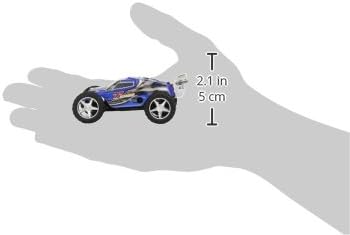
Figure 3: The Amewi 22100 Mini Truggy Running Dog RC car resting in an adult's hand, illustrating its compact dimensions of approximately 11 cm (4.3 inches) in length and 5 cm (2.1 inches) in height.
5. Setup
5.1. Battery Installation (Remote Control)
- Locate the battery compartment on the back of the remote control.
- Open the battery compartment cover.
- Insert the required AA batteries (typically 4x AA, not included), ensuring correct polarity (+/-).
- Close the battery compartment cover securely.
5.2. Charging the Car Battery
The Amewi 22100 Mini Truggy Running Dog is equipped with an internal rechargeable battery. Refer to the specific charging cable and port on your vehicle. Typically, you will:
- Connect the charging cable to the car's charging port.
- Connect the other end of the charging cable to a suitable USB power source (e.g., computer USB port, USB wall adapter).
- Allow the battery to charge fully. Charging indicators (LEDs) on the car or charger will typically change color or turn off when charging is complete.
- Disconnect the charging cable once charging is finished.
5.3. Pairing the Car and Remote Control
To establish a connection between the car and the remote control:
- Ensure both the car and the remote control have sufficient battery power.
- Turn on the Amewi Mini Truggy RC car using its power switch.
- Immediately turn on the remote control transmitter.
- The car and remote should automatically pair. A light on the car or remote may indicate a successful connection.
- If pairing fails, turn both devices off and repeat the process.
6. Operating Instructions
6.1. Basic Controls
- Forward/Reverse: Use the throttle stick/trigger on the remote control to move the car forward or backward.
- Steering: Use the steering wheel/stick on the remote control to turn the car left or right.
- Trim Adjustment: If the car does not drive straight when the steering is centered, use the steering trim dial/button on the remote control to fine-tune the steering alignment.
6.2. Turbo Function
The Amewi 22100 Mini Truggy Running Dog features a turbo function for increased speed. Locate the dedicated turbo button on your remote control (often a round button). Pressing this button will temporarily boost the car's speed.
6.3. Driving Tips
- Speed Settings: Some remote controls offer multiple speed settings (e.g., 5 stages). Start with lower speed settings to get accustomed to the car's handling, especially indoors.
- Indoor Use: Due to its compact size (1:50 scale), the Mini Truggy is suitable for indoor use. Exercise caution to avoid damaging furniture or walls.
- Outdoor Use: The car can also be used outdoors on smooth, clean surfaces. Avoid rough terrain, tall grass, or sandy areas, as these can impede performance and cause damage.
- Battery Life: Typical run time is approximately 10 minutes per charge, depending on driving style.
7. Maintenance
7.1. Cleaning
- After use, especially outdoors, gently wipe the car with a soft, dry cloth to remove dust and debris.
- Do not use water or chemical cleaners, as these can damage electronic components.
- Avoid getting sand or small particles into the gears or motor.
7.2. Storage
- Store the car and remote control in a cool, dry place, away from direct sunlight and extreme temperatures.
- If storing for an extended period, remove the AA batteries from the remote control to prevent leakage.
8. Troubleshooting
| Problem | Possible Cause | Solution |
|---|---|---|
| Car does not respond to remote control. | Low batteries in car or remote; Car and remote not paired; Power switches off. | Charge car battery; Replace remote control batteries; Ensure both power switches are ON; Re-pair car and remote. |
| Car drives slowly or inconsistently. | Low car battery; Obstruction in drivetrain. | Recharge car battery; Check wheels and gears for debris. |
| Car does not drive straight. | Steering trim needs adjustment. | Adjust the steering trim dial/button on the remote control until the car tracks straight. |
| Short control range. | Low remote control batteries; Environmental interference. | Replace remote control batteries; Move to an area with less electronic interference. |
9. Specifications
- Brand: Amewi
- Model: 22100 Mini Truggy Running Dog
- Dimensions (L x W x H): Approximately 11 x 5 x 8 cm (4.3 x 2 x 3.1 inches)
- Weight: Approximately 422 g (0.93 lbs)
- Scale: 1:50
- Material: Plastic
- Recommended Age: 14 years and up
- Remote Control Frequency: 2.4 GHz (or 27/40 MHz depending on specific model variant)
- Remote Control Channels: 2
- Power Source (Car): Internal rechargeable battery
- Power Source (Remote): AA batteries (not included)
- Usage Environment: Indoor and Outdoor
10. Warranty and Support
For warranty information or technical support, please refer to the documentation provided at the time of purchase or contact your retailer. You may also visit the official Amewi website for further assistance.


