
Introduction
This manual provides detailed instructions for the installation, operation, and maintenance of your SunTouch TapeMat Electric Under Floor Heating Kit. This kit is designed to provide radiant heat beneath tile, stone, or laminate flooring in residential and commercial settings, enhancing comfort in your space.
The kit includes a 120 VAC floor heating mat (2 feet wide x 10 feet long, covering 20 square feet), a SunStat Command programmable touchscreen thermostat, a LoudMouth installation monitor, double-sided tape, and this installation manual.

Figure 1: Main components of the SunTouch TapeMat Electric Floor Heating Kit, including the rolled mat, Command Touch thermostat, LoudMouth monitor, and double-sided tape.
Key Features:
- Electric underfloor heated TapeMat for easy installation under various flooring types.
- Programmable touchscreen thermostat for precise temperature control.
- LoudMouth installation monitor with audible alarm for installation safety.
- Double-sided tape for secure mat placement.
Setup and Installation
Proper installation is crucial for the safe and efficient operation of your heating system. Always consult local electrical codes and regulations before beginning installation. It is recommended that a qualified electrician perform the electrical connections.
Components Overview:
- TapeMat: The open-weave mat containing the heating cable. The orange mesh can be cut to fit the layout, and the blue heating wire can be carefully pulled out and routed around obstructions. Do not cut the blue heating wire.
- SunStat Command Thermostat: The control unit for your heating system.
- LoudMouth Installation Monitor: Used to continuously monitor the heating cable during installation for potential damage.
- Double-Sided Tape: For securing the mat to the subfloor.
Installation Steps:
- Plan Your Layout: Determine the area to be heated and create a detailed layout plan. Ensure the mat and heating cable avoid permanent fixtures like cabinets, toilets, and bathtubs.
- Prepare the Subfloor: Ensure the subfloor is clean, dry, and level. Apply double-sided tape to the subfloor according to the layout plan.
- Lay the TapeMat: Roll out the TapeMat onto the prepared subfloor. The open mesh allows for easy cutting and flipping to accommodate turns and irregular shapes. Carefully route the blue heating wire around obstacles as needed, ensuring it is not cut.
- Connect LoudMouth Monitor: Connect the LoudMouth monitor to the heating cable leads. Turn it on to continuously monitor the cable for damage during the subsequent steps. An audible alarm will sound if the cable is compromised.
- Apply Thin-Set or Self-Leveling Mortar: Once the mat is securely in place and monitored, apply a layer of thin-set mortar or self-leveling compound over the mat, embedding the heating cable.
- Install Flooring: After the mortar has cured, install your chosen flooring (tile, stone, or laminate) according to the manufacturer's instructions.
- Thermostat Installation: Install the SunStat Command thermostat in a suitable location, typically on an interior wall. Connect the heating cable leads and floor sensor to the thermostat as per the thermostat's specific wiring diagram.
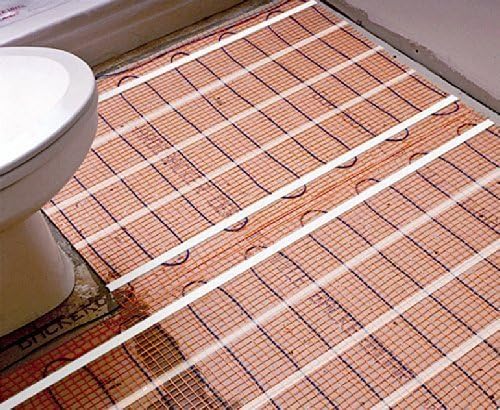
Figure 2: SunTouch TapeMat electric heating mat installed on a subfloor in a bathroom, showing routing around a toilet base.
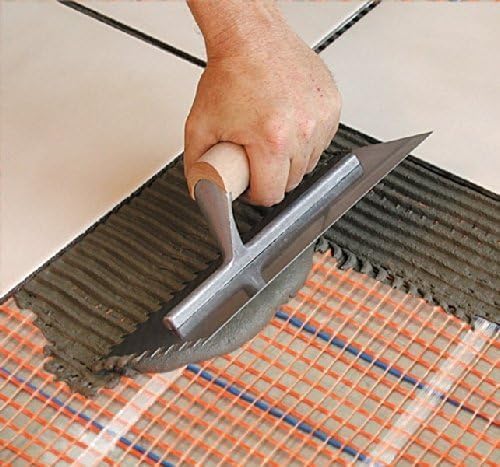
Figure 3: A hand using a trowel to apply thin-set mortar over the installed SunTouch TapeMat, embedding the heating cables.

Figure 4: The yellow LoudMouth installation monitor, showing its on/off switch, test button, and indicator lights for monitoring the heating cable during installation.

Figure 5: An illustration showing the SunTouch TapeMat installed beneath finished tile flooring, highlighting its discreet integration.
Video 1: A detailed demonstration of SunTouch TapeMat installation during a bathroom renovation, showcasing the process of laying the mat and preparing for flooring.
Operating Instructions
The SunStat Command programmable touchscreen thermostat allows you to control your floor heating system with ease. Refer to the separate SunStat Command thermostat manual for complete operating instructions.
Basic Operation:
- Power On/Off: Use the power button on the thermostat to turn the heating system on or off.
- Temperature Adjustment: Adjust the desired floor temperature using the up and down arrows on the touchscreen.
- Programming Schedule: The thermostat features auto-scheduling capabilities. You can program specific heating times and temperatures for different days of the week to optimize comfort and energy efficiency.
- Display Options: Customize display settings such as brightness, theme, and language through the thermostat's menu.
Video 2: An overview of the SunTouch product line, highlighting various heating solutions and their applications, including the thermostat's role in controlling the system.
Maintenance
The SunTouch TapeMat Electric Floor Heating Kit is designed for minimal maintenance once installed. The heating cables are sealed and do not require regular servicing.
General Care:
- Keep the thermostat clean by wiping it with a soft, damp cloth. Avoid abrasive cleaners.
- Ensure the floor sensor is not obstructed or damaged during any floor modifications.
- Regularly test the Ground Fault Circuit Interrupter (GFCI) on the thermostat as recommended in the thermostat manual (typically monthly).
Troubleshooting
If you experience issues with your SunTouch floor heating system, refer to the troubleshooting section in your SunStat Command thermostat manual for specific guidance. Below are some general troubleshooting tips:
Common Issues:
- No Heat: Check if the thermostat is powered on and set to a temperature above the current floor temperature. Verify the GFCI has not tripped.
- Uneven Heating: Ensure the heating mat was installed correctly and the cables are evenly spaced. Cold spots might indicate improper installation or damage to a section of the cable (unlikely if LoudMouth was used).
- Thermostat Error Codes: Consult the SunStat Command thermostat manual for explanations of any error codes displayed on the screen.
If problems persist after consulting the thermostat manual, contact SunTouch customer support for assistance.
Specifications
| Feature | Specification |
|---|---|
| Brand | SunTouch |
| Model Name | Electric Under Floor Heating Kit |
| Item Model Number | TapeMat |
| Size | 2.0' x 10.0' (20 Sq. Ft.) |
| Voltage | 120 Volts |
| Wattage | 240 Watts |
| Item Weight | 4.5 Pounds |
| Product Dimensions | 29 x 6 x 6 inches (packaging) |
| Controller Type | Programmable Thermostat (SunStat Command) |
| Special Feature | Auto-Scheduling |
| Display Type | Digital |
| Control Type | Touch |
| Included Components | Mat, installation accessories (thermostat, LoudMouth, tape) |
| UPC | 840213090999, 840213092542 |
Warranty and Support
Warranty Information:
SunTouch and Watts Radiant (the companies) warrant their respective electric floor heating mats and cables (the products) to be free from defects in materials and workmanship for twenty-five (25) years from the date of manufacture. Thermostats and controls sold by the companies are warranted, parts and materials, for two (2) years from the date of purchase. The sole remedy for controls is product replacement. This warranty is only provided to customers who purchase the products from authorized resellers and is transferable to subsequent owners of properties where the products are initially installed.
Customer Support:
For technical assistance, troubleshooting, or warranty claims, please contact SunTouch customer support. You can find contact information on the official SunTouch website or through your authorized reseller. SunTouch is committed to providing world-class support for its products.


