1. Introduction
This instruction manual provides comprehensive guidance for the DELTA H238 Lahara Two Metal Lever Handle Kit. This handle is designed for use with compatible bidet, lavatory, and kitchen faucets, offering a chrome finish and a metal lever design. Please read these instructions thoroughly before installation and use to ensure proper function and longevity of your product.

Image 1: DELTA H238 Lahara Faucet Handle, showcasing its chrome finish and lever design.
2. Safety Information
- Always turn off the water supply to the faucet before beginning any installation or maintenance.
- Wear appropriate personal protective equipment, such as safety glasses, during installation.
- If you are unsure about any step, consult a qualified plumber.
- Keep small parts away from children.
3. Package Contents
Verify that all components are present before beginning installation:
- DELTA H238 Lahara Metal Lever Handle (Quantity: 1)
- Set Screw (if applicable, typically pre-installed or included with handle)
- Base Ring/Escutcheon (if applicable)
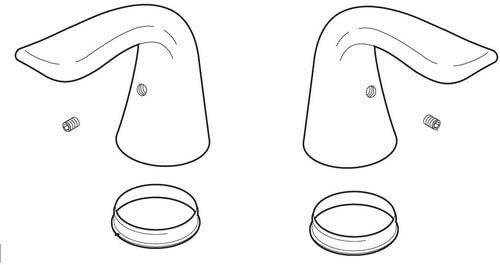
Image 2: Exploded view diagram showing the handle and associated components for installation.
4. Setup and Installation
This section outlines the general steps for installing the DELTA H238 Lahara faucet handle. Specific faucet models may have slight variations. Refer to your faucet's main instruction manual for detailed instructions if necessary.
- Prepare the Work Area: Ensure the water supply to the faucet is turned off. Clear the area around the faucet for easy access.
- Remove Old Handle (if applicable): If replacing an existing handle, locate the set screw (often hidden under a decorative cap) and loosen it with an appropriate Allen wrench. Carefully pull the old handle off the valve stem.
- Clean the Valve Stem: Clean any mineral deposits or debris from the faucet valve stem to ensure a smooth fit for the new handle.
- Install Base Ring (if applicable): If your faucet design includes a base ring or escutcheon, place it over the valve stem onto the faucet body.
- Position the New Handle: Align the DELTA H238 Lahara handle onto the valve stem. Ensure it is oriented correctly for desired operation (e.g., lever pointing forward when off).
- Secure the Handle: Insert and tighten the set screw (usually located on the underside or back of the handle) using an Allen wrench. Do not overtighten, as this can damage the handle or stem.
- Test Operation: Slowly turn on the water supply. Check for leaks and test the handle's movement to ensure it operates smoothly and controls water flow and temperature as expected.
5. Operation
The DELTA H238 Lahara metal lever handle provides intuitive control over your faucet's water flow and temperature. The specific operation will depend on the type of faucet it is installed on (e.g., single-handle or two-handle lavatory, kitchen, or bidet faucet).
- Water Flow: Typically, lifting the lever handle will increase water flow, and pushing it down will decrease or stop the flow.
- Temperature Control: For single-handle faucets, moving the lever left or right usually adjusts the water temperature (left for hot, right for cold). For two-handle faucets, each handle controls either hot or cold water independently.
6. Maintenance and Care
To maintain the appearance and functionality of your DELTA H238 Lahara faucet handle, follow these care guidelines:
- Cleaning: Clean the handle regularly with a soft, damp cloth. For stubborn spots, use a mild soap and water solution. Rinse thoroughly and dry with a soft cloth to prevent water spots.
- Avoid Harsh Cleaners: Do not use abrasive cleaners, scouring pads, ammonia-based cleaners, or cleaners containing bleach, acids, or alcohol. These can damage the chrome finish.
- Periodic Inspection: Periodically check the handle for any looseness. If the handle feels loose, gently tighten the set screw with an Allen wrench.
7. Troubleshooting
This section addresses common issues you might encounter with your faucet handle.
| Problem | Possible Cause | Solution |
|---|---|---|
| Handle is loose | Set screw is loose. | Tighten the set screw on the handle with an Allen wrench. |
| Handle is stiff or hard to turn | Mineral buildup on the valve stem or cartridge. | Turn off water supply, remove handle, clean valve stem and cartridge area. If issue persists, the faucet cartridge may need replacement (refer to faucet manual). |
| Water leaks from base of handle | Worn O-rings or seals within the faucet cartridge. | This indicates an issue with the faucet's internal cartridge, not the handle itself. Refer to your faucet's instruction manual for cartridge replacement. |
8. Specifications
| Feature | Detail |
|---|---|
| Brand | DELTA |
| Model Number | H238 |
| Material | Metal (Chrome) |
| Color/Finish | Chrome |
| Product Dimensions | 2.25"L x 3"W |
| Item Weight | 1.04 Pounds |
| Number of Handles | 1 |
| Specific Uses | Faucet (Bidet, Lavatory, Kitchen) |
| Special Feature | Easy to Install |
| UPC | 034449571425, 783961409241 |
9. Warranty Information
This DELTA product is covered by a Lifetime Faucet and Finish Lifetime Limited Warranty. For full details regarding warranty coverage, terms, and conditions, please refer to the official DELTA Faucet warranty documentation or contact DELTA customer support.
10. Customer Support
For further assistance, technical support, or to inquire about replacement parts, please contact DELTA Faucet customer service or visit their official website.
You can find more information and contact details on the DELTA Store on Amazon or the official DELTA Faucet website.


