
1. Introduction
The UNIVERSAL REMOTE MSC-400 Master System Controller is designed to manage complex audio/video systems. This device acts as a central brain, capable of expanding to control multiple rooms and A/V systems, and integrating various controllers and user interfaces. It is compatible with specific URC remotes, including system versions of the MX-3000, MX-950, MX-900, and TX-1000. This manual provides essential information for the setup, operation, and maintenance of your MSC-400 controller.
2. Safety Information
- Read all instructions carefully before operating the device.
- Keep the device away from water or moisture.
- Do not expose the device to extreme temperatures.
- Ensure proper ventilation to prevent overheating.
- Use only the power adapter supplied with the unit.
- Do not attempt to open or repair the unit yourself. Refer all servicing to qualified personnel.
3. Package Contents
Please verify that all components are present in the packaging. If any items are missing or damaged, contact your retailer immediately.
- MSC-400 Master System Controller Unit
- Power Adapter
- IR Emitters (quantity may vary)
- USB Cable
- User Manual (this document)
4. Product Overview
4.1 Front Panel
The front panel of the MSC-400 provides indicators and a USB port for connection and status monitoring.
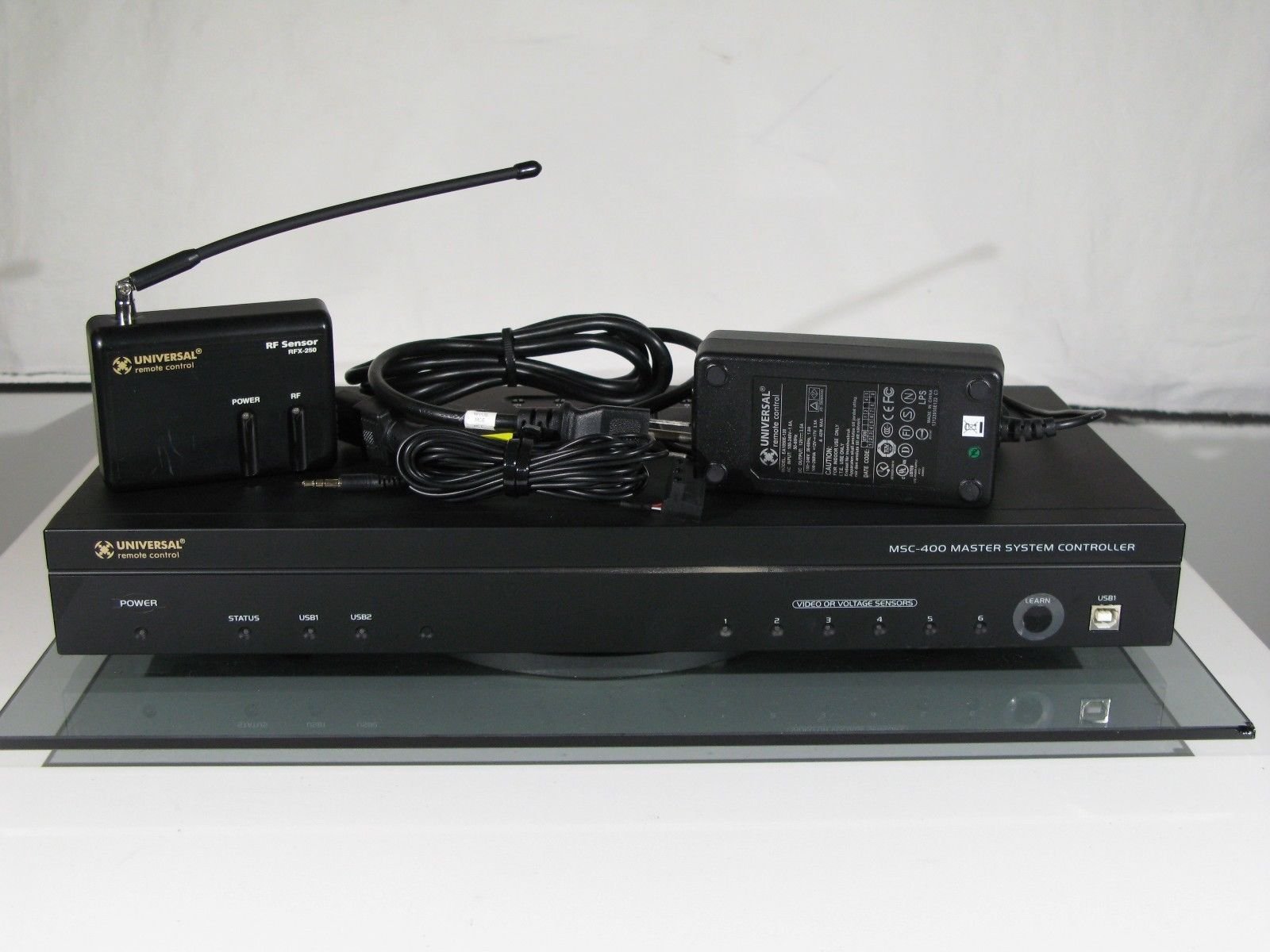
Figure 1: Front view of the MSC-400 Master System Controller.

Figure 2: Detail of the MSC-400 front panel, showing the LEARN button, USB port, and video voltage sensor indicators.
- Power Indicator: Illuminates when the unit is powered on.
- Status Indicators: Provide feedback on system activity.
- Video Voltage Sensors (1-6): Inputs for detecting the power status of connected devices.
- LEARN Button: Used for programming and configuration.
- USB1 Port: For connecting to a computer for programming.
4.2 Rear Panel
The rear panel houses all the necessary connection ports for integrating the MSC-400 into your home theater system.

Figure 3: Rear view of the MSC-400 Master System Controller, showing connection ports.
- IR Outputs: Ports for connecting IR emitters to control A/V components.
- Serial Ports: For direct control of devices via RS-232.
- Video Voltage Sensor Inputs: Additional inputs for device status detection.
- Power Input: Connects to the supplied power adapter.
- USB2 Port: Additional USB connection point.
5. Setup
5.1 Placement
Position the MSC-400 in a central location, preferably near your A/V equipment rack, ensuring adequate ventilation. Avoid placing it directly on top of heat-generating components.
5.2 Connections
- IR Emitters: Connect the IR emitters to the IR output ports on the rear of the MSC-400. Place the emitter heads directly over the IR receiver windows of your A/V components.
- Serial Devices: For devices supporting RS-232 control, connect a serial cable from the device to one of the serial ports on the MSC-400.
- Video Voltage Sensors: If using, connect the sensor cables from the video output of your devices to the corresponding sensor inputs on the MSC-400. This allows the controller to detect if a device is powered on or off.
- Power: Connect the supplied power adapter to the DC IN port on the rear panel, then plug it into a standard electrical outlet.
- USB (for Programming): Connect the MSC-400 to your computer using a USB cable for initial setup and programming.
6. Operation
The MSC-400 operates by receiving commands from compatible URC remotes and executing programmed actions. Its advanced capabilities allow for sophisticated control of your home theater system.
6.1 Programming
The MSC-400 requires programming using specialized software. This software allows you to define codes for your devices, create macros, and implement control logic.
- Device Codes: Input the control codes for all your A/V components into the MSC-400's programming software.
- Macros: Create sequences of commands (macros) that can be triggered by a single button press on your remote. For example, a "Watch Movie" macro could turn on the TV, Blu-ray player, and receiver, select the correct inputs, and dim the lights.
- Advanced Logic: The MSC-400 supports advanced programming logic, including If-Then-Else statements and Boolean variables. This enables the system to make decisions based on the current state of your devices (e.g., if the TV is off, turn it on; otherwise, leave it off).
- Sensor Integration: Utilize the video voltage sensor inputs to provide feedback to the MSC-400, allowing it to confirm the power status of devices, especially those without discrete ON/OFF commands.
6.2 Remote Control Interaction
Once programmed, the MSC-400 communicates with compatible URC remotes using Narrow Band RF technology. The remote sends a trigger command, and the MSC-400 executes the corresponding macro or command sequence.
7. Important Notes and Compatibility
- Programming Software: The programming software for the MSC-400 is typically restricted to authorized dealers and installers. It is not generally available for public download. Ensure you have access to the necessary software and drivers before attempting to program the unit.
- Operating System Compatibility: Be aware that older versions of the programming software or drivers may not be compatible with newer 64-bit operating systems (e.g., modern Windows versions). Verify compatibility with your computer's operating system before attempting installation.
- Compatible Remotes: The MSC-400 is designed to operate with specific URC remotes that support Narrow Band RF, such as system versions of the MX-3000, MX-950, MX-900, and TX-1000. Ensure your remote control is compatible for optimal performance.
8. Maintenance
- Keep the unit clean by wiping it with a soft, dry cloth.
- Avoid using liquid cleaners or abrasive chemicals.
- Ensure all cables are securely connected and free from damage.
- Periodically check for firmware updates if available through authorized channels.
9. Troubleshooting
- Unit Not Powering On: Check the power adapter connection to the unit and the wall outlet. Ensure the outlet is functional.
- Remote Commands Not Working: Verify that your remote is compatible with the MSC-400. Ensure IR emitters are correctly placed over device IR windows. Check programming for correct device codes and macro logic.
- Programming Software Issues: If you encounter difficulties with the programming software, ensure you have the correct version and drivers for your operating system. Contact your dealer for support regarding software access or compatibility.
- Intermittent Control: Check for potential RF interference. Ensure the MSC-400 is not obstructed and is within range of your compatible URC remote.
10. Specifications
| Feature | Detail |
|---|---|
| Product Dimensions | 18.99 x 11.99 x 5.99 inches |
| Item Weight | 9 pounds |
| Manufacturer | Universal Remote Control |
| Item Model Number | MSC-400 |
| Brand | Universal |
| Special Feature | Universal Control |
| Color | Black |
| Max Number of Supported Devices | 12 |
| Compatible Devices | Audio/Video Receiver, Cable/Satellite Box, Media Player, Other Electronic Equipment, Television |
| First Available Date | April 18, 2005 |
11. Warranty and Support
For warranty information and technical support, please refer to the documentation provided at the time of purchase or contact your authorized Universal Remote Control dealer. Keep your purchase receipt as proof of purchase.


