


KEITHLEY Automated Characterization System Basic Edition Software

spésifikasi
| Nomer Dokumén | 077187601 |
|---|---|
| titimangsa | Oktober 2025 |
Keithley Instrumén
Pamasangan Dasar ACS sareng Pitunjuk Ngarengsekeun Masalah Startup
Bubuka
This document provides information on installing the Automated Characterization System Basic Edition (ACS Basic) software and tips on troubleshooting installation and startup issues.
You must be able to run applications as an Administrator to install and run ACS Basic.
Pasang ACS Basic
To install ACS Basic:
Dina .exe file,-klik katuhu jeung pilih Jalankeun salaku administrator.

Run ACS Basic
To start ACS Basic if your Windows account has administrative privileges:
- Double-click the ACS Basic icon.
To start ACS Basic without administrative privileges:
- Right-click the ACS Basic icon and select Jalankeun salaku administrator.
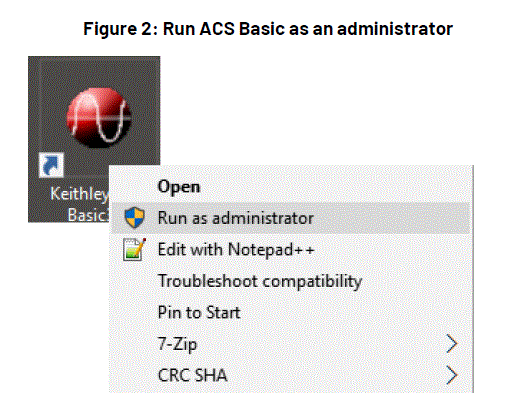
Set ACS Basic to Always Run as Administrator
- Right-click the ACS Basic icon and select Pasipatan.
- Pilih nu Kasaluyuan tab.
- Pilih Run this program as an administrator.

GPIB Driver Installation
If you are using ACS Basic on a 4200A-SCS, do not install the NI GPIB driver. The KUSB-488B GPIB driver is installed by default.
If you are using ACS Basic on a computer that does not have a GPIB driver and want to use the KUSB-488 driver:
- During KUSB-488B GPIB driver installation, select Komando Keithley cocog.
- Pilih Teras pikeun neraskeun pamasangan.
- If you are using ACS Basic on a computer that does not have a GPIB driver and want to use the NI GPIB driver, keep the default selections to complete the installation.
- If you are using ACS Basic on a computer that has a KUSB-488B GPIB driver and want to use the NI GPIB driver, after installing the NI GPIB driver, manually copy the file
C:\ACS_BASIC\HotFix\ieee_32m.dllkanaC:\Windows\SysWOW64\polder.

If you uninstall the KUSB-488B GPIB driver or NI GPIB driver after you install ACS Basic, you must reinstall ACS Basic. If you do not reinstall ACS Basic, it cannot be started because of the GPIB driver uninstall.
Windows Update Setting
- Disable Automatic Windows Update to prevent the interruption of ACS tests, or set the updates schedule outside testing hours.
- It’s recommended that the Windows system be updated on schedule to maintain security.
 Ngajalankeun apdet WindowsTM dina waktosna
Disarankeun pikeun ngapdet sistem Windows sacara rutin supados sistemna aman sareng tetep aman.
Pilih masalah anu pakait sareng kasalahan, teras pitunjuk solusi anu pas bakal ditampilkeun.
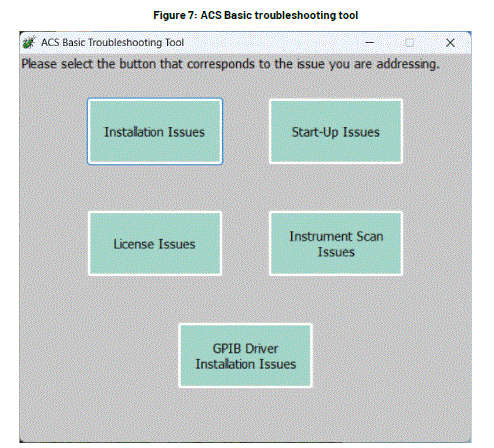
Masalah Instalasi
Aya dua jinis kaayaan pikeun masalah pamasangan:
- Pasang ACS pikeun kahiji kalina
- Ngaronjatkeun atanapi masang deui ACS
Pilih masalah anu pakait sareng kasalahan, teras pitunjuk solusi anu pas bakal ditampilkeun.
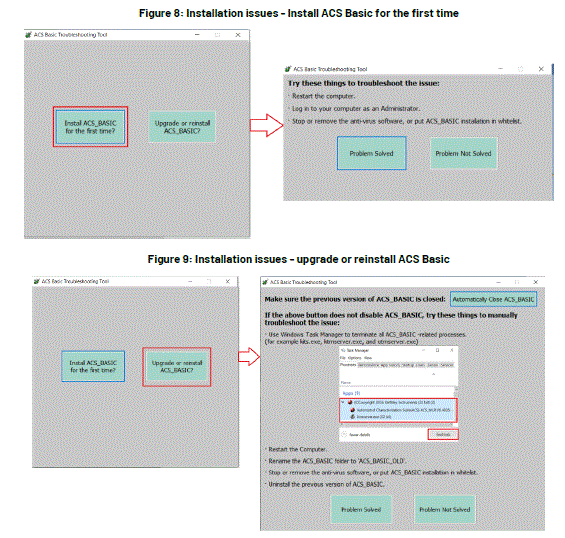
If the problem is solved, select the button Masalah direngsekeun. The instruction window will be closed, and it goes back to the main window of the troubleshooting tool.
Problem Not Solved
If the problem is not solved, select the button Problem Not Solved. Support information will be packed as a zip file named with year_month_date_hour_minute_second in the path C:\ACS\KATS\support_info\. A notice will be shown asking you to contact your Field Application Engineer (FAE) and send this zip file.

Isu ngamimitian
There are two types of situations for Start-up Issues:
- Sandi Teu Sah atanapi Proyék Teu Sah File Masalah
- Kacilakaan Start-Up
Select the button according to the situation, and the instructions of the solution will be shown.

Masalah Lisensi
Instructions for License Issues are shown in the following picture:

Instrument Scan Issues
Instructions for Instrument Scan Issues are shown in the following figure.
 Masalah Tos Direngsekeun sareng Masalah Teu Tos Direngsekeun, mangga tingal pitunjuk dina bagian Masalah Pamasangan.
GPIB Driver Installation Issues
Instructions for Instrument Scan Issues are shown in the following figure:
 Masalah Tos Direngsekeun sareng Masalah Teu Tos Direngsekeun, mangga tingal pitunjuk dina bagian Masalah Pamasangan.
Troubleshooting TekAMS License Issues
The ACS Basic license can become invalid if the Host ID of the computer changes. This can occur if the computer system or hardware is changed or if the computer is broken.
- Get a new license:
- Hubungi insinyur aplikasi lapangan (FAE) anjeun. Kanggo nomer kontak di sakumna dunya, mangga buka tek.com/contact-tek.
- FAE bakal ngabalikeunview setelan komputer anjeun sareng kéngingkeun ID Host.
- The FAE will give the new host ID to the Customer Service Representative (CSR). The CSR will reset the license record on TEKAMS, get a new license file pakait sareng ID host anu énggal, teras pasihan ka FAE.
- The FAE will provide you with a new license file.
- Pasang lisénsi anyar file pikeun ngarengsekeun masalah ieu:
- In ACS, select Tulung, teras pilih Lisensi.
- Pilih Pasang pikeun milih lisénsi file.
Troubleshooting Antivirus Software Blocking Issues
- If the ACS Basic installation process is blocked by antivirus software, select Buka blokir in the dialog.
- Add ACS Basic to the trusted list in the antivirus software.
- If ACS Basic is blocked while running, identify the .exe fileanu diblokir ku parangkat lunak antivirus teras tambahkeun .exe éta filekana daptar parangkat lunak antivirus anu dipercaya.
Troubleshooting an Invalid Password, Error Message, or Login Crashes
Lamun éta KATS_Pref.ini file is corrupt, you may see one of the following issues when you log into ACS Basic:
- Pesen peringatan "Sandi Teu Sah. Mangga cobian deui!" sok némbongan, sanaos Ngaran Pangguna sareng Sandi leres.
- Pesen kasalahan "Proyék teu valid" file”Ditampilkeun.
- ACS Basic crashes.
Pikeun ngabéréskeun masalah ieu:
- Rename or delete the
C:\ACS_BASIC\KATS\KATS_pref.inifile. - Restart ACS Basic to reset
KATS_Pref.ini.
Upami ieu henteu ngabéréskeun masalahna, hubungi insinyur aplikasi lapangan (FAE) anjeun. Kanggo nomer kontak di sakumna dunya, mangga buka tek.com/contact-tek.
Troubleshooting Tool
When an error occurs while starting ACS, a troubleshooting button may appear in the error-reporting window.
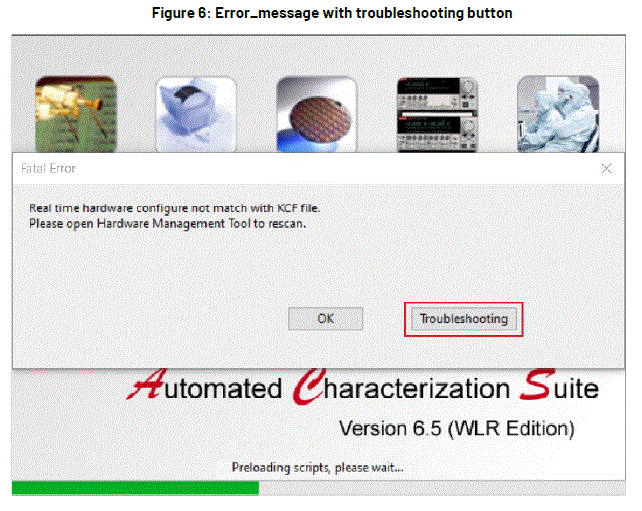
Pilih tombolna sareng alat ngungkulan masalah bakal dijalankeun. Aya lima masalah anu tiasa dideteksi:
- Masalah pamasangan
- Masalah ngamimitian usaha
- Masalah lisénsi
- Masalah scan instrumen
- Masalah pamasangan supir GPIB
TAROS KAMI
- 28775 Parakan Jalan
- Cleveland, Ohio 44139
- 1-800-833-9200
- tek.com/keithley
FAQ
-
What should I do if ACS Basic does not start?
Ensure you are running the application as an administrator. If issues persist, use the troubleshooting tool to identify the problem.
How do I resolve license issues?
Contact your field application engineer to get a new license file if the Host ID has changed.
What if my antivirus software blocks ACS Basic?
Add ACS Basic to the trusted list in your antivirus software and unblock any .exe files that are blocked.
How can I prevent Windows updates from interrupting ACS tests?
Disable automatic Windows updates or schedule them outside testing hours.
Dokumén / Sumberdaya
 |
KEITHLEY Automated Characterization System Basic Edition Software [pdf] Pituduh instalasi Automated Characterization System Basic Edition Software, Characterization System Basic Edition Software, Basic Edition Software, Software |