1. Bubuka
This manual provides detailed instructions for the use and maintenance of your Samsung Galaxy Watch 8 (SM-L335). Please read this manual carefully to ensure proper operation and to maximize the lifespan of your device.
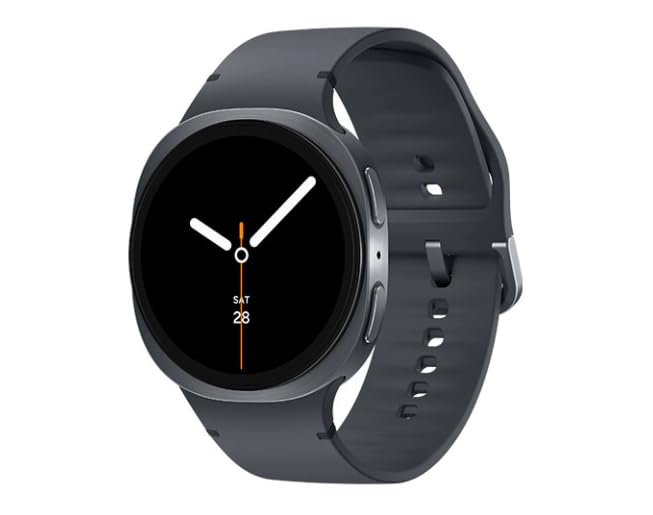
Image 1.1: Samsung Galaxy Watch 8 44mm in Graphite. This image shows the smartwatch from a slight angle, highlighting its round display and the graphite band.
Naon dina Box
- Samsung Galaxy Watch 8 (SM-L335)
- Lalajo Band
- Watch charging cord
- Quick Start Guide (may vary)
2. Setélan
2.1 Ngecas Alat
Before initial use, fully charge your Galaxy Watch 8. Connect the charging cord to the watch and a compatible power adapter. The watch display will indicate charging status.
2.2 Powering on / Pareum
- Pikeun Ngahurungkeun: Press and hold the Home key (bottom button) until the Samsung logo appears.
- Pikeun mareuman: Press and hold the Home key, then tap "Power off" on the screen.
2.3 Ngapasangkeun sareng Smartphone
- Ensure your smartphone is running Android and has Bluetooth enabled.
- Unduh sareng pasang Galaxy Wearable aplikasi ti Google Play Store.
- Open the Galaxy Wearable app on your smartphone.
- Follow the on-screen prompts to connect your Galaxy Watch 8.
- Confirm the passkey displayed on both devices.
2.4 Carrier Activation (LTE + Wi-Fi Models)
For LTE connectivity, your Galaxy Watch 8 must be activated with a compatible carrier plan. This process is typically managed through the Galaxy Wearable app after initial pairing. Contact your mobile carrier for specific activation steps and plan details.
3. Operating Your Galaxy Watch 8
3.1 Napigasi
- Layar cabak: Swipe left/right to navigate tiles, swipe up/down for notifications/quick panel. Tap to select.
- Home Key (bottom button): Press to go to the Watch face or App screen. Double-press for a customizable shortcut. Press and hold for Power options or Bixby.
- Back Key (top button): Pencét pikeun balik deui ka layar sateuacana.
3.2 Fitur konci
- Nyukcruk Kaséhatan: Monitor heart rate, track steps, sleep patterns, and various workouts. Access data via Samsung Health app.
- Bewara: Receive alerts from your paired smartphone directly on your watch.
- Telepon Sora: Make and receive calls directly from your watch using its built-in speaker and microphone (requires LTE activation or Bluetooth connection to phone).
- GPS: Utilize built-in GPS for accurate location tracking during outdoor activities.
3.3 Ngaropea Watch Faces
To change your watch face, press and hold the current watch face on the screen. Swipe left or right to browse available faces, then tap to select. More options are available in the Galaxy Wearable app.
3.4 Ngagunakeun Aplikasi
Access your installed applications by pressing the Home key from the watch face. Swipe through the app list and tap an icon to open. New apps can be downloaded via the Galaxy Wearable app.
Video 3.1: Leuwihview of Samsung Galaxy Watch 8 features. This video demonstrates various functionalities of the smartwatch, including navigation, health tracking, and notification management.
4. Pangropéa
4.1 Ngabersihan Arloji Anjeun
Wipe the watch and band with a soft, lint-free cloth. For stubborn dirt, slightly dampen the cloth with water. Avoid using harsh chemicals or abrasive materials. Ensure the watch is dry before charging.
4.2 Perawatan Batré
- Hindarkeun suhu anu ekstrim, anu tiasa ngirangan umur batre.
- Ulah ninggalkeun arloji pinuh discharged pikeun période nambahan.
- Use only the provided charging cord.
4.3 Apdet parangkat lunak
Regularly check for and install software updates via the Galaxy Wearable app. Updates provide new features, performance improvements, and security enhancements.
5. Cara ngungkulan
| Masalah | Solusi |
|---|---|
| Jam tangan teu hurung | Ensure the watch is fully charged. Press and hold the Home key for at least 10 seconds to force restart. |
| Teu tiasa dipasangkeun sareng smartphone | Check if Bluetooth is enabled on your phone. Ensure the Galaxy Wearable app is installed and updated. Restart both devices. |
| LTE connectivity issues | Verify carrier activation. Check signal strength. Contact your mobile carrier for assistance. |
| Aplikasi laun atanapi teu responsif | Close background apps. Restart the watch. Ensure software is up to date. |
5.1 Ngareset Alat
If issues persist, you may need to reset your watch. Go to Settings > General > Reset on your watch. This will erase all data and restore factory settings. Back up important data before proceeding.
6. Spésifikasi
| Fitur | Rincian |
|---|---|
| Ngaran modél | Galaxy Watch 8 44mm |
| Nomer modél | SM-L335 |
| merek | Samsung |
| Ukuran layar | 44 milimeter |
| Sistem operasi | Nganggo OS |
| Téhnologi konektipitas | Cellular (LTE), Wi-Fi |
| Kapasitas batré | 435 Miliamp Jam-jaman |
| Komposisi sél batré | Litium Ion |
| Fitur husus | Voice Call, Built-in GPS |
| Item Beurat | 8.1 ons |
| Ukuran Paket | 7.05 x 2.72 x 2.13 inci |
7. Garansi jeung Rojongan
7.1 Kaayaan Produk sareng Garansi
This Samsung Galaxy Watch 8 is a renewed product. Renewed devices are retested to ensure 100% functionality and come in great cosmetic condition. Please refer to your purchase documentation for specific warranty details provided by the seller. Standard manufacturer warranties may not apply to renewed products.
7.2 Rojongan Palanggan
For technical assistance, troubleshooting, or further information, please visit the official Samsung support website or contact your product retailer. You can find detailed support resources, FAQs, and contact options on their respective platforms.
- Dukungan Samsung: www.samsung.com/us/support/
- Rojongan pangecér: Refer to your purchase invoice or retailer's websitus pikeun inpo kontak.