Bubuka
The JBL MA510 is a high-performance 5.2-channel AV Receiver engineered to deliver an exceptional home cinema experience. Featuring advanced 8K HDMI specifications, it ensures spectacular realism for both audio and video. Designed with a passion for music and movies, the MA510 brings content to life with true high fidelity. Its five channels of low noise Class D amplification provide robust power to all channels, ensuring dynamic and clear sound reproduction.
This manual provides detailed instructions for setting up, operating, and maintaining your JBL MA510 AV Receiver to ensure optimal performance and longevity.
Naon dina Box
Upon unpacking your JBL MA510 AV Receiver, please ensure all the following items are present:
- IR Jauh
- Anteneu Bluetooth
- Anteneu Wi-Fi
- Kabel listrik
- Gancang-Mimitian Guide na Lambaran Kasalametan
Disetél
1. Sambungan fisik
Before connecting any components, ensure the receiver is powered off and unplugged from the main power outlet.
- Panyatur: Connect your 5.2-channel speaker system to the corresponding terminals on the rear panel. Ensure correct polarity (positive to positive, negative to negative) for each speaker.
- Alat HDMI: Connect your smart TV, projector, gaming consoles, streaming devices, and cable boxes to the HDMI inputs (HDMI 1-4) on the rear panel. Use the HDMI OUT (eARC) port to connect to your TV for audio return channel functionality.
- Anteneu: Attach the Bluetooth and Wi-Fi antennas to their designated ports on the rear panel for optimal wireless performance.
- kakuatan: Once all audio and video connections are secure, connect the power cord to the receiver and then to a wall outlet.
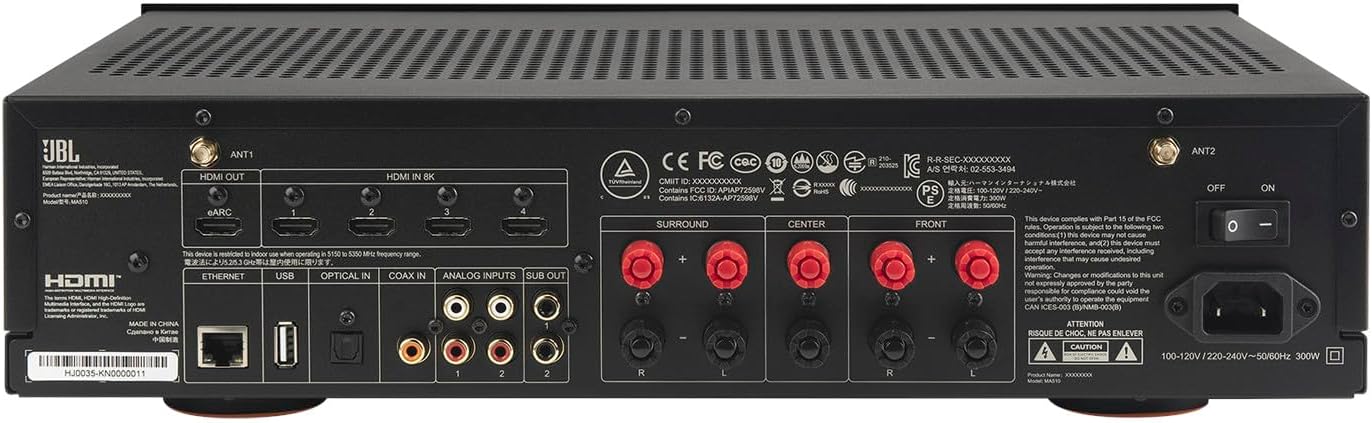
2. Speaker Calibration (EZ Set EQ)
The JBL MA510 features EZ Set EQ for automatic speaker calibration. This system optimizes sound output based on your room's acoustics and speaker placement, ensuring a balanced and immersive listening experience.
- Connect the included setup microphone to the designated port on the front panel.
- Teundeun mikropon dina posisi déngékeun primér Anjeun.
- Follow the on-screen instructions on your connected TV/display to initiate the EZ Set EQ calibration process. The receiver will emit test tones to measure and adjust speaker levels, distances, and equalization.
3. Network and Bluetooth Setup
The MA510 supports various wireless connectivity options for audio streaming.
- Wifi: Access the receiver's setup menu via your TV and navigate to network settings to connect to your home Wi-Fi network. This enables features like Apple Airplay 2 and Google Chromecast.
- Bluetooth: To pair a Bluetooth device, select the Bluetooth input on the receiver. Your device should then be able to discover and connect to the JBL MA510.
Parentah Operasi
1. Kadali dasar
The receiver can be operated using the front panel controls or the included IR remote control.


- kakuatan: Use the power button on the front panel or remote to turn the receiver on/off.
- Pamilih Input: Rotate the INPUT knob on the front panel or use the INPUT buttons on the remote to switch between connected sources (e.g., HDMI 1, Bluetooth).
- Kontrol volume: Adjust the master volume using the VOLUME knob on the front panel or the VOLUME +/- buttons on the remote.
- Napigasi Menu: Use the MENU, BACK, and navigation buttons on the remote to access and adjust receiver settings on your connected TV.
2. Modeu Audio
The MA510 supports native 5-channel decoding of Dolby and DTS formats, providing immersive surround sound.
- Use the SURROUND MODE buttons on the remote to cycle through available audio processing modes (e.g., Stereo, Dolby Surround, DTS Neural:X).
- The receiver will automatically detect and decode compatible audio formats from your source devices.
3. Streaming Musik
Enjoy music wirelessly through Bluetooth or network streaming features.
- Bluetooth: Select the Bluetooth input and pair your smartphone or tablet to stream audio directly.
- Streaming jaringan: Utilize Apple Airplay 2 or Google Chromecast from compatible devices connected to the same Wi-Fi network as the receiver.
Pangropéa
To ensure the longevity and optimal performance of your JBL MA510 AV Receiver, follow these maintenance guidelines:
- beberesih: Use a soft, dry cloth to clean the exterior surfaces. Avoid using abrasive cleaners, solvents, or chemical sprays, as these can damage the finish.
- Ventilasi: Ensure adequate ventilation around the receiver. Do not block the ventilation slots on the top, sides, or rear panel. Overheating can lead to performance issues or damage.
- Manajemén Kabel: Periodically check all cable connections to ensure they are secure and free from damage. Loose connections can degrade audio/video quality.
- Apdet parangkat lunak: Check the JBL support website periodically for any available firmware updates. Keeping your receiver's software up-to-date can improve performance and add new features.
Pamérésan masalah
If you encounter issues with your JBL MA510 AV Receiver, refer to the following common troubleshooting steps:
| Masalah | Mungkin Cukang lantaranana | Solusi |
|---|---|---|
| Taya Sora | Incorrect input selected, volume too low, speaker cables loose, mute activated. | Verify input source, increase volume, check speaker connections, deactivate mute. |
| Taya Gambar | Incorrect HDMI input, faulty HDMI cable, TV input not selected correctly. | Ensure correct HDMI input on receiver and TV, try a different HDMI cable. |
| Gagal Nyapasangkeun Bluetooth | Device too far, receiver not in pairing mode, interference. | Move device closer, ensure receiver is in Bluetooth input mode, restart both devices. |
| Masalah Sambungan Jaringan | Incorrect Wi-Fi password, router issues, signal interference. | Re-enter Wi-Fi password, restart router, ensure strong Wi-Fi signal. |
If the problem persists after trying these steps, please contact JBL customer support for further assistance.
spésifikasi
Detailed technical specifications for the JBL MA510 AV Receiver:
- Ukuran produk: 13.7 x 17 x 4.3 inci
- Beurat barang: 12 pon
- Téknologi konektipitas: Bluetooth
- Jenis Controller: Jauh
- Fitur husus: Bluetooth and network streaming, EZ Set EQ, High-performance immersive surround sound, On-screen setup and operation, Spectacular audio and video performance
- Alat anu cocog: Speaker
- Total palabuhan HDMI: 4 inputs, 1 output (eARC)
- Tipe Panyambung: HDMI
- Mode Kaluaran Audio: Sakuriling
- Konfigurasi Saluran Sora Sakuliling: 5.2
- Pengkodean Pidéo: H.264, H.265/HEVC
- Pabrikan: JBL
- Titimangsa munggaran sadia: 12 Juli 2024
Garansi sareng Rojongan
The JBL MA510 AV Receiver comes with a manufacturer's warranty. Please refer to the warranty card included in your product packaging for specific terms and conditions.
Kanggo dukungan téknis, bantuan ngungkulan masalah, atanapi klaim garansi, mangga buka dukungan resmi JBL. website or contact their customer service department. Keep your proof of purchase and product model number (JBLMA510WHTAM) handy when contacting support.
Dukungan Online: www.jbl.com/support


