
Bubuka
The JBL Soundgear Frames are innovative Bluetooth audio glasses designed to provide an immersive audio experience while allowing you to remain aware of your surroundings. Equipped with ultra-slim speakers, an integrated microphone, and touch controls, these frames offer seamless connectivity for music, calls, and video conferences. This manual provides essential information for setting up, operating, and maintaining your Soundgear Frames.
Naon dina Box
Carefully unpack your JBL Soundgear Frames and ensure all items are present:
- JBL Soundgear Frames (Onyx)
- Kabel Ngecas
- Kain beberesih
- Mawa Kasus
Catetan: Asesoris tambahan tiasa dijual nyalira.
Disetél
1. Ngecas Alat
Before first use, fully charge your JBL Soundgear Frames. Connect the provided charging cable to the charging port on the frames and to a USB power source. The LED indicator will show charging status.

Gambar: Sisi view of the JBL Soundgear Frames, highlighting the charging port and internal electronics within the temple arms.
- Waktu Ngecas: Kurang leuwih 2 jam pikeun ngecas pinuh.
- Kahirupan batré: Up to 8 hours of audio playback on a full charge.
2. Papasangan Bluetooth
To connect your Soundgear Frames to a Bluetooth-enabled device:
- Ensure the Soundgear Frames are charged and powered off.
- Press and hold the power button (usually located on one of the temple arms) until the LED indicator flashes blue, indicating pairing mode.
- Dina alat Anjeun (smartphone, tablet, komputer), buka setelan Bluetooth tur aktipkeun Bluetooth.
- Select "JBL Soundgear Frames" from the list of available devices.
- Sakali disambungkeun, indikator LED bakal ngahurungkeun biru padet.
The frames support Bluetooth 5.2 for stable and efficient wireless connectivity.
Parentah Operasi
Daya Hurung/Pareuman
- Daya Hurung: Press and hold the power button for 2 seconds. The LED will light up.
- Pareum listrik: Pencét terus tahan tombol daya salami 3 detik. LED bakal pareum.
Puterkeun Musik
Use the touch controls located on the temple arms to manage your audio:
- Puter / Reureuh: Single tap on either temple arm.
- Lagu salajengna: Double tap on the right temple arm.
- Lagu Sateuacanna: Double tap on the left temple arm.
- Volume Up: Swipe forward on the right temple arm.
- Volume Turun: Swipe backward on the right temple arm.
Manajemén Telepon
The integrated microphone allows for clear hands-free calls:
- Ngajawab / mungkas Telepon: Single tap on either temple arm.
- Nolak Telepon: Press and hold either temple arm for 2 seconds.
Asisten sora
Activate your device's voice assistant (e.g., Siri, Google Assistant) by triple-tapping on either temple arm.

Image: A person wearing the JBL Soundgear Frames outdoors, demonstrating their use in a real-world setting.
Pangropéa
beberesih
To maintain the clarity of your lenses and the integrity of the frames:
- Anggo lawon beberesih anu disayogikeun pikeun ngusap lénsa sareng pigura sacara lembut.
- For stubborn smudges, use a lens cleaning spray specifically designed for eyewear.
- Avoid using abrasive materials or harsh chemicals, as these can damage the lenses and frame finish.
Panyimpenan
When not in use, store your Soundgear Frames in the provided carrying case to protect them from scratches and impacts.
Perawatan batré
To prolong battery life, avoid exposing the frames to extreme temperatures. If storing for an extended period, charge the battery to approximately 50% before storage.
Pamérésan masalah
| Masalah | Solusi |
|---|---|
| Frames do not power on. | Pastikeun batréna geus dieusian. Sambungkeun ka sumber listrik teras cobian deui. |
| Teu bisa nyambung via Bluetooth. | Make sure the frames are in pairing mode (flashing blue LED). Check your device's Bluetooth settings and forget previous connections if necessary. Restart both devices. |
| Taya sora atawa volume low. | Check the volume level on both the frames and your connected device. Ensure the frames are properly paired. |
| Kadali rampa henteu ngaréspon. | Ensure the touch surface is clean and dry. Restart the frames. |
spésifikasi
| Fitur | Rincian |
|---|---|
| Nomer modél | JBLSNDGEARFMSRONX |
| UPC | 050036399845 |
| Warna | Onyx |
| Wangun Item | Buleud |
| Warna Lensa | Hideung |
| Tipe Lénsa | Non-polarisasi |
| Bahan Pigura | Thermoplastic |
| Panutup Pigura | Pigura Pinuh |
| Konektipitas | Bluetooth 5.2 |
| Panyatur | Ultra-slim 25mm x 9mm |
| Mikropon | terpadu |
| Kadali | Toél |
| Kahirupan batré | Nepi ka 8 jam |
| Waktu Ngecas | Kurang leuwih 2 jam |
| Tahan cai | IP54 (Tahan cipratan sareng lebu) |
| Dianjurkeun Paké | Ngadangukeun musik |
| Rentang umur | Dewasa |
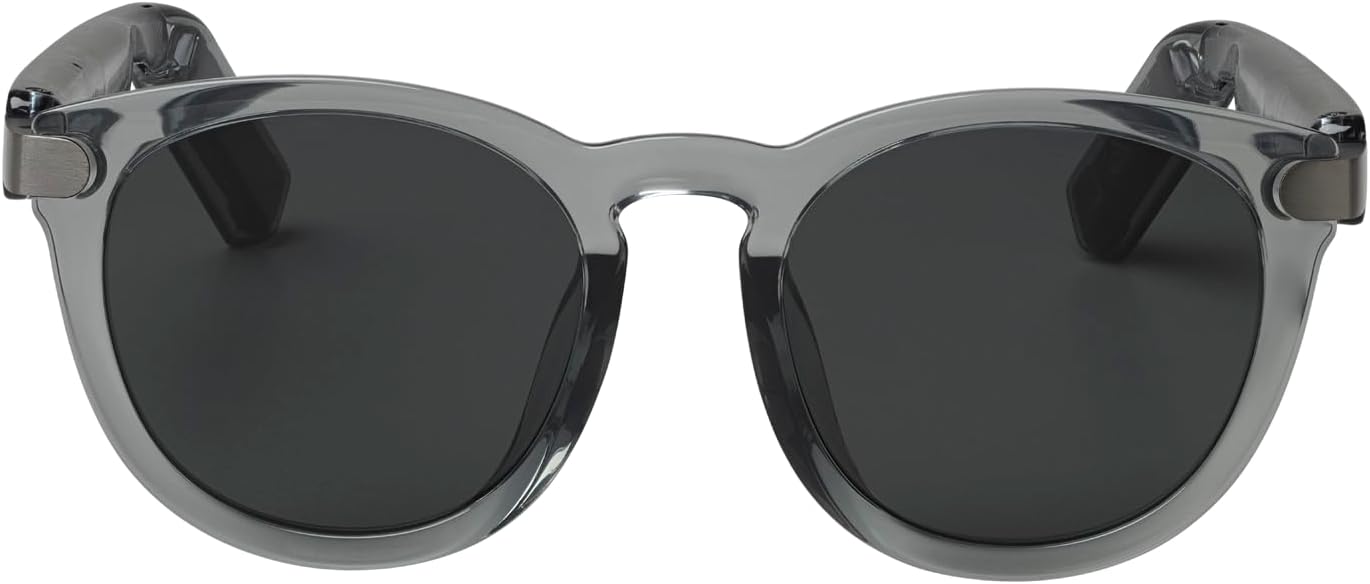
Gambar: Hareupeun view of the JBL Soundgear Frames, showcasing the round, full-frame design and black non-polarized lenses.

Gambar: Balik view of the JBL Soundgear Frames, showing the overall structure from the rear.
Garansi sareng Rojongan
JBL products are designed for reliability and performance. For warranty information and customer support, please refer to the warranty card included with your product or visit the official JBL website. You can also find FAQs and additional support resources online.
Dukungan Online: www.jbl.com/support