1. Bubuka
This manual provides essential information for the safe and efficient operation of your Samsung MS19M8000AS/AA Large Capacity Countertop Microwave Oven. This appliance is designed to simplify meal preparation with its generous 1.9 cu. ft. capacity, accommodating various dish sizes. It features Sensor Cook technology for automatic cooking time adjustments and a Ceramic Enamel Interior for durability and easy cleaning. Please read this manual thoroughly before using the appliance and keep it for future reference.
2. Émbaran Kasalametan
Pikeun ngirangan résiko kahuruan, kejutan listrik, cilaka jalma, atanapi paparan énergi gelombang mikro kaleuleuwihan nalika nganggo alat anjeun, turutan pancegahan kaamanan dasar, kalebet ieu:
- Baca sadaya parentah sateuacan nganggo alat.
- Ulah ngajalankeun oven lamun geus ruksak.
- Ulah panas cair atawa kadaharan séjénna dina wadah disegel sabab bisa ngabeledug.
- Entong nganggo bahan kimia korosif atanapi uap dina alat ieu.
- Ulah make oven ieu keur kaperluan komérsial.
- Salawasna mastikeun ventilasi ditangtoskeun sabudeureun microwave nu.
- Awas barudak taliti nalika gelombang mikro keur dipake.
3. Produk Langkungview
The Samsung MS19M8000AS/AA microwave oven is designed for convenient and efficient cooking. Key features include:
- Kapasitas ageung: 1.9 cu. ft. interior to accommodate various dish sizes.
- Sénsor masak: Automatically adjusts cooking time for optimal results.
- Keramik Enamel Interior: Durable, scratch-resistant, and easy to clean.
- Otomatis Defrost: Simplifies defrosting by weight or time.
- Resep Masak: Convenient one-touch options for common foods.
Diménsi
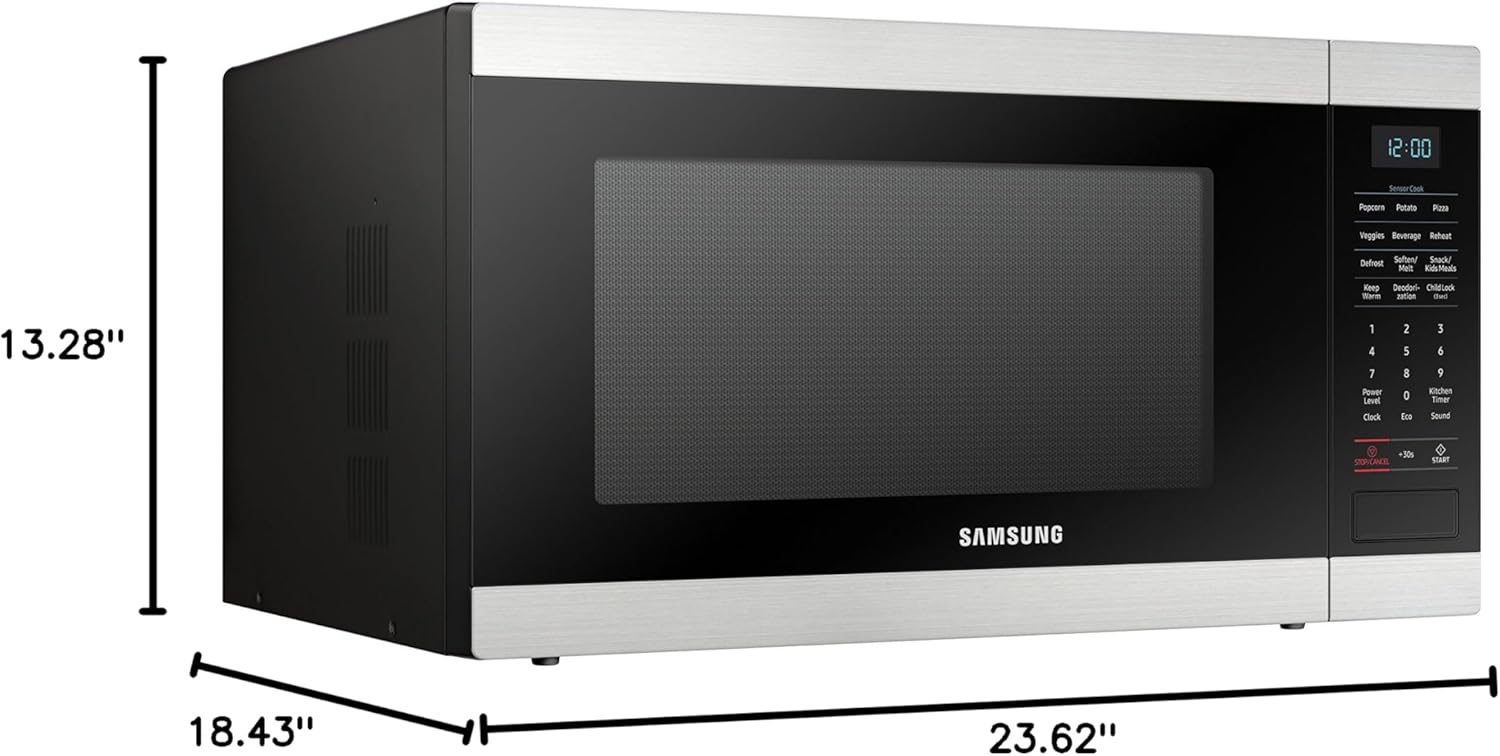
Gambar 1: Hareupeun view of the Samsung MS19M8000AS/AA Microwave Oven with labeled dimensions (18.43"D x 23.62"W x 13.28"H).
4. Setélan
Turutan léngkah ieu pikeun nyetél oven microwave anjeun:
- Ngabongkar: Sacara saksama piceun oven microwave sareng sadaya bahan bungkusan tina karton.
- panempatan: Place the microwave on a flat, stable surface that is strong enough to hold the oven and the food you place in it. Ensure there is adequate space for ventilation (at least 4 inches on top, sides, and back).
- Sambungan Daya: Plug the power cord into a grounded electrical outlet. Do not use an extension cord.
- Bersihan awal: Wipe the interior and exterior of the oven with a soft, damp lawon.
5. Parentah Operasi
Your Samsung microwave offers various cooking functions for your convenience.
Operasi Microwave Dasar
- Waktu masak: Press the 'Cook Time' button, enter the desired cooking time using the number pad, and then press 'Start'.
- Tingkat Kakuatan: After setting the cook time, press 'Power Level' and select a power level from 1 to 10 (10 being 100% power). Press 'Start'.
- Masak Express: For quick cooking, simply press any number from 1 to 6 on the number pad for 1 to 6 minutes of cooking at 100% power.
- Tambahkeun 30 detik: Press the '+30 Sec' button to add 30 seconds of cooking time at 100% power.
Sensor Masak
The Sensor Cook feature automatically detects the humidity released from food and adjusts the cooking time for optimal results. To use:
- Teundeun dahareun dina gelombang mikro.
- Press the 'Sensor Cook' button (e.g., 'Potato', 'Popcorn', 'Pizza').
- Pencét 'Mimitian'. Oven bakal otomatis nangtukeun waktos masak.
Otomatis Defrost
Use Auto Defrost to quickly and efficiently defrost various foods.
- Pencét tombol 'Pencairan Otomatis'.
- Select the food type (e.g., Meat, Poultry, Fish) and enter the weight using the number pad.
- Pencét 'Mimitian'. Oven bakal ngitung waktos defrosting.
Budak Konci
The Child Lock feature prevents unintended operation of the microwave, enhancing safety, especially around children. To activate or deactivate:
- Pikeun Aktipkeun: Press and hold the 'Stop/Cancel' button for 3 seconds until 'LOC' appears on the display.
- Pikeun mareuman: Press and hold the 'Stop/Cancel' button again for 3 seconds until 'LOC' disappears from the display.
6. beberesih sarta Pangropéa
Bebersih sareng pangropéa teratur bakal mastikeun umur panjang sareng kinerja optimal tina oven microwave anjeun.
- Keramik Enamel Interior: The ceramic enamel interior is designed for easy cleaning. Wipe spills immediately with a damp cloth. For stubborn stains, use a mild detergent and a soft sponge. Avoid abrasive cleaners or scouring pads.
- Luar: Clean the exterior surface with a soft cloth and mild soap and water. Dry thoroughly.
- Méja puteran: The glass turntable can be removed and washed with warm soapy water or in the dishwasher.
- Segel panto: Jaga segel panto tetep bersih pikeun mastikeun panutupanana leres sareng operasi anu efisien.

Gambar 2: View of the easy-to-clean Ceramic Enamel Interior.
7. Cara ngungkulan
Upami anjeun mendakan masalah sareng gelombang mikro anjeun, tingal masalah sareng solusi umum ieu:
| Masalah | Mungkin Cukang lantaranana | Solusi |
|---|---|---|
| Oven henteu ngamimitian | Panto teu ditutup leres; kabel kakuatan unplugged; sekering ditiup / circuit breaker tripped | Pastikeun panto ditutup pageuh; Pariksa sambungan kabel listrik; Pariksa sekering/pemutus sirkuit rumah tangga |
| Dahareun teu masak merata | Food not stirred/rotated; Improper power level/cook time | Stir or rotate food during cooking; Adjust power level and cook time as needed |
| Noise kaleuleuwihan salila operasi | Turntable not seated correctly; Foreign object in oven cavity | Ensure turntable is properly seated; Remove any foreign objects |
| Pintonan nunjukkeun kode kasalahan | Gangguan internal | Unplug the oven for 30 seconds and plug back in. If error persists, contact service. |
8. Spésifikasi
| Spésifikasi | Nilai |
|---|---|
| Ngaran Brand | Samsung |
| Info modél | MS19M8000AS/AA |
| Item Beurat | 43.03 pon |
| Dimensi produk | 18.43 x 23.62 x 13.28 inci |
| Tipe Pamasangan | Countertop |
| Kapasitas | 1.9 suku kubik |
| Paké énergi | 700 Watt |
| Voltage | 120 volt |
| Wattage | 950 watt |
| Jenis Bahan | Beusi sténless |
| Jinis Bahan Batin | Enamel Keramik |
| Fitur husus | Defrost, Sensor Cook |
| Komponén Kaasup | gelombang mikro |
9. Garansi jeung Rojongan
For warranty information or technical support, please refer to the warranty card included with your product or visit the official Samsung website. You may also contact Samsung customer service for assistance.


