Bubuka
This manual provides essential information for the safe and efficient use of your Samsung UN46C6300 46-Inch 1080p 120 Hz LED HDTV. Please read these instructions thoroughly before operating your television and retain them for future reference. Your Samsung LED HDTV combines advanced picture quality with versatile connectivity options, designed for an optimal viewpangalaman.
Émbaran Kasalametan
Always follow basic safety precautions when using this product to reduce the risk of fire, electric shock, and injury to persons. Keep the television away from moisture and heat sources. Do not block ventilation openings. Use only specified attachments/accessories. Refer all servicing to qualified service personnel.
- Ulah ngalaan alat ieu ka hujan atawa Uap.
- Ulah nempatkeun objék dieusian ku cairan, kayaning vases, dina alat.
- Entong dipasang di deukeut sumber panas sapertos radiator, register panas, kompor, atanapi aparat sanésna (kalebet ampLiifiers) anu ngahasilkeun panas.
- Nangtayungan kabel kakuatan tina keur leumpang dina atawa pinched.
- Ngan anggo kantétan/aksésori anu ditunjuk ku produsén.
Naon dina Box
Saatos ngabongkar bungkusan, pastikeun sadaya komponén aya sareng henteu ruksak:
- Samsung UN46C6300 LED HDTV
- Ngadeg TV
- Kabel listrik
- Kadali jauh
- Manual pangguna (dokumén ieu)
Disetél
1. Nangtung Majelis
Carefully place the TV screen-down on a soft, flat surface to prevent damage. Attach the stand to the television using the provided screws, ensuring it is securely fastened. Refer to the diagram below for proper stand attachment.

Gambar 1: Sisi view of the Samsung UN46C6300 LED HDTV, illustrating its thin profile and the location of side-mounted ports.
2. Nyambungkeun Alat éksternal
Connect your external devices such as cable/satellite boxes, Blu-ray players, or gaming consoles to the appropriate ports on the back or side of the TV. The UN46C6300 features 4 HDMI (ver 1.3) ports for high-definition connectivity. Ensure all cables are securely connected.
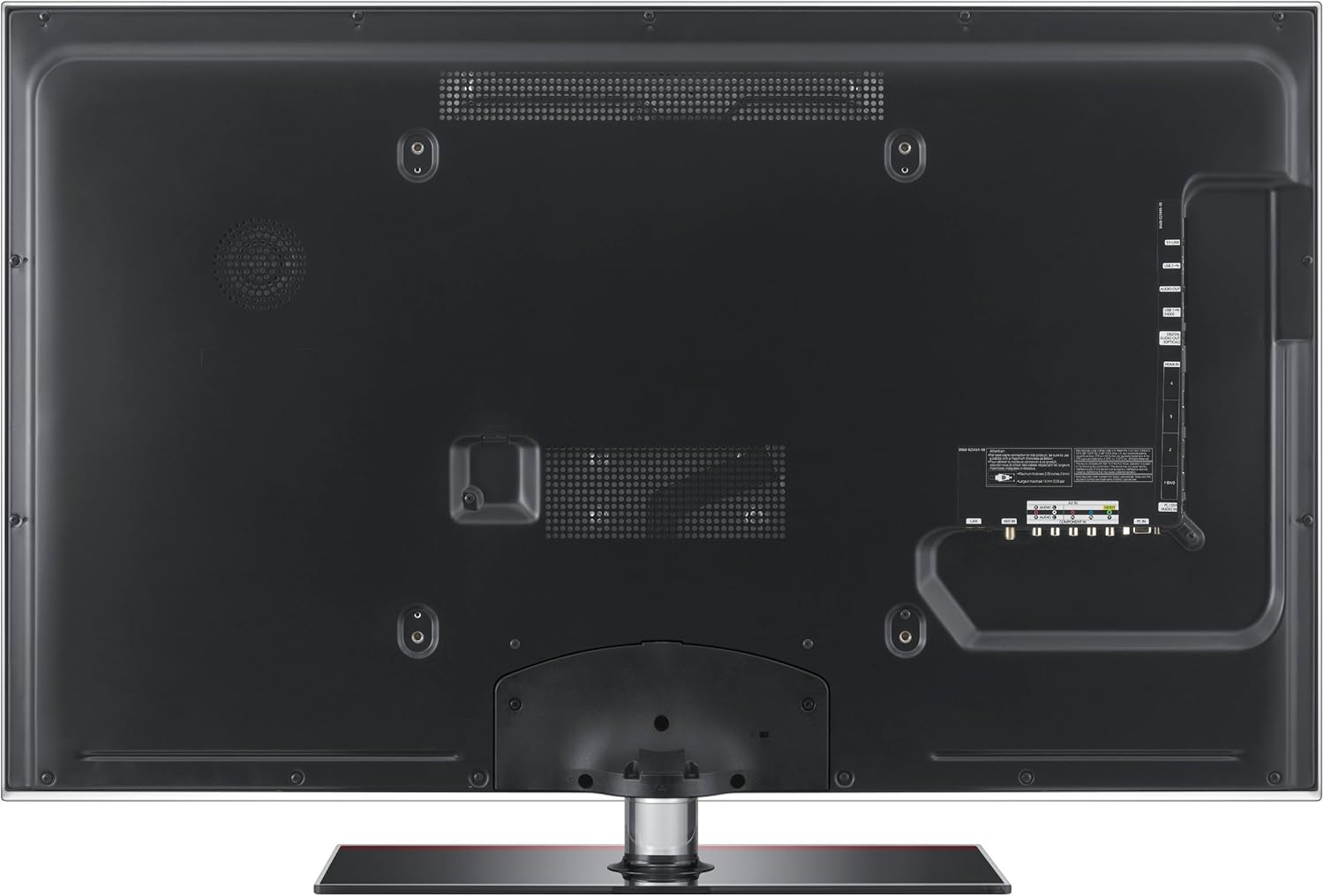
Gambar 2: Tukangeun view of the Samsung UN46C6300 LED HDTV, highlighting the arrangement of various input and output ports for external device connections.
- HDMI: For high-definition video and audio from devices like Blu-ray players, game consoles, and set-top boxes.
- USB: For connecting USB storage devices to use the ConnectShare Movie feature.
- Komponén / Komposit: Pikeun alat heubeul.
- Antena/Kabel In: Pikeun nyambungkeun anteneu atawa sinyal TV kabel.
3. Sambungan Daya
Plug the power cord into the TV's power input, then plug the other end into a wall outlet. The TV is designed to be ENERGY STAR compliant, promoting energy efficiency.
Parentah Operasi
Daya Hurung/Pareuman
Pencét éta POWER button on the remote control or on the TV to turn the television on or off.
Pilihan Sumber Input
Pencét éta SUMBER button on the remote control to cycle through available input sources (HDMI1, HDMI2, USB, Component, etc.).
Fitur konci
- Auto Motion Plus: Reduces blur in fast-moving scenes, providing smoother action. This feature can be adjusted or turned off via the picture settings menu.
- Wide Color Enhancer Plus: Delivers a broader spectrum of colors for a more vibrant and lifelike picture.
- Mega Dynamic Contrast Ratio: Enhances the contrast between the brightest whites and darkest blacks, making images pop.
- ConnectShare Movie: Allows you to play movies, photos, and music directly from a USB storage device by simply plugging it into the TV's USB port.
- HDMI-CEC: Enables control of multiple HDMI-connected devices with a single remote control.
Pangropéa
Pikeun ngajaga kinerja sareng penampilan TV anjeun:
- Ngabersihan layar: Ngusap layar nganggo kaén anu lembut sareng teu aya serat. Pikeun tanda pengkuh, enteng dampen lawon jeung cai atawa cleaner layar husus. Ulah menyemprot cleaner langsung kana layar.
- beberesih Kabinet: Ngusap lomari ku lawon lemes, garing. Ulah make cleaners abrasive atawa pangleyur.
- Ventilasi: Pastikeun bukaan ventilasi dina tonggong TV teu diblokir pikeun nyegah overheating.
Pamérésan masalah
Upami anjeun ngalaman masalah sareng TV anjeun, tingal solusi umum ieu:
| Masalah | Solusi anu mungkin |
|---|---|
| Taya Daya | Pariksa naha kabel listrik parantos dipasang pageuh kana TV sareng stop kontak. Uji stop kontakna nganggo alat anu sanés. |
| Taya Gambar / Gambar menyimpang | Ensure the correct input source is selected. Check all cable connections (HDMI, component) for looseness or damage. Try a different source device. Adjust picture settings. |
| Taya Sora | Check the volume level and ensure the TV is not muted. Verify audio cable connections. If using external audio, ensure it is properly configured. |
| Remote Control Teu Gawé | Ganti batré dina kadali jauh. Pastikeun teu aya halangan antara jauh sareng sénsor IR TV. |
spésifikasi
| Fitur | Rincian |
|---|---|
| Nomer modél | UN46C6300 |
| Ukuran layar | 46 inci |
| Téknologi tampilan | LED |
| Resolusi | 1080p (HD lengkep) |
| Refresh Laju | 120 Hz |
| Rasio Aspék | 16:9 |
| Téhnologi konektipitas | HDMI (4 ports), USB |
| Fitur husus | Flat Panel, ConnectShare Movie, Auto Motion Plus, Wide Color Enhancer Plus, Mega Dynamic Contrast Ratio, HDMI-CEC |
| Diménsi Produk (WxHxD) | 43 x 28.5 x 10.8 inci (kalayan nangtung) |
| Item Beurat | 44.1 pon |
| Produsén | Samsung Electronics |
Garansi sareng Rojongan
Kanggo inpormasi garansi sareng dukungan téknis, mangga tingali kartu garansi anu kalebet dina produk anjeun atanapi kunjungi dukungan resmi Samsung. website. You can find detailed support resources, FAQs, and contact information for customer service.
Rojongan Samsung Websitus: www.samsung.com/us/support/


