
Вовед
This manual provides essential information for the proper setup, operation, maintenance, and troubleshooting of your Samsung Galaxy XCover7 Pro. Please read this manual thoroughly before using your device to ensure optimal performance and longevity.

Слика 1: Напред и назад view of the Samsung Galaxy XCover7 Pro smartphone.
Поставување
1. Содржина на пакетот
Потврдете дека вашиот пакет ги содржи следниве ставки:
- Samsung Galaxy XCover7 Pro device
- Исфрлач на фиока за SIM
- USB кабел
- Литиум-јонска батерија (претходно инсталирана или одделна)
2. Battery Installation (if separate)
The Galaxy XCover7 Pro features a replaceable battery. If your battery is not pre-installed:
- Внимателно отстранете го задниот капак на уредот.
- Align the battery with the contacts inside the battery compartment.
- Нежно притиснете ја батеријата на своето место додека не се намести безбедно.
- Reattach the back cover, ensuring it clicks into place.
3. SIM and eSIM Setup
The device supports Dual SIM functionality (1 Nano SIM + 1 eSIM).
Nano SIM Card Installation:
- Пронајдете го држачот за SIM-картичка на страната од уредот.
- Вметнете ја алатката за исфрлање на фиоката на SIM-картичката во малата дупка до фиоката и нежно притискајте додека фиоката не испадне надвор.
- Place your Nano SIM card onto the tray with the gold contacts facing down.
- Внимателно повторно вметнете ја фиоката во уредот.
Активирање на eSIM:
eSIM activation typically involves scanning a QR code provided by your carrier or entering activation details manually through the device settings. Refer to your mobile carrier for specific eSIM activation instructions.
4. Првично вклучување и конфигурација
- Притиснете и задржете го копчето за вклучување (се наоѓа од страната) додека не се појави логото на Samsung.
- Следете ги упатствата на екранот за да го завршите почетното поставување, вклучувајќи го изборот на јазик, Wi-Fi конекцијата, поставувањето на Google сметката и безбедносните поставки (отпечаток од прст, PIN, шема).
Упатства за работа
1. Basic Device Functions
- Вклучување/исклучување: Притиснете го и задржете го копчето за вклучување. Изберете „Исклучи“ или „Рестарт“.
- Контрола на јачината на звукот: Користете ги копчињата за зголемување и намалување на јачината на звукот од страната на уредот.
- Навигација со екран на допир: Swipe, tap, pinch-to-zoom, and long-press to interact with the display. The touchscreen is designed to be sensitive enough for use with gloves or when wet.

Figure 2: The sensitive touchscreen allows operation even with gloves or when wet.
2. Робусни карактеристики
The Galaxy XCover7 Pro is built for demanding environments:
- Трајност: MIL-STD-810H tested for resistance against drops and environmental conditions.
- Отпорност на вода и прашина: IP68 rated, protecting against dust, dirt, sand, and immersion in up to 5 feet of water for up to 30 minutes.
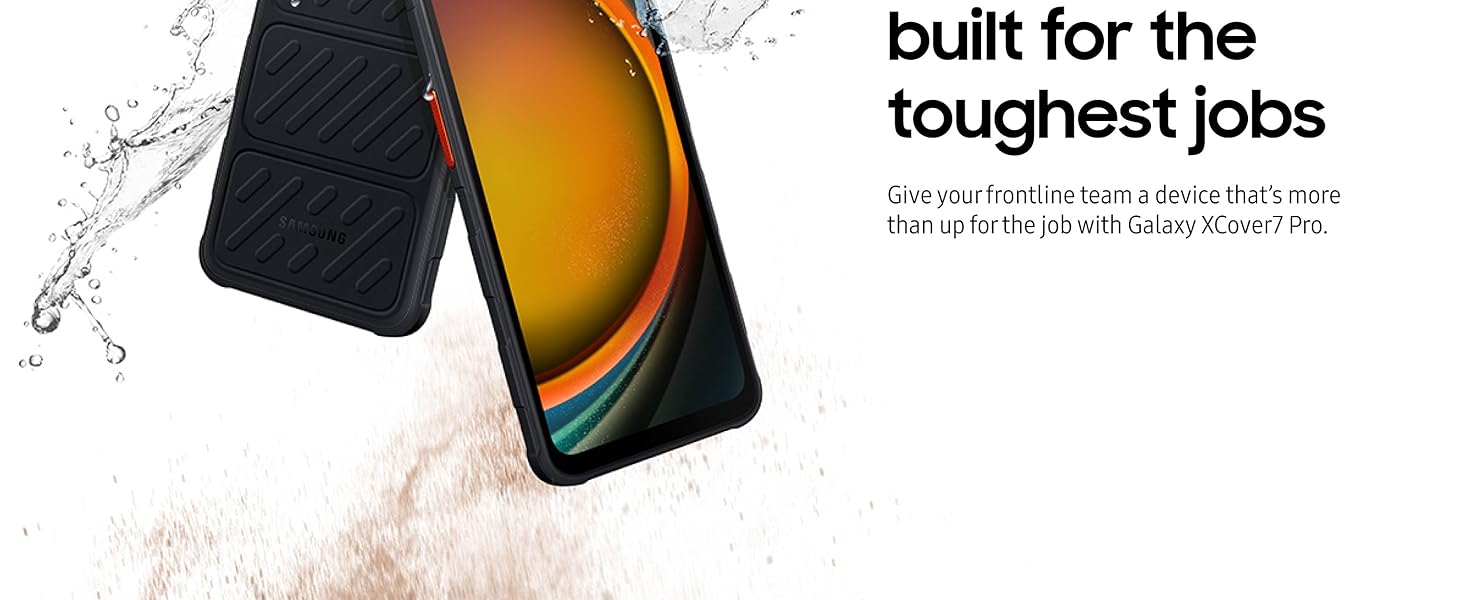
Figure 3: The device is designed to withstand exposure to water and sand.
3. Поврзување
- 5G and Wi-Fi 6E: Enjoy high-speed wireless data networks for efficient communication and data transfer.
- Bluetooth & NFC: For connecting accessories and contactless payments.

Figure 4: The device supports 5G connectivity for faster data speeds.
4. Управување со батерии
The 4350 mAh battery provides extended usage. Its replaceable design allows for quick swaps to maintain productivity.

Figure 5: The 4350mAh battery ensures long operational hours.
5. Customizable Hot Keys
Utilize the programmable hot keys to quickly access frequently used functions or applications, such as push-to-talk or scanner features.

Figure 6: Hot keys can be configured for functions like push-to-talk.
6. Samsung DeX
Connect your Galaxy XCover7 Pro to an external display (like a PC monitor) to experience a desktop-like environment, enhancing productivity for tasks requiring a larger screen.

Figure 7: Samsung DeX allows for a desktop experience by connecting to an external screen.
7. Заокружи за пребарување со Google
Quickly search for information by circling an object on your screen. This feature leverages Google's search capabilities for instant results.

Figure 8: Use Circle to Search with Google for quick information retrieval.
Одржување
1. Чистење на вашиот уред
To maintain the device's IP68 rating and overall condition:
- After exposure to water, rinse the device with clean fresh water and dry thoroughly with a clean, soft cloth.
- For general cleaning, wipe the screen and body with a soft, lint-free cloth. Avoid abrasive materials or harsh chemicals.
2. Нега на батерии
- За да го максимизирате животниот век на батеријата, избегнувајте екстремни температури.
- If using multiple batteries, ensure they are stored in a cool, dry place.
- Use only Samsung-approved chargers and batteries.
3. Софтверски ажурирања
Your Galaxy XCover7 Pro is designed to receive 7 OS upgrades and 7 years of security updates. Regularly check for and install software updates to ensure optimal performance, security, and access to new features.
- Одете на Поставки.
- Допрете Ажурирање на софтверот.
- Допрете Преземете и инсталирајте.
Решавање проблеми
Ако имате проблеми со вашиот уред, обидете се со следниве решенија:
- Уредот не се вклучува: Ensure the battery is properly installed and charged. Connect the device to a charger for at least 10 minutes before attempting to power on again.
- Проблеми со поврзувањето (Wi-Fi/5G):
- Вклучете и исклучете Wi-Fi или мобилни податоци.
- Рестартирајте го вашиот уред.
- Check router or network settings.
- Екранот на допир не реагира: Рестартирајте го уредот. Уверете се дека екранот е чист и сув.
- Паѓање на апликации: Clear the app's cache or data in Settings > Apps. If the issue persists, uninstall and reinstall the app.
- Бавни перформанси: Close unused applications, clear cache, or restart the device. Consider freeing up storage space.
За посложени проблеми, погледнете ја поддршката на Samsung webсајт или контактирајте со службата за корисници.
Спецификации
| Карактеристика | Детал |
|---|---|
| Име на моделот | XCover7 Pro |
| Број на модел на ставка | SM-G766UZKFN14 |
| Димензии на производот | 6.64 x 3.15 x 0.4 инчи |
| Тежина на ставката | 2.62 унци (74.2 грама) |
| Оперативен систем | Андроид 15, OneUI 7.0 |
| Брзина на процесорот | 2.4 GHz |
| Големина на екранот | 6.6 инчи |
| Резолуција | 1080 x 2408 (FHD+) |
| Стапка на освежување | 120 Hz |
| Големина на инсталирана RAM меморија | 6 GB |
| Капацитет за складирање на меморија | 128 GB (expandable up to 2 TB via MicroSD) |
| Капацитет на батеријата | 4350 милиониamp Работно време (заменливо) |
| Време за разговор на телефон | 7 часа |
| Технологии за поврзување | Bluetooth, NFC, USB, Wireless (5G, Wi-Fi 6E) |
| Посебни карактеристики | Dual SIM, Fingerprint Sensor, Push-to-Talk, Rugged Body, Water Resistant (IP68), MIL-STD-810H |
| Боја | Црното |
| Што има во кутијата | Исфрлувач на фиоката за SIM картичка, USB кабел |
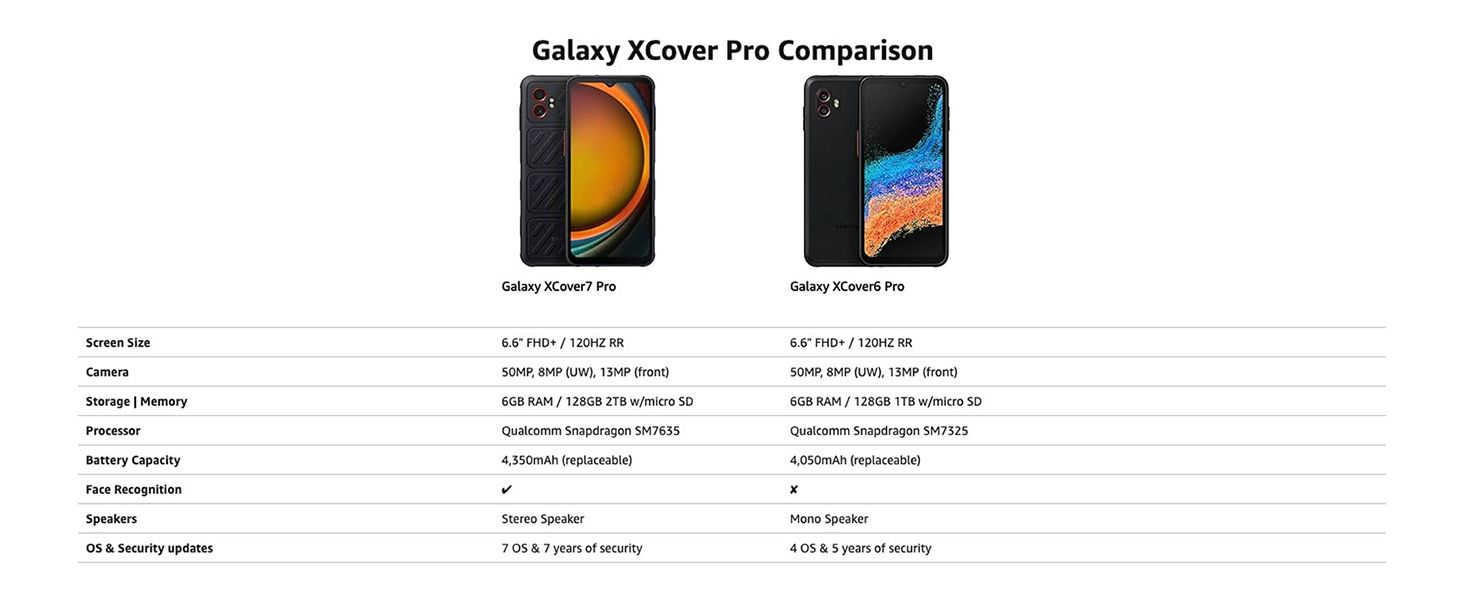
Figure 9: A comparison of key specifications between the Galaxy XCover7 Pro and XCover6 Pro.
Информации за гаранцијата
Samsung provides a limited warranty for its products. For detailed information regarding the warranty period, coverage, and terms and conditions for your Samsung Galaxy XCover7 Pro, please refer to the warranty card included with your product or visit the official Samsung website. The device is supported with 7 OS upgrades and 7 years of security updates from its release date.
Поддршка за корисници
For further assistance, technical support, or service inquiries, please contact Samsung Customer Service or visit the official Samsung support webсајт:
- Поддршка на Samsung Webсајт: www.samsung.com/us/support/
- Погледнете го пакувањето на вашиот производ за регионални контакт броеви.