1. Вовед
This manual provides essential information for the installation, operation, and maintenance of your Samsung 970 EVO Plus 1TB NVMe M.2 Internal Solid State Drive. Please read these instructions carefully before proceeding to ensure proper usage and to maximize the performance and lifespan of your SSD.

Figure 1: Samsung 970 EVO Plus SSD and its retail packaging.
2. Производот завршиview
The Samsung 970 EVO Plus is a high-performance NVMe M.2 SSD designed for demanding computing tasks. It leverages V-NAND technology and a PCIe Gen 3.0 x4 interface to deliver exceptional read and write speeds, making it suitable for gaming, graphics, and intensive workloads.
Клучни карактеристики:
- Капацитет: 1 ТБ
- Интерфејс: NVMe M.2 (PCIe Gen 3.0 x4)
- Секвенцијална брзина на читање: До 3,500 MB/s
- Секвенцијална брзина на пишување: До 3,300 MB/s
- Технологија: V-NAND, Dynamic Thermal Guard, Intelligent TurboWrite
- Софтвер: Samsung Magician for drive management

Figure 2: The 970 EVO Plus SSD delivering high performance in a laptop environment.
3. Поставување и инсталација
Before installation, ensure your system's motherboard supports NVMe M.2 SSDs and has an available M.2 slot. Refer to your motherboard's manual for specific M.2 slot locations and installation procedures.
Безбедносни мерки на претпазливост:
- Always power off your computer and disconnect it from the power source before installing any internal components.
- Испразнете го статичкиот електрицитет со допирање на заземјен метален предмет пред да го допрете SSD-дискот.
- Држете го SSD-то за рабовите за да избегнете допирање на златните конектори или компоненти.
Чекори за инсталација:
- Пронајдете достапен слот M.2 на вашата матична плоча.
- Carefully insert the Samsung 970 EVO Plus SSD into the M.2 slot at a slight angle.
- Нежно притиснете го SSD-то надолу додека не биде паралелно со матичната плоча.
- Secure the SSD with the provided screw (or the screw from your motherboard's M.2 standoff).
- Затворете го куќиштето на компјутерот и повторно вклучете го напојувањето.
- Boot your computer and initialize the new SSD through your operating system's Disk Management utility.
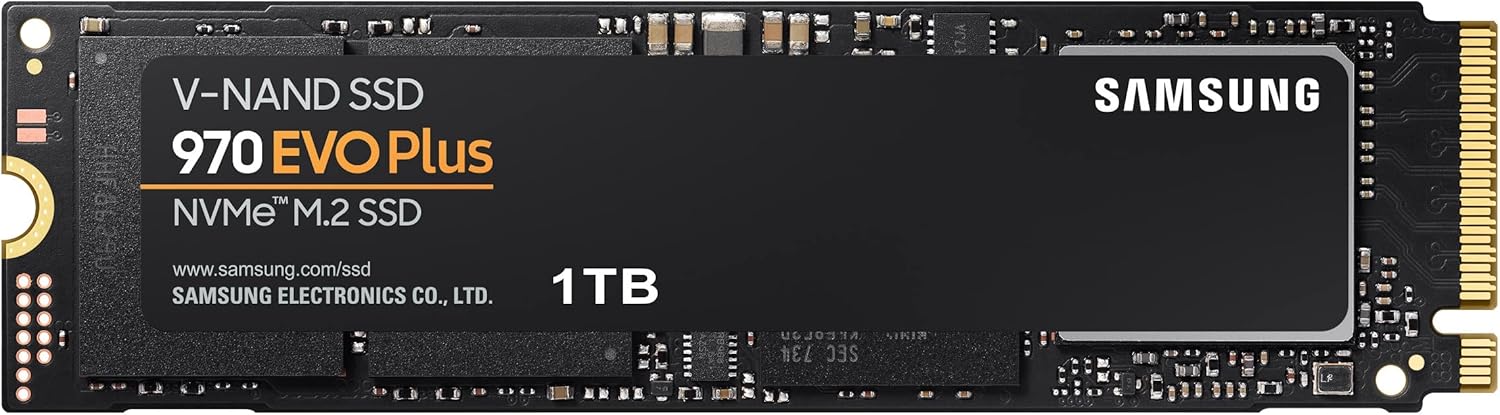
Figure 3: The Samsung 970 EVO Plus NVMe M.2 SSD module.
4. Упатства за работа
Once installed and initialized, your Samsung 970 EVO Plus SSD is ready for use. For optimal performance and drive health management, it is recommended to install the Samsung Magician software.
Софтвер за волшебници на Samsung:
Samsung Magician is a suite of user-friendly tools designed to help you manage your SSD. It allows you to:
- Следете го здравјето и температурата на погонот.
- Benchmark performance.
- Ажурирајте го фирмверот.
- Optimize performance settings.
- Securely erase data.
Download the latest version of Samsung Magician from the official Samsung webсајт.

Figure 4: The Samsung Magician software interface for SSD management.
5. Одржување
Редовното одржување помага да се обезбеди долготрајност и оптимални перформанси на вашиот SSD.
Ажурирања на фирмверот:
Periodically check for and install firmware updates using the Samsung Magician software. Firmware updates can improve performance, stability, and compatibility.
Управување со топлина:
The 970 EVO Plus features Dynamic Thermal Guard technology, which automatically monitors and maintains optimal operating temperatures to minimize performance drops. Ensure adequate airflow within your computer case to assist with heat dissipation.

Figure 5: Illustration of Dynamic Thermal Guard for heat dissipation.
6 Смена на проблеми
If you encounter issues with your Samsung 970 EVO Plus SSD, consider the following troubleshooting steps:
- SSD не е откриен:
- Проверете дали SSD-дискот е правилно поставен во слотот M.2.
- Check your motherboard's BIOS/UEFI settings to confirm the M.2 slot is enabled and configured correctly.
- Verify that your motherboard drivers are up to date.
- Проблеми со перформансите:
- Ensure the latest firmware is installed via Samsung Magician.
- Check for sufficient free space on the drive (performance can degrade with very full drives).
- Monitor drive temperature using Samsung Magician to ensure it's not overheating.
- Оперативниот систем не се стартува:
- Проверете го редоследот на подигнување во поставките на BIOS/UEFI.
- If migrating an OS, ensure the migration process was completed successfully.
For persistent issues, consult the Samsung support webсајт или контактирајте со службата за корисници.
7. Спецификации
| Карактеристика | Детал |
|---|---|
| Број на модел | MZ-V7S1T0B/AM |
| Капацитет | 1 ТБ |
| Интерфејс | NVMe (PCIe Gen 3.0 x4) |
| Форма фактор | М.2 (2280) |
| Секвенцијална брзина на читање | До 3,500 MB/s |
| Секвенцијална брзина на пишување | До 3,300 MB/s |
| V-NAND Technology | Да |
| Dynamic Thermal Guard | Да |
| Димензии на ставката (ДxШxВ) | 3.15 x 0.87 x 0.09 инчи |
| Тежина на ставката | 0.32 унци |
| Voltage | 3.3 V ± 5% Allowable voltage |

Figure 6: Physical dimensions of the Samsung 970 EVO Plus SSD.
8. Гаранција и поддршка
Ограничена гаранција:
The Samsung 970 EVO Plus 1TB SSD comes with a 5-year limited warranty or up to 600 Terabytes Written (TBW), whichever comes first. For detailed warranty terms and conditions, please refer to the enclosed warranty statement in the product package.
Поддршка за корисници:
For further assistance, technical support, or warranty claims, please visit the official Samsung website or contact their customer service department. Keep your product's model number (MZ-V7S1T0B/AM) and serial number handy when seeking support.