
1. Introduction
This manual provides essential instructions for the assembly, operation, and maintenance of your JUMMICO Electric Standing Desk. Designed for ergonomic comfort, this desk allows seamless transitions between sitting and standing positions, promoting a healthier work environment. Please read this manual thoroughly before assembly and use to ensure proper function and safety.
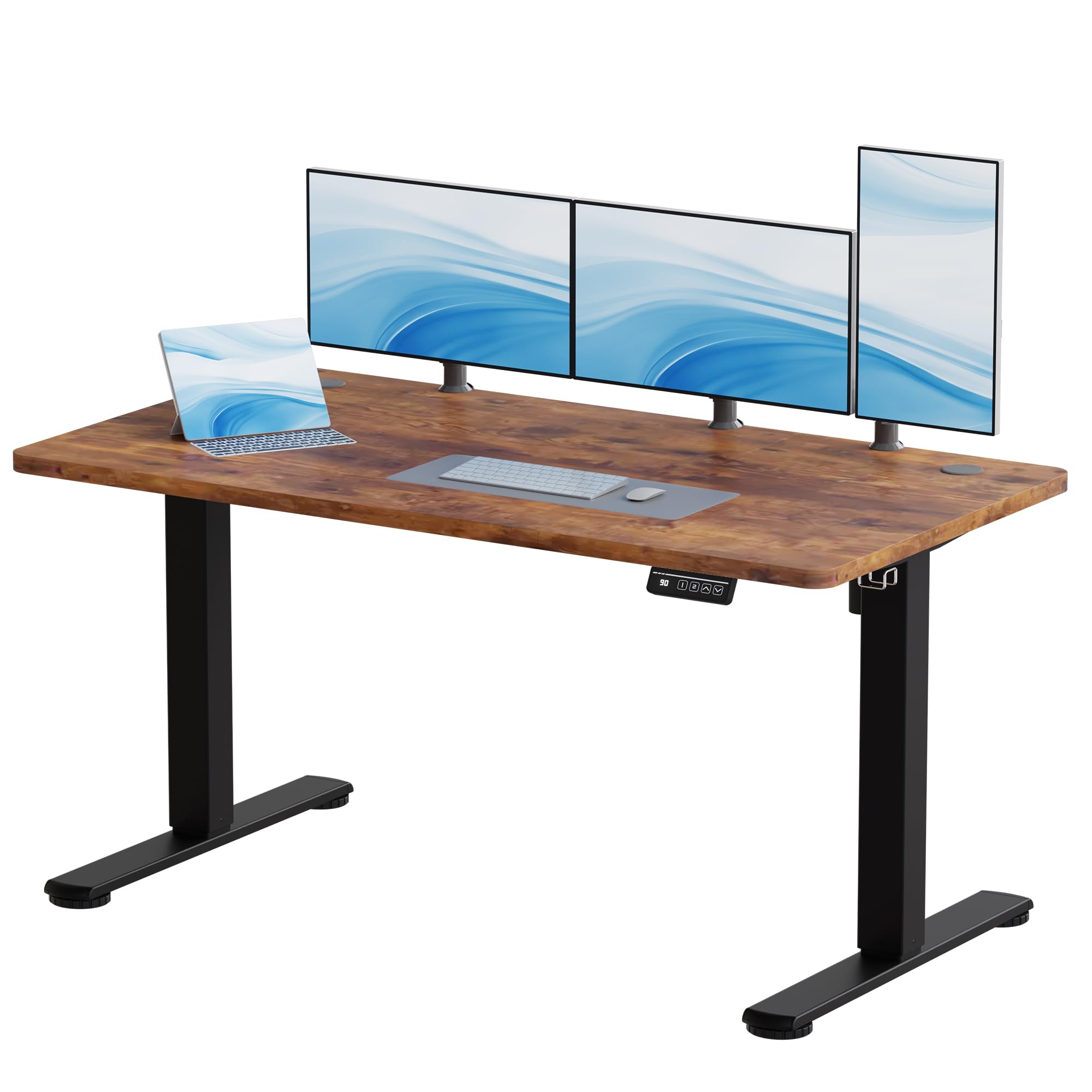
Image 1.1: JUMMICO Electric Standing Desk in a modern office setting.
2. Safety Information
- Read all instructions carefully before assembly and first use.
- Keep children and pets away from the desk during operation to prevent injury.
- Ensure there are no obstructions (e.g., walls, furniture, cables) in the desk's path during height adjustment to avoid damage or pinching.
- Do not exceed the maximum weight capacity of 70 kg (dynamic) or 85 kg (static). Overloading can cause damage and pose a safety risk.
- Keep all power cords clear and protected from damage. Do not place heavy objects on the cords.
- Only use the power adapter supplied with the desk. Using an incorrect adapter may cause malfunction or fire.
- Do not attempt to disassemble or repair the motor or control unit yourself. Contact customer support for assistance.
- Avoid spilling liquids on the control panel or motor components.
3. Package Contents
Please verify that all components are present and undamaged before beginning assembly. If any parts are missing or damaged, contact JUMMICO customer support.
- Desktop (140x60 cm, Wood finish)
- Desk Legs (2)
- Crossbar/Frame
- Control Panel
- Motor
- Power Adapter
- Headphone Hook
- Assembly Hardware (screws, bolts, etc.)
4. Setup and Assembly
The JUMMICO Electric Standing Desk requires assembly. For detailed, step-by-step instructions, please refer to the official installation manual provided as a PDF document:
Download Installation Manual (PDF)
General Assembly Steps:
- Unpack all components and lay them out on a clean, soft surface to prevent scratches.
- Attach the desk legs to the crossbar/frame using the provided hardware.
- Secure the desktop to the assembled frame. The desktop is pre-drilled for easy installation.
- Connect the motor and control panel cables to the main control box. Ensure all connections are secure.
- Attach the headphone hook to the desired location on the desk frame.
- Plug the power adapter into the control box and then into a wall outlet.
Note: Assembly tools are not included with the product. You will need standard tools such as a screwdriver and possibly an Allen wrench for assembly.

Image 4.1: Illustration of desk components and assembly process.
5. Operating Instructions
Your JUMMICO Electric Standing Desk features intuitive controls for height adjustment and memory presets.
5.1. Height Adjustment
- To raise the desk, press and hold the Up arrow (▲) button on the control panel.
- To lower the desk, press and hold the Down arrow (▼) button on the control panel.
- Release the button at your desired height. The desk can be adjusted smoothly between 73 cm and 118 cm.
5.2. Memory Presets
The desk features two programmable memory buttons to save and recall your preferred sitting and standing heights.
- Adjust the desk to your desired height using the Up/Down arrows.
- Press the "M" button. The display will show "S-".
- Within 3 seconds, press either the "1" or "2" button to save the current height to that preset. The display will show "S-1" or "S-2" to confirm.
- To recall a saved height, simply press the corresponding "1" or "2" button. The desk will automatically move to the saved position.
5.3. Anti-Collision Feature
The desk is equipped with an anti-collision system. If the desk encounters an obstruction during height adjustment, it will automatically stop and reverse slightly to prevent damage or injury.
5.4. Quiet Operation
The desk's motor operates quietly, with a noise level below 50 dB, ensuring a peaceful work environment.

Image 5.1: Control panel with height adjustment and memory functions.

Image 5.2: Desk motor operating quietly below 55 dB.
6. Maintenance
Regular maintenance helps ensure the longevity and optimal performance of your JUMMICO Electric Standing Desk.
- Cleaning: Clean the desk surface with a soft, damp cloth. Avoid using abrasive cleaners, harsh chemicals, or solvents, as these can damage the finish.
- Screw Tightness: Periodically check and tighten all screws and connections to ensure stability.
- Cable Management: Ensure all cables are neatly managed and not pinched or tangled, especially during height adjustments.
- Dust Removal: Keep the motor and control unit free from excessive dust accumulation. Use a dry cloth or a soft brush for cleaning.
7. Troubleshooting
If you encounter any issues with your JUMMICO Electric Standing Desk, refer to the following common troubleshooting steps:
- Desk not moving or unresponsive:
- Check if the power cord is securely plugged into both the desk and the wall outlet.
- Ensure the power adapter is functioning correctly.
- Verify that no cables are disconnected from the control box or motor.
- Error codes displayed:
- If the control panel displays an error code (e.g., E01, E02), refer to the detailed PDF installation manual for specific interpretations and solutions.
- Desk stops unexpectedly:
- This may be due to the anti-collision feature. Check for any obstructions in the desk's path.
- If the desk overheats from continuous use, it may temporarily stop. Allow it to cool down for 20-30 minutes before resuming operation.
- Reset Procedure:
- If the desk is unresponsive or behaving erratically, a reset may resolve the issue. Press and hold the Down arrow (▼) button until the desk reaches its lowest position and slightly rebounds. Release the button. If this does not work, consult the PDF manual for specific reset instructions for your model.
If the problem persists after attempting these steps, please contact JUMMICO customer support for further assistance.
8. Specifications
Detailed technical specifications for the JUMMICO Electric Standing Desk.
| Feature | Specification |
|---|---|
| Brand | JUMMICO |
| Model Number | JU-1021-140FW-FR |
| Desktop Dimensions (L x W) | 140 x 60 cm |
| Height Range | 73 - 118 cm |
| Desktop Material | Wood |
| Frame Material | Alloy Steel |
| Dynamic Load Capacity | 70 kg |
| Static Load Capacity | 85 kg |
| Motor Noise Level | < 50 dB |
| Assembly Required | Yes |
| Included Components | Headphone hook |

Image 8.1: Desk dimensions and height range.

Image 8.2: Desk stability and load capacity features.
9. Warranty and Support
For warranty information, technical support, or any questions not covered in this manual, please contact JUMMICO customer service. Please have your model number (JU-1021-140FW-FR) and purchase details ready when contacting support.


