
1. Introduction
This instruction manual provides comprehensive guidance for the installation, operation, and maintenance of your Qubo Smart 360° 3MP Wi-Fi Security Camera. Please read this manual thoroughly before using the product to ensure proper functionality and safety. Keep this manual for future reference.
The Qubo Smart 360° 3MP Wi-Fi Security Camera is designed to provide advanced home surveillance with features such as 2K resolution, 360° pan/tilt/zoom, AI-powered person detection, two-way audio, and night vision. It integrates with your home Wi-Fi network for remote monitoring via the Qubo App.
2. What's in the Box
Upon unpacking, please verify that all the following items are included:
- Qubo Smart Cam (1N)
- Power Adapter (5V/1A) (1N)
- Warranty Card (1N)
- USB Cable (1N)
- Screw Kit (1N)
3. Product Overview
The Qubo Smart 360° 3MP Wi-Fi Security Camera offers a robust set of features for comprehensive home security.
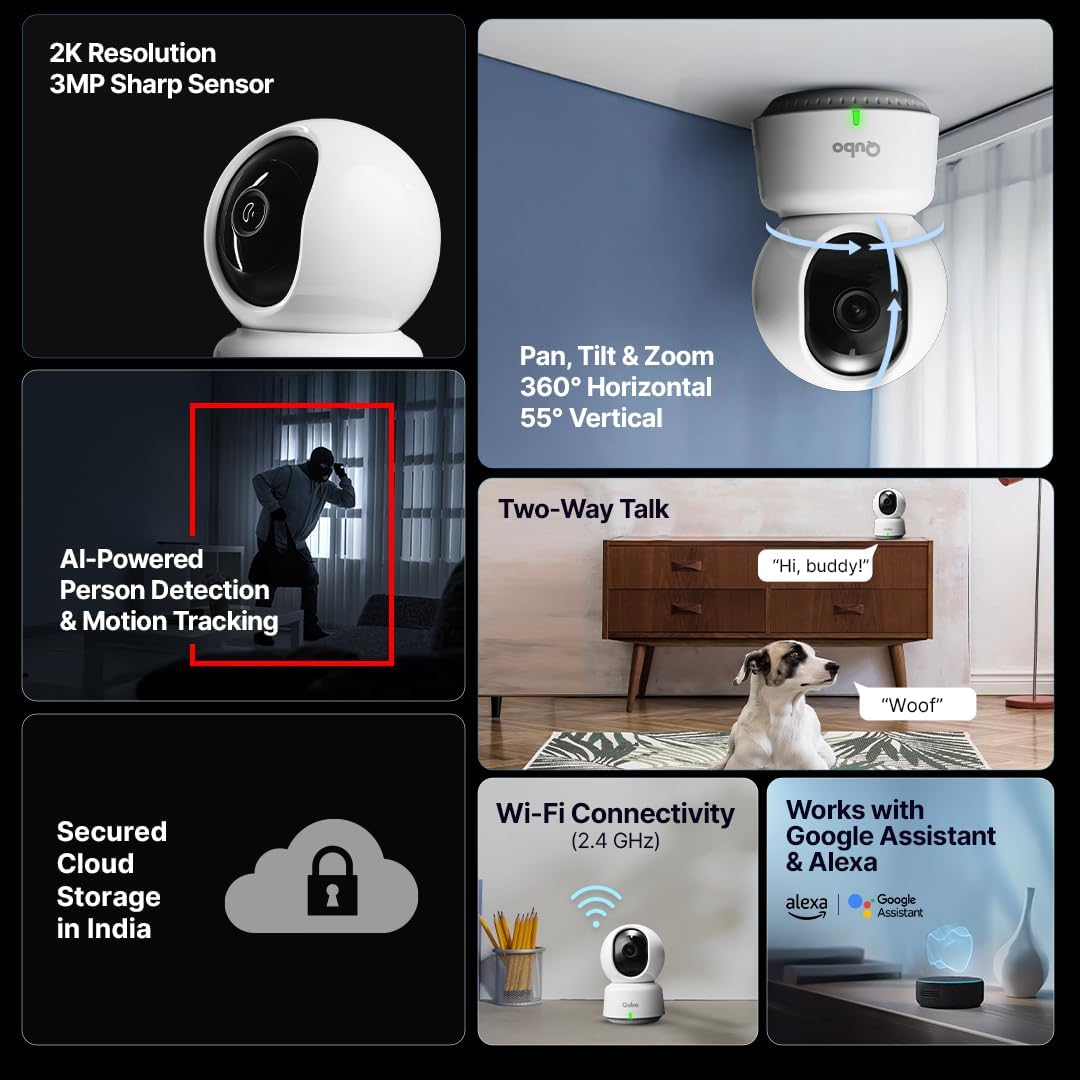
Image: Overview of Qubo Smart 360 Camera key features including 2K resolution, 3MP sensor, 360° pan/tilt/zoom, two-way talk, AI person detection, and smart alerts.

Image: Detailed view of the camera hardware, highlighting ABS & PC build, dust-resistant design, loud alarm, advanced ISP, 4MP sensor, dual IR LEDs, and echo cancellation.
Key Features:
- 2K Resolution & 3MP Sharp Sensor: Provides clear and detailed video footage (2304 x 1296p).
- 360° Pan, Tilt & Zoom: Offers a wide viewing angle with 360° horizontal and 55° vertical rotation for comprehensive coverage.
- AI-Powered Person Detection: Intelligently identifies human figures, reducing false alarms.
- Motion Tracking: Automatically follows detected movement within its field of view.
- Two-Way Talk: Built-in microphone and speaker allow for real-time communication.
- Night Vision: Enhanced infrared technology with 6pcs 850nm superior IR LEDs provides clear visibility up to 20ft in total darkness.
- Automatic Intruder Alarm: Triggers an alarm upon detecting suspicious activity.
- Wi-Fi Connectivity (2.4 GHz): Connects wirelessly to your home network.
- Smart Home Integration: Works with Google Assistant and Amazon Alexa.
- Expandable Storage: Supports SD cards up to 1TB for local recording.
- Secured Cloud Storage: Optional cloud backup available with a subscription plan.
4. Setup
4.1 Initial Setup
- Download the Qubo App: Search for "Qubo" in your smartphone's app store (Google Play Store or Apple App Store) and install the application.
- Create an Account: Open the Qubo App and follow the on-screen instructions to create a new user account or log in if you already have one.
- Power On the Camera: Connect the provided USB cable to the camera and the power adapter. Plug the power adapter into a wall outlet. The camera will power on and its indicator light will begin to flash, indicating it is ready for setup.
- Add Device: In the Qubo App, tap the "+" icon or "Add Device" option. Select your camera model from the list.
- Connect to Wi-Fi: Follow the app's instructions to connect the camera to your 2.4 GHz Wi-Fi network. You may need to scan a QR code displayed on your phone with the camera.
- Complete Setup: Once connected, name your camera and complete the remaining setup steps in the app.
4.2 Mounting Options
The Qubo Smart 360° camera can be placed on various surfaces or mounted for optimal viewing.
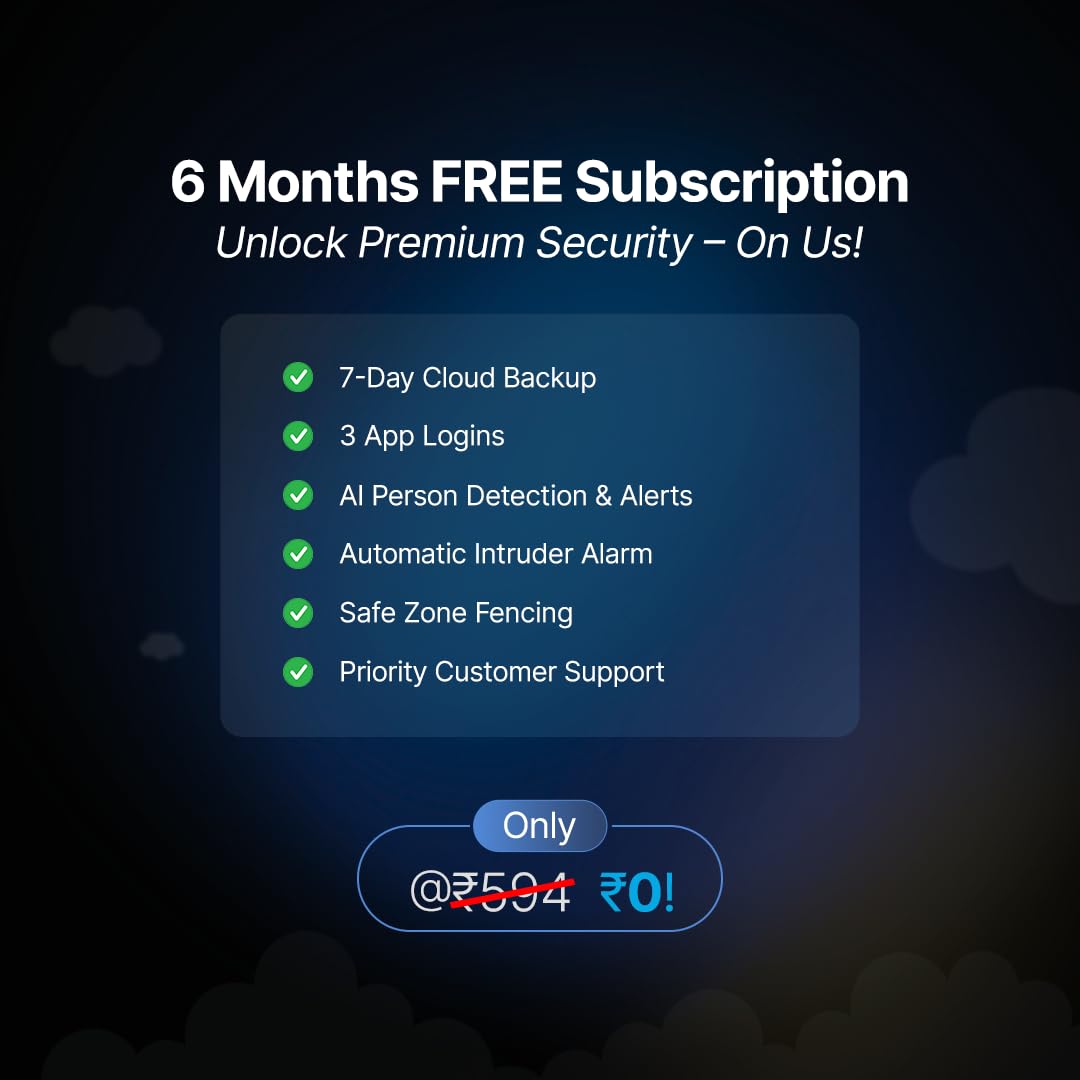
Image: Illustration of various placement options for the Qubo Smart 360 Camera, including tabletops, shelves, wall, or ceiling mounts, to secure different areas like keeping intruders away, watching over household, ensuring child's safety, and looking after elderly parents.
- Freestanding: Place the camera on any flat surface such as a table, shelf, or desk.
- Wall Mount: Use the provided screw kit to securely mount the camera to a wall. Ensure the mounting surface is stable.
- Ceiling Mount: The camera can also be inverted and mounted to the ceiling using the screw kit. The app allows for image rotation if mounted upside down.
5. Operating Instructions
Control and monitor your Qubo Smart 360° camera using the Qubo App.
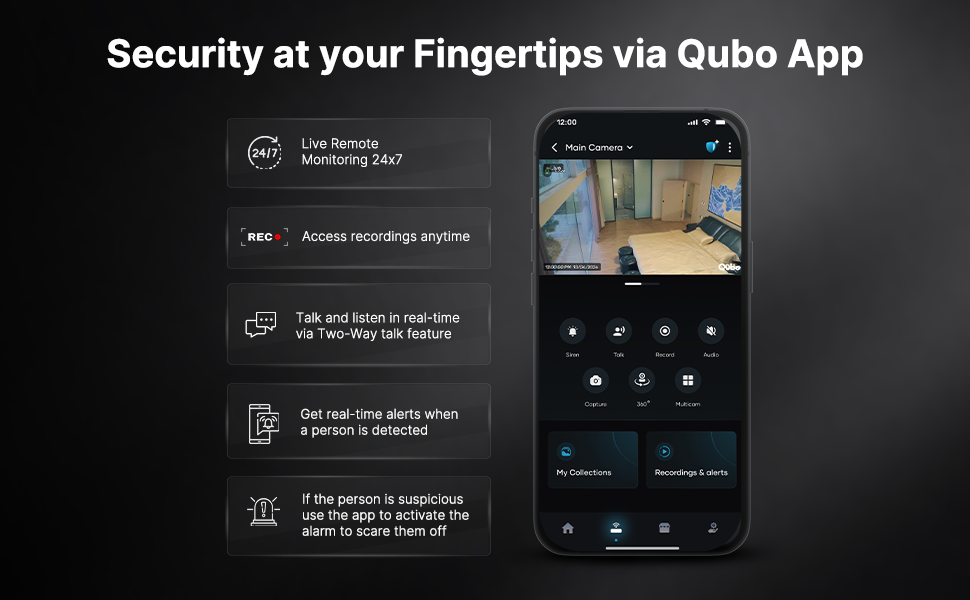
Image: Screenshot of the Qubo App interface demonstrating features like live remote monitoring, access to recordings, two-way talk, real-time alerts, and activating the alarm.
5.1 Live Monitoring & Control
- Live View: Open the Qubo App and select your camera to view the live feed.
- Pan/Tilt/Zoom: Use the on-screen controls to remotely adjust the camera's viewing angle.
- Two-Way Talk: Tap the microphone icon in the app to speak through the camera's speaker and listen through its microphone.
- Snapshot/Record: Capture still images or manually record video clips from the live view.
5.2 Recording & Alerts
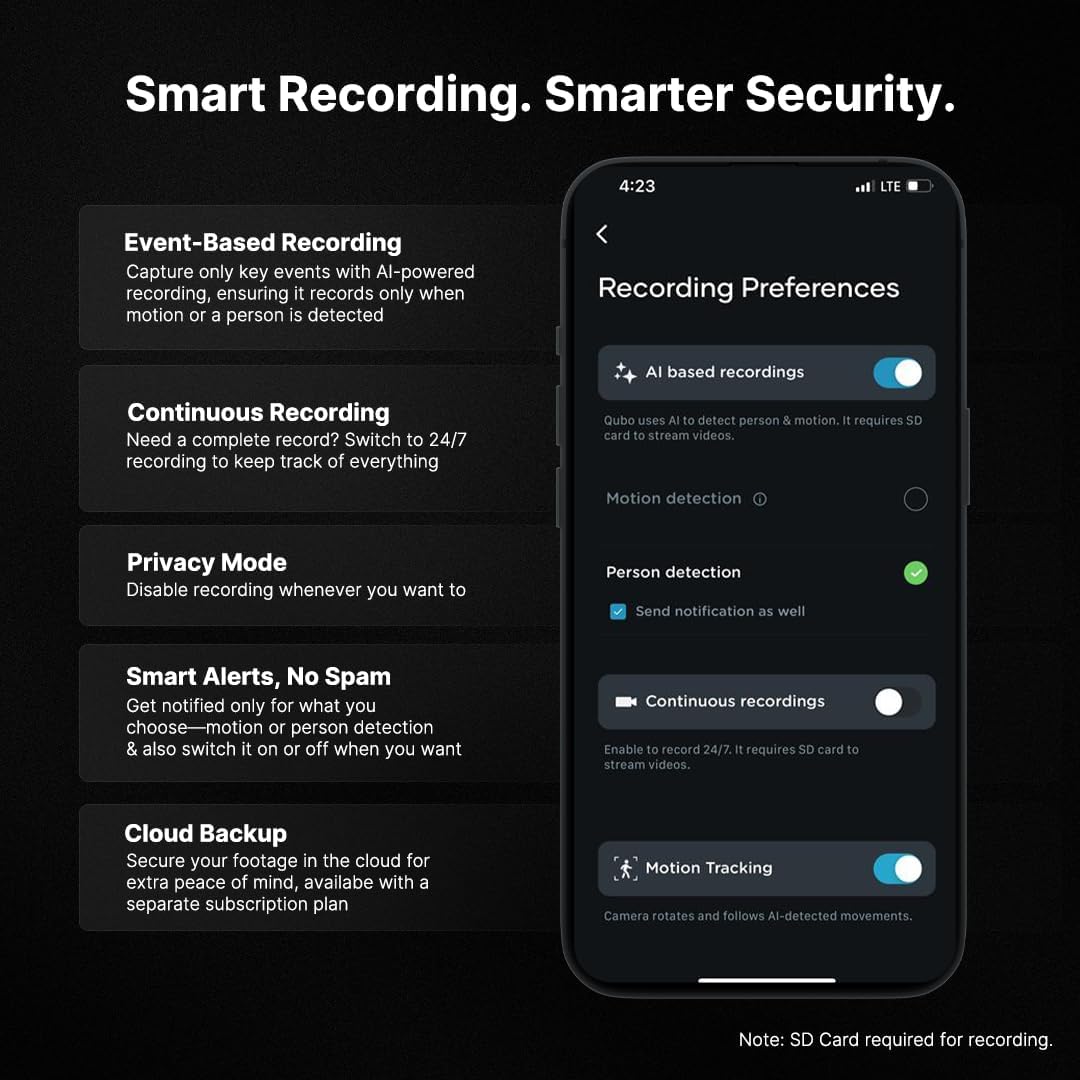
Image: Qubo App screen showing recording preferences, including options for AI-based recordings (person detection, motion detection), continuous recordings, privacy mode, and motion tracking. Note: SD Card is required for recording.
- Event-Based Recording: The camera can be configured to record only when motion or a person is detected.
- Continuous Recording: Enable 24/7 recording (requires an SD card).
- Privacy Mode: Temporarily disable recording and live view for privacy.
- Smart Alerts: Receive real-time notifications on your smartphone for detected motion or persons. Customize alert settings in the app.
- Cloud Backup: Secure your footage with an optional cloud subscription.
- SD Card Storage: Insert a compatible SD card (up to 1TB) for local storage of recordings.
5.3 Smart Home Integration
The Qubo Smart 360° camera can be integrated with Amazon Alexa and Google Assistant for voice control and smart home routines. Refer to the respective smart assistant's app for integration instructions.
6. Maintenance
- Cleaning: Use a soft, dry cloth to clean the camera lens and body. Avoid using harsh chemicals or abrasive cleaners.
- Firmware Updates: Regularly check the Qubo App for available firmware updates to ensure optimal performance and security.
- Power Cycle: If the camera experiences issues, try unplugging it from the power source for 10 seconds and then plugging it back in.
7. Troubleshooting
If you encounter issues with your Qubo Smart 360° camera, refer to the following common solutions:
| Problem | Possible Solution |
|---|---|
| Camera fails to connect to Wi-Fi. |
|
| No recording or SD card not recognized. |
|
| Poor video quality or night vision. |
|
| Camera is unresponsive. |
|
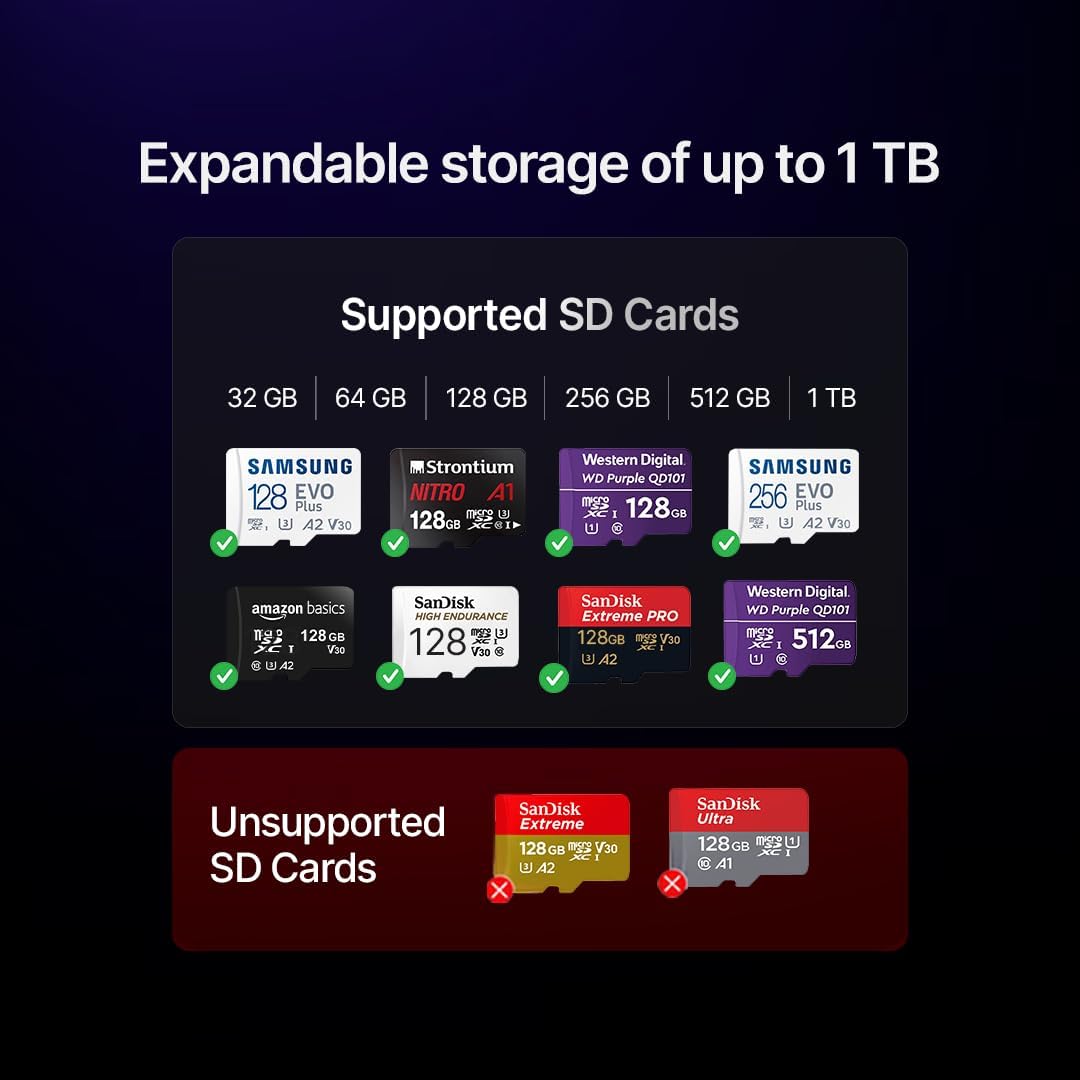
Image: Visual guide indicating various brands and types of supported SD cards (e.g., Samsung EVO Plus, Strontium NITRO, Western Digital Purple) and unsupported SD cards (e.g., SanDisk Extreme, SanDisk Ultra) for the Qubo Smart 360 Camera.
8. Specifications
| Feature | Detail |
|---|---|
| Model Name | SmartCam3603MP |
| Connectivity Technology | Wired, Wireless (Wi-Fi 2.4 GHz) |
| Special Features | 2 Way Audio, HD Resolution, Motion Sensor, Night Vision, PTZ Technology (Pan-Tilt-Zoom) |
| Indoor/Outdoor Usage | Indoor |
| Compatible Devices | Smartphone (via Qubo App) |
| Power Source | Corded Electric (5V/1A) |
| Controller Type | Amazon Alexa, Google Assistant |
| Mount Type | Wall Mount, Freestanding |
| Form Factor | Dome |
| Enclosure Material | Plastic (ABS & PC Build) |
| Water Resistance Level | Not Water Resistant |
| Alert Type | Motion Only, Person Detection |
| Light Source | Infrared (6pcs 850nm IR LEDs) |
| Effective Still Resolution | 3 MP (2K Resolution) |
| Video Capture Resolution | 1440p (2304 x 1296p) |
| Effective Video Resolution | 1080p (Full HD) |
| Frame Rate | 30 frames per second |
| Viewing Angle | 360 Degrees (Pan), 55 Degrees (Tilt) |
| Focus Type | Auto Focus |
| Flash Memory Type | SD (up to 1TB) |
| Item Dimensions | 10 x 10 x 12 Centimeters |
| Item Weight | 165 Grams |
| Voltage | 12 Volts (Input to adapter, camera uses 5V) |
| Wattage | 5 Watts |
| Video Capture Format | MPEG-4 |
9. Warranty and Support
Your Qubo Smart 360° 3MP Wi-Fi Security Camera comes with a standard warranty. Please refer to the included Warranty Card for specific terms and conditions.
9.1 Customer Support
For any technical assistance, queries, or support, please contact Hero Electronix Pvt Ltd:
- Toll-free helpline number: 9319095757
- Manufacturer: Hero Electronix Pvt. Ltd.
- Importer/Packer: Hero Electronix Pvt Ltd

Image: Information highlighting Qubo products are designed, engineered, and manufactured in India, with secured cloud servers hosted in India, and prompt pre & post-sales support via WhatsApp or phone.
9.2 Free 6-Month Subscription Benefits
Your purchase includes a free 6-month subscription to unlock premium security features:
- 7-Day Cloud Backup
- 3 App Logins
- AI Person Detection & Alerts
- Automatic Intruder Alarm
- Safe Zone Fencing
- Priority Customer Support


