
1. Important Safety Instructions
Please read all safety instructions carefully before using the Kiwi KWC-7140 Window Cleaning Robot. Failure to follow these instructions may result in electric shock, fire, or serious injury.
- Intended Use: This device is designed exclusively for cleaning vertical glass surfaces. Do not use it on horizontal surfaces, sloped surfaces, or any other material.
- Power Supply: Only use the original power adapter provided with the robot. Ensure the power cord is securely connected and not damaged.
- Safety Rope: Always attach the safety rope to a secure anchor point before operating the robot, especially when cleaning high windows or exterior surfaces. The safety rope is a critical fall prevention measure.
- Operating Environment: Do not operate the robot in rainy or extremely humid conditions. Avoid direct sunlight for prolonged periods. Ensure the glass surface is free from large debris or cracks that could damage the robot or cause it to fall.
- Water Tank: Only fill the water tank with clean water or a recommended window cleaning solution. Do not use corrosive liquids or solvents.
- Supervision: Do not leave the robot unattended during operation, especially in areas accessible to children or pets.
- Maintenance: Disconnect the power supply before performing any maintenance or cleaning tasks.
- Backup Battery: The integrated backup battery provides temporary power to keep the robot attached to the window during a power outage. It is not intended for cordless operation.
2. Product Overview
The Kiwi KWC-7140 is an intelligent window cleaning robot designed to provide efficient and safe cleaning for vertical glass surfaces. It features powerful suction, multiple cleaning modes, and a water spray function for thorough cleaning.
Key Features:
- 3500Pa Powerful Suction: Ensures a firm grip on vertical surfaces.
- 3 Automatic Cleaning Modes: Adapts to different surface layouts for comprehensive cleaning.
- 100 ml Water Tank: Provides continuous moistening during cleaning for effective results.
- 600 mAh Backup Battery: Offers support to maintain suction in case of power interruption.
- Brushless Motor Technology: Ensures long-lasting and stable operation.
- Smart Cleaning System: Delivers even cleaning across large areas.
- Remote Control: Allows for easy and convenient operation.
- Safety Rope: Provides an additional safety measure against falls.
Package Contents:
- Kiwi KWC-7140 Window Cleaning Robot
- Remote Control
- Power Adapter
- Cleaning Pads (multiple sets)
- Safety Rope
- User Manual
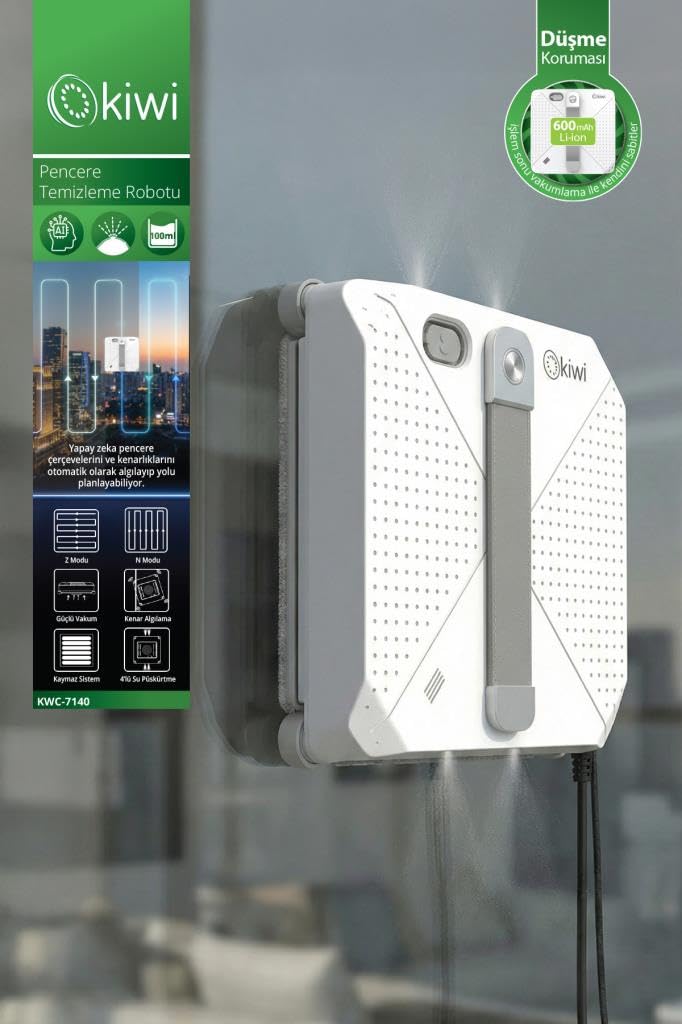
Figure 2.1: The Kiwi KWC-7140 Window Cleaning Robot and its included accessories.
3. Setup
Follow these steps to prepare your robot for its first use.
- Attach Cleaning Pads: Securely attach the provided cleaning pads to the designated areas on the bottom of the robot. Ensure they are clean and properly aligned.
- Fill Water Tank: Open the water tank cap and carefully fill the 100 ml tank with clean water or a suitable window cleaning solution. Close the cap tightly to prevent leakage.
- Connect Power Adapter: Plug the power adapter into the robot's power input port, then connect the adapter to a power outlet. Ensure the connection is firm.
- Attach Safety Rope: This is a crucial safety step. Attach one end of the safety rope to the robot and the other end to a strong, secure anchor point indoors, such as a heavy furniture leg or a dedicated safety hook. Ensure there is enough slack for the robot to move but not so much that it could hit the ground if it detaches.

Figure 3.1: The window cleaning robot securely attached to a window, demonstrating the proper use of the safety rope for fall prevention.
4. Operating Instructions
Learn how to effectively operate your Kiwi KWC-7140 for sparkling clean windows.
- Power On: Press the power button on the robot or the remote control to turn on the device. The indicator light will illuminate.
- Place Robot: Carefully place the robot onto the glass surface. Ensure it is flat against the glass. The powerful suction will activate, securing the robot in place.
- Select Cleaning Mode: Use the remote control to select one of the three automatic cleaning modes (e.g., Z-mode, N-mode, or a combination). Refer to the remote control diagram for specific button functions.
- Start Cleaning: Press the 'Start' button on the remote control. The robot will begin its cleaning cycle according to the selected mode, automatically spraying water and moving across the surface.
- Monitor Progress: Observe the robot's movement. It will detect edges and obstacles, adjusting its path as needed.
- Pause/Stop: To pause the cleaning cycle, press the 'Pause' button on the remote control. To stop and retrieve the robot, press the 'Stop' button. The robot will return to its starting position or a safe, accessible location.
- Retrieve Robot: Once the cleaning cycle is complete or stopped, carefully grasp the robot by its handle and gently pull it away from the glass surface. The suction will release.
- Power Off: Press and hold the power button to turn off the robot. Disconnect the power adapter.

Figure 4.1: Operating the robot with the remote control for easy command and mode selection.
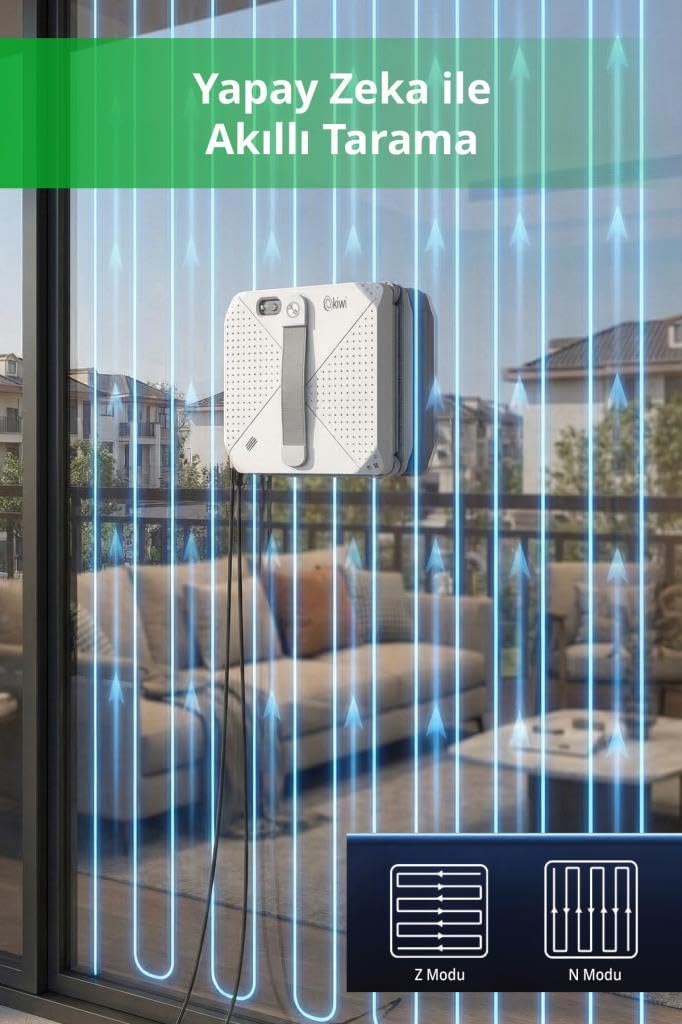
Figure 4.2: The robot utilizes intelligent scanning with Z-mode and N-mode patterns for comprehensive cleaning coverage.
5. Maintenance
Regular maintenance ensures optimal performance and extends the lifespan of your robot.
- Cleaning Pads: After each use, remove the cleaning pads from the robot. Wash them with mild detergent and water, then air dry completely before storing or reusing. Replace worn-out pads with new ones.
- Water Tank: Empty any remaining water from the tank after use. If using cleaning solution, rinse the tank with clean water to prevent residue buildup.
- Robot Body: Wipe the exterior of the robot with a soft, dry cloth. Do not use abrasive cleaners or immerse the robot in water. Ensure the suction vents are clear of dust and debris.
- Sensors: Periodically clean the sensors on the robot's edges with a soft, dry cloth to ensure accurate edge detection.
- Storage: Store the robot and its accessories in a cool, dry place away from direct sunlight and extreme temperatures.
6. Troubleshooting
If you encounter issues with your Kiwi KWC-7140, refer to the following common problems and solutions.
| Problem | Possible Cause | Solution |
|---|---|---|
| Robot does not stick to the window. | Insufficient suction; dirty pads; uneven surface; power issue. | Ensure power adapter is connected. Check if cleaning pads are clean and properly attached. Verify the glass surface is smooth and free of large debris. |
| Robot stops unexpectedly during cleaning. | Power interruption; low backup battery; sensor obstruction. | Check power connection. Allow backup battery to charge. Clean sensors. If power was interrupted, the robot should remain attached due to the backup battery. |
| Cleaning performance is poor. | Dirty or worn-out cleaning pads; empty water tank; incorrect cleaning solution. | Replace or wash cleaning pads. Refill the water tank. Use clean water or a recommended window cleaning solution. |
| Remote control is not working. | Dead batteries; obstruction; out of range. | Replace remote control batteries. Ensure no obstructions between remote and robot. Operate within effective range. |
7. Specifications
| Feature | Specification |
|---|---|
| Brand | Kiwi |
| Model Name | KWC-7140 |
| Color | White |
| Product Dimensions (L x W x H) | 35U x 25G x 15Y centimeters (approx. 35 x 25 x 15 cm) |
| Suction Power | 3500Pa |
| Cleaning Modes | 3 Automatic Modes |
| Water Tank Capacity | 100 ml |
| Backup Battery | 600 mAh |
| Motor Type | Brushless Motor |
| Control Method | Remote Control |
8. Warranty and Support
Your Kiwi KWC-7140 Window Cleaning Robot comes with a standard manufacturer's warranty. Please refer to the warranty card included in your package for specific terms and conditions, including coverage period and limitations.
For technical support, troubleshooting assistance beyond this manual, or warranty claims, please contact Kiwi customer service. Contact information can typically be found on the product packaging, the official Kiwi website, or your purchase receipt.
Please have your model number (KWC-7140) and proof of purchase ready when contacting support.