
1. Introduction
Thank you for purchasing the EPZ G30 Wired Gaming Earphones. These earphones are designed to provide a high-fidelity audio experience for both music and gaming, featuring a 1DD+1BA hybrid driver configuration and a high-performance DAC chip. This manual provides essential information for setup, operation, maintenance, and troubleshooting to ensure optimal performance and longevity of your device.
2. Product Overview
Key Features
- 9.2mm DLC+PU Composite Diaphragm Driver: Equipped with EPZ's independently developed 9.2mm DLC+PU composite diaphragm driver and a 29689BA driver, offering detailed and balanced sound for music appreciation and gaming.
- High-Performance DAC Chip: Built-in Hi-Fi compatible DAC chip supports high-resolution PCM audio sources up to 384kHz/32bit, delivering clear and rich sound.
- Ergonomic Design: Engineered based on ear shape research for a comfortable and secure fit, suitable for extended gaming sessions or music listening.
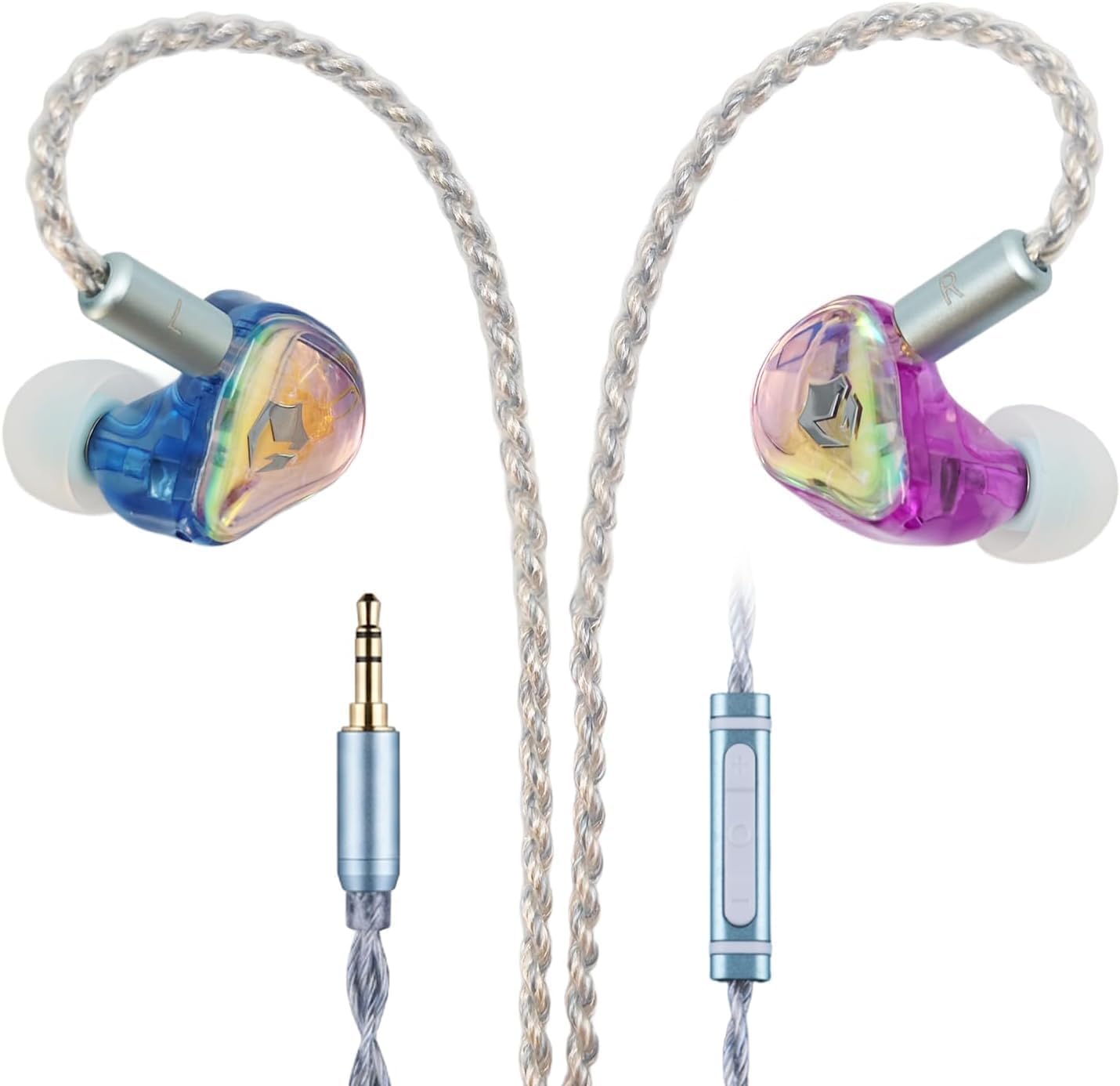
- Detachable OFC Silver-Plated Cable: Features a 1.7m detachable Oxygen-Free Copper (OFC) silver-plated cable to minimize signal transmission loss. Compatible with 3.5mm connections for various devices like PCs, smartphones, and DACs.
- High Noise Resistance: The combination of the DAC decoder chip and EPZ's proprietary audio circuit design achieves excellent sound separation and noise suppression, reducing static noise and electrical interference for clear audio.
- Rainbow Resin Faceplate: The earphones feature a beautiful rainbow resin faceplate that changes appearance with light, offering a unique aesthetic. The skin-friendly resin material ensures comfortable wear.
Package Contents
The EPZ G30 package includes the following items:
- EPZ G30 Earphones (Left and Right)
- Detachable 3.5mm Cable with Microphone
- S/M/L Size Eartips
- Storage Case

3. Setup
3.1 Connecting the Cable
- Identify the left (L) and right (R) earpieces and the corresponding connectors on the detachable cable.
- Align the cable connectors with the ports on the earphones. Gently push the connectors into place until they are secure. Ensure a firm connection to prevent signal loss.
- Connect the 3.5mm plug of the cable to your audio source (PC, smartphone, gaming console controller, etc.).
3.2 Wearing the Earphones
- Select the appropriate size of eartips for your ears. The correct size ensures optimal sound isolation and comfort.
- Insert the earphones into your ear canals. The cable should typically loop over the top of your ear for a secure fit.
- Adjust the earphones until they feel comfortable and provide a good seal.
4. Operating Instructions
4.1 Audio Playback
Once connected to your audio source, begin playback from your device. The earphones will reproduce the audio. Adjust the volume using the inline volume control on the cable or your device's volume controls.
4.2 Microphone Usage
The EPZ G30 includes a built-in microphone for communication. When connected to a compatible device (e.g., PC, smartphone, gaming console controller with a 3.5mm jack supporting microphone input), the microphone will automatically activate. Ensure your device's audio settings are configured to use the external microphone.
4.3 DSP Tuning (Note for 3.5mm Connection)
The EPZ G30 features DSP tuning capabilities. However, for the 3.5mm connection variant, the EQ adjustment function is not available. DSP tuning and custom sound settings are primarily supported when using the Type-C variant with the official EPZ software. For detailed information on DSP functionality with Type-C models, please refer to the official EPZ website.

5. Maintenance
5.1 Cleaning the Earphones
- Regularly clean the eartips with a soft, dry cloth. For deeper cleaning, remove the eartips and wash them with mild soap and water, ensuring they are completely dry before reattaching.
- Gently wipe the earphone bodies with a soft, slightly damp cloth. Avoid using harsh chemicals or abrasive materials.
- Use a small, soft brush or cotton swab to carefully remove any earwax or debris from the earphone nozzles.
5.2 Cable Care
- Avoid sharp bends or excessive pulling on the cable.
- When storing, coil the cable loosely to prevent tangling and damage.
- The detachable design allows for easy replacement if the cable becomes damaged.
5.3 Storage
When not in use, store the earphones in the provided storage case to protect them from dust, moisture, and physical damage.
6. Troubleshooting
| Problem | Possible Cause | Solution |
|---|---|---|
| No sound or low volume |
|
|
| Microphone not working |
|
|
| Sound distortion or static |
|
|
| Uncomfortable fit or poor sound isolation |
|
|
7. Specifications
| Feature | Detail |
|---|---|
| Brand | EPZ |
| Model Number | EPZ-G30 |
| Headphone Style | In-Ear Monitor (IEM) |
| Audio Driver Type | Hybrid Driver (1 Dynamic Driver + 1 Balanced Armature) |
| Dynamic Driver Size | 9.2 mm |
| Impedance | 14 Ohms |
| Sensitivity | 105 dB |
| Connectivity | Wired (Detachable Cable) |
| Headphone Jack | 3.5mm Jack |
| Control | Volume Control |
| Microphone | Built-in Microphone |
| Product Exterior Material | Rainbow Resin |
| Color | Rainbow |
| Recommended Use | Audio Monitoring, Gaming, Calls, Entertainment, Travel |
| Included Items | Cable, Eartips, Storage Case |
| Country of Origin | China |
8. Warranty and Support
8.1 Warranty Information
The EPZ G30 Wired Gaming Earphones come with a 1-year manufacturer's warranty from the date of purchase. This warranty covers defects in materials and workmanship under normal use. It does not cover damage caused by misuse, accidents, unauthorized modifications, or normal wear and tear.
8.2 Customer Support
If you encounter any issues with your EPZ G30 earphones that cannot be resolved using the troubleshooting guide, or if you require warranty service, please contact EPZ customer support. You can typically find contact information on the official EPZ website or through your retailer.
When contacting support, please have your purchase receipt and the product model number (G30) ready.