
1. Introduction
Thank you for purchasing the SHIHOT 46" RGB Ceiling Fan. This manual provides detailed instructions for safe installation, operation, and maintenance of your new ceiling fan. Please read this manual thoroughly before installation and keep it for future reference.
2. Safety Instructions
To reduce the risk of electric shock, fire, or personal injury, always follow these basic safety precautions:
- Read all instructions before installing the fan.
- Ensure the installation site is suitable for supporting the fan's weight.
- All wiring must be in accordance with national and local electrical codes. Consult a qualified electrician if unsure.
- Disconnect power at the circuit breaker before installation or servicing.
- Do not operate the fan with damaged wiring or if any parts are missing.
- Keep hands, clothing, and other objects away from rotating fan blades.
- This fan is designed for indoor use only.
3. Product Overview and Components
The SHIHOT 46" RGB Ceiling Fan features a quiet DC motor, integrated RGB lighting, and multiple control options. Below are the key components and dimensions.
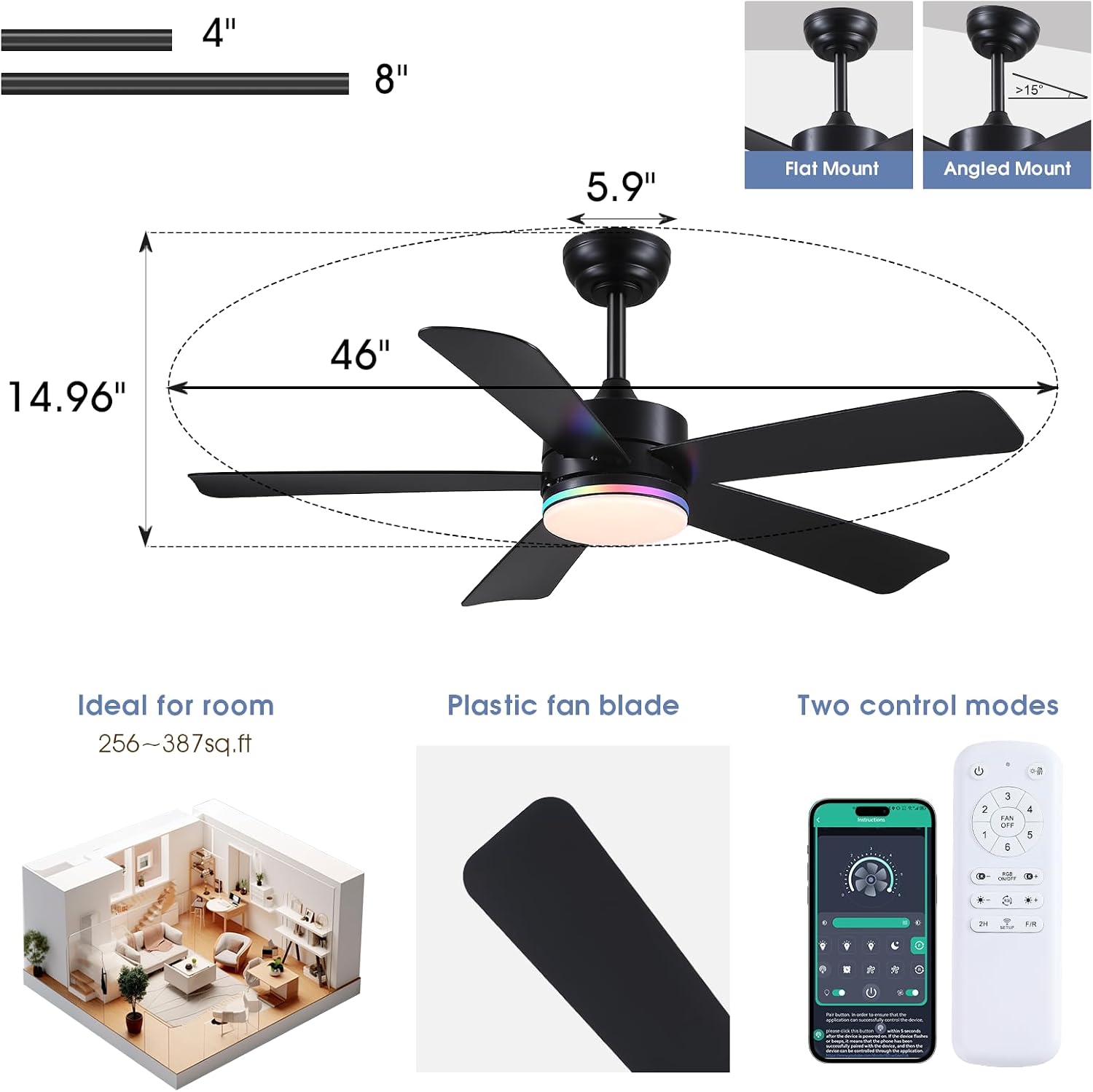
Image: Overview of the 46-inch SHIHOT RGB Ceiling Fan, showing its dimensions (46" diameter, 14.96" height, 5.9" canopy width), suitable room size (256-387 sq.ft), plastic fan blades, and dual control modes (remote and app).

Image: Illustration of the fan's 35W silent DC motor and its 6 adjustable speed settings, categorized as Comfortable Wind (1-2 speeds), Natural Wind (3-4 speeds), and Cool Wind (5-6 speeds).

Image: Demonstrates the quiet operation of the 35W DC motor, with noise levels compared to rustling leaves and talking sounds, indicating less than 35dB. Also highlights the 2-hour timing function.
4. Specifications
| Feature | Detail |
|---|---|
| Brand | SHIHOT |
| Model Name | 8926 |
| Color | 46" Black RGB |
| Product Dimensions | 46"D x 46"W x 15"H |
| Item Weight | 8 Pounds |
| Material | Acrylic, Iron, Plastic |
| Power Source | DC |
| Wattage | 48 watts |
| Voltage | 120 Volts |
| Number of Blades | 5 |
| Number of Speeds | 6 |
| Noise Level | 35 Decibels |
| Control Method | Remote, App Control |
| Special Features | App Operable, LED Light, Quiet Operation, Remote Controlled, Timer, Reversible Motor |
| Installation Type | Down rod (3.94" & 7.87" included) |
| Indoor/Outdoor Usage | Indoor |
5. Installation
5.1 Pre-Installation Checklist
- Ensure power is disconnected at the circuit breaker.
- Verify all components are present as per the package contents.
- Prepare necessary tools (screwdriver, wire strippers, ladder, etc.).
- Confirm the ceiling junction box is securely mounted and capable of supporting the fan's weight.
5.2 Mounting Options
The fan supports both flat and angled ceiling mounts (up to 15° slope). Two down rods (3.94" and 7.87") are provided for different ceiling heights.
Image: Illustrates the flat mount and angled mount options for the ceiling fan, showing compatibility with ceilings sloped up to 15 degrees.
5.3 Step-by-Step Installation Guide
For a visual guide, please refer to the installation video below. Always ensure power is off before beginning installation.
Video: Detailed installation guide for the SHIHOT 46" RGB Ceiling Fan with lights. This video demonstrates the assembly and mounting process.
- Mounting Bracket Installation: Secure the mounting bracket to the ceiling junction box.
- Downrod Assembly: Insert the chosen downrod through the canopy and connect it to the fan motor housing. Ensure all screws are tightened.
- Wiring: Connect the fan's electrical wires to the household wiring according to the wiring diagram in the full manual. Ensure all connections are secure with wire nuts.
- Hanging the Fan: Carefully lift the fan assembly and hang it from the mounting bracket.
- Blade Attachment: Attach the fan blades to the motor housing.
- Light Kit Installation: Connect and secure the LED light kit to the fan.
- Canopy Installation: Slide the canopy up and secure it to the mounting bracket, covering the wiring.
6. Operating Instructions
Your SHIHOT ceiling fan can be controlled via the included remote control or a smartphone application.
6.1 Remote Control Functions

Image: Diagram showing the layout and functions of the SHIHOT ceiling fan remote control, including buttons for fan speed, light on/off, color temperature, brightness, RGB control, 2-hour timer, and forward/reverse mode.
- Fan On/Off: Press the fan icon to turn the fan on or off.
- Fan Speed: Use the '1' through '6' buttons to select desired fan speed.
- Light On/Off: Press the light bulb icon to turn the light on or off.
- Color Temperature: Adjust between 3000K (Warm Light), 4500K (Natural Light), and 6000K (White Light).
- Brightness Adjustment: Use the brightness +/- buttons for stepless dimming (0-100%).
- RGB Control: Press the RGB on/off button to activate or deactivate RGB lighting. Use the RGB changing button to cycle through 13 RGB colors.
- Timer: Set a 2-hour timer for automatic fan shutdown.
- Forward/Reverse: Change the direction of the fan blades for summer (downdraft) or winter (updraft) mode.
6.2 APP Control Setup
The fan can be controlled via the 'Fan Lamp Pro' smartphone application. Scan the QR code provided in the packaging or visit https://www.jasonghost.com/fanlamppro/ to download the app.
Video: Guide on how to set up and use the smartphone application for controlling the SHIHOT 46" RGB Ceiling Fan.
- Download and install the 'Fan Lamp Pro' app.
- Open the app and follow the on-screen instructions to add your device.
- Ensure the fan's main power is on.
- Click the 'Pair Button' in the app several times within 5 seconds after the fan is powered on. The fan light will blink twice to indicate a successful connection.
6.3 Light Control Features

Image: Displays various customized light effects for different scenarios, including side RGB light, white lights, and a combination of both, showcasing 13 distinct RGB modes.

Image: Illustrates the flicker-free LED light with 0-100% stepless dimming and three adjustable light colors: 3000K Warm Light, 4500K Natural Light, and 6000K White Light.
- RGB Colors: The fan supports 13 RGB colors, suitable for various ambient settings.
- Dimmable LED: The main LED light source offers stepless dimming from 0% to 100%.
- 3 Color Temperatures: Choose between Warm Light (3000K), Natural Light (4500K), and White Light (6000K).
- Memory Function: The fan remembers your last light settings (color temperature and brightness) if the light is turned off for 10 seconds or more. If turned on within 10 seconds, the color temperature may switch.
6.4 Reversible DC Motor
The fan's reversible DC motor allows you to change the direction of the blades for optimal airflow throughout the year.
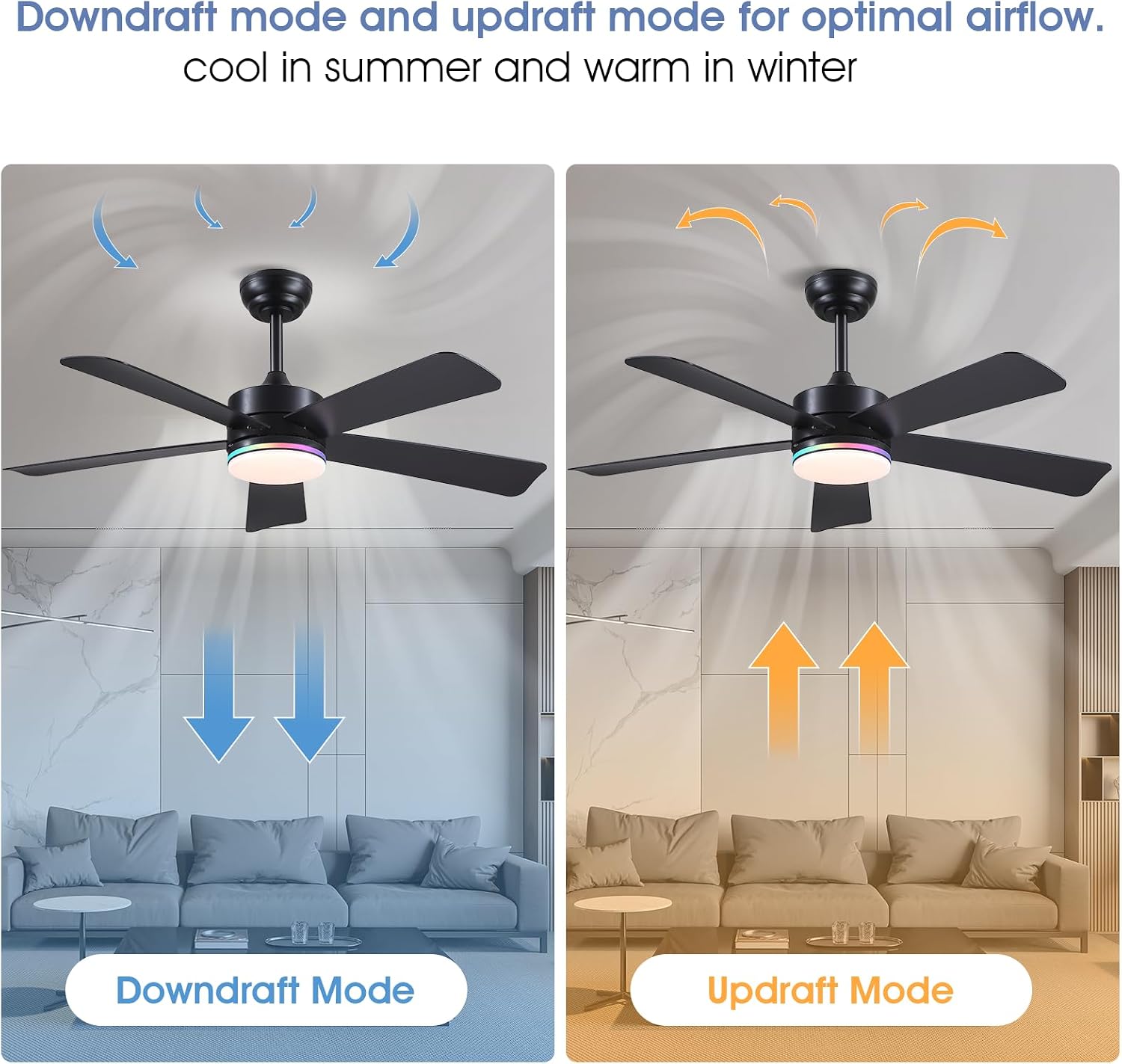
Image: Depicts the downdraft mode (cool in summer) and updraft mode (warm in winter) for optimal air circulation.
- Summer Mode (Downdraft): Blades rotate counter-clockwise, pushing cool air downwards to create a cooling effect.
- Winter Mode (Updraft): Blades rotate clockwise, drawing cool air up and pushing warm air down from the ceiling, helping to distribute heat.
7. Maintenance
Regular maintenance ensures the longevity and optimal performance of your ceiling fan.
- Cleaning: Periodically clean the fan blades and motor housing with a soft, damp cloth. Do not use abrasive cleaners or solvents.
- Blade Balance: If the fan wobbles, check that all blade screws are tight and that blades are evenly balanced.
- Electrical Connections: Annually inspect all electrical connections for tightness.
- Light Source: The LED light source is integrated and generally does not require replacement.
8. Troubleshooting
If you encounter issues with your fan, refer to the following common problems and solutions:
| Problem | Possible Cause | Solution |
|---|---|---|
| Fan does not start | No power, loose wiring, remote not paired. | Check circuit breaker. Ensure all wires are connected securely. Re-pair remote/app with the fan. |
| Light does not work | Loose wiring, LED failure. | Check light kit wiring. Contact customer support if LED is faulty. |
| Fan wobbles | Loose blades, unbalanced blades, loose mounting. | Ensure all blade screws are tight. Check mounting bracket. Use a balancing kit if necessary. |
| Remote/APP not responding | Low battery, not paired, interference. | Replace remote batteries. Re-pair remote/app. Ensure no strong interference sources nearby. |
| Fan is noisy | Loose screws, motor issue. | Check all screws for tightness. If noise persists, contact customer support. |
9. Warranty and Support
This SHIHOT ceiling fan comes with a manufacturer's warranty. Please refer to your purchase documentation for specific warranty terms and conditions. For technical support, replacement parts, or any questions not covered in this manual, please contact SHIHOT customer service through your retailer or the official SHIHOT website.
Video: Overview of the SHIHOT 46" Black RGB ceiling fan with light, demonstrating its features and functionality.


