
Introduction
Welcome to the Roinside Electric Scooter UP8Pro user manual. This document provides essential information for the safe operation, maintenance, and troubleshooting of your electric scooter. Featuring an 8.5-inch solid tire, a powerful 350W motor, and a long-range battery, the UP8Pro is designed for efficient urban commuting. Please read this manual thoroughly before first use and keep it for future reference to ensure optimal performance and safety.
Safety Information
Your safety is paramount. Always adhere to the following guidelines:
- Always wear a helmet and appropriate protective gear (knee and elbow pads) while riding.
- Familiarize yourself with and obey all local traffic laws and regulations regarding electric scooters.
- Do not ride in adverse weather conditions such as heavy rain, snow, or icy roads. The scooter has an IP64 waterproof rating, but it is not designed for submersion or heavy downpours.
- Ensure the scooter is fully charged and all components are securely fastened before each ride.
- The maximum weight limit for this scooter is 265 pounds (120 kg). Do not exceed this limit.
- Utilize the dual braking system (front regenerative brake and rear disc brake) for effective stopping power.
- Use the bright LED headlight and rear reflective taillight for increased visibility, especially during low-light conditions.
Package Contents
Upon opening your Roinside Electric Scooter UP8Pro package, please verify that all the following items are included:
- Roinside Electric Scooter UP8Pro (main unit)
- Charger
- User Manual
- Assembly Tools (if required for minor assembly)
If any items are missing or damaged, please contact customer support immediately.
Setup
Your Roinside Electric Scooter UP8Pro comes largely pre-assembled. Follow these steps for initial setup:
- Unfolding the Scooter: Carefully unfold the scooter until the stem locks securely into place. Ensure all locking mechanisms are engaged.
- Handlebar Attachment: Attach the handlebars to the stem, ensuring they are aligned and tightened according to the instructions provided with the assembly tools.
- Initial Charge: Fully charge the battery before your first ride. Connect the charger to the charging port located on the side of the scooter's deck and then to a power outlet. The indicator light on the charger will change when fully charged.

The Roinside Electric Scooter UP8Pro, showcasing its sleek design and ready-to-use configuration.

A visual representation of the scooter's folding mechanism, demonstrating its compact size for easy storage and portability.
Operating Instructions
Learn how to operate your Roinside Electric Scooter UP8Pro safely and efficiently:
- Power On/Off: Press and hold the power button on the central display for a few seconds to turn the scooter on or off.
- Riding Modes: Briefly press the power button to cycle through the available riding modes: ECO (energy-saving for longer range), D (drive for balanced performance), and S (sport for maximum speed).
- Acceleration: Once powered on and in a riding mode, gently press the throttle lever located on the right handlebar to accelerate.
- Braking: Use the brake lever on the left handlebar to engage the dual braking system (front regenerative brake and rear disc brake). The rear taillight will illuminate when braking.
- Headlight: Double-press the power button to turn the LED headlight on or off for improved visibility.
- Cruise Control: For consistent speed on long rides, activate cruise control by maintaining a steady speed for a few seconds. The scooter will beep to confirm activation. To deactivate, simply press the brake or throttle.
- Smart App Connectivity: Connect your smartphone via Bluetooth to the scooter's dedicated app for additional features, ride statistics, and settings adjustments.

The scooter's handlebar display and smartphone mount, highlighting smart app integration for monitoring speed, battery, and riding modes.

A rider on the scooter, illustrating the effective dual braking system for enhanced safety.
Maintenance
Regular maintenance ensures the longevity and safe operation of your scooter:
- Cleaning: Wipe the scooter with a soft, damp cloth after each use. Avoid using high-pressure water or harsh chemicals, which can damage electronic components.
- Tire Care: The 8.5-inch solid tires are designed to be maintenance-free, eliminating the need for inflation. Regularly inspect them for any signs of wear or damage.
- Battery Care: To prolong battery life, charge the scooter regularly, even when not in frequent use. Avoid fully discharging the battery and store it with at least a 50% charge.
- Storage: Store the scooter in a cool, dry place away from direct sunlight and extreme temperatures. The foldable design allows for compact storage in small spaces.
- General Inspection: Periodically check all screws, bolts, and moving parts for tightness and proper function.
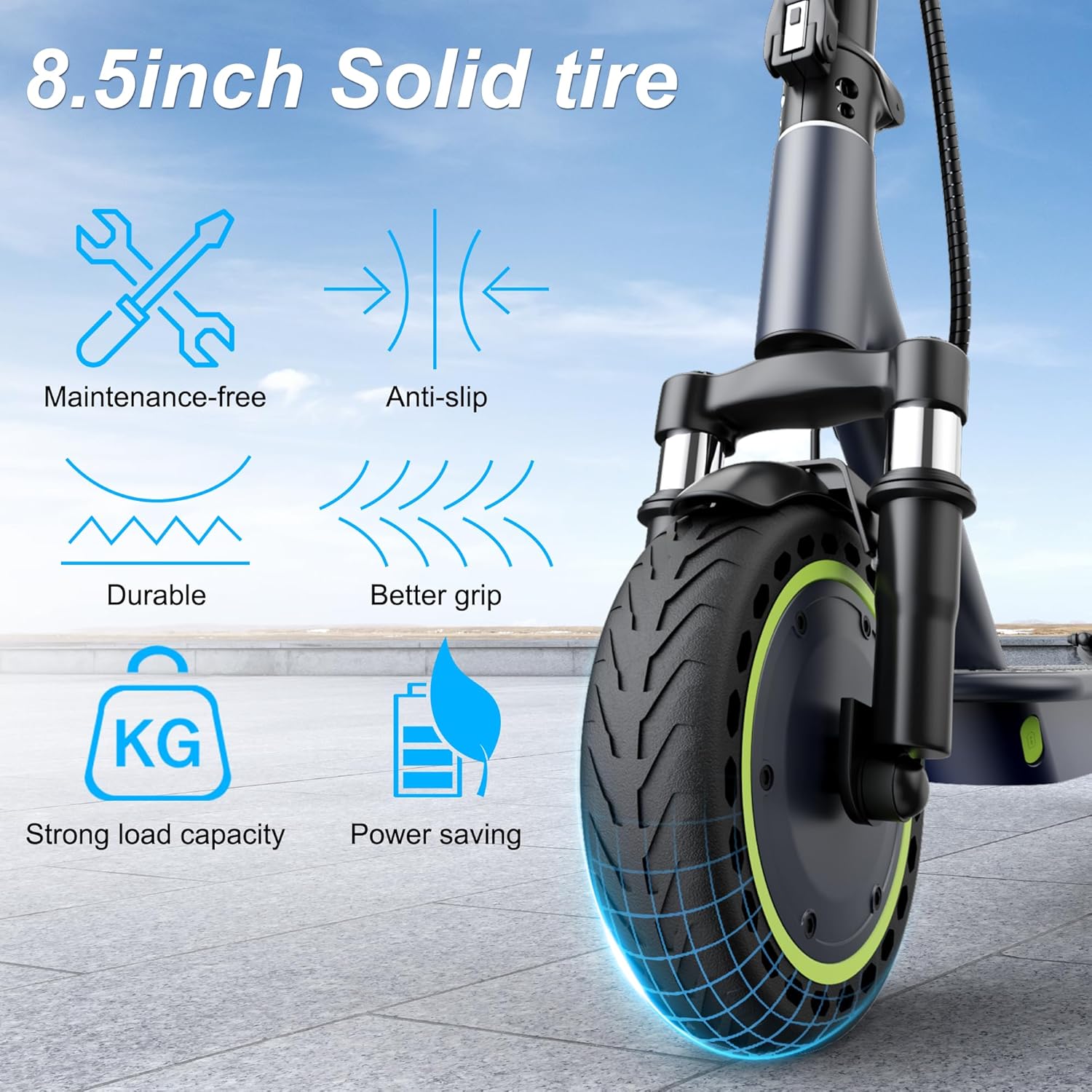
Detail of the 8.5-inch solid tire, emphasizing its robust construction and benefits like durability and energy efficiency.

The scooter demonstrating its IP64 waterproof capability, suitable for use in light rain conditions.
Troubleshooting
If you encounter any issues with your Roinside Electric Scooter UP8Pro, refer to the following common problems and solutions:
- Scooter not turning on: Ensure the battery is charged. Press and hold the power button firmly for several seconds. If the issue persists, check the charger connection.
- Reduced range or speed: This may indicate a low battery level. Fully charge the scooter. Riding in ECO mode, against strong winds, or uphill can also reduce performance. Check for any obstructions on the wheels.
- Brakes not responding effectively: Inspect the brake levers and cables for any damage or looseness. Ensure the brake pads are not excessively worn. If the problem continues, professional inspection is recommended.
- Unusual noises during operation: Check for loose components, debris in the wheels, or issues with the suspension system. Tighten any loose parts.
For problems not listed here or if solutions do not resolve the issue, please contact customer support.
Specifications
Detailed technical specifications for the Roinside Electric Scooter UP8Pro:
| Brand | Roinside |
| Model Name | UP8Pro |
| Motor | 350W Brushless Hub Motor |
| Maximum Speed | Up to 19 mph |
| Maximum Distance Range | Up to 21 miles (7.8Ah battery) / 23 miles (specific variant) |
| Battery | 36V 7.8Ah Lithium Battery |
| Weight Limit | 265 Pounds |
| Wheel Size | 8.5 Inches (Solid) |
| Suspension Type | Dual Suspension (Front and Rear Spring) |
| Brake Style | Dual Braking System (Front Regenerative Brake, Rear Disc Brake) |
| Frame Material | Aluminum |
| Special Features | Digital Display, Cruise Control, Foldable Design, App Connectivity, IP64 Waterproof |
| Age Range (Description) | Adult |

A view of the rear wheel and motor, detailing the 350W EABS brake, maximum speed, uphill climbing capability, and battery specifications.
Warranty Information
The Roinside Electric Scooter UP8Pro comes with a 1-year limited warranty. This warranty covers manufacturing defects under normal use. Please refer to the warranty card included in your package for full details, terms, and conditions. Keep your proof of purchase for warranty claims.
Support
For further assistance, technical support, or warranty claims, please contact Roinside customer service. You can typically find contact information on the official Roinside website or through the retailer where the product was purchased. Please have your model number (UP8Pro) and proof of purchase ready when contacting support.