
1. Introduction
This manual provides essential information for the setup, operation, and maintenance of your Hisense 75U6SF Pro 75-inch U6 Pro Series Mini-LED ULED 4K UHD Smart Fire TV. Please read these instructions carefully to ensure proper use and to maximize your viewing experience. The Hisense U6 Pro offers an immersive Mini-LED experience with vibrant color and strong contrast, minimizing reflections and glare. It features a Native 144Hz Refresh Rate for smooth motion, a built-in subwoofer for enhanced sound, and the Hi-View AI Engine for optimized picture settings. With Dolby Vision, Dolby Atmos, HDR10+, and integrated Fire TV with Alexa voice control, this television provides a comprehensive entertainment solution.
2. What's in the Box
Verify that all components are present in the packaging:
- TV Unit
- Power Cable
- Remote Control
- TV Stand Components
- Quick Start Guide (QSG)
3. Setup Instructions
3.1. Assembling the Stand or Wall Mounting
If using the included stand, carefully attach the stand components to the bottom of the TV using the provided screws. Ensure the stand is securely fastened before placing the TV on a stable surface. For wall mounting, refer to the VESA mounting standard (500 x 400 mm) and use a compatible wall mount kit (sold separately). Always ensure the TV is handled by at least two people during assembly or mounting to prevent damage or injury.
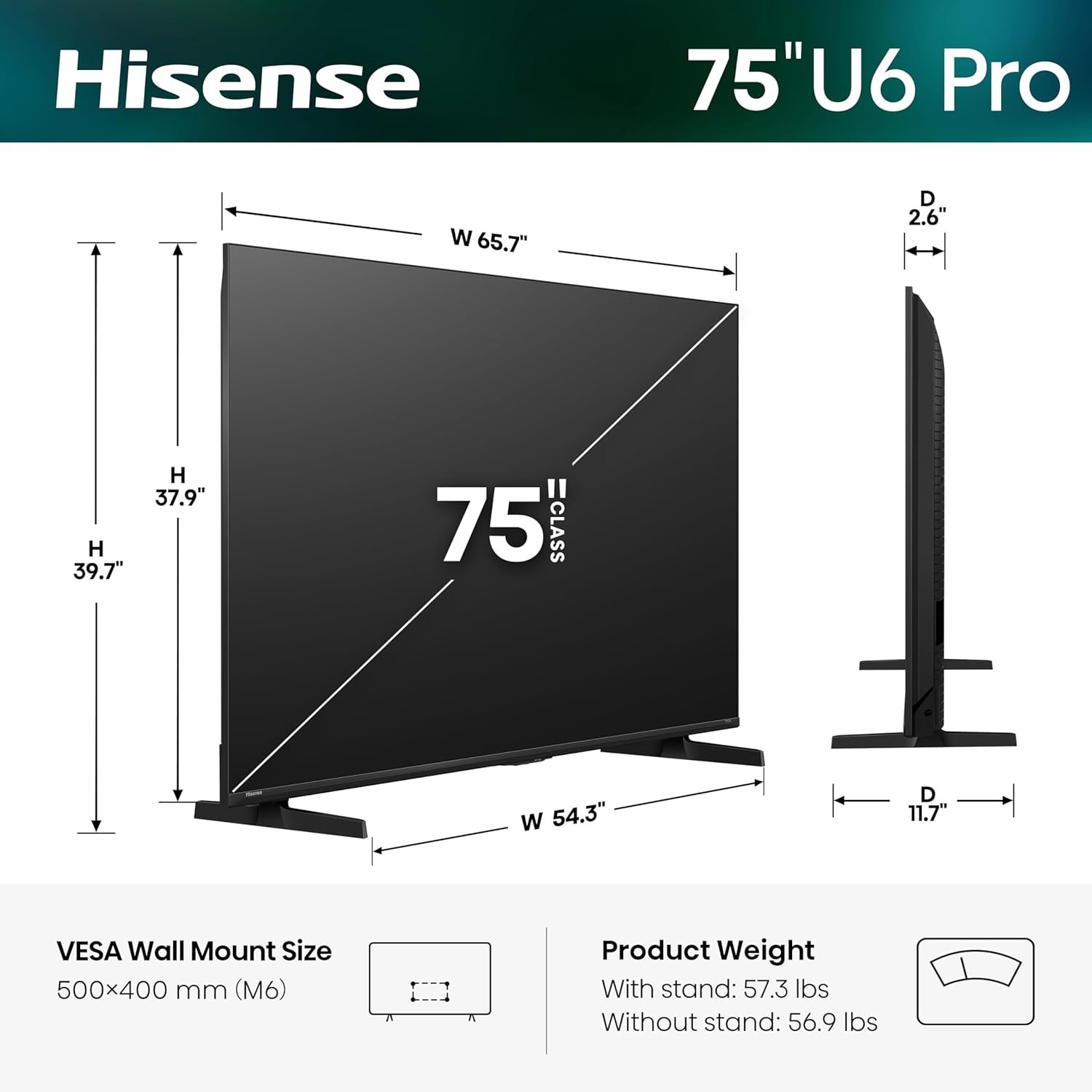
Diagram showing the dimensions of the Hisense 75-inch U6 Pro TV, including width, height, depth, and VESA wall mount size.
3.2. Initial Power-On and Fire TV Setup
Connect the power cable to the TV and a power outlet. Press the power button on the remote control to turn on the TV. Follow the on-screen instructions to complete the initial setup, including language selection, network connection (Wi-Fi or Ethernet), and Fire TV account login. The Fire TV interface provides smart recommendations and access to various streaming applications.
4. Operating Instructions
4.1. Picture Quality Features
Your Hisense U6 Pro TV incorporates advanced technologies for superior picture quality:
- Hi-QLED MiniLED: Experience striking contrast and vivid, lifelike colors. Mini-LED backlighting uses precise light zones to enhance contrast, delivering stunning depth and accuracy.
- Native 144Hz Refresh Rate: Enjoy crisp and fluid motion for fast-paced content like sports and gaming, reducing blur and improving responsiveness.
- Anti-Reflection & Glare-Free: The display minimizes reflections and glare, ensuring a clear view even in bright rooms.
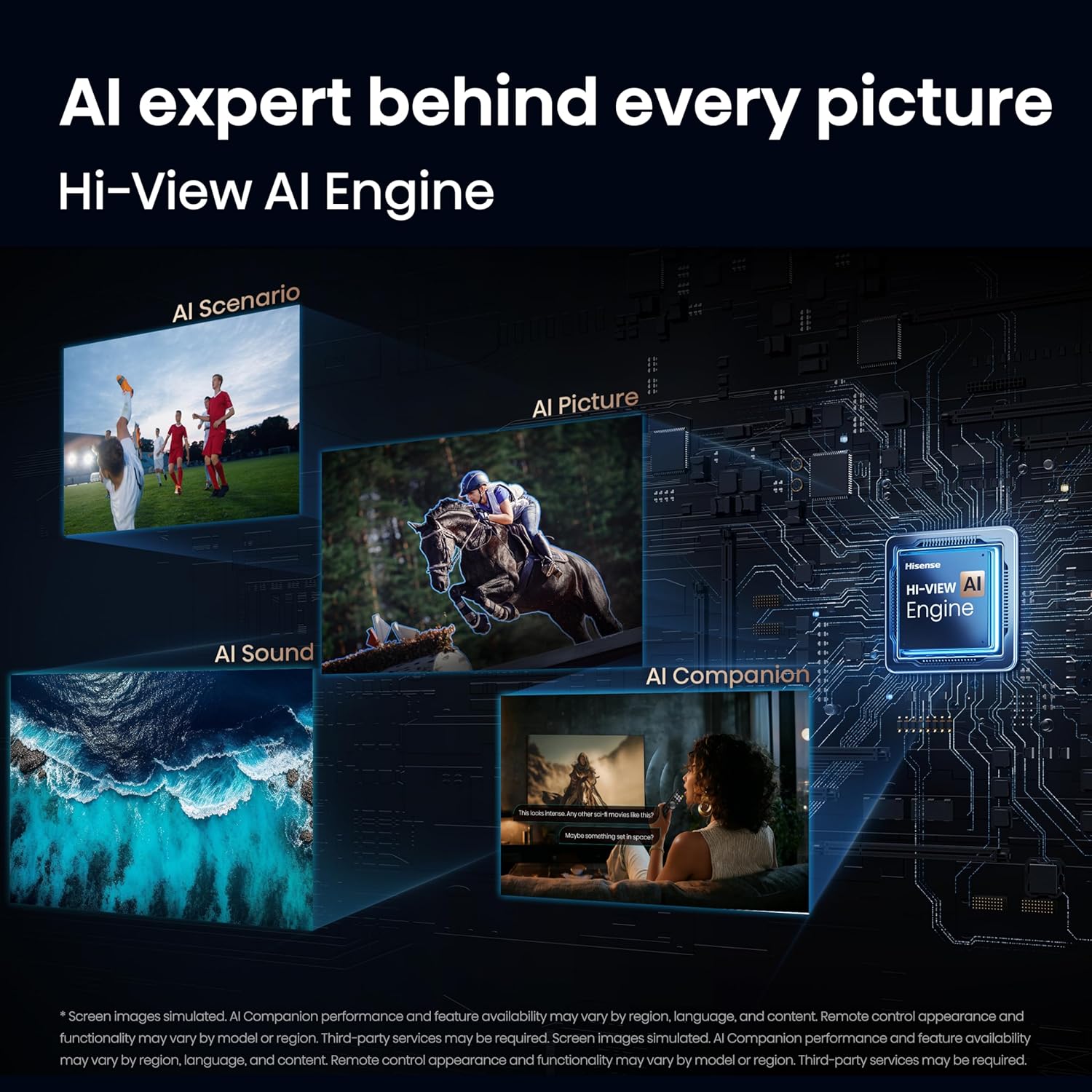
- Hi-View AI Engine: This intelligent engine automatically fine-tunes picture settings and upscales content towards 4K, adapting to different content types for a consistently high-quality image.
- Total HDR Solution: Supports Dolby Vision IQ, HDR10+ Adaptive, HDR10, and HLG for brighter highlights, deeper blacks, and more detail in every scene.
- IMAX Enhanced: Certified for signature IMAX picture performance and DTS-powered immersive audio, bringing a true cinema experience home.

Overview graphic of Hisense U6 Pro features.

Illustration of Hi-QLED MiniLED technology.

Native 144Hz Refresh Rate for smooth action.

Hi-View AI Engine for intelligent picture optimization.

Total HDR Solution for enhanced visual detail.

IMAX Enhanced for a cinematic home experience.
4.2. Audio Features
The TV is equipped with a built-in subwoofer and supports Dolby Atmos for an immersive audio experience. The built-in subwoofer delivers deep, powerful bass, enhancing the impact of movies, music, and games.

Immersive deep bass from the built-in subwoofer.
4.3. Smart TV Features (Fire TV with Alexa+)
The integrated Fire TV platform provides access to a wide range of streaming services and smart features. Use the remote control or Alexa+ voice commands to navigate, search for content, manage smart home devices, and get recommendations.

Fire TV interface for easy content discovery.

Smarter content picks with Alexa+ voice control.

Integrate and control smart home devices with Alexa+.
4.4. Connectivity
The TV supports Wi-Fi 6 for faster and more stable wireless connections, reducing buffering and improving overall network performance, especially when multiple devices are connected.

Wi-Fi 6 for faster and more reliable streaming.
4.5. Official Product Videos
Official Hisense 55-85inch U6SF-Pro Product Overview video, detailing key features and benefits of the TV series.
5. Connections
The rear panel of your TV provides various ports for connecting external devices:
- USB x 2: For media playback or powering compatible devices. (1x USB 2.0, 1x USB 3.0)
- HDMI 1 (4K@60Hz EARC): Enhanced Audio Return Channel for high-quality sound via soundbars or AV receivers.
- HDMI 2 (4K@60Hz): Supports 4K@60Hz with VRR and ALLM, ideal for gaming consoles, PCs, and high-frame-rate sources.
- HDMI 3 / 4 (4K@144Hz): Supports up to 4K@144Hz with VRR and ALLM, ideal for gaming consoles, PCs, and high-frame-rate sources.
- ANT / CABLE: Connects to over-the-air or cable TV signals.
- ETHERNET (LAN): Provides a stable wired connection for streaming, updates, and smart TV features.
- DIGITAL AUDIO OUT (OPTICAL): Outputs high-quality digital sound to external audio systems.
Rear panel connections and ports.
6. Maintenance
6.1. Cleaning the Screen
Gently wipe the screen with a soft, dry, lint-free cloth. For stubborn marks, lightly dampen the cloth with water or a specialized screen cleaner. Avoid using harsh chemicals, abrasive materials, or direct spraying of liquids onto the screen.
6.2. Cleaning the TV Body
Use a soft, dry cloth to clean the TV's frame and back panel. Do not use liquid cleaners directly on the TV body.
6.3. Power Management
Unplug the TV from the power outlet during lightning storms or when it will be left unattended for long periods to prevent damage from power surges.
7. Troubleshooting
If you encounter issues with your TV, refer to the following common solutions:
- No Power: Ensure the power cable is securely connected to both the TV and a working power outlet. Try plugging another device into the outlet to confirm it has power.
- No Picture/Sound: Check that the correct input source is selected. Verify all HDMI or other connection cables are securely plugged in. Restart the TV by unplugging it for a few minutes and then plugging it back in.
- Remote Not Responding: Replace the batteries in the remote control (2 AAA batteries required). Ensure there are no obstructions between the remote and the TV's IR sensor.
- Network Connection Issues: For Wi-Fi, ensure your router is on and within range. For Ethernet, check the cable connection. Try restarting your router and modem.
- Picture Quality Issues: Adjust picture settings (brightness, contrast, color) in the TV menu. Ensure the content source is of high quality.
For further assistance, consult the full user manual or contact Hisense customer support.
8. Specifications
| Feature | Detail |
|---|---|
| Screen Size | 75 inches |
| Model Number | 75U6SF Pro |
| Resolution | 4K UHD (3840 x 2160) |
| Refresh Rate | Native 144Hz |
| Display Technology | Mini LED Pro, Quantum Dot (Hi-QLED), Full-Array Local Dimming, Wide Color Gamut |
| HDR Format Supported | Dolby Vision IQ, HDR10+ Adaptive, HDR10, HLG |
| Operating System | FireOS |
| Audio Output Mode | Surround (Dolby Atmos, DTS Virtual:X) |
| Speaker Maximum Output Power | 40 watts |
| Total Number of HDMI Ports | 4 (2x 4K@60Hz, 2x 4K@144Hz) |
| Total USB Ports | 2 (1x USB 2.0, 1x USB 3.0) |
| Connectivity Technology | Bluetooth 5.3, Ethernet, HDMI, USB, Wi-Fi 6 |
| Product Dimensions (D x W x H) | 2.6"D x 65.7"W x 37.9"H |
| Item Weight (without stand) | 56.9 pounds |
| VESA Mount Standard | 500 x 400 mm |
| Power Consumption | 320 watts |
9. Warranty and Support
9.1. Warranty Information
Your Hisense 75U6SF Pro TV comes with a 2-year manufacturer's warranty. This warranty covers defects in materials and workmanship under normal use. Please retain your proof of purchase for warranty claims. For specific terms and conditions, refer to the warranty documentation included with your product or visit the official Hisense website.
9.2. Customer Support
For technical support, service inquiries, or additional product information, please visit the official Hisense support website or contact their customer service hotline. Contact details can typically be found in the Quick Start Guide or on the Hisense website.


